
Chapter 22: Production Operations
After tuning storage durability, write ingestion, and query plans, production operations are about choosing the right boundary: where the database lives, who can reach it, how failures are isolated, how replicas are maintained, and what signals tell you the system is healthy. This chapter closes Part V by covering that operational lifecycle: how to test an application against Datalevin, choose a deployment mode, choose a tenancy shape, run a server when needed, secure remote access, operate replicas or HA, and monitor a production system.
It begins with testing, because the cheapest place to catch a modeling, schema, or query mistake is in a test, long before deployment. It also pulls together Datalevin's concurrency and failure model, because production code needs a clear policy for which transaction failures are data bugs, which are logical conflicts, and which are transient operational conditions.
1. Testing Datalevin Applications
Datalevin is easy to test because the same library that runs in production can run entirely inside a test process. There is no separate test server to manage and no external service to mock. Most application logic can be exercised against a real Datalevin database that is created and discarded inside a single test.
Three levels of test are useful, from fastest to most realistic:
- Pure logic tests over in-memory tuples, with no database at all.
- In-memory database tests that exercise schema, transactions, indexes, search, and queries against a real but ephemeral store.
- Temporary on-disk tests for behavior that depends on files, persistence, or WAL.
Start at the cheapest level that can fail for the reason you care about, and move to a more realistic level only when the test needs it.
Choose the cheapest faithful test
Use tuple tests for pure query logic, in-memory databases for schema and transaction behavior, and temporary on-disk databases when persistence, WAL, file paths, or recovery behavior is part of the claim.
1.1 Pure Logic Tests Over Tuples
Chapter 8 showed that the query engine accepts any sequence of [e a v] tuples as a data source. This is the fastest way to unit-test query and rule logic, because there is no store to open, transact, or clean up. The fixture data sits in the test itself. In the Clojure example, the tuple collection itself fills $, with no connection at all. The Java, Python, and JavaScript connection APIs always supply $ from a database, so those examples open a throwaway in-memory connection and bind the tuple fixture as an extra $data source.
(ns my-app.query-test
  (:require [clojure.test :refer [deftest is]]
            [datalevin.core :as d]))

(def people
  [[1 :user/name "Alice"] [1 :user/age 30]
   [2 :user/name "Bob"]   [2 :user/age 25]])

(deftest adults-are-selected
  (is (= #{["Alice"]}
         (d/q '[:find ?name
                :in $ ?min
                :where [?e :user/name ?name]
                       [?e :user/age ?age]
                       [(>= ?age ?min)]]
              people 28))))
import datalevin.Connection;
import datalevin.Datalevin;

import java.util.List;
import java.util.Map;

List<?> people = List.of(
    List.of(1, Datalevin.kw(":user/name"), "Alice"),
    List.of(1, Datalevin.kw(":user/age"), 30),
    List.of(2, Datalevin.kw(":user/name"), "Bob"),
    List.of(2, Datalevin.kw(":user/age"), 25));

try (Connection conn = Datalevin.createConn(
        "/tmp/query-fixture",
        (Map<?, ?>) null,
        Map.of(":kv-opts", Map.of(":inmemory?", true)))) {
    Object result = conn.query("[:find ?name " +
        ":in $ $data ?min " +
        ":where [$data ?e :user/name ?name] " +
        "       [$data ?e :user/age ?age] " +
        "       [(>= ?age ?min)]]",
        people,
        28);
    assert result.toString().contains("Alice");
}
from datalevin import connect, q, tx

people = [
    [1, q.kw("user/name"), "Alice"], [1, q.kw("user/age"), 30],
    [2, q.kw("user/name"), "Bob"],   [2, q.kw("user/age"), 25],
]

with connect(None,
             opts={":kv-opts": {":inmemory?": True}}) as conn:
    data = q.source("data")
    entity, name, age, minimum = map(
        q.var, ("e", "name", "age", "min"))
    query = q.query(
        find=q.relation(name),
        inputs=[q.DB, data, minimum],
        where=[
            q.datom(entity, "user/name", name, from_source=data),
            q.datom(entity, "user/age", age, from_source=data),
            q.predicate(">=", age, minimum),
        ],
    )
    result = conn.query(query, people, 28)
    assert any(row[0] == "Alice" for row in result)
import { connect, q } from "datalevin-node";

const people = [
  [1, q.kw("user/name"), "Alice"], [1, q.kw("user/age"), 30],
  [2, q.kw("user/name"), "Bob"],   [2, q.kw("user/age"), 25]
];

const conn = await connect(null, {
  opts: { ":kv-opts": { ":inmemory?": true } }
});

try {
  const data = q.source("data");
  const entity = q.var("e");
  const name = q.var("name");
  const age = q.var("age");
  const minimum = q.var("min");
  const query = q.query({
    find: q.relation(name),
    inputs: [q.DB, data, minimum],
    where: [
      q.datom(entity, "user/name", name, { source: data }),
      q.datom(entity, "user/age", age, { source: data }),
      q.predicate(">=", age, minimum)
    ]
  });
  const result = await conn.query(query, people, 28);
  console.assert(result.some(([name]) => name === "Alice"));
} finally {
  await conn.close();
}
Rules are data too, so a rule set can be passed straight into a tuple-backed query as the % input. Use this level for query shape, rule composition, predicates, and aggregation logic. It does not exercise schema, indexes, upsert, or search; those need a real store.
1.2 In-Memory Database Tests
When a test needs schema, transactions, indexes, or search, open a real in-memory connection. An in-memory database uses the same API as a persistent one, but keeps nothing on disk and is discarded when the connection closes (Chapter 2). Each test gets a fresh, isolated database with no cleanup step.
(deftest upsert-updates-existing-user
  (let [schema {:user/email {:db/valueType :db.type/string
                             :db/unique    :db.unique/identity}
                :user/name  {:db/valueType :db.type/string}}
        conn   (d/create-conn nil schema {:kv-opts {:inmemory? true}})]
    (try
      (d/transact! conn [{:user/email "ada@example.com" :user/name "Ada"}])
      (d/transact! conn [{:user/email "ada@example.com" :user/name "Ada L."}])
      (is (= "Ada L."
             (d/q '[:find ?name .
                    :where [?e :user/email "ada@example.com"]
                           [?e :user/name ?name]]
                  (d/db conn))))
      (finally
        (d/close conn)))))
import datalevin.Connection;
import datalevin.Datalevin;
import datalevin.Schema;

import java.util.List;
import java.util.Map;

Schema schema = Datalevin.schema()
    .attr(":user/email",
          Schema.attribute()
              .valueType(Schema.ValueType.STRING)
              .unique(Schema.Unique.IDENTITY))
    .attr(":user/name",
          Schema.attribute().valueType(Schema.ValueType.STRING));

try (Connection conn = Datalevin.createConn(
        "/tmp/upsert-test",
        schema,
        Map.of(":kv-opts", Map.of(":inmemory?", true)))) {
    conn.transact(List.of(
        Map.of(":user/email", "ada@example.com", ":user/name", "Ada")));
    conn.transact(List.of(
        Map.of(":user/email", "ada@example.com", ":user/name", "Ada L.")));

    Object name = conn.query(
        "[:find ?name . " +
        " :where [?e :user/email \"ada@example.com\"] " +
        "        [?e :user/name ?name]]");
    assert "Ada L.".equals(name);
}
from datalevin import connect

schema = {
    ":user/email": {":db/valueType": ":db.type/string",
                    ":db/unique": ":db.unique/identity"},
    ":user/name": {":db/valueType": ":db.type/string"},
}

with connect(None,
             schema=schema,
             opts={":kv-opts": {":inmemory?": True}}) as conn:
    conn.transact(tx.data(tx.entity(attrs={
        "user/email": "ada@example.com", "user/name": "Ada",
    })))
    conn.transact(tx.data(tx.entity(attrs={
        "user/email": "ada@example.com", "user/name": "Ada L.",
    })))

    e = q.var("e")
    name = q.var("name")
    assert conn.query(q.query(
        find=q.scalar(name),
        where=[
            q.datom(e, "user/email", "ada@example.com"),
            q.datom(e, "user/name", name),
        ],
    )) == "Ada L."
import { connect, q, tx } from "datalevin-node";

const schema = {
  ":user/email": {
    ":db/valueType": ":db.type/string",
    ":db/unique": ":db.unique/identity"
  },
  ":user/name": { ":db/valueType": ":db.type/string" }
};

const conn = await connect(null, {
  schema,
  opts: { ":kv-opts": { ":inmemory?": true } }
});

try {
  await conn.transact(tx.data(tx.entity({
    "user/email": "ada@example.com", "user/name": "Ada"
  })));
  await conn.transact(tx.data(tx.entity({
    "user/email": "ada@example.com", "user/name": "Ada L."
  })));

  const e = q.var("e");
  const nameValue = q.var("name");
  const name = await conn.query(q.query({
    find: q.scalar(nameValue),
    where: [
      q.datom(e, "user/email", "ada@example.com"),
      q.datom(e, "user/name", nameValue)
    ]
  }));
  console.assert(name === "Ada L.");
} finally {
  await conn.close();
}
Because in-memory stores are cheap to create, the simplest isolation strategy is one fresh store per test. Prefer per-test fixtures such as :each, @BeforeEach, pytest's default function-scoped fixtures, or beforeEach over suite-level setup, so one test cannot leave state that another test depends on. Section 1.8.1 shows complete runner-specific fixture examples.
1.3 Temporary On-Disk Tests
Some behavior only appears on disk: persistence across reopen, WAL replay, snapshots, compaction, or copy/dump/load. For those, open a database in a unique temporary directory and delete it afterward. The with-conn macro opens the connection, runs the body, and closes it, so only the directory needs explicit cleanup:
(ns my-app.persistence-test
  (:require [clojure.test :refer [deftest is]]
            [datalevin.core :as d]
            [datalevin.util :as u]))

(deftest data-survives-reopen
  (let [dir (u/tmp-dir (str "test-" (random-uuid)))]
    (try
      (d/with-conn [conn dir test-schema]
        (d/transact! conn [{:user/email "ada@example.com"}]))
      ;; Reopen the same path; the fact should still be there.
      (d/with-conn [conn dir test-schema]
        (is (some? (d/entity (d/db conn) [:user/email "ada@example.com"]))))
      (finally
        (u/delete-files dir)))))
datalevin.util/tmp-dir returns a platform-neutral temporary path, and delete-files removes the directory tree; both are utility helpers used by Datalevin's own test suite. Adding a random-uuid keeps parallel test runs from colliding on the same path.
1.4 Make Tests Strict to Catch Typos
Schema-on-write is convenient in production but unhelpful in a test: a misspelled attribute such as :user/emial is silently accepted as a new attribute, and the assertion simply fails to find the data (Chapter 5). Tests are the right place to turn that leniency off. Open test connections with :validate-data? and :closed-schema? so unknown attributes and ill-typed values fail loudly:
(d/create-conn nil schema
  {:kv-opts        {:inmemory? true}
   :validate-data? true
   :closed-schema? true})
Connection conn = Datalevin.createConn(
    null,
    schema,
    Map.of(":kv-opts", Map.of(":inmemory?", true),
           ":validate-data?", true,
           ":closed-schema?", true));
conn = connect(
    None,
    schema=schema,
    opts={":kv-opts": {":inmemory?": True},
          ":validate-data?": True,
          ":closed-schema?": True})
const conn = await connect(null, {
  schema,
  opts: {
    ":kv-opts": { ":inmemory?": true },
    ":validate-data?": true,
    ":closed-schema?": true
  }
});
With these options, a transaction that mentions an undeclared attribute or writes a value that does not match its declared :db/valueType throws instead of quietly storing surprising data. This converts a class of modeling bugs into test failures (Chapter 11).
1.5 Dry-Run Transactions With Simulated Reports
To test how transaction data resolves, including tempids, upserts, and the datoms that would be added or retracted, without mutating the database, use the simulated transaction report API. It returns the same transaction-report shape as transact! but leaves the connection untouched. The :db-after value is the would-be post-transaction database, so tests can inspect the state that would result without committing it (Appendix E).
This is useful for unit-testing transaction-function output and validation logic, where you care about the datoms or would-be state a transaction would produce rather than committing them. Section 1.8.2 shows complete examples for each language binding.
1.6 Testing Search, Vectors, and Async Indexing
Full-text, idoc, and vector indexes are maintained synchronously by default (Chapters 16-17), so an in-memory database is enough to test them: read-your-writes holds, and a fulltext, idoc-match, or vec-neighbors query sees data committed earlier in the same test.
Two pitfalls are worth avoiding:
- Keep vector tests deterministic. Prefer
:db.type/vecwith literal vectors andvec-neighborsrather than depending on a remote embedding provider in a unit test. A network call to an embedding API makes the test slow, nondeterministic, and dependent on credentials. Reserve provider-backed:db/embeddingtests for a small, clearly separated integration suite. - Wait for async indexing before asserting. If a domain opts into
:indexing-mode :async, the source datoms commit before the secondary index catches up, so an immediate search may miss them. Callwait-for-secondary-index(orprocess-secondary-index-jobs!) before the assertion (Appendix E):
(let [conn (d/create-conn
             nil
             {:doc/content {:db/valueType :db.type/string
                            :db/fulltext true
                            :db.fulltext/autoDomain true}}
             {:kv-opts {:inmemory? true}
              :search-domains {"doc/content" {:indexing-mode :async}}})]
  (try
    (d/transact! conn [{:doc/content "vector search guide"}])
    (d/wait-for-secondary-index conn)
    (is (seq (d/q '[:find [?e ...]
                    :where [(fulltext $ :doc/content "vector") [[?e _ _]]]]
                  (d/db conn))))
    (finally
      (d/close conn))))
import datalevin.Connection;
import datalevin.Datalevin;
import datalevin.DatalevinInterop;
import datalevin.Schema;

import java.util.Collection;
import java.util.List;
import java.util.Map;

Schema schema = Datalevin.schema()
    .attr(":doc/content",
          Schema.attribute()
              .valueType(Schema.ValueType.STRING)
              .fulltext(true)
              .fulltextAutoDomain(true));

try (Connection conn = Datalevin.createConn(
        "/tmp/async-index-test",
        schema,
        Map.of(":kv-opts", Map.of(":inmemory?", true),
               ":search-domains",
               Map.of("doc/content",
                      Map.of(":indexing-mode", ":async"))))) {
    conn.transact(List.of(
        Map.of(":doc/content", "vector search guide")));
    DatalevinInterop.coreInvoke("wait-for-secondary-index", List.of(conn));

    Object result = conn.query(
        "[:find [?e ...] " +
        " :where [(fulltext $ :doc/content \"vector\") [[?e _ _]]]");
    assert !((Collection<?>) result).isEmpty();
}
from datalevin import connect, interop, q, tx

schema = {
    ":doc/content": {
        ":db/valueType": ":db.type/string",
        ":db/fulltext": True,
        ":db.fulltext/autoDomain": True,
    }
}

with connect(
    None,
    schema=schema,
    opts={
        ":kv-opts": {":inmemory?": True},
        ":search-domains": {
            "doc/content": {":indexing-mode": ":async"}
        },
    },
) as conn:
    conn.transact(tx.data(tx.entity(attrs={
        "doc/content": "vector search guide",
    })))
    interop().core_invoke("wait-for-secondary-index", [conn.raw_handle()])

    e = q.var("e")
    result = conn.query(q.query(
        find=q.collection(e),
        where=[q.fulltext(
            "vector", [e, q.IGNORE, q.IGNORE],
            attribute="doc/content",
        )],
    ))
    assert result
import { connect, interop, q, tx } from "datalevin-node";

const schema = {
  ":doc/content": {
    ":db/valueType": ":db.type/string",
    ":db/fulltext": true,
    ":db.fulltext/autoDomain": true
  }
};

const conn = await connect(null, {
  schema,
  opts: {
    ":kv-opts": { ":inmemory?": true },
    ":search-domains": {
      "doc/content": { ":indexing-mode": ":async" }
    }
  }
});

try {
  await conn.transact(tx.data(
    tx.entity({ "doc/content": "vector search guide" })
  ));
  await interop().coreInvoke("wait-for-secondary-index", [conn.rawHandle()]);

  const e = q.var("e");
  const result = await conn.query(q.query({
    find: q.collection(e),
    where: [q.fulltext(
      "vector", [e, q.IGNORE, q.IGNORE],
      { attribute: "doc/content" }
    )]
  }));
  console.assert(result.length > 0);
} finally {
  await conn.close();
}
The same full-text, idoc, and vector queries can be tested through ordinary query calls. The wait helper is only needed for domains that explicitly choose async secondary indexing; synchronous domains are visible before transact returns.
1.7 Testing From Application Test Runners
Use the test runner your application already uses. Datalevin should be ordinary application code inside those tests.
The portable patterns are:
- Tuple-backed query tests: Bind an EAV tuple sequence as a named source such as
$data, using a throwaway in-memory connection when the query API needs a primary database source. - Fresh in-memory databases: open a fresh in-memory database and close the connection at the end of the test.
- Per-test temporary directories: use the test runner's temporary-directory facility, open a normal path-backed connection, and let the runner delete the directory after the test.
- Simulated transaction reports: dry-run transaction data against the current database state and assert on the resulting report without committing the transaction.
- Helper APIs: fixtures and temporary-directory helpers are conveniences; explicit connection lifecycle management works everywhere.
1.8 Testing Recipes
The following recipes turn the testing strategy into complete runner-specific fixtures and simulated-transaction examples.
1.8.1 Per-Test In-Memory Fixtures
Each test should read the connection supplied by the fixture and start from an empty database. The second test below would fail if the first test's transaction leaked into it.
(def test-schema
  {:user/email {:db/valueType :db.type/string
                :db/unique    :db.unique/identity}
   :user/name  {:db/valueType :db.type/string}})

(def ^:dynamic *conn* nil)

(defn with-fresh-db [f]
  (let [conn (d/create-conn nil test-schema {:kv-opts {:inmemory? true}})]
    (binding [*conn* conn]
      (try (f) (finally (d/close conn))))))

(use-fixtures :each with-fresh-db)

(deftest create-user
  (d/transact! *conn* [{:user/email "ada@example.com"
                       :user/name  "Ada"}])
  (is (= "Ada"
         (:user/name (d/entity (d/db *conn*) [:user/email "ada@example.com"])))))

(deftest each-test-starts-empty
  (is (nil? (d/q '[:find ?e .
                  :where [?e :user/email "ada@example.com"]]
                (d/db *conn*)))))
import datalevin.Connection;
import datalevin.Datalevin;
import datalevin.Schema;
import org.junit.jupiter.api.AfterEach;
import org.junit.jupiter.api.BeforeEach;
import org.junit.jupiter.api.Test;

import java.util.List;
import java.util.Map;

import static org.junit.jupiter.api.Assertions.assertEquals;
import static org.junit.jupiter.api.Assertions.assertNull;

class UserDbTest {
    private static final Schema TEST_SCHEMA = Datalevin.schema()
        .attr(":user/email", Schema.attribute()
            .valueType(Schema.ValueType.STRING)
            .unique(Schema.Unique.IDENTITY))
        .attr(":user/name", Schema.attribute()
            .valueType(Schema.ValueType.STRING));

    private Connection conn;

    @BeforeEach
    void openDb() {
        conn = Datalevin.createConn(
            "/tmp/test-fixture",
            TEST_SCHEMA,
            Map.of(":kv-opts", Map.of(":inmemory?", true)));
    }

    @AfterEach
    void closeDb() {
        conn.close();
    }

    @Test
    void createUser() {
        conn.transact(List.of(Map.of(
            ":user/email", "ada@example.com",
            ":user/name", "Ada")));

        Object name = conn.query(
            "[:find ?name . " +
            " :where [?e :user/email \"ada@example.com\"] " +
            "        [?e :user/name ?name]]");

        assertEquals("Ada", name);
    }

    @Test
    void eachTestStartsEmpty() {
        Object user = conn.query(
            "[:find ?e . " +
            " :where [?e :user/email \"ada@example.com\"]]");

        assertNull(user);
    }
}
import pytest
from datalevin import connect, q, tx

test_schema = {
    ":user/email": {":db/valueType": ":db.type/string",
                    ":db/unique": ":db.unique/identity"},
    ":user/name": {":db/valueType": ":db.type/string"},
}

@pytest.fixture
def conn():
    with connect(None,
                 schema=test_schema,
                 opts={":kv-opts": {":inmemory?": True}}) as c:
        yield c

def test_create_user(conn):
    conn.transact(tx.data(tx.entity(attrs={
        "user/email": "ada@example.com",
        "user/name": "Ada",
    })))

    e = q.var("e")
    name = q.var("name")
    assert conn.query(q.query(
        find=q.scalar(name),
        where=[
            q.datom(e, "user/email", "ada@example.com"),
            q.datom(e, "user/name", name),
        ],
    )) == "Ada"

def test_each_test_starts_empty(conn):
    e = q.var("e")
    assert conn.query(q.query(
        find=q.scalar(e),
        where=[q.datom(e, "user/email", "ada@example.com")],
    )) is None
import { test, beforeEach, afterEach } from "node:test";
import assert from "node:assert/strict";
import { connect, q, tx } from "datalevin-node";

const testSchema = {
  ":user/email": {
    ":db/valueType": ":db.type/string",
    ":db/unique": ":db.unique/identity"
  },
  ":user/name": { ":db/valueType": ":db.type/string" }
};

let conn;

beforeEach(async () => {
  conn = await connect(null, {
    schema: testSchema,
    opts: { ":kv-opts": { ":inmemory?": true } }
  });
});

afterEach(async () => {
  await conn.close();
});

test("create user", async () => {
  await conn.transact(tx.data(tx.entity({
    "user/email": "ada@example.com", "user/name": "Ada"
  })));

  const e = q.var("e");
  const nameValue = q.var("name");
  const name = await conn.query(q.query({
    find: q.scalar(nameValue),
    where: [
      q.datom(e, "user/email", "ada@example.com"),
      q.datom(e, "user/name", nameValue)
    ]
  }));

  assert.equal(name, "Ada");
});

test("each test starts empty", async () => {
  const e = q.var("e");
  const user = await conn.query(q.query({
    find: q.scalar(e),
    where: [q.datom(e, "user/email", "ada@example.com")]
  }));

  assert.equal(user, null);
});
1.8.2 Simulated Transaction Reports
The simulated transaction report method follows each binding's naming convention: tx-data->simulated-report in Clojure, txDataToSimulatedReport in Java and JavaScript, and tx_data_to_simulated_report in Python.
(deftest signup-adds-email-datom
  (let [conn   (d/create-conn nil schema {:kv-opts {:inmemory? true}})
        report (d/tx-data->simulated-report
                 (d/db conn)
                 [{:db/id -1
                   :user/email "ada@example.com"
                   :user/name "Ada"}])
        eid    (get (:tempids report) -1)]
    (try
      ;; The report shows the datoms that *would* be written ...
      (is (some #(and (= :user/email (d/datom-a %))
                      (= "ada@example.com" (d/datom-v %)))
                (:tx-data report)))
      ;; ... and :db-after can be read as the would-be result.
      (is (= "Ada" (:user/name (d/pull (:db-after report) [:user/name] eid))))
      ;; ... but the database itself is left untouched.
      (is (nil? (d/entity (d/db conn) [:user/email "ada@example.com"])))
      (finally
        (d/close conn)))))
import datalevin.Connection;
import datalevin.Datalevin;

import java.util.List;
import java.util.Map;

try (Connection conn = Datalevin.createConn(
        "/tmp/simulated-report-test",
        schema,
        Map.of(":kv-opts", Map.of(":inmemory?", true)))) {
    Map<?, ?> report = conn.txDataToSimulatedReport(List.of(
        Map.of(":db/id", -1L,
               ":user/email", "ada@example.com",
               ":user/name", "Ada")));

    List<?> txData = (List<?>) report.get(Datalevin.kw(":tx-data"));
    Object eid = ((Map<?, ?>) report.get(Datalevin.kw(":tempids"))).get(-1L);
    Map<?, ?> preview = Datalevin.pull(
        report.get(Datalevin.kw(":db-after")),
        Datalevin.pull().attr(":user/name"),
        eid);
    assert !txData.isEmpty();
    assert "Ada".equals(preview.get(Datalevin.kw(":user/name")));
    assert conn.query(
        "[:find ?e . :where [?e :user/email \"ada@example.com\"]]") == null;
}
from datalevin import connect, q, tx

with connect(None,
             schema=schema,
             opts={":kv-opts": {":inmemory?": True}}) as conn:
    report = conn.tx_data_to_simulated_report(tx.data(tx.entity(-1, {
        "user/email": "ada@example.com",
        "user/name": "Ada",
    })))

    eid = report[":tempids"][-1]
    preview = report[":db-after"].pull(q.selector("user/name"), eid)
    assert report[":tx-data"]
    assert preview[":user/name"] == "Ada"
    entity = q.var("e")
    persisted = q.query(
        find=q.scalar(entity),
        where=[q.datom(entity, "user/email", "ada@example.com")],
    )
    assert conn.query(persisted) is None
import { connect, q, tx } from "datalevin-node";

const conn = await connect(null, {
  schema,
  opts: { ":kv-opts": { ":inmemory?": true } }
});

try {
  const report = await conn.txDataToSimulatedReport(tx.data(tx.entity(-1, {
    "user/email": "ada@example.com",
    "user/name": "Ada"
  })));

  const eid = report[":tempids"].get(-1);
  const preview = await report[":db-after"].pull(
    q.selector("user/name"), eid
  );
  console.assert(report[":tx-data"].length > 0);
  console.assert(preview[":user/name"] === "Ada");
  const entity = q.var("e");
  const persisted = q.query({
    find: q.scalar(entity),
    where: [q.datom(entity, "user/email", "ada@example.com")]
  });
  console.assert(await conn.query(persisted) == null);
} finally {
  await conn.close();
}
2. Choose a Deployment Mode
Datalevin can run as an embedded library, a TCP server, a read-replica topology, a consensus-lease HA cluster, an MCP tool process, or a Babashka pod. Figure 22.1 depicts these different modes. The data model and storage format stay the same; the operational boundary changes.
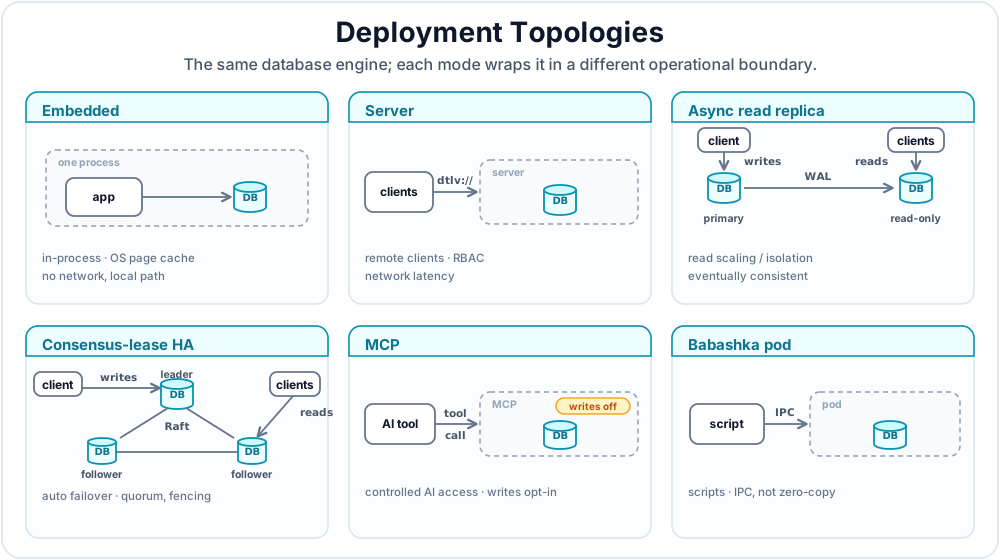
Appendix A gives package coordinates, supported platforms, startup commands, and connection examples. This chapter focuses on the production decision: which operational boundary should own the database?
| Mode | Best Fit | Main Trade-Off |
|---|---|---|
| Embedded | Single-process services, desktop apps, local tools | Fastest path, but access is local to the process and storage path |
| Server | Shared databases, remote clients, centralized RBAC | Adds network latency and serialization |
| Async read replica | Read scaling or workload isolation without failover | Eventually consistent and read-only; no automatic promotion |
| Consensus-lease HA | Automatic write-leader promotion and follower reads | Requires quorum discipline, fencing, and explicit membership management |
| MCP | AI tools that need controlled Datalevin access | Tool-call boundary; writes disabled unless explicitly allowed |
| Babashka pod | Scripts and maintenance tasks | IPC boundary; convenient but not the zero-copy embedded path |
Embedded mode is the default when one application owns the database path. It avoids network serialization and uses the OS page cache directly, so leave RAM headroom for that cache. Server mode is the right boundary when multiple processes need the same database, when remote clients need dtlv:// access, or when server-side RBAC is part of the deployment.
An embedded Clojure application with the full Datalevin library, or a Java application with org.datalevin:datalevin-java-server, can also host a server inside its own process. Use that only when the application intentionally owns both lifecycles. Python and Node.js applications should run dtlv, Docker, or the standalone JVM jar as a separate server process.
Async read replicas and consensus HA both depend on WAL records, but they solve different problems:
- Async read replicas scale or isolate reads behind one primary writer. They do not elect a leader, fence writes, or promote automatically.
- Consensus-lease HA keeps one write leader per database, uses a Raft-backed control plane for leases and membership, and lets followers serve reads. Raft is a replicated-consensus algorithm for agreeing on cluster state [1].
Choose async replicas when stale-by-lag reads are acceptable. Choose HA only when automatic failover is worth the extra operational surface.
In HA discussions, fencing means preventing a stale or deposed writer from continuing to accept writes after another node has been allowed to lead. It is the safety mechanism that keeps failover from becoming split-brain.
dtlv mcp and the Babashka pod are tooling modes. They are useful for local AI tools, maintenance jobs, and ad hoc scripts, but they are not replacements for the embedded or server boundary of the main application.
Production version pinning. Pin the Datalevin version across the application, server, CLI, Docker image, pod, and language bindings. This guide targets the Datalevin 1.2.3 release; before upgrading, read the release notes and verify the upgrade in staging. Appendix A covers runtime requirements, and Chapter 19 covers storage-format upgrade workflows.
2.1 Connection Lifecycle
A long-running application should normally keep one shared Datalog connection per Datalevin database in a process. Create it during application startup, pass it to the code that needs database access, and close it during application shutdown. Do not open and close the same local embedded database for every web request, job, or repository call.
For embedded Datalog databases, use the normal open-or-reuse path at the application boundary. In Clojure, that is d/get-conn; in Java, it is Datalevin.getConn; in Python and JavaScript, it is connect. Short-lived connections are fine for REPL experiments, scripts, and tests. Controlled test fixtures and specialized construction paths may deliberately create a fresh connection object, such as with d/create-conn in Clojure or Datalevin.createConn in Java.
For path-addressed embedded databases, get-conn keeps a process-local entry for the path. If an open connection for that path is already registered, it returns that connection; if the registered connection has been closed, it opens a new one. Treat this as connection-opening behavior, not as a reason to call get-conn in every function. The schema and option maps are the complicating part: the first successful open establishes the live connection for that path, and later calls may simply receive that already-open connection instead of applying a different schema or option map in the way the caller expects. Repeated calls also obscure ownership and close timing. Keep the returned connection at the application boundary and pass it to the code that needs it.
3. Multi-Tenancy Trade-Offs
Tenant shape is part of choosing the operational boundary. It affects deployment mode, RBAC, backup and restore workflows, migration strategy, monitoring cardinality, and HA topology. Choose the tenancy shape based on the isolation boundary the application really needs, not only on the number of tenants.
| Pattern | Best fit | Main trade-off |
|---|---|---|
| Database per tenant | Strong isolation, per-tenant backup/delete/export, local-first workspaces | You operate many database paths and run migrations across a fleet. |
| Shared database with tenant facts | Many tiny tenants, global analytics, shared reference data | Every query and write path must preserve the tenant predicate. |
| Catalog database plus tenant databases | SaaS workspaces with shared identity/billing and isolated tenant data | Cross-database changes are not one Datalevin transaction. |
| Tiered tenancy | Free/small tenants shared, large or regulated tenants isolated | Moving a tenant between tiers becomes an operational workflow. |
Database per tenant is the most Datalevin-native pattern when tenant isolation matters. Use one database path per tenant, workspace, or user. The advantages are operational: per-tenant backup, restore, migration, export, and deletion are path-level operations; the OS page cache shares memory across many idle databases efficiently; tenant isolation is physical rather than a repeated query predicate; and the same database path can often move between server and local devices. This pattern is common in personal knowledge management, hosted workspaces, and agent memory stores. A local-first per-user or per-workspace database is a deployment variant of the same pattern: the database path is a useful unit of ownership that can be backed up, moved, synced through application-specific tooling, or attached to a server later.
The trade-off is fleet management and open-store budgeting. You need a catalog that maps tenant ids to database names or paths, a migration runner that can visit every tenant database, backup and retention automation, and monitoring that can summarize many small databases. Cross-tenant analytics usually become a fan-out query over many databases or a separate reporting database fed by application jobs.
High density also does not mean every tenant database should stay open forever. Each open database consumes file descriptors and a memory-mapped virtual address reservation related to :mapsize. The page cache can make many idle database files cheap, but process virtual address space and OS limits are still finite. For database-per-tenant deployments, keep an explicit open-database budget, close idle tenant connections, size :mapsize with Chapter 19's guidance, and monitor open file counts plus process virtual size and resident memory. If the tenant database can be edited independently on several devices, conflict detection and merge policy are part of the application design; Datalevin's server replicas and HA modes are server-side operations, not a general multi-master local-first sync protocol.
Shared database with tenant facts keeps all tenants in one Datalevin database and models tenancy as ordinary data, for example with :workspace/id, :account/id, or :entity/tenant refs. This can be the right choice when tenants are tiny, when cross-tenant reporting is central, or when many tenants share the same reference data. Datalevin's indexes make tenant filters ordinary indexed facts, so a query can start from the tenant and join outward:
(d/q '[:find ?doc ?title
       :in $ ?workspace-id
       :where
       [?w :workspace/id ?workspace-id]
       [?doc :doc/workspace ?w]
       [?doc :doc/title ?title]]
     (d/db conn)
     workspace-id)
Object docs = conn.query(
    "[:find ?doc ?title " +
    " :in $ ?workspace-id " +
    " :where [?w :workspace/id ?workspace-id] " +
    "        [?doc :doc/workspace ?w] " +
    "        [?doc :doc/title ?title]]",
    workspaceId);
from datalevin import q

document, title, workspace_id_var, workspace = map(
    q.var, ("doc", "title", "workspace-id", "w"))
docs = conn.query(q.query(
    find=q.relation(document, title),
    inputs=[q.DB, workspace_id_var],
    where=[
        q.datom(workspace, "workspace/id", workspace_id_var),
        q.datom(document, "doc/workspace", workspace),
        q.datom(document, "doc/title", title),
    ],
), workspace_id)
import { q } from "datalevin-node";

const document = q.var("doc");
const title = q.var("title");
const workspaceIdVar = q.var("workspace-id");
const workspace = q.var("w");
const docs = await conn.query(q.query({
  find: q.relation(document, title),
  inputs: [q.DB, workspaceIdVar],
  where: [
    q.datom(workspace, "workspace/id", workspaceIdVar),
    q.datom(document, "doc/workspace", workspace),
    q.datom(document, "doc/title", title)
  ]
}), workspaceId);
The risk is correctness. Server RBAC controls access to a database, not per-entity tenant predicates inside that database. If one shared database holds many tenants, the application must make tenant scoping part of every query, pull, transaction function, background job, and admin path. Consider wrapping query construction, adding transaction-time validation for required tenant refs, and testing that unscoped reads are impossible in application code.
Catalog plus tenant databases is often the best SaaS compromise. Keep a small shared catalog database for users, organizations, billing state, entitlements, and the mapping from tenant id to tenant database. Store each tenant's domain data in its own Datalevin database. The catalog answers "which database should this request open?", while the tenant database holds the application facts. This gives physical isolation for tenant data while keeping global account operations centralized.
The boundary is transactional: a Datalevin transaction is scoped to one database. If a signup updates the catalog and initializes a tenant database, that is an application-level workflow, not one atomic database transaction. Use idempotent steps, retries, and repair jobs for cross-database workflows.
Tiered tenancy mixes the first two patterns. You might place many free or trial tenants in a shared database, give enterprise tenants dedicated database paths, and place regulated tenants in separate regions or storage roots. This keeps small tenants cheap while preserving an upgrade path for isolation, custom backup schedules, or data-residency requirements. The cost is migration: tenant promotion from shared to dedicated storage needs an export/import or copy workflow, validation, and a catalog switch.
For most applications, start with the narrowest isolation boundary that matches the product and compliance requirements. If tenants must be individually exported, deleted, restored, encrypted, or hosted in different regions, prefer database-per-tenant or catalog-plus-tenant databases. If cross-tenant analytics and global queries dominate, a shared database with explicit tenant facts may be simpler.
4. Operate a Datalevin Server
The server is a non-blocking network service that exposes Datalevin APIs over a TCP connection. Appendix A shows the dtlv, Docker, standalone JVM jar, in-process Clojure, and in-process Java startup forms. In production, the important operational rules are the same for all of them: bind to loopback unless remote access is intended, set DATALEVIN_DEFAULT_PASSWORD before exposing a non-loopback address, and run the server under the platform's service manager with a service account that can read and write the data root.
The main server options are:
-r <path>: Root directory for databases. The default is/var/lib/datalevinon POSIX systems andC:\ProgramData\Datalevinon Windows.-p <port>: Listening port. The default is8898.--host <host>: Listening address. Binding to a non-loopback address requiresDATALEVIN_DEFAULT_PASSWORD.--idle-timeout <ms>: Disconnect inactive sessions. The default is172800000ms, or 48 hours.-v: Enable verbose server logs on stdout.
4.1 Remote Database URIs
Remote Datalog and KV databases use this URI shape:
dtlv://<user>:<pass>@<host>:<port>/<db-name>?store=datalog|kv
store is optional and defaults to datalog. Database names must be unique across the whole server, so a Datalog database and a KV database cannot share the same server-side name. Appendix A shows connection examples, and Appendix G lists the public datalevin.client administrative API.
4.2 Protocol and Client Tuning
The server protocol uses a TLV-style (type-length-value) message format. Clojure clients use Nippy serialization by default [3]. The wire protocol also supports Transit/JSON, Cognitect's data interchange format encoded over JSON [2], for clients that cannot use Nippy, and Datalevin also exposes a JSON command API.
Most deployments should start with defaults. Tune only when a measured workload needs it:
- Freshness checks:
datalevin.constants/*remote-db-last-modified-check-interval-ms*defaults to0, which checks remote modification state on every call. A positive interval reduces round trips but can delay observation of remote updates. - Connection pool:
datalevin.client/new-clientaccepts:pool-size(default3) and:time-out(default60000ms). - HA write retry:
:ha-write-retry-timeout-msand:ha-write-retry-delay-msbound automatic retries after retryable HA write rejections such as:not-leader. The timeout default is derived from the HA lease and promotion timings, currentlymin(:time-out, 17000), rather than a fixed constant. - Wire compression:
datalevin.constants/*wire-compression-threshold*defaults to8192bytes, anddatalevin.constants/*wire-compression-level*defaults to3.
For network-heavy workloads, prefer fewer larger requests. Batch writes with transact!, use transact-async when appropriate, use pull instead of many small entity lookups, and keep :find clauses specific so large unused result sets are not serialized over the wire.
4.3 Runtime UDFs in Server Mode
Descriptor-backed :db/udf functions resolve where the query or transaction executes. Embedded databases can receive a runtime registry in store options. Remote transactions execute in the server process, so the UDF registry or resolver must be installed on the server. Client-local registries are not consulted for remote transaction execution.
Remote queries use the server-safe resolver mode described in Chapter 8, Section 3.5. Operationally, custom query predicates, binding functions, and aggregates must be installed in the server-side UDF registry and called through udf; client-local functions are not callable just because the client submits the query. RBAC controls who may query or write, while the resolver boundary controls what code a permitted query may run.
In HA deployments, :ha-require-udf-ready? true makes a leader reject writes until installed transaction UDF descriptors can be resolved by the server runtime.
Server UDFs run on the server
Remote transactions and server-side query UDF calls resolve in the server process. Install the registry or resolver where the work executes; a client registry does not make client-local functions available to remote queries or writes.
Custom data type functions also execute on the server. When a type uses UDF descriptors for its order function, serializer, or deserializer, install the matching implementations in the server runtime. To reconstruct native class instances on the client, also supply the caller's registry through :runtime-opts when opening the remote handle. Chapter 10, Section 3.4 and Appendix F, Section 12 cover registration.
5. Security and Access Control
Security has two separate layers: physical protection of database files and server authorization for remote access.
5.1 Default Admin Account
Every server has a built-in administrative user:
- Username:
datalevin - Default password:
datalevin
Set DATALEVIN_DEFAULT_PASSWORD when starting the server. It is required when binding to a non-loopback address and should be treated as mandatory in production. Leave the datalevin user for administration and create separate application users with narrower roles.
Change the default administrator password
The built-in administrator is for setup and administration, not application traffic. Set a non-default password before exposing a server, then create least-privilege users for application clients.
5.2 RBAC Model
Server permissions are granted to roles, then roles are assigned to users. Every user also has a private role named :datalevin.role/<username>.
Each permission has three parts:
- Action:
:datalevin.server/view,:datalevin.server/alter,:datalevin.server/create, or:datalevin.server/control. - Object:
:datalevin.server/database,:datalevin.server/user,:datalevin.server/role, or:datalevin.server/server. - Target: A database name, username, role keyword, or
nilfor all targets of that object type.
The actions are hierarchical: :alter includes read access, :create includes lower actions, and :control is administrative control. The server object also subsumes database, user, and role objects, so reserve server-scoped grants for administrative roles.
5.3 Create a Least-Privilege User
This example creates a user, creates a role, grants read-only access to one database, and assigns the role to the user.
(c/create-user client "alice" "password123")
(c/create-role client :app.role/analyst)

(c/grant-permission client
                    :app.role/analyst
                    :datalevin.server/view
                    :datalevin.server/database
                    "sales-db")

(c/assign-role client :app.role/analyst "alice")
import datalevin.PermissionAction;
import datalevin.PermissionObject;

client.createUser("alice", "password123");
client.createRole(":app.role/analyst");

client.grantPermission(":app.role/analyst",
                       PermissionAction.VIEW,
                       PermissionObject.DATABASE,
                       "sales-db");

client.assignRole(":app.role/analyst", "alice");
client.create_user("alice", "password123")
client.create_role(":app.role/analyst")

client.grant_permission(":app.role/analyst",
                        ":datalevin.server/view",
                        ":datalevin.server/database",
                        "sales-db")

client.assign_role(":app.role/analyst", "alice")
await client.createUser("alice", "password123");
await client.createRole(":app.role/analyst");

await client.grantPermission(":app.role/analyst",
                             ":datalevin.server/view",
                             ":datalevin.server/database",
                             "sales-db");

await client.assignRole(":app.role/analyst", "alice");
5.4 Encryption at Rest
Datalevin does not currently provide database-level transparent data encryption. Use encryption at the layer where it is easiest to operate and audit:
- Cloud volume encryption such as AWS EBS, GCP Persistent Disk, or Azure Disk Encryption.
- OS or filesystem encryption such as LUKS, FileVault, or
fscrypt. - Application-level encryption for sensitive fields such as PII or secrets.
For SaaS systems, envelope encryption is usually an application concern: keep tenant keys in a managed KMS (Key Management Service), wrap data-encryption keys with KMS-managed keys, and encrypt sensitive values before transacting them into Datalevin. NIST SP 800-57 is a useful general reference for key-management terminology and lifecycle concerns [4].
This guide does not include a hand-rolled encryption implementation. Correct field encryption depends on the runtime, threat model, KMS provider, key rotation policy, backup policy, and whether encrypted fields must be searched or joined. Use vetted libraries or managed KMS features, store enough key metadata to support rotation, and security-review the application code that encrypts and decrypts values.
6. Replication and High Availability
Replication and HA are server-mode features. Chapter 19 covers WAL durability and snapshots; this section covers the operational shape.
Both modes begin with the same physical mechanism: one server writes WAL records and another server can copy and replay them. The difference is what happens when the writer is unavailable. An async replica is a read-copy feature: it gives another server a lagging, read-only copy. Consensus-lease HA is a leadership feature: it decides which server may accept writes, rejects unsafe writes, and promotes another server when the old leader is no longer safe.
Figure 22.2 shows the two shapes side by side.
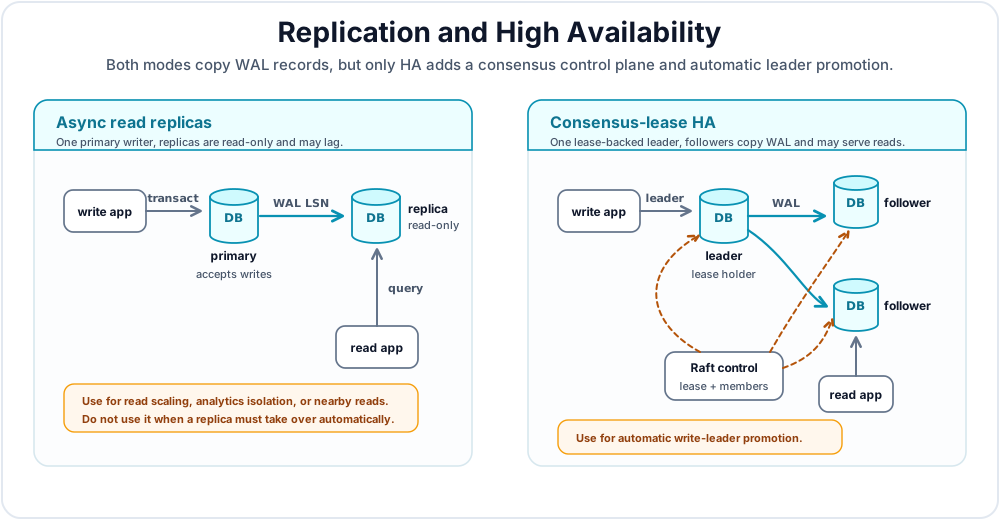
Use the smallest mode that satisfies the operational requirement:
- Use an async read replica when you want read scaling, reporting isolation, or lower-latency reads near another region, and stale-by-lag reads are acceptable.
- Use consensus-lease HA when the system must promote a new write leader after a server failure. HA needs more operational discipline: stable membership, clock discipline, tested fencing, and monitoring.
Replication is not a backup
Async replicas and HA followers copy current state, including bad writes, deletes, and application mistakes. Keep independent backup copies, off-site retention, and practiced restore procedures.
6.1 Non-HA Async Read Replicas
Use an async read replica when you want one primary writer and one or more read-only servers. The primary must have WAL enabled. The default :strict WAL durability profile is appropriate because the replica tails durable source records. The replica open also enables WAL so replayed records are persisted durably on the replica side.
A first async-replica rollout has six steps:
- Start the primary Datalevin server and open the database with WAL enabled.
- Create or choose a server user for the replica to read the primary database and WAL stream.
- Start the replica Datalevin server with its own data root.
- Open the database on the replica server with
:replica/read-only? trueand a:replica/sourceURI pointing at the primary. - Point read-only application traffic, dashboards, or batch jobs at the replica only after initial bootstrap completes.
- Monitor
:replica-lag-lsn,:replica-last-error, and degraded state.
The next example shows step 4, the replica-side database open:
(require '[datalevin.core :as d]
         '[datalevin.client :as cl])

(def schema
  {:name {:db/valueType :db.type/string
          :db/cardinality :db.cardinality/one}})

(def replica-conn
  (d/create-conn
   "dtlv://replica-admin:pass@replica-host:8898/app"
   schema
   {:replica/read-only? true
    :replica/source "dtlv://replicator:pass@primary-host:8898/app"
    :replica/id "app-replica-us-west"
    :replica/poll-ms 250
    :replica/report-ms 5000
    :wal? true
    :wal-durability-profile :strict}))
import datalevin.Connection;
import datalevin.Datalevin;
import datalevin.Schema;

import java.util.Map;

Schema schema = Datalevin.schema()
    .attr(":name",
          Schema.attribute()
              .valueType(Schema.ValueType.STRING)
              .cardinality(Schema.Cardinality.ONE));

Connection replicaConn = Datalevin.createConn(
    "dtlv://replica-admin:pass@replica-host:8898/app",
    schema,
    Map.of(":replica/read-only?", true,
           ":replica/source", "dtlv://replicator:pass@primary-host:8898/app",
           ":replica/id", "app-replica-us-west",
           ":replica/poll-ms", 250,
           ":replica/report-ms", 5000,
           ":wal?", true,
           ":wal-durability-profile", ":strict"));
from datalevin import connect

schema = {
    ":name": {":db/valueType": ":db.type/string",
              ":db/cardinality": ":db.cardinality/one"},
}

replica_conn = connect(
    "dtlv://replica-admin:pass@replica-host:8898/app",
    schema=schema,
    opts={":replica/read-only?": True,
          ":replica/source": "dtlv://replicator:pass@primary-host:8898/app",
          ":replica/id": "app-replica-us-west",
          ":replica/poll-ms": 250,
          ":replica/report-ms": 5000,
          ":wal?": True,
          ":wal-durability-profile": ":strict"})
import { connect } from "datalevin-node";

const schema = {
  ":name": {
    ":db/valueType": ":db.type/string",
    ":db/cardinality": ":db.cardinality/one"
  }
};

const replicaConn = await connect(
  "dtlv://replica-admin:pass@replica-host:8898/app",
  {
    schema,
    opts: {
      ":replica/read-only?": true,
      ":replica/source": "dtlv://replicator:pass@primary-host:8898/app",
      ":replica/id": "app-replica-us-west",
      ":replica/poll-ms": 250,
      ":replica/report-ms": 5000,
      ":wal?": true,
      ":wal-durability-profile": ":strict"
    }
  }
);
On first open, Datalevin bootstraps the replica from the primary copy interface if the local replica database does not exist. After that, the replica tails WAL records in LSN order and reports its applied LSN to the primary so WAL garbage collection preserves needed segments.
The source user in :replica/source must be able to open/copy the primary database, read the transaction log, and update the replica floor. In practice, grant the replicator user database :datalevin.server/alter permission. The user opening the local replica needs permission to create or open the database on the replica server.
Replica reads use normal APIs. User writes are rejected by the replica server:
(d/q '[:find [?name ...] :where [?e :name ?name]] (d/db replica-conn))

;; Throws: Replica is read-only
(d/transact! replica-conn [{:db/id -1 :name "blocked"}])
import java.util.List;
import java.util.Map;

Object names = replicaConn.query(
    "[:find [?name ...] :where [?e :name ?name]]");

// Throws: Replica is read-only
replicaConn.transact(List.of(Map.of(":db/id", -1, ":name", "blocked")));
from datalevin import q, tx

e = q.var("e")
name = q.var("name")
names = replica_conn.query(q.query(
    find=q.collection(name),
    where=[q.datom(e, "name", name)],
))

# Throws: Replica is read-only
replica_conn.transact(tx.data(tx.entity(-1, {"name": "blocked"})))
import { q, tx } from "datalevin-node";

const e = q.var("e");
const name = q.var("name");
const names = await replicaConn.query(q.query({
  find: q.collection(name),
  where: [q.datom(e, "name", name)]
}));

// Throws: Replica is read-only
await replicaConn.transact(tx.data(
  tx.entity(-1, { "name": "blocked" })
));
Replica status is available through typed admin clients:
(require '[datalevin.client :as cl])

(def client
  (cl/new-client "dtlv://replica-admin:pass@replica-host:8898"))

(cl/replica-status client "app")
import datalevin.Client;
import datalevin.Datalevin;

import java.util.Map;

Client client =
    Datalevin.newClient("dtlv://replica-admin:pass@replica-host:8898");

Map<?, ?> status = client.replicaStatus("app");
from datalevin import new_client

client = new_client("dtlv://replica-admin:pass@replica-host:8898")

status = client.replica_status("app")
import { newClient } from "datalevin-node";

const client = await newClient(
  "dtlv://replica-admin:pass@replica-host:8898"
);

const status = await client.replicaStatus("app");
The returned map includes :replica/read-only?, :replica/source, :replica/id, :replica-applied-lsn, :replica-source-durable-lsn, :replica-source-committed-lsn, :replica-lag-lsn, :replica-last-sync-ms, :replica-degraded-reason, and :replica-last-error.
Operationally, treat a replica as eventually consistent. A successful write on the primary is visible to later primary reads immediately, but a replica sees it only after it has copied and replayed the corresponding WAL record. If a user workflow needs read-your-write behavior, route that read to the primary or wait until the replica has applied the needed LSN.
6.2 Consensus-Lease HA
Consensus HA gives each HA database exactly one write leader at a time. Followers replicate from the leader using WAL records and snapshots and can serve reads.
Think of HA as an async replica topology plus a small consensus authority. The consensus group does not replicate every user transaction. User data still moves through WAL and snapshots. The consensus group decides which node owns the write lease, which membership is authoritative, and whether a candidate is allowed to become leader.
The design has three operational layers:
- Data plane: The leader appends writes to WAL; followers copy and replay records. A follower that falls behind retained WAL bootstraps from a snapshot.
- Control plane: A Raft-backed group stores the lease owner, term, leader endpoint, membership hash, and leader LSN.
- Local state: Each database on each node is a
:follower,:candidate,:leader, or:demoting.
Writes are admitted only when the node has fresh proof that it is the current leader and is not demoting. HA forces :wal? true and defaults to :wal-durability-profile :strict.
Fencing is the external proof that the previous writer cannot keep accepting writes after leadership moves. The Raft control plane can decide that a lease has expired and that a candidate may try to lead, but it cannot by itself prove that an old process, host, load-balancer route, or storage attachment is unable to keep serving stale write traffic. That proof is deployment-specific, so Datalevin runs the configured fencing hook before a candidate admits writes.
A fencing hook should make the old writer harmless, not merely report that it looks unhealthy. Depending on the deployment, that may mean stopping or disabling the old Datalevin service, removing the old node from a write load balancer, revoking a virtual IP, detaching or remounting a writable volume, quarantining a host through a cloud or orchestration API, or acquiring a durable external lock that only one writer can hold. A health check, a failed ping, or client-side routing change is not enough by itself: the old writer might still be reachable from some clients or might recover while believing it can still write.
The hook must be idempotent and bounded. Datalevin may retry it, so running it twice should have the same effect as running it once. It should return success only after the old writer has been fenced, or after the operator's chosen lower layer already guarantees that the old writer cannot write. If fencing cannot be confirmed, the safe behavior is to remain unavailable for writes rather than risk two leaders writing divergent histories.
Failed fencing should stop promotion
HA is allowed to pause writes while the cluster proves safety. It should not trade a short outage for split-brain risk. Treat a failing fencing hook as an operational incident, not as a warning that can be ignored.
A first HA rollout usually looks like this:
- Pick a stable database identity and a stable ordered member list. Do not reuse node ids for different machines.
- Start at least three promotable nodes for normal quorum behavior. A witness voter can help quorum in some topologies, but it cannot become a data leader.
- Open the database on every node with the same
:db-identity,:ha-members, and promotable voter mapping. Each node gets its own:ha-node-id, control-plane:local-peer-id, and durable Raft directory. - Install and test the fencing hook before letting a node become promotable. Fencing must be idempotent because Datalevin may retry it.
- Point write clients at the known HA endpoints and configure bounded HA write retry with the client options from Section 4.2.
- Verify that exactly one node is leader, followers are caught up, and every node reports the same membership hash.
- Run a failover drill before treating the cluster as production-ready. Stop or isolate the leader, watch a follower promote, verify writes succeed again, and verify the old leader rejoins as a follower.
A minimal HA option map has this shape. The exact hostnames, ports, credentials, and fencing command are deployment-specific:
{:db-identity "orders-prod"
 :ha-mode :consensus-lease
 :ha-node-id 1
 :ha-members
 [{:node-id 1 :endpoint "node-a:8898"}
  {:node-id 2 :endpoint "node-b:8898"}
  {:node-id 3 :endpoint "node-c:8898"}]

 :ha-client-credentials
 {:username "ha-replica"
  :password "secret"}

 :ha-fencing-hook
 {:cmd ["/usr/local/bin/dtlv-fence"]
  :timeout-ms 3000
  :retries 2
  :retry-delay-ms 1000}

 :ha-control-plane
 {:backend :sofa-jraft
  :group-id "orders-prod-ha"
  :local-peer-id "node-a:9098"
  :raft-dir "/var/lib/datalevin/orders/ha-control/node-a"
  :voters [{:peer-id "node-a:9098" :ha-node-id 1 :promotable? true}
           {:peer-id "node-b:9098" :ha-node-id 2 :promotable? true}
           {:peer-id "node-c:9098" :ha-node-id 3 :promotable? true}]}}
On node-b, use :ha-node-id 2, :local-peer-id "node-b:9098", and a node-local :raft-dir. On node-c, use the corresponding 3 values. The membership list and voter mapping should otherwise describe the same ordered members and voters on every node.
The healthy write path is:
- A client sends a write to a node it believes can lead.
- The server admits the write only if its local role is
:leader, its cached lease still names that node, its term is current, and it is not demoting. - The leader applies the transaction locally and appends the WAL record.
- Followers copy and replay WAL records in LSN order.
- If the leader fails, followers wait for the lease to expire, check membership and lag, race for the lease through the control plane, run fencing, and only then admit writes.
What HA does not mean is just as important: it is not multi-leader replication, not automatic membership discovery, not automatic failback to the old leader, and not quorum replication of every user transaction. A committed write is accepted by the current leader under a valid lease. It may not have reached a follower yet. If your risk model requires zero acknowledged-write loss after permanent destruction of the latest leader, design the deployment and client workflow around that requirement.
For follower reads, connect to a follower endpoint with the normal APIs:
(def follower
  (d/get-conn "dtlv://user:pass@replica-host:8898/app"))
Connection follower =
    Datalevin.getConn("dtlv://user:pass@replica-host:8898/app");
follower = connect("dtlv://user:pass@replica-host:8898/app")
const follower = await connect("dtlv://user:pass@replica-host:8898/app");
Use RBAC to enforce read-only access. Grant only :datalevin.server/view to users that should read from followers.
6.3 HA Membership Updates
Consensus HA membership is operator managed. Datalevin does not discover data nodes automatically. Update the authoritative membership for an open HA database with the HA membership update admin call.
ha-members endpoints use host:port member endpoints, not dtlv:// database URIs, and must be ordered by ascending :node-id.
Use membership updates for planned changes such as adding a node, replacing a node, or changing the control-plane voter set. A typical replacement procedure is:
- Start the new server with the target Datalevin version, database identity, credentials, and node-local Raft directory.
- Let it bootstrap or catch up as a follower before it is relied on for promotion.
- Submit one desired membership spec that includes the full replacement member list, not only the changed node.
- Keep
:clear-leases? trueunless you have a tested reason not to; leadership should be reacquired under the new membership. - Apply the same desired configuration to surviving or newly staged servers so their local options match the authoritative membership hash.
- Verify one leader, matching membership hashes, follower lag, and fencing health after the update.
(require '[datalevin.client :as cl])

(def client
  (cl/new-client "dtlv://admin:pass@node-a:8898"))

(cl/ha-update-membership!
 client
 "app"
 {:ha-members
  [{:node-id 1 :endpoint "node-a:8898"}
   {:node-id 2 :endpoint "node-b:8898"}
   {:node-id 3 :endpoint "node-c-new:8898"}]
  :ha-control-plane
  {:voters [{:peer-id "node-a:9098" :promotable? true :ha-node-id 1}
            {:peer-id "node-b:9098" :promotable? true :ha-node-id 2}
            {:peer-id "node-c-new:9098" :promotable? true :ha-node-id 3}]}})
import datalevin.Client;
import datalevin.Datalevin;

import java.util.List;
import java.util.Map;

Client client = Datalevin.newClient("dtlv://admin:pass@node-a:8898");

Map<?, ?> result = client.haUpdateMembership(
    "app",
    Map.of(
        ":ha-members",
        List.of(
            Map.of(":node-id", 1, ":endpoint", "node-a:8898"),
            Map.of(":node-id", 2, ":endpoint", "node-b:8898"),
            Map.of(":node-id", 3, ":endpoint", "node-c-new:8898")),
        ":ha-control-plane",
        Map.of(
            ":voters",
            List.of(
                Map.of(":peer-id", "node-a:9098",
                       ":promotable?", true,
                       ":ha-node-id", 1),
                Map.of(":peer-id", "node-b:9098",
                       ":promotable?", true,
                       ":ha-node-id", 2),
                Map.of(":peer-id", "node-c-new:9098",
                       ":promotable?", true,
                       ":ha-node-id", 3)))));
from datalevin import new_client

client = new_client("dtlv://admin:pass@node-a:8898")

result = client.ha_update_membership("app", {
    ":ha-members": [
        {":node-id": 1, ":endpoint": "node-a:8898"},
        {":node-id": 2, ":endpoint": "node-b:8898"},
        {":node-id": 3, ":endpoint": "node-c-new:8898"},
    ],
    ":ha-control-plane": {
        ":voters": [
            {":peer-id": "node-a:9098",
             ":promotable?": True,
             ":ha-node-id": 1},
            {":peer-id": "node-b:9098",
             ":promotable?": True,
             ":ha-node-id": 2},
            {":peer-id": "node-c-new:9098",
             ":promotable?": True,
             ":ha-node-id": 3},
        ],
    },
})
import { newClient } from "datalevin-node";

const client = await newClient("dtlv://admin:pass@node-a:8898");

const result = await client.haUpdateMembership("app", {
  ":ha-members": [
    { ":node-id": 1, ":endpoint": "node-a:8898" },
    { ":node-id": 2, ":endpoint": "node-b:8898" },
    { ":node-id": 3, ":endpoint": "node-c-new:8898" }
  ],
  ":ha-control-plane": {
    ":voters": [
      { ":peer-id": "node-a:9098",
        ":promotable?": true,
        ":ha-node-id": 1 },
      { ":peer-id": "node-b:9098",
        ":promotable?": true,
        ":ha-node-id": 2 },
      { ":peer-id": "node-c-new:9098",
        ":promotable?": true,
        ":ha-node-id": 3 }
    ]
  }
});
This is an operator API; keep it in deployment tooling that is tested against the target Datalevin version. The binding names are ha-update-membership!, haUpdateMembership, and ha_update_membership.
The request validates the member and voter lists, persists the new HA options on the target server, optionally replaces the Raft voter set, CAS-updates the authoritative membership hash, clears existing leases by default, and restarts that server's local HA runtime.
Useful request keys:
:ha-members: Replacement data-node member list.:ha-control-plane {:voters [...]}or:ha-control-plane-voters: Replacement control-plane voters.:expected-membership-hash: Optional CAS guard.:replace-voters?: Defaults totrue.:clear-leases?: Defaults totrue, forcing leadership to be reacquired.:timeout-ms: Optional control-plane operation timeout.
Run the same desired update on surviving or newly staged servers so local persisted options match the authoritative membership hash. A node with a membership mismatch fails closed and will not promote or admit writes until the mismatch is resolved.
7. Monitoring and Diagnostics
Datalevin relies heavily on the operating system for memory mapping and disk I/O. Production monitoring should combine host metrics with Datalevin-specific checks.
Monitor the host and the database together
Datalevin depends on memory-mapped files, the operating system page cache, and storage flush behavior. Pair Datalevin signals with disk latency, page faults, swap, free space, and process residency metrics.
7.1 Host Metrics
Watch these first:
- Disk latency and
iowait:iowaitis CPU time spent waiting for storage I/O. Durable direct-LMDB commits are bounded by synchronous flush latency. WAL commit latency depends on the chosen durability profile. - Free disk space: LMDB copy-on-write and WAL files need enough room for new pages, snapshots, and retained WAL segments.
- Page cache and major page faults: Datalevin's effective buffer pool is the OS page cache. Major page faults indicate that the active working set is not resident.
- RSS vs virtual size: RSS is resident set size, the memory pages actually resident in RAM. A large virtual mapping reflects
:mapsize; it is not the same as resident memory.
Chapter 19 shows concrete Linux and macOS commands for checking page-cache residency, major page faults, swap activity, and file-backed cache usage.
7.2 Database Statistics
Use stat to inspect LMDB B+Tree statistics. In Clojure, stat operates on a KV handle. For a Datalog database directory, the dtlv stat command opens the store and reports the same class of LMDB statistics.
(def kv (d/open-kv "/data/companydb"))

(d/stat kv)

(d/open-dbi kv "datalevin/eav")
(d/stat kv "datalevin/eav")
KV kv = Datalevin.openKV("/data/companydb");

Map<?, ?> stats = kv.stat();

kv.openDbi("datalevin/eav");
Map<?, ?> eavStats = kv.stat("datalevin/eav");
from datalevin import open_kv

with open_kv("/data/companydb") as kv:
    stats = kv.stat()

    kv.open_dbi("datalevin/eav")
    eav_stats = kv.stat("datalevin/eav")
import { openKv } from "datalevin-node";

const kv = await openKv("/data/companydb");

try {
  const stats = await kv.stat();

  await kv.openDbi("datalevin/eav");
  const eavStats = await kv.stat("datalevin/eav");
} finally {
  await kv.close();
}
$ dtlv -d /data/companydb stat
$ dtlv -d /data/companydb stat datalevin/eav
Useful fields include :branch-pages, :leaf-pages, :overflow-pages, and :entries. LMDB reuses deleted pages rather than shrinking the file in place. After large deletions, use the compact-copy workflow from Chapter 19 during controlled maintenance.
7.3 Query and Write Diagnostics
- Use
explainfrom Chapter 21 to inspect the selected physical plan and, with{:run? true}, confirm the executed root and compare estimates with actual result sizes. - If writes are slow and disk is busy, check storage latency and the selected durability profile.
- If writes are slow while disk is idle, look for writer contention, many small transactions, or WAL group-commit settings that do not fit the workload.
- Log transaction latency, query latency, and result sizes at the application boundary. Datalevin cannot know which latency budget matters to your service.
7.4 Replication and HA Checks
For async replicas, monitor replica-status (replicaStatus in Java and JavaScript, replica_status in Python), especially :replica-lag-lsn, :replica-degraded-reason, and :replica-last-error.
For HA clusters, monitor leader identity, follower lag, membership hash agreement, clock skew, and fencing health. Keep each node's :ha-members and promotable control-plane voters aligned with the authoritative membership hash.
7.5 Health Checks
A service health check should prove that the application can reach the database path it depends on. For a Datalog database, use a scalar probe:
(d/q '[:find ?e . :where [?e _ _]] (d/db conn))
Object probe = conn.query("[:find ?e . :where [?e _ _]]");
from datalevin import q

entity = q.var("e")
probe = conn.query(q.query(
    find=q.scalar(entity),
    where=[q.pattern(entity, q.IGNORE, q.IGNORE)],
))
import { q } from "datalevin-node";

const entity = q.var("e");
const probe = await conn.query(q.query({
  find: q.scalar(entity),
  where: [q.pattern(entity, q.IGNORE, q.IGNORE)]
}));
This is cheaper than returning a relation with :limit 1; the health check only needs one scalar value or nil.
For server deployments, check both the server process and the application-level operation that your service needs, such as a read-only query for read endpoints or a small write in a dedicated health database for write-path checks.
8. Concurrency and Failure Handling
Datalevin's normal transaction examples focus on successful writes. Production code also needs a failure policy. Separate failures into three groups:
- Semantic transaction failures: the transaction data is invalid for the current database state or schema.
- Logical conflicts: the transaction was well-formed, but a condition such as
:db/casdid not hold. - Operational failures: the local store, WAL, remote server, or HA topology could not complete the write.
Handle those groups differently, as shown in Figure 22.3.
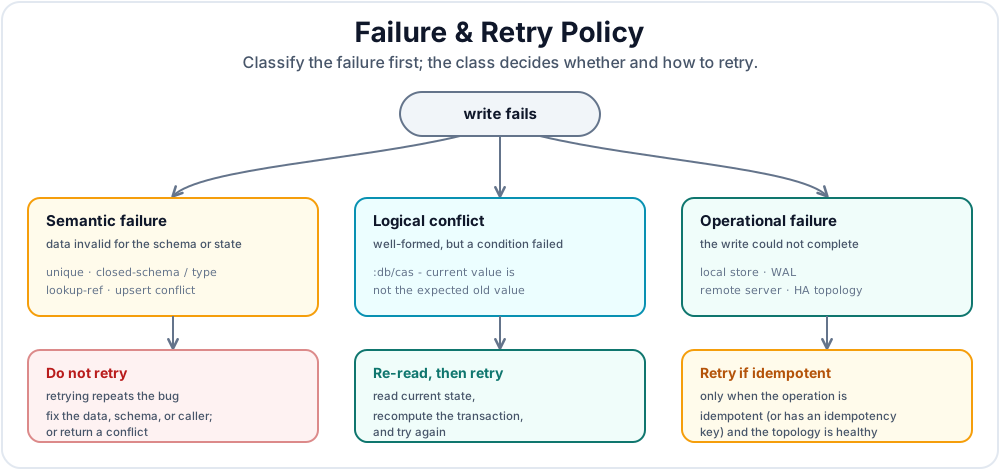
Retrying a validation error just repeats a bug. Retrying a CAS conflict can be correct if the operation re-reads current state on every attempt. Retrying an operational failure is only safe when the application operation is idempotent or has an idempotency key.
Retry by failure class
Do not retry semantic transaction failures blindly. Retry logical conflicts only by re-reading current state and recomputing the transaction. Retry operational failures only for idempotent operations and only when the topology is healthy enough to accept writes safely.
8.1 The Write Serialization Model
Datalevin inherits LMDB's MVCC read model: readers do not block writers, and writers do not block readers. A reader sees a stable read view for its current operation. A writer commits a new version that later reads can observe.
Writes are different. For a single Datalevin store, the durable B+Tree commit path has one writer at a time. In embedded Clojure, transact! serializes writes through the connection and the underlying LMDB write transaction. WAL mode can queue and batch concurrent callers, but the committed writes still have a single order. The caller either receives a transaction report or an exception.
In SQL isolation terminology, committed Datalevin write transactions are serializable within that store because they are physically ordered by the single writer. Ordinary read-only queries use MVCC read views: the view is stable and isolated from concurrent writes, but it is not an application-level read/write transaction unless the read and write are placed inside one transaction callback or encoded as one conditional transaction.
with-transaction opens one read/write transaction around its body. Reads and writes inside the body observe the same write transaction, so no other write can interleave between the read and the write within that store. A query inside the body also reads writes already made earlier in the same body, which gives with-transaction the usual read-your-writes behavior. If the body throws, the transaction is aborted. Explicit Datalog and KV transaction callbacks can also be given a timeout; when it expires, Datalevin aborts the transaction and reports :type :transaction/timeout. with-transaction does not retry logical conflicts such as CAS failures or unique-constraint violations. It only retries Datalevin's internal map-resize condition, where the LMDB map was grown and the write can be replayed safely.
Normal Datalevin writes should serialize rather than deadlock. If a write path appears stuck, look for a long-running transaction function, application locks held around database calls, callbacks that synchronously wait on other writes, slow storage flushes, or HA/network waits. Keep transaction functions small and side-effect-free, and perform external side effects after the transaction commits.
8.2 Common Transaction Failures
Most Datalevin-originated transaction failures are clojure.lang.ExceptionInfo. When Datalevin supplies structured ex-data, use that for application branching and treat the message as human diagnostics. Native storage and remote failures may wrap lower-level exceptions, so log the full exception and its cause chain at the service boundary.
| Failure | When it happens | Typical ex-data |
Retry policy |
|---|---|---|---|
| Unique constraint violation | A transaction adds a value already present for a :db.unique/value attribute, or creates an inconsistent unique assertion. :db.unique/identity normally upserts when used as identity. |
{:error :transact/unique, :attribute attr, ...} |
Do not retry blindly. Return a conflict or use identity upsert intentionally. |
| Closed schema or type validation | :closed-schema? rejects an undeclared attribute, or :validate-data? rejects a value that does not match :db/valueType. |
Often :transact/syntax for syntax errors; type and closed-schema checks may only include input context. |
Do not retry. Fix schema, data, or caller validation. |
| Lookup-ref syntax or non-unique attribute | A lookup ref is not [attr value], or attr is not unique. |
:lookup-ref/syntax or :lookup-ref/unique |
Do not retry. Fix the transaction shape or schema. |
| Lookup-ref miss in a transaction | A transaction form requires an existing entity and [attr value] resolves to nothing. |
{:error :entity-id/missing, :entity-id [...]} |
Usually do not retry. Create the referenced entity first, use identity upsert, or treat it as a domain conflict. |
:db/cas or :db.fn/cas failure |
The current value is not the expected old value. | {:error :transact/cas, :old old, :expected old-value, :new new-value} |
Retry only by re-reading current state and recomputing the new transaction. |
| Upsert conflict | Multiple identity assertions in one entity resolve to different existing entities. | {:error :transact/upsert, ...} |
Do not retry. The input identifies two different entities. |
| Transaction function failure | An installed transaction function or descriptor-backed UDF throws, cannot be resolved, or returns invalid transaction data. | Depends on the function or UDF validation. | Depends on the function. Keep transaction functions deterministic and side-effect-free. |
| Explicit transaction timeout | A with-transaction or with-transaction-kv body exceeds its per-call timeout or the configured default explicit transaction timeout. |
{:type :transaction/timeout, :timeout-ms n} |
Treat as an aborted transaction. Retry only if the application operation is idempotent and still useful. Shorten or move slow work out of the transaction. |
| LMDB map full / map resize | The write exceeds the current memory map size. | Normally handled internally as "DB resized" with {:resized true} and retried. |
Usually no application action. If it happens often, set a larger :mapsize up front. |
| WAL, remote, or HA write failure | WAL sync fails or times out, a remote server returns an error, or HA rejects a write because leadership or fencing changed. | Often :type :txlog/... or :error :ha/... |
Retry only if the operation is idempotent and the topology is healthy. For HA, use the HA retry settings and still design writes to be replay-safe. |
The important distinction is that Datalevin does not turn logical conflicts into transparent retries. If the old value for :db/cas is wrong, the transaction fails because the caller's premise is false. The application must decide whether to report the conflict or compute a new transaction against current state.
8.3 Recommended Retry Patterns
In embedded Clojure, Java, or Python, prefer the Datalog transaction callback (with-transaction, withTransaction, or with_transaction) for read-modify-write logic that must be atomic within one store:
(defn increment-counter! [conn counter-id]
  (d/with-transaction [cn conn]
    (let [db  (d/db cn)
          n   (or (d/q '[:find ?n .
                         :in $ ?id
                         :where [?e :counter/id ?id]
                                [?e :counter/value ?n]]
                       db counter-id)
                  0)]
      (d/transact! cn
        [{:counter/id counter-id
          :counter/value (inc n)}]))))
import datalevin.Connection;

import java.util.List;
import java.util.Map;

void incrementCounter(Connection conn, String counterId) {
    conn.withTransaction(tx -> {
        Object value = tx.query("[:find ?n . " +
            " :in $ ?id " +
            " :where [?e :counter/id ?id] " +
            "        [?e :counter/value ?n]]",
            counterId);
        long n = value == null ? 0L : ((Number) value).longValue();

        tx.transact(List.of(
            Map.of(":counter/id", counterId,
                   ":counter/value", n + 1)));
        return null;
    });
}
from datalevin import q, tx

def increment_counter(conn, counter_id):
    entity, value_var, counter_id_var = map(
        q.var, ("e", "n", "id"))
    current_value = q.query(
        find=q.scalar(value_var),
        inputs=[q.DB, counter_id_var],
        where=[
            q.datom(entity, "counter/id", counter_id_var),
            q.datom(entity, "counter/value", value_var),
        ],
    )

    def body(txn):
        value = txn.query(current_value, counter_id)
        n = value or 0

        txn.transact(tx.data(tx.entity(attrs={
            "counter/id": counter_id,
            "counter/value": n + 1,
        })))

    return conn.with_transaction(body)
This pattern does not need a CAS retry loop because the read and write happen inside the same write transaction. Use it only for short critical sections. Do not perform HTTP calls, file uploads, email delivery, or long CPU work inside the transaction body.
If the host API does not expose the Datalog transaction callback, keep the read-modify-write operation as a single transaction when possible, use :db/cas for optimistic updates, or move the serialized command into the Datalevin-hosting process.
When a write is intentionally optimistic, use CAS and retry at the application operation boundary. Re-read inside every attempt:
(defn cas-conflict?
  [e]
  (= :transact/cas (:error (ex-data e))))

(defn retry-cas
  [f]
  (loop [attempt 1]
    (let [result (try
                   {:ok? true :value (f)}
                   (catch clojure.lang.ExceptionInfo e
                     {:ok? false :error e}))]
      (if (:ok? result)
        (:value result)
        (let [e (:error result)]
          (if (and (cas-conflict? e) (< attempt 5))
            (do
              (Thread/sleep (* 25 attempt))
              (recur (inc attempt)))
            (throw e)))))))

(defn deposit! [conn email amount]
  (retry-cas
    #(let [db      (d/db conn)
           balance (or (d/q '[:find ?balance .
                              :in $ ?email
                              :where [?e :account/email ?email]
                                     [?e :account/balance ?balance]]
                            db email)
                       0)]
       (d/transact! conn
         [[:db/cas [:account/email email]
           :account/balance balance (+ balance amount)]]))))
import datalevin.Connection;
import datalevin.DatalevinException;

import java.util.List;
import java.util.Map;
import java.util.function.Supplier;

boolean casConflict(Throwable e) {
    if (e instanceof DatalevinException de
        && de.getData() instanceof Map<?, ?> data) {
        Object error = data.get(":error");
        if (error == null) {
            error = data.get("error");
        }
        return error != null && error.toString().contains("transact/cas");
    }
    return false;
}

<T> T retryCas(Supplier<T> f) {
    for (int attempt = 1; ; attempt++) {
        try {
            return f.get();
        } catch (DatalevinException e) {
            if (!casConflict(e) || attempt >= 5) {
                throw e;
            }
            try {
                Thread.sleep(25L * attempt);
            } catch (InterruptedException interrupted) {
                Thread.currentThread().interrupt();
                throw e;
            }
        }
    }
}

void deposit(Connection conn, String email, long amount) {
    retryCas(() -> {
        Object value = conn.query("[:find ?balance . " +
            " :in $ ?email " +
            " :where [?e :account/email ?email] " +
            "        [?e :account/balance ?balance]]",
            email);
        long balance = value == null ? 0L : ((Number) value).longValue();

        conn.transact(List.of(List.of(
            ":db/cas",
            List.of(":account/email", email),
            ":account/balance",
            balance,
            balance + amount)));
        return null;
    });
}
import time
from datalevin import DatalevinError, q, tx

def cas_conflict(exc):
    data = getattr(exc, "data", {}) or {}
    return (data.get(":error") == ":transact/cas"
            or data.get("error") == "transact/cas")

def retry_cas(fn, max_attempts=5):
    attempt = 1
    while True:
        try:
            return fn()
        except DatalevinError as exc:
            if not cas_conflict(exc) or attempt >= max_attempts:
                raise
            time.sleep(0.025 * attempt)
            attempt += 1

def deposit(conn, email, amount):
    def attempt():
        e = q.var("e")
        email_input = q.var("email")
        balance_value = q.var("balance")
        balance = conn.query(q.query(
            find=q.scalar(balance_value),
            inputs=[q.DB, email_input],
            where=[
                q.datom(e, "account/email", email_input),
                q.datom(e, "account/balance", balance_value),
            ],
        ), email) or 0

        account = tx.lookup_ref("account/email", email)
        return conn.transact(tx.data(tx.compare_and_swap(
            account, "account/balance", balance, balance + amount
        )))

    return retry_cas(attempt)
import { DatalevinError, q, tx } from "datalevin-node";

function casConflict(error) {
  const data = error?.data ?? {};
  return data[":error"] === ":transact/cas" ||
         data.error === "transact/cas";
}

async function retryCas(fn, maxAttempts = 5) {
  for (let attempt = 1; ; attempt += 1) {
    try {
      return await fn();
    } catch (error) {
      if (!(error instanceof DatalevinError) ||
          !casConflict(error) ||
          attempt >= maxAttempts) {
        throw error;
      }
      await new Promise(resolve => setTimeout(resolve, 25 * attempt));
    }
  }
}

async function deposit(conn, email, amount) {
  return retryCas(async () => {
    const e = q.var("e");
    const emailInput = q.var("email");
    const balanceValue = q.var("balance");
    const balance = await conn.query(q.query({
      find: q.scalar(balanceValue),
      inputs: [q.DB, emailInput],
      where: [
        q.datom(e, "account/email", emailInput),
        q.datom(e, "account/balance", balanceValue)
      ]
    }), email) ?? 0;

    const account = tx.lookupRef("account/email", email);
    return conn.transact(tx.data(tx.compareAndSwap(
      account, "account/balance", balance, balance + amount
    )));
  });
}
The retry wrapper does not retry unique, lookup-ref, schema, or validation failures. It retries only CAS conflicts, and each retry re-reads the balance from the current database state before preparing a new transaction.
For operational retries, apply the same rule at a higher level:
- Retry whole application operations, not half-built transaction data.
- Make every retried operation idempotent. Use a request id, event id, or unique identity attribute so a replay updates the same logical fact instead of creating a duplicate.
- Keep external side effects outside the transaction, and make listeners idempotent because they observe committed transactions after the write.
- Use bounded retries with backoff. Infinite retries can hide a broken schema, a missing entity, full disk, or an HA cluster that cannot safely accept writes.
8.4 Recovery Strategy Ladder
A full Erlang/OTP supervision treatment is outside this guide's scope, but the supervision idea is useful for production Datalevin services: when a component fails, recover at the smallest boundary that can safely repair the problem, and escalate only when that boundary is no longer credible. The database should not silently retry every error, and transaction functions should not supervise the rest of the application. Instead, the application or service manager should decide whether the right response is a local retry, a component restart, or failover.
Figure 22.4 shows the basic ladder.
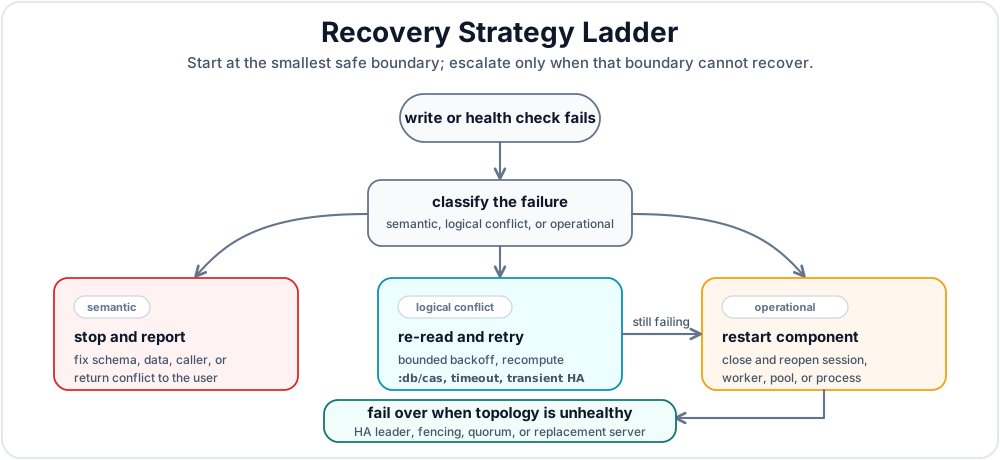
| Strategy | Use when | What to do | Avoid |
|---|---|---|---|
| Local retry | The operation is still valid and the failure may clear quickly, such as a CAS conflict, transaction timeout, transient network failure, or retryable HA write rejection. | Re-read current state, rebuild the transaction, and retry with a small bounded backoff. Require idempotency for writes that may have reached the database. | Retrying validation, schema, unique-conflict, or lookup-ref bugs. |
| Component restart | One local database-facing component appears unhealthy: a worker, connection pool, remote client session, queue consumer, or process keeps failing after bounded retries. | Stop accepting new work for that component, close Datalevin connections or clients, create fresh ones, and replay only idempotent queued work. | Restarting the whole service for every logical conflict, or hiding a persistent data bug behind repeated restarts. |
| Failover | The database topology is unhealthy: the write leader is unreachable, fencing or membership changed, a host failed, or a server cannot safely accept writes. | Route writes to the current HA leader after the cluster converges, or let the deployment supervisor replace the failed server. Continue only when health checks and HA status agree. | Inventing a second writer in application code, bypassing fencing, or using replication as a backup substitute. |
The CAS helper above is a local retry example. A component restart helper is usually not a Datalevin function; it belongs in the worker framework, connection pool, job runner, service manager, or orchestration system that owns the failed component. Failover belongs to the deployment topology. In a non-HA deployment, failover is manual repair or restore. In consensus-lease HA, the cluster must settle on a safe leader before write traffic resumes.
8.5 Production Policy
A useful HTTP or job-worker policy is:
- Return
400for transaction syntax, closed-schema, and type-validation failures. - Return
404or409for lookup-ref misses, depending on whether the missing entity is a resource path or a domain precondition. - Return
409for unique conflicts and CAS conflicts unless the operation has a specific retry loop. - Return
503for operational storage, remote, WAL, or HA failures that may clear after repair or failover. - Log the exception class, message,
ex-data, and cause chain. Do not log full transaction data if it can contain secrets.
This policy gives production readers a consistent mental model: Datalevin serializes writes for a store, exposes logical conflicts as exceptions, retries only safe internal resize events, and leaves application-level retries to the code that understands the business operation.
9. Database Change Notifications Across Connections
Use d/listen-db! to refresh an application view when another connection commits a write to the same remote database. The subscription follows the database name in the connection URI, so writes from other clients on that server can trigger it. It requires a remote Datalog connection, including when the changes of interest are KV writes in the same database.
These Clojure APIs are available in Datalevin 1.2.0. Choose the listener according to the scope and information you need:
| API | Scope | Callback receives |
|---|---|---|
listen! |
Transactions through the registered connection | A transaction report |
listen-db! |
Committed writes to the named database on one server, across connections | A change notification; query again for current data |
9.1 Subscribe, Refresh, and Unsubscribe
For this example, set DATALEVIN_URI to a database URI on a running development server, using an account with view and write permissions for that test database. The watcher and writer below are separate connections. The promise lets this short example wait for its asynchronous callback before cleanup:
(require '[datalevin.core :as d])

(let [uri (System/getenv "DATALEVIN_URI")
      watcher (d/create-conn uri)
      writer (d/create-conn uri)
      refreshed (promise)]
  (try
    (d/listen-db! watcher :user-names
      (fn [{:keys [type db-name error]}]
        (case type
          :db-changed
          (deliver refreshed
            {:db-name db-name
             :names (d/q '[:find ?name
                           :where [?e :user/name ?name]]
                         (d/db watcher))})

          :subscription-error
          (deliver refreshed {:db-name db-name :error error}))))

    ;; The subscription is ready before this write starts.
    (d/transact! writer [{:user/name "Ada"}])
    (deref refreshed 5000 :timeout)
    ;; => {:db-name "your-db-name", :names #{["Ada"] ...}}
    ;; Or an error map / :timeout; the notification is asynchronous.
    (finally
      (d/unlisten-db! watcher :user-names)
      (d/close writer)
      (d/close watcher))))
In a running application, keep the subscription open and refresh state on each :db-changed callback. Register before loading the initial view so that a write between initialization and subscription is not missed. Callbacks run asynchronously and may query through the original connection. If a callback throws an exception, the committed write and other subscribers are unaffected.
listen-db! returns a listener key. You may supply a key as above or omit it and retain the generated key. Reusing a key replaces the previous subscription. unlisten-db! removes it, and closing the owning connection stops its subscriptions.
9.2 Delivery and Recovery
A change event has the shape {:type :db-changed :db-name "app"}. It does not contain datoms, a transaction report, or a transaction count. Datalog and KV transaction writes notify after commit, including a mixed explicit transaction. Aborted, failed, and simulated transactions do not notify. Several commits may coalesce into one event, so refresh current state rather than using callback counts to count transactions.
Subscriptions are ephemeral and scoped to one server. They provide no durable history or cross-node delivery guarantee. For durable processing, store work or events as database facts and use notifications to wake a reader; Chapter 6, Section 3 describes the outbox pattern.
Database :datalevin.server/view permission is required and rechecked before delivery. A terminal transport or authorization failure sends {:type :subscription-error :db-name "app" :error exception} and stops the subscription. Resolve the failure, register again, and reload current state. Plan the same resubscription and refresh step when moving an application to a different server after failover. Appendix G, Section 7 lists the API forms.
Summary
Production Checklist
Use this as a final review before production:
- Cover schema, queries, rules, and transaction logic with tests against in-memory or temporary Datalevin databases, and run tests with
:validate-data?and:closed-schema?enabled (Section 1). - Choose the simplest deployment mode that satisfies the availability and access requirements.
- Choose a tenancy shape deliberately: shared database, database per tenant, catalog-plus-tenant databases, or tiered tenancy; treat local-first per-user databases as a database-per-tenant variant (Section 3).
- Run the server under a service manager with a dedicated data directory and restricted filesystem permissions.
- Set
DATALEVIN_DEFAULT_PASSWORD; do not expose a server using the built-in default password. - Create application users and roles with least-privilege RBAC permissions.
- Use disk or volume encryption for the data directory, and application-level encryption for sensitive fields.
- Follow Chapter 19 for
:mapsize,:max-readers, WAL, durability profile, copy, dump/load, snapshots, and compaction. - Define an application recovery policy for CAS conflicts, uniqueness conflicts, validation failures, lookup-ref misses, operational write failures, component restarts, and failover boundaries (Section 8).
- Automate transactionally consistent backups and test restores.
- Monitor disk latency, free space, page-cache behavior, query latency, write latency, and result sizes.
- For async replicas, remember that reads are eventually consistent; monitor replica lag, last errors, and degraded state.
- For HA, keep membership, voter mapping, clock discipline, fencing checks, and failover drills part of normal operations. HA promotes a write leader; it is not a backup system or quorum replication of every user transaction.
- Install server-side UDF registries before relying on descriptor-backed UDFs in remote queries or transactions. Remote queries can call built-ins and server-registered UDFs, not arbitrary host functions.
Datalevin is operationally quiet when the deployment boundary is chosen correctly. Most production issues come from choosing a topology that is more complex than the application needs, starving the OS page cache, or failing to test backup and restore paths.
With the operational base in place, Part VI builds application architectures on top of these guarantees, especially intelligent-memory systems.
References
[1] Diego Ongaro and John Ousterhout, "In Search of an Understandable Consensus Algorithm," USENIX ATC 2014. URL: https://raft.github.io/raft.pdf.
[2] Cognitect, "Transit Format." URL: https://github.com/cognitect/transit-format.
[3] Peter Taoussanis, "Nippy: High-performance serialization library for Clojure." URL: https://github.com/ptaoussanis/nippy.
[4] Elaine Barker, "Recommendation for Key Management: Part 1 - General," NIST Special Publication 800-57 Part 1 Revision 5, 2020. DOI: https://doi.org/10.6028/NIST.SP.800-57pt1r5.
User Examples
Log in to create examplesNo examples for this chapter yet.