
Chapter 5: Attributes, Namespaces, and Entities
Chapter 4 covered how Datalevin stores triples (datoms) in DLMDB. This chapter moves up the stack to the logical model. Datalevin's data model is built on three pillars: Attributes, Namespaces, and Entities.
Datalevin's schema model is flexible by default and provides powerful controls when you need performance and integrity. Declared attribute properties control how values are stored, constrained, indexed, and queried, while namespaces keep the vocabulary readable and entities give facts a stable place to collect.
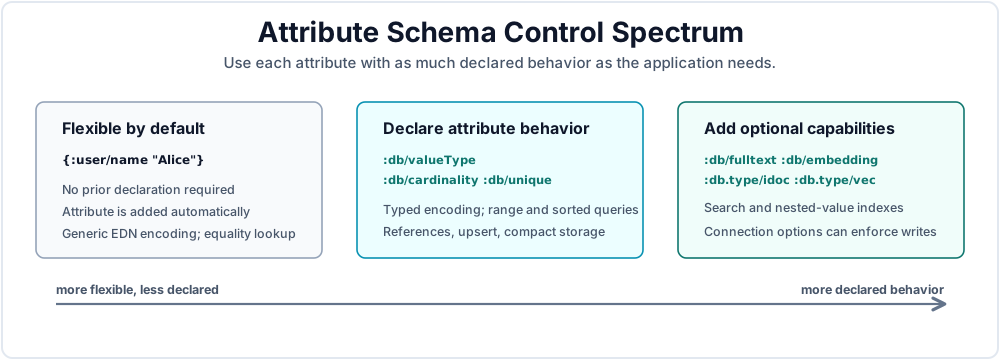
Figure 5.1 shows Datalevin's schema controls as a spectrum. An attribute can start with no declaration, but you can add declared behavior when the application needs typed storage, range access, identity, references, specialized indexes, or stricter write-time checks. The sections below explain each control.
1. Attributes: Flexible Schema
An attribute (the "A" in EAV) defines a property that can be associated with an entity. Attributes are the main subjects of a Datalevin schema.
1.1 Automatic Attribute Creation
By default, you do not need to "create a table" or "define a schema" to start using Datalevin. When you transact a new attribute keyword that the database has not seen before, Datalevin automatically adds it to the schema for you.
;; This works even if :user/name was never defined
(d/transact! conn [{:user/name "Alice"}])
// This works even if :user/name was never defined
conn.transact(Datalevin.tx()
    .entity(Tx.entity()
        .put(":user/name", "Alice")));
from datalevin import tx

# This works even if :user/name was never defined
conn.transact(tx.data(tx.entity(-1, {"user/name": "Alice"})))
import { tx } from "datalevin-node";

// This works even if :user/name was never defined
await conn.transact(tx.data(tx.entity(-1, { "user/name": "Alice" })));
Info
In Clojure source, attribute names such as :user/name are EDN keywords. Python and JavaScript schema maps and legacy native forms spell them as colon-prefixed strings. The typed q and tx builders also accept "user/name" and convert it in attribute positions. They do not reinterpret values: use q.kw("user.status/active") when the stored value itself must be a keyword.
This convenience has a flip side: a misspelled attribute does not cause an error. Transacting :user/emial quietly creates a new attribute alongside :user/email, and queries against the correct name will not see the misspelled facts. During development this is a minor annoyance; in production you can open the connection with the option {:closed-schema? true}, which rejects any transaction that mentions an attribute not already defined in the schema. Chapter 11 covers this and other write-time validation options.
1.2 The Default Type: EDN Encoding
If an attribute is added automatically, Datalevin treats its value as a generic EDN-encoded value, which has some trade-offs.
- Pros: You can store any EDN data structure (maps, vectors, sets) directly.
- Cons: Because the values are stored as opaque binary blobs, the database cannot perform efficient range queries, such as "find all orders with total greater than 100", because it does not know how to sort the binary data.
Exact-value matching on untyped attributes is byte-encoded matching, not a semantic equality layer for every EDN shape. Simple values that encode the same way can still be matched exactly, so a query such as "find the order whose total is exactly 100" can use the index. Do not rely on untyped maps, sets, or nested values for canonical equality lookup: Datalevin does not sort or normalize all EDN structures on every transaction before serializing them. What you lose is meaningful ordering, range scans, sorted results, and comparisons. You also cannot enable specialized indexes that require typed values. Embedding search requires a declared string type. Full-text indexing is more permissive: Datalevin calls str on the transacted value before indexing it, though string attributes are still the usual choice for human text.
1.3 Why Explicit Types Are Preferred
To enable range queries, validation, compact storage, and specialized indexes, you are strongly encouraged to specify a data type. Explicit types allow Datalevin to use specialized codecs for sorting values in the B+Tree instead of treating values as opaque EDN-encoded blobs.
This is a pay-as-you-go tradeoff. During early exploration, undeclared attributes let you move quickly. Once an attribute becomes part of an important access path or application contract, declaring its type gives Datalevin the information it needs to compare, range-scan, validate, and index that value predictably.
Common Datalog value types for :db/valueType:
| Type | Use |
|---|---|
:db.type/string |
Strings. Use for names, emails, external ids, and text fields. |
:db.type/keyword |
Keywords. Good for enums such as :order.status/paid. |
:db.type/boolean |
true or false. |
:db.type/long |
64-bit signed integers. |
:db.type/bigint |
Large integer values. |
:db.type/double |
64-bit floating-point numbers. |
:db.type/instant |
Instants, as Unix epoch time. |
:db.type/uuid |
UUID values. |
:db.type/bytes |
Byte arrays. |
:db.type/ref |
Entity references. Required for reverse attribute navigation and component relationships. |
Raw keyword values are useful for small symbolic fields. When the enum value should itself be an entity with identity, documentation, sort order, lifecycle, or additional facts, model it as a :db/ident entity and point to it with a :db.type/ref attribute. Chapter 11 covers that pattern.
Beyond these scalar types, Datalevin offers specialized value types: :db.type/tuple for tuple values, :db.type/vec for similarity-indexed vectors (Chapter 17), and :db.type/idoc for path-indexed nested documents (Chapter 14). Composite indexes over several attributes use :db/tupleAttrs (Chapter 11). For a complete list of acceptable value types, see Appendix C.
2. Attribute Properties
While attributes are created automatically, you can provide a schema map when opening a connection with d/get-conn or d/create-conn, or later with d/update-schema, to define behavior for specific attributes. The table below lists some example attribute properties.
| Property | Description |
|---|---|
:db/valueType |
The data type, such as :db.type/long. |
:db/cardinality |
:db.cardinality/one (allow single value, default) or :db.cardinality/many (allow multiple values). |
:db/unique |
:db.unique/identity (unique, upsert when duplicate) or :db.unique/value (unique, reject duplicate). |
:db/fulltext |
Set to true to enable full-text search. Values are converted to strings before indexing. |
:db/embedding |
Set to true on string attributes to maintain an embedding similarity index. |
:db/idocFormat |
Format for :db.type/idoc attributes: :edn, :json, or :markdown. |
:db/doc |
Human-readable documentation string for the attribute. |
Appendix C includes a complete reference for the schema properties that Datalevin interprets.
Info
Datalevin stores attributes in indexes by an internal 32-bit attribute id, exposed in schema inspection as :db/aid. A database can therefore have at most about 2.1 billion distinct attribute ids, including built-in attributes. That ceiling is far above ordinary application schemas, but it is a reminder that attributes are schema vocabulary, not an unbounded place to put user-generated keys. If a key space can grow without control, model the key as data, an enum/value, an idoc path, or a referenced entity instead of minting a new Datalevin attribute for every key.
Here is a schema that uses several of these properties. The :db/doc entries describe the intended meaning of each attribute:
(def schema
  {:user/email       {:db/valueType :db.type/string
                      :db/unique    :db.unique/identity
                      :db/doc       "Login and notification email; unique identity for a user."}
   :user/login-count {:db/valueType :db.type/long
                      :db/doc       "Number of successful logins recorded for the user."}
   :user/tags        {:db/valueType   :db.type/string
                      :db/cardinality :db.cardinality/many
                      :db/doc         "Labels assigned to the user for segmentation or search."}
   :user/bio         {:db/valueType :db.type/string
                      :db/fulltext  true
                      :db/embedding true
                      :db/doc       "Profile biography used for full-text and embedding search."}})
Schema schema = Datalevin.schema()
    .attr(":user/email",
          Schema.attribute()
              .valueType(Schema.ValueType.STRING)
              .unique(Schema.Unique.IDENTITY)
              .doc("Login and notification email; unique identity for a user."))
    .attr(":user/login-count",
          Schema.attribute()
              .valueType(Schema.ValueType.LONG)
              .doc("Number of successful logins recorded for the user."))
    .attr(":user/tags",
          Schema.attribute()
              .valueType(Schema.ValueType.STRING)
              .cardinality(Schema.Cardinality.MANY)
              .doc("Labels assigned to the user for segmentation or search."))
    .attr(":user/bio",
          Schema.attribute()
              .valueType(Schema.ValueType.STRING)
              .fulltext(true)
              .embedding(true)
              .doc("Profile biography used for full-text and embedding search."));
schema = {
    ":user/email": {
        ":db/valueType": ":db.type/string",
        ":db/unique": ":db.unique/identity",
        ":db/doc": "Login and notification email; unique identity for a user.",
    },
    ":user/login-count": {
        ":db/valueType": ":db.type/long",
        ":db/doc": "Number of successful logins recorded for the user.",
    },
    ":user/tags": {
        ":db/valueType": ":db.type/string",
        ":db/cardinality": ":db.cardinality/many",
        ":db/doc": "Labels assigned to the user for segmentation or search.",
    },
    ":user/bio": {
        ":db/valueType": ":db.type/string",
        ":db/fulltext": True,
        ":db/embedding": True,
        ":db/doc": "Profile biography used for full-text and embedding search.",
    },
}
const schema = {
  ":user/email": {
    ":db/valueType": ":db.type/string",
    ":db/unique": ":db.unique/identity",
    ":db/doc": "Login and notification email; unique identity for a user."
  },
  ":user/login-count": {
    ":db/valueType": ":db.type/long",
    ":db/doc": "Number of successful logins recorded for the user."
  },
  ":user/tags": {
    ":db/valueType": ":db.type/string",
    ":db/cardinality": ":db.cardinality/many",
    ":db/doc": "Labels assigned to the user for segmentation or search."
  },
  ":user/bio": {
    ":db/valueType": ":db.type/string",
    ":db/fulltext": true,
    ":db/embedding": true,
    ":db/doc": "Profile biography used for full-text and embedding search."
  }
};
2.1 Cardinality: One Value or a Set of Values
Cardinality controls how many values one entity may hold for one attribute.
:db.cardinality/oneis the default: an entity holds at most one value, and transacting a new value replaces the old one. There is no separate "update" operation: asserting{:db/id 1 :user/email "new@example.com"}retracts the old email and asserts the new one in a single step.:db.cardinality/many: transacting a new value accumulates instead. The values behave as a set: duplicates are ignored, and there is no ordering.
The example below uses the schema from Section 2: :user/tags is declared as a string-valued :db.cardinality/many attribute.
;; Assumes :user/tags is declared string-valued and :db.cardinality/many.
(d/transact! conn [{:db/id 1 :user/tags "clojure"}])
(d/transact! conn [{:db/id 1 :user/tags ["databases" "clojure"]}])
(d/transact! conn [{:db/id 1 :user/tags ["databases" "datalevin"]}])
;; Entity 1 now has tags "clojure", "databases", and "datalevin": a set, no duplicates.
// Assumes :user/tags is declared string-valued and :db.cardinality/many.
conn.transact(Datalevin.tx()
    .entity(Tx.entity(1)
        .put(":user/tags", "clojure")));

conn.transact(Datalevin.tx()
    .entity(Tx.entity(1)
        .put(":user/tags", Datalevin.listOf("databases", "clojure"))));

conn.transact(Datalevin.tx()
    .entity(Tx.entity(1)
        .put(":user/tags", Datalevin.listOf("databases", "datalevin"))));

// Entity 1 now has tags "clojure", "databases", and "datalevin": a set, no duplicates.
# Assumes :user/tags is declared string-valued and :db.cardinality/many.
conn.transact(tx.data(tx.entity(1, {"user/tags": "clojure"})))
conn.transact(tx.data(tx.entity(1, {
    "user/tags": ["databases", "clojure"],
})))
conn.transact(tx.data(tx.entity(1, {
    "user/tags": ["databases", "datalevin"],
})))

# Entity 1 now has tags "clojure", "databases", and "datalevin": a set, no duplicates.
// Assumes :user/tags is declared string-valued and :db.cardinality/many.
await conn.transact(tx.data(tx.entity(1, { "user/tags": "clojure" })));
await conn.transact(tx.data(tx.entity(1, {
  "user/tags": ["databases", "clojure"]
})));
await conn.transact(tx.data(tx.entity(1, {
  "user/tags": ["databases", "datalevin"]
})));

// Entity 1 now has tags "clojure", "databases", and "datalevin": a set, no duplicates.
This collection syntax is specific to map-style entity transaction data. For a cardinality-many attribute, a scalar value adds one value, and a non-map collection adds each element as a separate value. If :user/tags were undeclared, it would be an untyped cardinality-one attribute. The vector would then be stored as one EDN value and would replace the previous value; it would not become two string tags. In raw datom operation vectors, the value position is always one value. To add several values with raw datom operations, write one operation per value, such as [:db/add 1 :user/tags "databases"] and [:db/add 1 :user/tags "clojure"].
If you need an ordered or duplicate-preserving collection, model it differently: store a small typed vector as a :db.type/tuple when the positions and element types are fixed, store an arbitrary vector in an EDN-valued attribute, or model the list items as entities that carry a position attribute (a variant of the join-entity pattern in Chapter 11). Tuple values have their own schema rules and size limits; see Appendix C, Section 8.
2.2 Uniqueness: Identity vs. Value
Both :db/unique settings enforce that no two entities share a value for the attribute, and both can be used in lookup refs. They differ in how a duplicate write is handled:
:db.unique/valueis a pure constraint: transacting a duplicate is an error. Use it when a value must be unique, but a duplicate write means "reject this data", not "find that entity and update it." One-time invitation codes and password-reset tokens are good examples: the token can be used in a lookup ref, but if newly generated token data collides with an existing token, the application should fail the transaction or generate a different token, not merge fields into the existing token entity.:db.unique/identitytreats the value as the entity's identity: transacting a map with an existing value upserts by updating the existing entity instead of creating a new one. Use it for natural keys such as email addresses, slugs, or external ids that application code uses to identify an entity.
Chapter 6 shows lookup refs and upserts in transactions; Chapter 11 goes deeper into identity modeling.
3. Namespaces: Semantic Grouping
In Datalevin, attribute names are keywords, and by convention, they almost always include a namespace.
In EDN, :user/email is a qualified keyword. The part before the slash, user, is the keyword namespace. The part after the slash, email, is the keyword name. The same syntax is used for attribute names and for keyword values, so the examples below include both.
Attribute names are not throwaway local names. In SQL, a column name is often mediated through aliases, views, ORM fields, or API serializers. In Datalevin, the attribute name usually appears directly in transactions, queries, pull patterns, logs, migrations, and sometimes API payloads. Treat an attribute such as :user/email, :doc/body, or :invoice/total more like a public data key than a local variable: it should clearly represent the domain because it becomes part of the schema vocabulary.
:user/email          ;; namespace: user, name: email
:line-item/quantity  ;; namespace: line-item, name: quantity
:order.status/paid   ;; namespace: order.status, name: paid
:invoice/line.total  ;; namespace: invoice, name: line.total
String userEmail = ":user/email";              // namespace: user, name: email
String orderId = ":order/id";                  // namespace: order, name: id
String lineItemQuantity = ":line-item/quantity"; // namespace: line-item, name: quantity
String orderStatusPaid = ":order.status/paid"; // namespace: order.status, name: paid
String invoiceLineTotal = ":invoice/line.total"; // namespace: invoice, name: line.total
user_email = ":user/email"          # namespace: user, name: email
order_id = ":order/id"              # namespace: order, name: id
line_item_quantity = ":line-item/quantity"  # namespace: line-item, name: quantity
order_status_paid = ":order.status/paid"    # namespace: order.status, name: paid
invoice_line_total = ":invoice/line.total"  # namespace: invoice, name: line.total
const userEmail = ":user/email";          // namespace: user, name: email
const orderId = ":order/id";              // namespace: order, name: id
const lineItemQuantity = ":line-item/quantity"; // namespace: line-item, name: quantity
const orderStatusPaid = ":order.status/paid"; // namespace: order.status, name: paid
const invoiceLineTotal = ":invoice/line.total"; // namespace: invoice, name: line.total
For attributes, the namespace is part of the attribute's identity. :user/name, :product/name, and :company/name are three different attributes. They may all store strings called "name" in English, but Datalevin stores and indexes them as distinct facts.
A dot inside the namespace or name is just another keyword character. Datalevin does not treat :order.status/paid as nested under :order/status, nor :invoice/line.total as nested under :invoice/line; the slash is the delimiter that separates namespace from name. Dotted namespaces are a common convention for enum value domains, such as order statuses, but Datalevin assigns no special meaning to the dot.
3.1 Namespaces Are Not Tables
Namespaces are a naming convention, not a storage container or type constraint. An entity can have attributes from more than one namespace:
{:user/email "ada@example.com"
 :account/id "acct-1"
 :account/plan :account.plan/pro}
conn.transact(Datalevin.tx()
    .entity(Tx.entity()
        .put(":user/email", "ada@example.com")
        .put(":account/id", "acct-1")
        .put(":account/plan", Datalevin.kw(":account.plan/pro"))));
from datalevin import q, tx

conn.transact(tx.data(tx.entity(-1, {
    "user/email": "ada@example.com",
    "account/id": "acct-1",
    "account/plan": q.kw("account.plan/pro"),
})))
import { q, tx } from "datalevin-node";

await conn.transact(tx.data(tx.entity(-1, {
  "user/email": "ada@example.com",
  "account/id": "acct-1",
  "account/plan": q.kw("account.plan/pro")
})));
That is legal because entities are collections of facts, not rows in a table. The namespace tells readers what the attribute means; it does not prevent the attribute from appearing on a particular entity.
Best Practice
If your application needs to enforce that only certain entities have certain attributes, enforce that where transactions are built: command handlers, transaction functions, or higher-level validation. For transaction-time checks that need the would-be database state, use :db/ensure.
For checks that must see the entity after all transaction data has been processed, use :db/ensure in the transaction. It lets a predicate inspect the would-be database state before commit, which is the right place for entity-shape invariants that namespaces alone do not enforce. Chapter 6 covers the transaction form in detail, and Chapter 11 covers schema-design uses.
3.2 Why Namespaces Are Preferred
Namespaces give Datalevin's flexible schema enough structure to remain maintainable:
- Collision avoidance:
:user/id,:order/id, and:product/idcan coexist without fighting over a generic:id. - Query readability:
[?order-eid :order/customer ?user-eid]says more than[?order-eid :customer ?user-eid]. - Schema evolution: A well-named attribute can be moved, specialized, or renamed deliberately. Chapter 11 shows the
update-schemaworkflow for schema changes and attribute renames.
3.3 Attribute Namespaces and Value Namespaces
The namespace on an attribute describes the fact. The namespace on a keyword value describes the value domain. These often differ:
{:order/status :order.status/paid}
conn.transact(Datalevin.tx()
    .entity(Tx.entity()
        .put(":order/status", Datalevin.kw(":order.status/paid"))));
from datalevin import q, tx

conn.transact(tx.data(tx.entity(-1, {
    "order/status": q.kw("order.status/paid"),
})))
import { q, tx } from "datalevin-node";

await conn.transact(tx.data(tx.entity(-1, {
  "order/status": q.kw("order.status/paid")
})));
Here, :order/status is an attribute on an order. The value :order.status/paid is an enum-like keyword from the order-status value domain. This pattern keeps the attribute and its possible values distinct. It is a naming convention, not a database requirement.
Info
System namespaces such as :db, :db.type, :db.cardinality, :db.unique, and :datalevin are used by Datalevin itself. Treat them as reserved for schema properties, built-in values, and Datalevin-specific metadata.
3.4 Datalevin Attributes and RDF Predicates
Readers who know RDF will notice the similarity: RDF uses subject-predicate-object triples, while Datalevin uses entity-attribute-value datoms. That resemblance is useful, but the design goals are different [1].
The terminology difference is deliberate. An entity is a database identity whose facts may accumulate over time; it is not necessarily a globally named subject. An attribute is a schema-bearing property: it can have a value type, cardinality, uniqueness, indexing behavior, documentation, and validation. Datalevin avoids calling this position a predicate because, elsewhere in database and query discussions, a predicate usually means a test that returns true or false. A value is also broader than an RDF object: it may be a scalar, a reference to another entity, a tuple, a document value, a vector, or another supported Datalevin value type.
In RDF, predicates are often IRIs, Internationalized Resource Identifiers, chosen from shared vocabularies or ontologies. An IRI is the Unicode-capable generalization of a URI; RDF uses the more precise term. RDF predicates are meant to carry portable meaning across datasets, organizations, and reasoning systems. RDF Schema and OWL can then attach richer ontology semantics to those predicates: class hierarchies, property relationships, domain/range constraints, and inference rules [2,3].
Datalevin attributes are intentionally more local and operational. An attribute such as :order/placed-at or :invoice/issued-at is not meant to be a universal ontology term for time. It is a precise fact name inside your database. Its schema properties tell Datalevin how to store, compare, index, and validate values; they do not assert a global ontology.
That difference makes Datalevin's model more open in day-to-day application design. You can create many specific attributes when they make the data clearer:
:order/placed-at
:invoice/issued-at
:shipment/delivered-at
:support-ticket/closed-at
List<String> attributes = List.of(
    ":order/placed-at",
    ":invoice/issued-at",
    ":shipment/delivered-at",
    ":support-ticket/closed-at");
attributes = [
    ":order/placed-at",
    ":invoice/issued-at",
    ":shipment/delivered-at",
    ":support-ticket/closed-at",
]
const attributes = [
  ":order/placed-at",
  ":invoice/issued-at",
  ":shipment/delivered-at",
  ":support-ticket/closed-at"
];
Those attributes may all be :db.type/instant, but they mean different things to the application. You do not need to collapse them into a generic :event/time attribute just to make the vocabulary look smaller. In Datalevin, a larger set of clear, specific attributes is often better than a small set of overloaded general attributes.
This does not prevent ontology-like modeling when you need it. You can still use enum entities, references, rules, and Datalog queries to represent domain knowledge. The point is that Datalevin does not require every attribute to be a general-purpose ontology predicate before it can be useful.
3.5 Rules of Thumb
The following are conventions and suggestions, not hard requirements. Use them unless your domain has a strong reason to differ:
- Use qualified keywords for application attributes:
:user/email, not:email. - Use singular domain nouns for namespaces:
:user/email, not:users/email. The attribute name can still be plural when it represents a cardinality-many value, such as:user/emails. - Choose the namespace that reflects where the relationship fact belongs in your model:
:order/customer,:comment/post,:role-assignment/user. - Use separate value namespaces for enums:
:order.status/paid,:order.status/cancelled. - Avoid using namespaces as security or type boundaries. They clarify meaning; they do not enforce authorization or entity classes.
Ownership is a modeling choice, not a storage container. The attribute name tells readers where the fact belongs and usually matches the shape you want to write, pull, and validate.
For a one-to-one relationship, :user/profile says the user owns the profile link; use that shape when the profile is normally reached from the user. For a one-to-many relationship, :comment/post puts the parent pointer on each comment. A post's comments can still be found by querying for comments whose value is the post entity id, but each comment can be added, removed, or filtered independently. For a many-to-many relationship, :user/roles can be fine for a small owned set. When the relationship has its own facts, make the relationship an entity, with attributes such as :role-assignment/user, :role-assignment/role, and :role-assignment/assigned-at.
The namespace does not enforce the relationship. Cardinality, reference types, uniqueness, and transaction-time validation do that. Chapter 11 covers those schema choices in detail.
4. Entities and Ids
An entity (the "E" in EAV) is a collection of datoms that share the same entity id. There is no separate entity record in storage: the id is the only thing tying the datoms together. Assert a datom with a new id and an entity comes into existence; retract the last datom carrying an id and that entity is gone. As Chapter 3 discussed, an entity has no declared type, only whatever attributes have been asserted about it.
Datalevin uses 64-bit integers for entity ids. An entity id is the stable internal handle for the entity inside the database. The system attribute :db/id is the transaction-data notation for addressing an entity, but it is not application identity. Chapter 6 covers the transaction mechanics.
Because entity ids are assigned by the database, they carry no stable meaning outside it. Avoid exposing them in URLs, API payloads, or other systems: data that is exported and re-imported, merged from another database, or rebuilt from source may end up with different ids. Two databases can contain the same application data while using different eids for the corresponding entities.
For a stable, externally visible identity, give the entity a natural key declared as :db.unique/identity, such as an email, a slug, or a UUID. The example schema in Section 2 declares :user/email this way, which lets the rest of the application address that user as [:user/email "alice@example.com"] without ever knowing the internal id. Chapter 11 also introduces :db/ident, a built-in identity attribute for system-wide named entities such as enums.
5. Schema Workflow in Practice
In practice, the schema workflow often follows this path:
- Prototyping: Start without a schema and transact maps.
- Relations: Use
:db.type/refto connect entities, forming the graph that Datalog traverses efficiently. - Optimization: Once you know your access patterns, add
:db/valueTypeto enable range queries on specific attributes. - Integrity: Add
:db.unique/identityfor fields like emails or slugs so you can use them as lookup refs, such as[:user/email "alice@example.com"]. - Lockdown: In production, consider opening the connection with
{:closed-schema? true}to reject unknown attributes, and{:validate-data? true}to check values against their declared types.
Because schemas are EDN data, production projects often keep them in a file such as resources/app-schema.edn and commit that file to version control. That makes schema changes reviewable like code and gives migrations an explicit artifact to point at.
Chapter 11 covers this workflow in depth, including update-schema, typed-value migration, closed schemas, and write-time validation.
Summary
Datalevin's approach to schema is pay-as-you-go. You get the speed of a schemaless store during development, but the power of a typed, indexed database as your application matures. Namespaces keep your attributes organized. System-managed ids keep references stable across transactions, while unique identity attributes, not raw ids, provide the stable names the outside world should use.
References
[1] Richard Cyganiak, David Wood, and Markus Lanthaler, "RDF 1.1 Concepts and Abstract Syntax," W3C Recommendation, February 25, 2014. URL: https://www.w3.org/TR/rdf11-concepts/.
[2] Dan Brickley and R. V. Guha, "RDF Schema 1.1," W3C Recommendation, February 25, 2014. URL: https://www.w3.org/TR/rdf-schema/.
[3] W3C OWL Working Group, "OWL 2 Web Ontology Language Document Overview (Second Edition)," W3C Recommendation, December 11, 2012. URL: https://www.w3.org/TR/owl2-overview/.
User Examples
Log in to create examplesNo examples for this chapter yet.