
Chapter 6: Transactions and Atomic Updates
Every read or write to a Datalevin database happens within a transaction. This chapter focuses on write transactions, so "transaction" here means a write transaction.
Transactions are the cornerstone of database reliability, ensuring that your data moves from one consistent state to another, even in the face of concurrent operations or system crashes. Datalevin provides ACID (Atomicity, Consistency, Isolation, Durability) guarantees [1], and this chapter explores how. It closes by relating the transaction modes to current write-benchmark results.
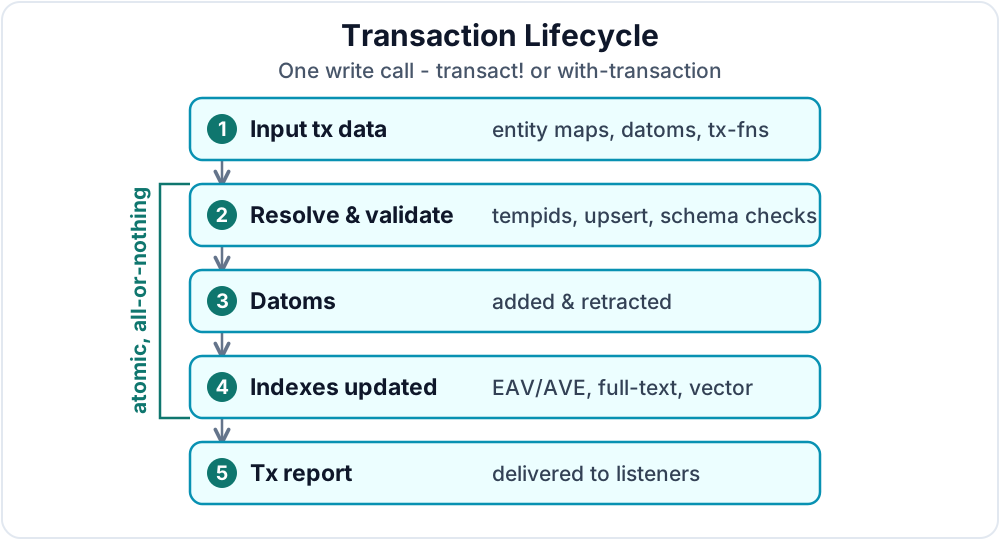
Figure 6.1 gives an overview of a Datalog transaction's lifecycle. The sections below explain the details.
1. The Transaction Model
Datalevin supports several transaction modes with different properties.
1.1 Default Mode: Synchronous LMDB Transactions
In its default (non-WAL) mode, a Datalevin transaction is a direct mapping to an underlying LMDB transaction, which has strict ACID guarantees.
- Atomicity: All changes within a single
transact!call are applied as a single, atomic unit. They either all succeed or all fail. - Durability: By default, LMDB writes changed pages with
pwriteand callsfsyncbefore confirming the transaction. This guarantees that once a transaction is committed, it is durable and will survive a system crash. Thefsynccall is often expensive, and its cost depends on the hardware and workload.
Store-scoped atomicity
A transaction is scoped to one Datalevin store: one LMDB environment whose primary data lives in one memory-mapped data file. In the default non-WAL mode, a Datalog transaction is ultimately a KV transaction over that store.
It can atomically update the Datalog indexes and any other DBIs that live in the same store, but it cannot atomically write to two separately opened Datalevin stores or two different LMDB environments. If you need one atomic unit across multiple logical datasets, put those datasets in the same store; separate files require application-level coordination.
1.2 Durability Settings
For use cases where maximum write speed is more important than crash-proof durability, such as bulk loading or caching, you can relax commit-time fsync by setting LMDB flags during connection creation. For example, using :nosync can significantly improve write throughput at the cost of durability: how frequently dirty pages are synced is left to OS discretion, and an untimely system crash can result in a corrupted database. There are also other non-durable flags; see Chapter 10 for details.
Apart from controlling durability during connection creation, you can explicitly force a flush with d/sync, and you can change LMDB environment flags at runtime with d/set-env-flags. Both functions operate on the KV store handle; for a Datalog connection, use the backing KV handle returned by d/datalog-kv.
(def kv (d/datalog-kv conn))

;; Force a synchronous flush to disk after a burst of faster writes.
(d/sync kv)

;; Change sync behavior for subsequent transactions.
(d/set-env-flags kv #{:nosync} true)  ; relax commit-time sync
(d/set-env-flags kv #{:nosync} false)
KV kv = conn.datalogKV();

// Force a synchronous flush to disk after a burst of faster writes.
kv.sync();

// Change sync behavior for subsequent transactions.
kv.setEnvFlags(Set.of("nosync"), true);  // relax commit-time sync
kv.setEnvFlags(Set.of("nosync"), false);
kv = conn.datalog_kv()

# Force a synchronous flush to disk after a burst of faster writes.
kv.sync()

# Change sync behavior for subsequent transactions.
kv.set_env_flags({"nosync"}, True)  # relax commit-time sync
kv.set_env_flags({"nosync"}, False)
const kv = await conn.datalogKv();

// Force a synchronous flush to disk after a burst of faster writes.
await kv.sync();

// Change sync behavior for subsequent transactions.
await kv.setEnvFlags(["nosync"], true);  // relax commit-time sync
await kv.setEnvFlags(["nosync"], false);
Change runtime flags only in controlled ingestion or maintenance workflows. They affect subsequent transactions on that store, so they should not be used as incidental per-request toggles.
1.3 Asynchronous Transactions
For independent high-volume writes, asynchronous transactions let Datalevin batch work internally and improve throughput. Asynchronous transactions change when the caller waits, not what a transaction means. The async transaction API submits ordinary Datalevin transaction data and returns a future or promise immediately. The transaction still commits as one atomic unit, produces the usual transaction report, and either succeeds or fails as a whole.
Async is not fire-and-forget
If later code depends on the write, wait for the returned future or promise before reading or issuing dependent writes. Treating async transactions as fire-and-forget can hide validation errors, constraint violations, and write failures until too late.
1.4 Nested Transaction Calls
Nested transactions in Datalevin are not independent subtransactions. When code is already inside a write transaction, another synchronous transaction call uses that active transaction. There is still only one transaction, not a stack of separately committed transactions. If the inner code aborts or throws, the whole active transaction aborts; Datalevin does not provide nested savepoints.
2. Transacting Data
The primary function for writing Datalog data is d/transact!. It takes a connection and a collection of transaction values, called the transaction data. A transaction value is one item that Datalevin can prepare into datoms. Transaction values can take several forms:
- Entity maps, such as
{:user/name "Alice"}. - Raw datom operation vectors, such as
[:db/add eid attr value]. - Transaction function calls, such as
[:db.fn/call f arg1 arg2]. - Transactable Entity objects, a Clojure API convenience covered in Chapter 7.
Maps are the clearest shape for ordinary creates and updates, so this chapter starts with maps before moving on to the lower-level forms.
In Python and JavaScript, the typed tx namespace builds these same transaction values without hand-writing operation keywords. It converts attribute-name arguments to keywords, preserves ordinary values, and produces immutable data that the connection lowers when the transaction is submitted.
The order of transaction data matters during transaction preparation. Datalevin processes the collection in order, so a transaction function sees the database at the point where that form is expanded, and later forms such as :db/cas can depend on facts produced by earlier forms in the same transaction. Tempid resolution is transaction-wide, so tempids can still be used before the map that introduces them appears. The commit is atomic: all prepared changes succeed together, or none are applied.
A successful transact! returns a transaction report; Section 2.11 examines that report after the write forms. If the transaction fails validation, violates a constraint, aborts, or throws from transaction code, it does not commit and no transaction report is returned.
2.1 Entity Maps
The most common way to express an entity is using a map. Each map represents an entity with its attributes and values:
(d/transact! conn
  [{:user/name "Alice" :user/email "alice@example.com"}
   {:user/name "Bob" :user/email "bob@example.com"}])
conn.transact(Datalevin.tx()
    .entity(Tx.entity()
        .put(":user/name", "Alice")
        .put(":user/email", "alice@example.com"))
    .entity(Tx.entity()
        .put(":user/name", "Bob")
        .put(":user/email", "bob@example.com")));
from datalevin import tx

conn.transact(tx.data(
    tx.entity(attrs={
        "user/name": "Alice", "user/email": "alice@example.com"}),
    tx.entity(attrs={
        "user/name": "Bob", "user/email": "bob@example.com"}),
))
import { tx } from "datalevin-node";

await conn.transact(tx.data(
  tx.entity({
    "user/name": "Alice", "user/email": "alice@example.com"
  }),
  tx.entity({
    "user/name": "Bob", "user/email": "bob@example.com"
  })
));
In map-style transaction data, omitting :db/id means "create a new entity and let Datalevin assign its entity id." This convenience applies to entity maps, not to raw datom operation vectors, where the entity position is always explicit. The assigned entity id is a Datalevin internal long. Once assigned, it is the permanent handle for that entity inside the database: updating or adding attributes never changes the id, so references between entities remain stable across transactions.
When new entities need to refer to one another in the same transaction, use a tempid instead of omitting :db/id. A negative integer or string in :db/id is a tempid. Datalevin still replaces it with a new permanent entity id. Positive ids are not tempids; the next section describes how they are handled.
2.2 Updating Existing Entities
To update an existing entity, include its entity id in the map:
(d/transact! conn
  [{:db/id 101, :user/active? false}])
conn.transact(Datalevin.tx()
    .entity(Tx.entity(101)
        .put(":user/active?", false)));
conn.transact(tx.data(tx.entity(101, {"user/active?": False})))
await conn.transact(tx.data(tx.entity(101, { "user/active?": false })));
This updates entity id 101 to set :user/active? to false. Positive :db/id values are concrete entity ids, not tempids. If the current maximum entity id is 1000 and you transact {:db/id 2000 :foo "bar"}, Datalevin asserts facts for entity 2000, advances the internal maximum entity id to 2000, and the next automatically assigned entity id will be 2001. It does not create entities 1001 through 1999.
Use explicit positive ids only for controlled imports, restores, or other cases where you deliberately manage id allocation. In ordinary application transactions, omit :db/id for a new entity. Use a negative number or string tempid only when new entities need to refer to one another inside the same transaction, as shown in Section 2.4.
2.3 Automatic Entity Timestamps
Many applications want to know when an entity was first created and when it was last modified. Datalevin can maintain this information automatically when the connection is opened with :auto-entity-time? true:
(require '[datalevin.core :as d])

(def conn
  (d/get-conn
    "/tmp/entity-time-demo"
    {:user/email {:db/valueType :db.type/string
                  :db/unique    :db.unique/identity}}
    {:auto-entity-time? true}))

(d/transact! conn
  [{:user/email "alice@example.com"
    :user/name  "Alice"}])

(d/transact! conn
  [{:user/email "alice@example.com"
    :user/name  "Alice Smith"}])
import datalevin.Connection;
import datalevin.Datalevin;
import datalevin.Schema;
import datalevin.Tx;

import java.util.Map;

Connection conn = Datalevin.getConn(
    "/tmp/entity-time-demo",
    Datalevin.schema()
        .attr(":user/email",
              Schema.attribute()
                  .valueType(Schema.ValueType.STRING)
                  .unique(Schema.Unique.IDENTITY)),
    Map.of(":auto-entity-time?", true));

conn.transact(Datalevin.tx()
    .entity(Tx.entity()
        .put(":user/email", "alice@example.com")
        .put(":user/name", "Alice")));

conn.transact(Datalevin.tx()
    .entity(Tx.entity()
        .put(":user/email", "alice@example.com")
        .put(":user/name", "Alice Smith")));
from datalevin import connect, tx

conn = connect(
    "/tmp/entity-time-demo",
    schema={
        ":user/email": {
            ":db/valueType": ":db.type/string",
            ":db/unique": ":db.unique/identity",
        },
    },
    opts={":auto-entity-time?": True})

conn.transact(tx.data(tx.entity(attrs={
    "user/email": "alice@example.com",
    "user/name": "Alice",
})))

conn.transact(tx.data(tx.entity(attrs={
    "user/email": "alice@example.com",
    "user/name": "Alice Smith",
})))
import { connect, tx } from "datalevin-node";

const conn = await connect("/tmp/entity-time-demo", {
  schema: {
    ":user/email": {
      ":db/valueType": ":db.type/string",
      ":db/unique": ":db.unique/identity"
    }
  },
  opts: { ":auto-entity-time?": true }
});

await conn.transact(tx.data(tx.entity({
  "user/email": "alice@example.com",
  "user/name": "Alice"
})));

await conn.transact(tx.data(tx.entity({
  "user/email": "alice@example.com",
  "user/name": "Alice Smith"
})));
With this option enabled, a newly created entity receives both :db/created-at and :db/updated-at. Later transactions that modify the entity update :db/updated-at while preserving :db/created-at. The values are stored as Unix epoch milliseconds using :db.type/long.
These attributes describe Datalevin's system-level mutation time. They are not a replacement for domain event times. If your application needs to know when an order was placed, when an invoice was paid, or when an episode happened, model that explicitly with attributes such as :order/placed-at, :invoice/paid-at, or :episode/timestamp. Automatic entity timestamps answer "when did this entity change in the database?", not "when did the real-world event occur?"
Automatic timestamps also store only the current created/updated values. For a full audit trail, model audit events explicitly or use transaction-log-based operations, if WAL mode is enabled, such as the txlog tools covered in Chapter 19.
2.4 Tempids
When creating new entities that will be referenced by other entities in the same transaction, use tempids: temporary entity ids that act as placeholders. Negative numbers and strings can both serve as tempids; the examples below use negative numbers. They also assume :user/friend is declared as a :db.type/ref attribute. In an untyped attribute, a negative number in value position is just data.
In map-style transaction data, put the tempid in :db/id:
(d/transact! conn
  [{:db/id -1, :user/name "Alice" :user/friend -2}
   {:db/id -2, :user/name "Bob"}])
conn.transact(Datalevin.tx()
    .entity(Tx.entity(-1)
        .put(":user/name", "Alice")
        .put(":user/friend", -2))
    .entity(Tx.entity(-2)
        .put(":user/name", "Bob")));
conn.transact(tx.data(
    tx.entity(-1, {"user/name": "Alice", "user/friend": -2}),
    tx.entity(-2, {"user/name": "Bob"}),
))
await conn.transact(tx.data(
  tx.entity(-1, { "user/name": "Alice", "user/friend": -2 }),
  tx.entity(-2, { "user/name": "Bob" })
));
In this example, -1 references -2 as a friend through the ref-valued :user/friend attribute. Datalevin resolves these tempids during the transaction, replacing them with real entity ids.
String tempids work the same way and can make larger transactions easier to read. This example assumes :person/school is declared as a :db.type/ref attribute:
(d/transact! conn
  [{:db/id "alice"
    :person/name "Alice"
    :person/email "alice@example.com"
    :person/school "mit"}
   {:db/id "mit"
    :school/name "MIT"
    :school/country "USA"}])
conn.transact(Datalevin.tx()
    .entity(Tx.entity("alice")
        .put(":person/name", "Alice")
        .put(":person/email", "alice@example.com")
        .put(":person/school", "mit"))
    .entity(Tx.entity("mit")
        .put(":school/name", "MIT")
        .put(":school/country", "USA")));
conn.transact(tx.data(
    tx.entity("alice", {
        "person/name": "Alice",
        "person/email": "alice@example.com",
        "person/school": "mit",
    }),
    tx.entity("mit", {
        "school/name": "MIT",
        "school/country": "USA",
    }),
))
await conn.transact(tx.data(
  tx.entity("alice", {
    "person/name": "Alice",
    "person/email": "alice@example.com",
    "person/school": "mit"
  }),
  tx.entity("mit", {
    "school/name": "MIT",
    "school/country": "USA"
  })
));
Here, "alice" and "mit" are transaction-local placeholders. They do not become entity ids or stored string values; Datalevin resolves them to permanent integer entity ids during the transaction.
The same transaction can be written with raw datom operation vectors. In that form, there is no omitted :db/id; the entity position is explicit in every operation:
(d/transact! conn
  [[:db/add -1 :user/name "Alice"]
   [:db/add -1 :user/friend -2]
   [:db/add -2 :user/name "Bob"]])
conn.transact(Datalevin.tx()
    .add(-1, ":user/name", "Alice")
    .add(-1, ":user/friend", -2)
    .add(-2, ":user/name", "Bob"));
conn.transact(tx.data(
    tx.add(-1, "user/name", "Alice"),
    tx.add(-1, "user/friend", -2),
    tx.add(-2, "user/name", "Bob"),
))
await conn.transact(tx.data(
  tx.add(-1, "user/name", "Alice"),
  tx.add(-1, "user/friend", -2),
  tx.add(-2, "user/name", "Bob")
));
A tempid is meaningful only within a single transaction; using -1 again in a later transaction denotes a different new entity. String tempids are also only placeholders. They are resolved to Datalevin-managed integer entity ids; they do not become string-valued entity ids. To learn which permanent ids were assigned, inspect the :tempids map in the transaction report, covered in Section 2.11.
Tempids are especially useful when the data has cycles. Two new entities can refer to each other before either one has a permanent entity id:
(d/transact! conn
  [{:db/id -1
    :user/name "Alice"
    :user/friend -2}
   {:db/id -2
    :user/name "Bob"
    :user/friend -1}])
conn.transact(Datalevin.tx()
    .entity(Tx.entity(-1)
        .put(":user/name", "Alice")
        .put(":user/friend", -2))
    .entity(Tx.entity(-2)
        .put(":user/name", "Bob")
        .put(":user/friend", -1)));
conn.transact(tx.data(
    tx.entity(-1, {"user/name": "Alice", "user/friend": -2}),
    tx.entity(-2, {"user/name": "Bob", "user/friend": -1}),
))
await conn.transact(tx.data(
  tx.entity(-1, { "user/name": "Alice", "user/friend": -2 }),
  tx.entity(-2, { "user/name": "Bob", "user/friend": -1 })
));
Both references are resolved in the same transaction, so the database never needs a half-built intermediate state where only one side of the cycle exists.
2.5 Lookup Refs
Instead of knowing the entity id, you can use a lookup ref to identify an existing entity by a unique attribute. A lookup ref is a vector [attribute value]. It can be used anywhere transaction data expects an entity id, including the :db/id field of an entity map:
(d/transact! conn
  [{:db/id [:user/email "alice@example.com"]
    :user/active? false}])
conn.transact(Datalevin.tx()
    .entity(Tx.entity(List.of(":user/email", "alice@example.com"))
        .put(":user/active?", false)));
alice = tx.lookup_ref("user/email", "alice@example.com")
conn.transact(tx.data(tx.entity(alice, {"user/active?": False})))
const alice = tx.lookupRef("user/email", "alice@example.com");
await conn.transact(tx.data(tx.entity(alice, { "user/active?": false })));
This finds the entity with :user/email equal to "alice@example.com" and updates it. If no entity exists with that email, the transaction will fail.
Lookup refs are particularly useful when you only have a unique identifier (like an email) but not the entity id.
2.6 Unique Attributes and Upsert
When an attribute is marked as :db.unique/identity, Datalevin automatically performs an upsert: if an entity with that value exists, it updates that entity; otherwise, it creates a new one.
Declare the unique identity attribute in the schema before relying on upsert. You can include that schema when opening the connection, or add it to an open connection with update-schema:
;; First, make :user/email a unique identity attribute.
(d/update-schema conn
  {:user/email {:db/valueType :db.type/string
                :db/unique    :db.unique/identity}})

;; Now upsert based on email
(d/transact! conn
  [{:user/email "alice@example.com" :user/name "Alice v2"}])
// First, make :user/email a unique identity attribute.
Schema update = Datalevin.schema()
    .attr(":user/email", Schema.attribute()
        .valueType(Schema.ValueType.STRING)
        .unique(Schema.Unique.IDENTITY));

conn.updateSchema(update);

// Now upsert based on email
conn.transact(Datalevin.tx()
    .entity(Tx.entity()
        .put(":user/email", "alice@example.com")
        .put(":user/name", "Alice v2")));
# First, make :user/email a unique identity attribute.
conn.update_schema({
    ":user/email": {
        ":db/valueType": ":db.type/string",
        ":db/unique": ":db.unique/identity",
    },
})

# Now upsert based on email
conn.transact(tx.data(tx.entity(attrs={
    "user/email": "alice@example.com",
    "user/name": "Alice v2",
})))
// First, make :user/email a unique identity attribute.
await conn.updateSchema({
  ":user/email": {
    ":db/valueType": ":db.type/string",
    ":db/unique": ":db.unique/identity"
  }
});

// Now upsert based on email
await conn.transact(tx.data(tx.entity({
  "user/email": "alice@example.com",
  "user/name": "Alice v2"
})));
If "alice@example.com" already exists, this updates the existing entity. If not, it creates a new one. This eliminates the need to check for existence before transacting.
2.7 Raw Datom Operation Vectors
For fine-grained control, you can express changes as raw datom operation vectors [op entity attribute value]:
(d/transact! conn
  [[:db/add -1 :user/name "Alice"]
   [:db/add -1 :user/email "alice@example.com"]
   [:db/retract 101 :user/active? true]])
conn.transact(Datalevin.tx()
    .add(-1, ":user/name", "Alice")
    .add(-1, ":user/email", "alice@example.com")
    .retract(101, ":user/active?", true));
conn.transact(tx.data(
    tx.add(-1, "user/name", "Alice"),
    tx.add(-1, "user/email", "alice@example.com"),
    tx.retract(101, "user/active?", True),
))
await conn.transact(tx.data(
  tx.add(-1, "user/name", "Alice"),
  tx.add(-1, "user/email", "alice@example.com"),
  tx.retract(101, "user/active?", true)
));
The operations are:
:db/add- adds or updates an attribute value.:db/retract- removes an attribute value.
2.8 Retracting Attributes and Entities
Use :db/retract when you want to remove one attribute value. Use :db.fn/retractAttribute when you want to remove an entire attribute from an entity, regardless of its current value. Use :db/retractEntity when you want to remove an entire entity.
For cardinality-one attributes, retracting the known current value and retracting the whole attribute usually have the same final effect. The difference matters most for cardinality-many attributes: :db/retract removes one selected value from the set, while :db.fn/retractAttribute removes all values for that attribute on that entity.
;; Remove one known value.
(d/transact! conn
  [[:db/retract [:user/email "alice@example.com"]
                :user/status
                "inactive"]])

;; Remove the whole :user/status attribute from Alice.
(d/transact! conn
  [[:db.fn/retractAttribute [:user/email "alice@example.com"]
                            :user/status]])

;; Remove Alice as an entity.
(d/transact! conn
  [[:db/retractEntity [:user/email "alice@example.com"]]])
// Remove one known value.
conn.transact(Datalevin.tx()
    .retract(List.of(":user/email", "alice@example.com"),
             ":user/status",
             "inactive"));

// Remove the whole :user/status attribute from Alice.
conn.transact(Datalevin.tx()
    .raw(List.of(Datalevin.kw(":db.fn/retractAttribute"),
                 List.of(Datalevin.kw(":user/email"), "alice@example.com"),
                 Datalevin.kw(":user/status"))));

// Remove Alice as an entity.
conn.transact(Datalevin.tx()
    .retractEntity(List.of(":user/email", "alice@example.com")));
alice = tx.lookup_ref("user/email", "alice@example.com")

# Remove one known value.
conn.transact(tx.data(tx.retract(
    alice, "user/status", "inactive",
)))

# Remove the whole :user/status attribute from Alice.
conn.transact(tx.data(tx.retract_attribute(alice, "user/status")))

# Remove Alice as an entity.
conn.transact(tx.data(tx.retract_entity(alice)))
const alice = tx.lookupRef("user/email", "alice@example.com");

// Remove one known value.
await conn.transact(tx.data(
  tx.retract(alice, "user/status", "inactive")
));

// Remove the whole :user/status attribute from Alice.
await conn.transact(tx.data(
  tx.retractAttribute(alice, "user/status")
));

// Remove Alice as an entity.
await conn.transact(tx.data(tx.retractEntity(alice)));
retractEntity accepts an entity id or a lookup ref. It retracts facts where the entity is the subject, and it also retracts declared :db.type/ref facts that point to the entity. If the entity owns child entities through attributes declared with :db/isComponent true, those component children are retracted recursively. This is usually the right operation for deleting an entity that may be referenced elsewhere.
For example, with this schema:
{:order/id    {:db/valueType :db.type/string
               :db/unique    :db.unique/identity}
 :order/items {:db/valueType   :db.type/ref
               :db/cardinality :db.cardinality/many
               :db/isComponent true}
 :line/sku    {:db/valueType :db.type/string}}
Schema schema = Datalevin.schema()
    .attr(":order/id",
          Schema.attribute()
              .valueType(Schema.ValueType.STRING)
              .unique(Schema.Unique.IDENTITY))
    .attr(":order/items",
          Schema.attribute()
              .valueType(Schema.ValueType.REF)
              .cardinality(Schema.Cardinality.MANY)
              .isComponent(true))
    .attr(":line/sku",
          Schema.attribute().valueType(Schema.ValueType.STRING));
schema = {
    ":order/id": {
        ":db/valueType": ":db.type/string",
        ":db/unique": ":db.unique/identity",
    },
    ":order/items": {
        ":db/valueType": ":db.type/ref",
        ":db/cardinality": ":db.cardinality/many",
        ":db/isComponent": True,
    },
    ":line/sku": {
        ":db/valueType": ":db.type/string",
    },
}
const schema = {
  ":order/id": {
    ":db/valueType": ":db.type/string",
    ":db/unique": ":db.unique/identity"
  },
  ":order/items": {
    ":db/valueType": ":db.type/ref",
    ":db/cardinality": ":db.cardinality/many",
    ":db/isComponent": true
  },
  ":line/sku": {
    ":db/valueType": ":db.type/string"
  }
};
Deleting the order also deletes its owned line-item entities:
(d/transact! conn
  [[:db/retractEntity [:order/id "o-1001"]]])
conn.transact(Datalevin.tx()
    .retractEntity(List.of(":order/id", "o-1001")));
order = tx.lookup_ref("order/id", "o-1001")
conn.transact(tx.data(tx.retract_entity(order)))
const order = tx.lookupRef("order/id", "o-1001");
await conn.transact(tx.data(tx.retractEntity(order)));
Component relationships are lifecycle ownership. Mark a ref attribute with :db/isComponent true only when the referenced entity has no useful lifecycle apart from the owner. The flag matters when :db/retractEntity is applied to the owning entity: owned children, such as line items inside an order, are retracted recursively. It is not the mechanism for merely removing a link. To remove one relationship value, use :db/retract; to remove all values for a relationship attribute, use :db.fn/retractAttribute.
For example, :order/items is a component relationship because a line item belongs to one order and is not useful after that order is deleted. By contrast, :order/customer, :issue/assignee, and :team/member should usually not be components: deleting an order should not delete the customer, changing an assignee should not delete the user, and removing a member from a team should not delete the member entity. If either side of a non-component relationship is later retracted with :db/retractEntity, Datalevin removes the reference datoms that point at the retracted entity; it does not recursively delete the other independent entity.
2.9 Mixed Forms
You can mix all these forms in a single transaction:
This example assumes :user/friend is a ref attribute; because it receives a collection of lookup refs, a real schema would normally declare it as :db.cardinality/many.
(d/transact! conn
  [{:user/email "new@example.com" :user/name "New User"}  ; upsert
   [:db/add [:user/email "alice@example.com"] :user/status "active"] ; lookup ref
   {:db/id -1, :user/friend [[:user/email "bob@example.com"]]} ; tempid + lookup ref
   [:db/add -1 :user/notes "Added via datom vector"]]) ; raw datom
conn.transact(Datalevin.tx()
    .entity(Tx.entity()
        .put(":user/email", "new@example.com")
        .put(":user/name", "New User")) // upsert
    .add(List.of(":user/email", "alice@example.com"),
         ":user/status",
         "active") // lookup ref
    .entity(Tx.entity(-1)
        .put(":user/friend",
             List.of(List.of(":user/email", "bob@example.com")))) // tempid + lookup ref
    .add(-1, ":user/notes", "Added via datom vector")); // raw datom
alice = tx.lookup_ref("user/email", "alice@example.com")
bob = tx.lookup_ref("user/email", "bob@example.com")

conn.transact(tx.data(
    tx.entity(attrs={
        "user/email": "new@example.com",
        "user/name": "New User",
    }),  # upsert
    tx.add(alice, "user/status", "active"),  # lookup ref
    tx.entity(-1, {"user/friend": [bob]}),  # tempid + lookup ref
    tx.add(-1, "user/notes", "Added via datom operation"),
))
const alice = tx.lookupRef("user/email", "alice@example.com");
const bob = tx.lookupRef("user/email", "bob@example.com");

await conn.transact(tx.data(
  tx.entity({
    "user/email": "new@example.com",
    "user/name": "New User"
  }),  // upsert
  tx.add(alice, "user/status", "active"),  // lookup ref
  tx.entity(-1, { "user/friend": [bob] }),  // tempid + lookup ref
  tx.add(-1, "user/notes", "Added via datom operation")
));
This lets you choose the most convenient form for each operation in your transaction.
2.10 Typed Values, Validation, and Coercion
Datalevin works best when important attributes have explicit value types in the schema, such as :db.type/long, :db.type/string, :db.type/boolean, :db.type/uuid, or :db.type/instant. A declared :db/valueType tells Datalevin how to encode values, compare them, build indexes, and canonicalize transaction input.
Strict input validation is controlled separately by :validate-data?:
:db/valueType |
:validate-data? |
Write behavior |
|---|---|---|
| Not declared | N/A | Stored as serialized EDN; flexible, but weak for typed range access and predictable cross-language input. |
| Declared | false (default) |
Encoded with the declared type; simple values are coerced or canonicalized before storage. |
| Declared | true |
Checked against the declared type before storage; loose conversions accepted in default mode are rejected. |
The automatic coercions are deliberately simple. Declared string attributes use str; numeric attributes use the corresponding numeric cast (long, float, double, bigint, or bigdec); UUID attributes accept UUID values or parseable UUID strings in the default mode; instant attributes accept instant values and, in the default mode, integer epoch milliseconds; keyword and symbol attributes normalize with keyword and symbol; byte attributes store byte arrays; boolean attributes use Clojure truthiness; and tuple attributes are stored as vectors. Reference attributes resolve tempids, lookup refs, and entity ids before storing the referenced id as a long.
When you transact data without a value type in schema, Datalevin serializes it as an EDN binary blob. In Clojure/JVM code, where numeric literals and casts can produce different boxed numeric types, this can sometimes behave unexpectedly:
;; Transacting with an explicit int
(d/transact! conn [{:db/id -1, :my-entity/val (int 42)}])

;; Querying with a plain integer literal (defaults to long)
(d/q
  '[:find ?e :in $
    :where [?e :my-entity/val 42]]
  (d/db conn))
;;=> #{}  ;; Unexpected! No results because the untyped encodings differ.
The query returns no results because the untyped value was serialized as a 32-bit integer, but the query literal is encoded as a 64-bit long. Clojure numeric equality is not the issue here; the untyped encodings differ at the index boundary.
However, if you specify a type for :my-entity/val, such as :db.type/long, Datalevin does type coercion for you, so your (int 42) will be stored as a long instead. If you open the database with {:validate-data? true}, the same declared schema becomes stricter: malformed input fails before it is written instead of being corrected where possible.
Use coercion for trusted internal inputs and imports where convenience matters. Use :validate-data? true at system boundaries where malformed user, JSON, or remote-client data should fail early. Chapter 11 covers schema validation, coercion, and schema evolution in more detail.
2.11 Transaction Reports
Every successful transact! returns a transaction report. If a transaction fails or is aborted, the call throws instead; for async transaction APIs, the future or promise completes with that failure. In that case there is no committed transaction and no transaction report. A successful report contains the database handles before and after the transaction, the datoms that were actually added or retracted, the tempid resolution map, and any transaction metadata supplied by the caller. When a transaction introduces attributes that were not previously present in the database schema, the report also includes :new-attributes. The main report keys are:
| Report key | Value |
|---|---|
:db-before |
The Datalog Db handle used as the transaction input. |
:db-after |
The Datalog Db handle produced by the transaction. |
:tx-data |
The full datom objects actually added or retracted by the transaction; Chapter 15 explains their :e, :a, :v, :tx, and :added fields. |
:tempids |
Map from transaction tempids to assigned entity ids. |
:tx-meta |
The metadata value supplied as the optional third argument to transact!, or nil. |
:new-attributes |
Optional vector of attribute idents first introduced by this transaction. This appears only when the transaction adds facts for attributes that were not already in the schema. |
The :db-before and :db-after fields are mainly for code that needs the immediate transaction boundary for the datoms affected by this transaction. :db-after lets the caller or an embedded listener interpret the state produced by the transaction, for example after resolving tempids. :db-before lets tools compare the affected input state with the affected output state. These fields are not a general history API, and they are not meant to answer arbitrary questions such as "what would this unrelated query have returned before the transaction?" They are transaction-report context, not an application snapshot model. For normal application reads, read through the connection and take the current Db handle at the point of use.
A common use is a simulated report: ask Datalevin what a transaction would do and leave the live connection unchanged. The simulated report has the same boundary fields as a committed transaction report. Across Clojure, Java, Python, and JavaScript, :db-before is the input Db handle and :db-after is a readable post-transaction Db handle for inspection with the normal read helpers in that language. The :db-after handle represents the would-be state; it has not been committed.
(let [preview (d/tx-data->simulated-report
                (d/db conn)
                [{:db/id -1
                  :user/email "preview@example.com"
                  :user/name "Preview User"}])
      eid     (get (:tempids preview) -1)]
  {:preview-user (d/pull (:db-after preview)
                   [:user/email :user/name]
                   eid)
   :live-user    (d/q '[:find ?e .
                        :where [?e :user/email "preview@example.com"]]
                      (d/db conn))})
;=> {:preview-user {:db/id 101
;                   :user/email "preview@example.com"
;                   :user/name "Preview User"}
;    :live-user nil}
Map<?, ?> preview = conn.txDataToSimulatedReport(List.of(
    Map.of(":db/id", -1L,
           ":user/email", "preview@example.com",
           ":user/name", "Preview User")));

Object dbAfter = preview.get(Datalevin.kw(":db-after"));
Object eid = ((Map<?, ?>) preview.get(Datalevin.kw(":tempids"))).get(-1L);
Map<?, ?> previewUser = Datalevin.pull(
    dbAfter,
    Datalevin.pull().attr(":user/email").attr(":user/name"),
    eid);
Object liveUser = conn.query(
    "[:find ?e . :where [?e :user/email \"preview@example.com\"]]");
// liveUser is null; the simulated transaction was not committed.
from datalevin import q

preview = conn.tx_data_to_simulated_report(tx.data(
    tx.entity(-1, {
        "user/email": "preview@example.com",
        "user/name": "Preview User",
    }),
))

eid = preview[":tempids"][-1]
preview_user = preview[":db-after"].pull(
    q.selector("user/email", "user/name"),
    eid)
user = q.var("user")
live_user = conn.query(q.query(
    find=q.scalar(user),
    where=[q.datom(user, "user/email", "preview@example.com")],
))
# live_user is None; the simulated transaction was not committed.
import { q } from "datalevin-node";

const preview = await conn.txDataToSimulatedReport(tx.data(
  tx.entity(-1, {
    "user/email": "preview@example.com",
    "user/name": "Preview User"
  })
));

const eid = preview[":tempids"].get(-1);
const previewUser = await preview[":db-after"].pull(
  q.selector("user/email", "user/name"),
  eid
);
const user = q.var("user");
const liveUser = await conn.query(q.query({
  find: q.scalar(user),
  where: [q.datom(user, "user/email", "preview@example.com")]
}));
// liveUser is null; the simulated transaction was not committed.
For a committed transaction, the raw :tx-data shows datoms added or retracted; the two Db handles let you ask the same domain question over the affected data before and after the transaction. Assume account entity 101 currently has status "open". The Clojure and Java examples compare the report Db handles directly; the Python and JavaScript examples show the portable committed-state read from the connection:
(let [report (d/transact! conn
               [{:db/id 101
                 :account/status "closed"}])]
  {:before (d/pull (:db-before report)
             [:account/status]
             101)
   :after  (d/pull (:db-after report)
             [:account/status]
             101)
   :datoms (:tx-data report)})
;=> {:before {:db/id 101, :account/status "open"}
;    :after  {:db/id 101, :account/status "closed"}
;    :datoms [#datalevin/Datom [101 :account/status "open" ... false]
;             #datalevin/Datom [101 :account/status "closed" ... true]]}
Map<?, ?> report = conn.transact(Datalevin.tx()
    .entity(Tx.entity(101)
        .put(":account/status", "closed")));

Object datoms = report.get(Datalevin.kw(":tx-data"));
Object dbBefore = report.get(Datalevin.kw(":db-before"));
Object dbAfter = report.get(Datalevin.kw(":db-after"));
Map<?, ?> before = Datalevin.pull(
    dbBefore,
    Datalevin.pull().attr(":account/status"),
    101);
Map<?, ?> after = Datalevin.pull(
    dbAfter,
    Datalevin.pull().attr(":account/status"),
    101);
report = conn.transact(tx.data(
    tx.entity(101, {"account/status": "closed"}),
))

datoms = report[":tx-data"]
after = conn.pull(q.selector("account/status"), 101)
const report = await conn.transact(tx.data(
  tx.entity(101, { "account/status": "closed" })
));

const datoms = report[":tx-data"];
const after = await conn.pull(q.selector("account/status"), 101);
You can also attach application metadata to a transaction. This metadata is not transaction data and does not create datoms; Datalevin carries it through to the transaction report as :tx-meta. It is useful for request ids, audit context, or listener callbacks that need to know why the write happened.
(def report
  (d/transact! conn
    [{:db/id -1
      :user/email "alice@example.com"
      :user/name "Alice"}]
    {:source :signup-form}))

(select-keys report [:tempids :tx-meta])
;=> {:tempids {-1 101}
;    :tx-meta {:source :signup-form}}
Map<?, ?> report = conn.transact(
    Datalevin.tx()
        .entity(Tx.entity(-1)
            .put(":user/email", "alice@example.com")
            .put(":user/name", "Alice")),
    Map.of(Datalevin.kw(":source"), Datalevin.kw(":signup-form")));

Map<?, ?> sample = Map.of(
    "tempids", report.get(Datalevin.kw(":tempids")),
    "tx-meta", report.get(Datalevin.kw(":tx-meta")));
report = conn.transact(
    tx.data(tx.entity(-1, {
        "user/email": "alice@example.com",
        "user/name": "Alice",
    })),
    {q.kw("source"): q.kw("signup-form")})

sample = {
    ":tempids": report[":tempids"],
    ":tx-meta": report[":tx-meta"],
}
const report = await conn.transact(
  tx.data(tx.entity(-1, {
    "user/email": "alice@example.com",
    "user/name": "Alice"
  })),
  new Map([[q.kw("source"), q.kw("signup-form")]])
);

const sample = {
  ":tempids": report[":tempids"],
  ":tx-meta": report[":tx-meta"]
};
The example above selects two keys of the map to show, because the full report is large.
2.12 Writes That Need Only an Acknowledgment
Use d/transact-ack! for imports, status updates, and other writes where you only need to know whether the transaction succeeded. It accepts the same transaction data and optional metadata as transact!, and returns :transacted on success:
(d/transact-ack! conn
  [{:user/email "ada@example.com" :user/name "Ada"}]
  {:request-id "import-42"})
;; => :transacted
Object acknowledgment = conn.transactAck(
    Datalevin.tx().entity(Tx.entity()
        .put(":user/email", "ada@example.com")
        .put(":user/name", "Ada")),
    Map.of("request-id", "import-42"));
// => :transacted
from datalevin import tx

acknowledgment = conn.transact_ack(
    tx.data(tx.entity(attrs={
        "user/email": "ada@example.com", "user/name": "Ada"
    })),
    {"request-id": "import-42"},
)
# => ":transacted"
import { tx } from "datalevin-node";

const acknowledgment = await conn.transactAck(
  tx.data(tx.entity({
    "user/email": "ada@example.com", "user/name": "Ada"
  })),
  { "request-id": "import-42" }
);
// => ":transacted"
It performs the same validation and uniqueness checks and uses the same durability settings as transact!. A failed transaction throws an exception. Use transact! when you need the changed datoms or the entity ids assigned to tempids. Use transact-async when you want to continue working while the transaction runs.
transact-ack! can improve throughput for remote writes, especially when the connection has no listen! callbacks. If you have registered listeners, they still receive full transaction reports. Inside with-transaction, a return value of :transacted means the changes have been accepted into that transaction; they commit only when the enclosing transaction succeeds.
3. Observing Committed Transactions with listen!
Many applications need to react after a write commits: invalidate a cache, notify a UI session, enqueue a background job, update an in-process projection, or append an audit record in another system. The listener API registers an in-process callback on a Datalevin connection. After a transaction commits, Datalevin calls the callback with the transaction report:
(def listener-key
  (d/listen!
    conn
    :audit-log
    (fn [{:keys [tx-data tx-meta tempids]}]
      (println "committed" (count tx-data) "datoms")
      (println "metadata" tx-meta)
      (println "tempids" tempids))))

(d/transact!
  conn
  [{:db/id -1
    :user/email "ada@example.com"
    :user/name "Ada"}]
  {:request-id "req-123"})

(d/unlisten! conn listener-key)
Object listenerKey =
    conn.listen("audit-log", report -> {
        List<?> txData = (List<?>) report.get(Datalevin.kw(":tx-data"));
        System.out.println("committed " + txData.size() + " datoms");
        System.out.println("metadata " + report.get(Datalevin.kw(":tx-meta")));
        System.out.println("tempids " + report.get(Datalevin.kw(":tempids")));
    });

conn.transact(
    Datalevin.tx()
        .entity(Tx.entity()
            .put(":user/email", "ada@example.com")
            .put(":user/name", "Ada")),
    Map.of(Datalevin.kw(":request-id"), "req-123"));

conn.unlisten(listenerKey);
def audit_log(report):
    print("committed", len(report[":tx-data"]), "datoms")
    print("metadata", report[":tx-meta"])
    print("tempids", report[":tempids"])

listener_key = conn.listen(audit_log, key="audit-log")

conn.transact(
    tx.data(tx.entity(-1, {
        "user/email": "ada@example.com",
        "user/name": "Ada",
    })),
    {":request-id": "req-123"})

conn.unlisten(listener_key)
const listenerKey = await conn.listen((report) => {
  console.log("committed", report[":tx-data"].length, "datoms");
  console.log("metadata", report[":tx-meta"]);
  console.log("tempids", report[":tempids"]);
}, "audit-log");

await conn.transact(
  tx.data(tx.entity(-1, {
    "user/email": "ada@example.com",
    "user/name": "Ada"
  })),
  { ":request-id": "req-123" }
);

await conn.unlisten(listenerKey);
The listener registration call returns the listener key. When you pass a key explicitly, as above, that same key is returned and can be passed to the matching unlisten operation. When you register without a key, Datalevin generates and returns one for you. The callback receives the same transaction report returned by transact!.
This listener observes writes through its own connection. For notifications from other connections to the same remote database, use listen-db! and refresh the data you need. Chapter 22, Section 9 covers its database-wide scope, asynchronous callbacks, and delivery semantics.
The listener key can be any unique value meaningful to the application. Registering another listener with the same key replaces the previous callback, so listener registration is idempotent:
(d/listen! conn :cache (fn [report] (invalidate-cache! report)))
(d/listen! conn :cache (fn [report] (enqueue-cache-refresh! report)))
conn.listen("cache", report -> invalidateCache(report));
conn.listen("cache", report -> enqueueCacheRefresh(report));
conn.listen(invalidate_cache, key="cache")
conn.listen(enqueue_cache_refresh, key="cache")
await conn.listen((report) => invalidateCache(report), "cache");
await conn.listen((report) => enqueueCacheRefresh(report), "cache");
Durable side effects use an outbox
Listeners observe committed transactions; they do not make the listener's side effects part of the original transaction. If a callback writes to a log file, publishes to a queue, or calls another service, that work can fail separately from the Datalevin commit.
Keep listener callbacks small and predictable. For durable domain events, transact the event as data in the same Datalevin transaction, then use the listener only to wake a publisher or projector. The event is first stored in the database, so publishing can be retried from durable state if the callback, message queue, or downstream service fails.
A minimal outbox shape looks like this:
(d/transact!
  conn
  [{:user/email "ada@example.com"
    :user/name "Ada"}
   {:event/type :event.type/user-created
    :event/user [:user/email "ada@example.com"]
    :event/request-id "req-123"}])

(d/listen!
  conn
  :event-publisher
  (fn [_report]
    (publish-pending-events! conn)))
conn.transact(Datalevin.tx()
    .entity(Tx.entity()
        .put(":user/email", "ada@example.com")
        .put(":user/name", "Ada"))
    .entity(Tx.entity()
        .put(":event/type", Datalevin.kw(":event.type/user-created"))
        .put(":event/user", List.of(":user/email", "ada@example.com"))
        .put(":event/request-id", "req-123")));

conn.listen("event-publisher", report -> publishPendingEvents(conn));
ada = tx.lookup_ref("user/email", "ada@example.com")
conn.transact(tx.data(
    tx.entity(attrs={
        "user/email": "ada@example.com",
        "user/name": "Ada",
    }),
    tx.entity(attrs={
        "event/type": q.kw("event.type/user-created"),
        "event/user": ada,
        "event/request-id": "req-123",
    }),
))

conn.listen(lambda _report: publish_pending_events(conn),
            key="event-publisher")
const ada = tx.lookupRef("user/email", "ada@example.com");
await conn.transact(tx.data(
  tx.entity({
    "user/email": "ada@example.com",
    "user/name": "Ada"
  }),
  tx.entity({
    "event/type": q.kw("event.type/user-created"),
    "event/user": ada,
    "event/request-id": "req-123"
  })
));

await conn.listen((_report) => publishPendingEvents(conn), "event-publisher");
4. Atomic Read-Modify-Write with with-transaction
Often, you need to read a value, modify it, and write it back as a single atomic operation. That pattern has a classic race condition unless it is protected. Clojure, Java, and Python expose explicit Datalog transaction callbacks for this purpose:
(d/with-transaction [cn conn]
  (let [current-balance (d/q '[:find ?bal . :where [101 :account/balance ?bal]] (d/db cn))
        new-balance (- current-balance 100)]
    (d/transact! cn [{:db/id 101, :account/balance new-balance}])))
conn.withTransaction(tx -> {
    Number currentBalance =
        (Number) tx.query("[:find ?bal . :where [101 :account/balance ?bal]]");
    long newBalance = currentBalance.longValue() - 100;
    tx.transact(Datalevin.tx()
        .entity(Tx.entity(101)
            .put(":account/balance", newBalance)));
    return null;
});
balance = q.var("balance")
balance_query = q.query(
    find=q.scalar(balance),
    where=[q.datom(101, "account/balance", balance)],
)

def withdraw(txn):
    current_balance = txn.query(balance_query)
    txn.transact(tx.data(tx.entity(101, {
        "account/balance": current_balance - 100,
    })))

conn.with_transaction(withdraw)
The transaction callback keeps the read and write inside one isolated read/write transaction. Within one store, Datalevin serializes committed writes, so no other writer can commit in the middle of that read-modify-write sequence.
q, pull, and the other read APIs do not have separate isolation rules. They read through the connection or Db handle you pass:
| Read target | What the read sees |
|---|---|
Transaction-bound connection or Db inside with-transaction |
The active transaction, including writes already performed in the same body. If the body aborts, those writes never become visible after the callback. |
| Ordinary connection or Db outside the active transaction | The committed state available to that handle; it does not see uncommitted writes from the active transaction. |
:db-before or :db-after from a transaction report or simulated report |
Exactly the boundary state described by that report. For a simulated report, :db-after is a would-be state only. |
Outside with-transaction, a query runs against the Db supplied to it. That read view is stable for the query and isolated from concurrent writes, but it is not an application-level read/write transaction unless the related reads and writes are placed inside with-transaction.
The explicit Datalog abort helper, abort-transact, is meaningful only while an explicit Datalog transaction is active.
The JavaScript binding exposes the abort bridge for API parity, but does not expose an explicit Datalog transaction callback; use :db/cas or transaction functions for conditional Datalog writes instead. More generally, when a host API lacks an explicit callback, encode the conditional write in one transaction or run the command inside the Datalevin-hosting process when the read-modify-write logic must be serialized.
Explicit transaction callbacks can also take a timeout for the callback body:
(d/with-transaction [cn conn {:timeout-ms 5000}]
  (d/transact! cn [{:db/id 101 :account/checked true}]))
conn.withTransaction(5000L, tx -> {
    tx.transact(Datalevin.tx()
        .entity(Tx.entity(101)
            .put(":account/checked", true)));
    return null;
});
conn.with_transaction(
    lambda txn: txn.transact(tx.data(
        tx.entity(101, {"account/checked": True}),
    )),
    timeout_ms=5000)
The default explicit transaction timeout is unset. It can be read or changed through the explicit transaction timeout helpers. A per-call timeout overrides the default; a nil/null value disables the default for that call. If the timeout expires, Datalevin interrupts the transaction body, aborts the transaction, and reports :type :transaction/timeout with :timeout-ms. Code that ignores interruption may continue running until it returns, so transaction callbacks should remain small and bounded.
Not a retry loop
with-transaction is a serialization tool, not a general retry loop. If the body throws, the transaction aborts. Logical failures such as CAS mismatch, lookup-ref miss, validation failure, or unique conflict are returned to the caller. Chapter 22 pulls those cases together into a production retry and error-handling policy.
4.1 Mixing Datalog and KV Writes
Most applications can stay entirely in Datalog transaction data. Mixing Datalog and KV writes is useful when the Datalog facts are the source of truth, but you also maintain a custom KV structure for a workflow that benefits from direct key-value access: an audit or outbox DBI, an ingestion checkpoint, a compact deduplication table, or a small side index for application code. In those cases, the Datalog facts and the KV entry often describe one business event and should commit or abort together.
A Datalog database and its custom KV DBIs live in the same Datalevin store. datalog-kv works with local and remote Datalog handles. A Datalog update and a KV update can commit as one atomic unit when both use the same transaction; inside with-transaction, obtain the KV handle from its transaction-bound connection. Open application DBIs before starting that transaction, and close the owning Datalog connection when finished.
Suppose marking an order paid must also write an audit entry to a custom "audit-log" DBI. The shape to avoid is: commit the Datalog update through the Datalog connection, then write the audit entry through a separately opened open-kv handle on the same directory. Those are two independent transactions. A crash or exception between them can leave the order marked paid without the audit entry.
;; Avoid this shape: two separate transactions.
(d/transact! conn
  [{:order/id     "o-1001"
    :order/status :order.status/paid}])

(let [separate-kv (d/open-kv db-dir)] ; the same directory used by conn
  (d/transact-kv separate-kv "audit-log"
    [[:put "o-1001" {:event/type :order/paid
                     :order/id   "o-1001"}]]
    :string :data))
The correct shape is to use the KV handle that belongs to the Datalog connection, open the application DBI during setup, and then perform both writes while one transaction is active. The examples below use with-transaction because it gives application code a transaction-bound connection. Inside the block, get the transaction-bound KV handle from that connection and use it for the KV write. The borrowed KV handle is owned by the Datalog connection; close the Datalog connection, not the borrowed handle.
(let [kv (d/datalog-kv conn)]
  ;; DBI opening is idempotent, so this is safe during application startup.
  (d/open-dbi kv "audit-log")

  (d/with-transaction [cn conn]
    (let [cn-kv (d/datalog-kv cn)]
      (d/transact! cn
        [{:order/id     "o-1001"
          :order/status :order.status/paid}])

      (d/transact-kv cn-kv "audit-log"
        [[:put "o-1001"
          {:event/type :order/paid
           :order/id   "o-1001"}]]
        :string :data))))
KV kv = conn.datalogKV();
// DBI opening is idempotent, so this is safe during application startup.
kv.openDbi("audit-log");

conn.withTransaction(tx -> {
    KV txKv = tx.datalogKV();

    tx.transact(Datalevin.tx()
        .entity(Tx.entity()
            .put(":order/id", "o-1001")
            .put(":order/status", Datalevin.kw(":order.status/paid"))));

    txKv.transact(
        "audit-log",
        List.of(List.of(
            Datalevin.kw(":put"),
            "o-1001",
            Map.of(Datalevin.kw(":event/type"), Datalevin.kw(":order/paid"),
                   Datalevin.kw(":order/id"), "o-1001"))),
        "string",
        "data");

    return null;
});
kv = conn.datalog_kv()
# DBI opening is idempotent, so this is safe during application startup.
kv.open_dbi("audit-log")

def mark_paid(txn):
    tx_kv = txn.datalog_kv()

    txn.transact(tx.data(tx.entity(attrs={
        "order/id": "o-1001",
        "order/status": q.kw("order.status/paid"),
    })))

    tx_kv.transact(
        [(":put",
          "o-1001",
          {":event/type": ":order/paid",
           ":order/id": "o-1001"})],
        dbi_name="audit-log",
        k_type=":string",
        v_type=":data")

conn.with_transaction(mark_paid)
If the block returns normally, both the Datalog datoms and the KV entry are committed. If the block throws or the active Datalog transaction is explicitly aborted, both parts are aborted. This only works for DBIs that live in the same local Datalevin store; it is not a cross-file transaction mechanism.
5. Transaction Functions
Transaction functions are transaction data forms that run while a transaction is being prepared and expand to more transaction data. They run against the current DB object and are committed atomically with the rest of the transaction. Transaction functions are expressed as transaction data vectors, not as a bare symbolic list form such as (my-tx-fn arg).
Transaction functions must be free of side effects. Concurrent standalone writes can share a commit group; if a function fails and the group aborts, Datalevin can retry the requests individually. A function may therefore run more than once. Compute transaction data inside the function, and record an outbox entry in that data when external work must follow a successful commit. Section 3 explains the outbox pattern. This internal retry does not turn a logical failure such as a CAS mismatch into a successful transaction.
If a transaction function calls q, pull, or another read API, that read uses the DB object passed to the function. This is the database at the point where the function is expanded during transaction preparation, not the final post-transaction database.
Transaction-time vector forms include:
[:db.fn/call f arg ...]calls an inline function, an installed function, or a user-defined function (UDF) descriptor.[:some/installed-fn arg ...]calls an installed transaction function whose entity has:db/ident :some/installed-fn.[:db/cas e a old new]or[:db.fn/cas e a old new]performs compare-and-swap.[:db.fn/retractAttribute e a],[:db.fn/retractEntity e], and[:db/retractEntity e]are built-in transaction functions for retraction.[:db.fn/patchIdoc ...]patches an idoc value; idoc document modeling is covered in Chapter 14.[:db/ensure pred arg ...]validates a post-condition that runs after all transaction data has been expanded and applied, but before commit.
5.1 Compare-and-Swap
Use :db/cas when the write should succeed only if the current value is what you expect. The entity position may be an entity id or a lookup ref.
(d/transact! conn
  [[:db/cas [:user/email "alice@example.com"]
    :account/balance
    100
    75]])
conn.transact(Datalevin.tx()
    .raw(List.of(Datalevin.kw(":db/cas"),
                 List.of(":user/email", "alice@example.com"),
                 Datalevin.kw(":account/balance"),
                 100,
                 75)));
alice = tx.lookup_ref("user/email", "alice@example.com")
conn.transact(tx.data(
    tx.compare_and_swap(alice, "account/balance", 100, 75),
))
const alice = tx.lookupRef("user/email", "alice@example.com");
await conn.transact(tx.data(
  tx.compareAndSwap(alice, "account/balance", 100, 75)
));
If Alice's balance is not currently 100, the whole transaction fails. This is useful for conditional updates that must not silently overwrite newer data. A CAS failure is a logical conflict, not an automatic retry signal; Chapter 22 shows how to re-read and retry when that is the correct application behavior.
5.2 Transaction UDFs
There are two ways to install a named application transaction function. Choose based on where the implementation lives:
| Mechanism | Stored attribute | Use when |
|---|---|---|
| Descriptor-backed UDF | :db/udf |
The function must be callable from Java, Python, JavaScript, client/server deployments, or another runtime that resolves descriptors through a registry. |
| Interpreted Clojure function | :db/fn |
The function is Clojure code for embedded Clojure-style environments and can be represented with datalevin.interpret helpers. |
Both mechanisms install an entity with :db/ident, and both can be invoked with [:some/ident arg ...] or through :db.fn/call. The difference is not the call shape; it is how the implementation is stored and resolved.
For arbitrary user-defined functions (UDFs), Datalevin allows descriptor-backed transaction functions. The same descriptor and registry model works in client/server deployments as long as the runtime that executes the transaction can resolve the UDF implementation.
Store the descriptor in :db/udf, open the database with a runtime UDF registry or resolver, and call it by descriptor or by installed :db/ident. Transaction UDF descriptors use :udf/kind :tx-fn. Post-condition predicates used by :db/ensure follow the same registry model with :udf/kind :predicate; Section 5.5 shows that form. The :udf/lang value is part of the descriptor identity and resolver namespace. Use the same descriptor when registering and calling the implementation. The examples below use :clojure for the Clojure function, :java for Java, :python for Python, and :javascript for JavaScript.
(require '[datalevin.udf :as udf])

(def descriptor
  {:udf/lang :clojure
   :udf/kind :tx-fn
   :udf/id   :user/bootstrap})

(def registry
  (doto (udf/create-registry)
    (udf/register! descriptor
      (fn [_db email name]
        [{:db/id       -1
          :user/email  email
          :user/name   name}]))))

(def conn
  (d/create-conn
    "/tmp/tx-udf-demo"
    {:user/email {:db/valueType :db.type/string
                  :db/unique    :db.unique/identity}}
    {:runtime-opts {:udf-registry registry}}))

;; Call the descriptor directly.
(d/transact! conn
  [[:db.fn/call descriptor "ada@example.com" "Ada"]])

;; Or install the descriptor and call it by :db/ident.
(d/transact! conn
  [{:db/ident :user/bootstrap
    :db/udf   descriptor}])

(d/transact! conn
  [[:user/bootstrap "bob@example.com" "Bob"]])
import datalevin.Connection;
import datalevin.Datalevin;
import datalevin.Schema;
import datalevin.Tx;

import java.util.List;
import java.util.Map;

Map<String, Object> descriptor = Map.of(
    ":udf/lang", ":java",
    ":udf/kind", ":tx-fn",
    ":udf/id", ":user/bootstrap");

Object registry = Datalevin.createUdfRegistry();
Datalevin.registerUdf(registry, descriptor, args -> {
    String email = (String) args.get(1);
    String name = (String) args.get(2);
    return List.of(Tx.entity(-1)
        .put(":user/email", email)
        .put(":user/name", name)
        .build());
});

try (Connection conn = Datalevin.createConn(
        "/tmp/tx-udf-demo",
        Datalevin.schema()
            .attr(":user/email",
                  Schema.attribute()
                      .valueType(Schema.ValueType.STRING)
                      .unique(Schema.Unique.IDENTITY)),
        Map.of(":runtime-opts", Map.of(":udf-registry", registry)))) {

    conn.transact(Datalevin.tx()
        .raw(List.of(Datalevin.kw(":db.fn/call"),
                     descriptor,
                     "ada@example.com",
                     "Ada")));

    conn.transact(Datalevin.tx()
        .entity(Tx.entity()
            .put(":db/ident", Datalevin.kw(":user/bootstrap"))
            .put(":db/udf", descriptor)));

    conn.transact(Datalevin.tx()
        .raw(List.of(Datalevin.kw(":user/bootstrap"),
                     "bob@example.com",
                     "Bob")));
}
from datalevin import UdfDescriptor, connect, create_udf_registry, tx

descriptor = UdfDescriptor.tx_fn("user/bootstrap")

registry = create_udf_registry()
registry.register(
    descriptor,
    lambda _db, email, name: tx.data(tx.entity(-1, {
        "user/email": email,
        "user/name": name,
    })))

with connect(
    "/tmp/tx-udf-demo",
    schema={
        ":user/email": {
            ":db/valueType": ":db.type/string",
            ":db/unique": ":db.unique/identity",
        },
    },
    opts={":runtime-opts": {":udf-registry": registry}},
) as conn:
    conn.transact(tx.data(
        tx.call_udf(descriptor, "ada@example.com", "Ada"),
    ))
    conn.transact(tx.data(tx.install_udf(descriptor)))
    conn.transact(tx.data(
        tx.invoke("user/bootstrap", "bob@example.com", "Bob"),
    ))
import {
  UdfDescriptor,
  connect,
  createUdfRegistry,
  tx
} from "datalevin-node";

const registry = await createUdfRegistry();
const descriptor = UdfDescriptor.txFn("user/bootstrap");

await registry.register(descriptor, (_db, email, name) => tx.data(
  tx.entity(-1, {
    "user/email": email,
    "user/name": name
  })
));

const conn = await connect("/tmp/tx-udf-demo", {
  schema: {
    ":user/email": {
      ":db/valueType": ":db.type/string",
      ":db/unique": ":db.unique/identity"
    }
  },
  opts: { ":runtime-opts": { ":udf-registry": registry } }
});

try {
  await conn.transact(tx.data(
    tx.callUdf(descriptor, "ada@example.com", "Ada")
  ));
  await conn.transact(tx.data(tx.installUdf(descriptor)));
  await conn.transact(tx.data(
    tx.invoke("user/bootstrap", "bob@example.com", "Bob")
  ));
} finally {
  await conn.close();
}
Only the descriptor is stored in the database. The implementation comes from the runtime registry or resolver, so server processes must be configured with the same UDF implementation before they can execute the transaction function.
5.3 Inline Transaction Functions
In embedded Clojure, :db.fn/call can call a regular Clojure function. The function receives the current DB object as its first argument and must return transaction data.
(defn rename-user [db email new-name]
  (if-let [eid (d/q '[:find ?e .
                     :in $ ?email
                     :where [?e :user/email ?email]]
                   db email)]
    [[:db/add eid :user/name new-name]]
    (throw (ex-info "No user with email" {:email email}))))

(d/transact! conn
  [[:db.fn/call rename-user "bob@example.com" "Bob V2"]])
The returned transaction data is prepared and committed as part of the same write transaction.
5.4 Installed Transaction Functions
For stored transaction functions written in Clojure, install an entity with :db/ident and :db/fn. The function value should be created with datalevin.interpret helpers such as inter-fn or definterfn, which keeps it usable in native image, server, and Babashka contexts.
Use this mechanism when the transaction logic is naturally Clojure and the environment can evaluate Datalevin interpreted functions. If the same installed function must be resolved by different server processes or runtimes, use the :db/udf descriptor mechanism from Section 5.2 instead.
(require '[datalevin.interpret :as i])

(def rename-user*
  (i/inter-fn [db email new-name]
    (if-some [ent (d/entity db [:user/email email])]
      [[:db/add (:db/id ent) :user/name new-name]]
      (throw (ex-info "No user with email" {:email email})))))

(d/transact! conn
  [{:db/ident :user/rename
    :db/fn    rename-user*}])

(d/transact! conn
  [[:user/rename "bob@example.com" "Bob V2"]])
You can also call an installed function through :db.fn/call:
(d/transact! conn
  [[:db.fn/call :user/rename "bob@example.com" "Bob V3"]])
5.5 Post-Conditions with :db/ensure
Use :db/ensure when the invariant must be checked after the entire transaction has been expanded and applied, but before commit. Most transaction functions see the database at the point where they are expanded. :db/ensure is different: it runs after transaction functions, UDF-backed calls, CAS operations, and ordinary datom additions have produced the would-be database.
The first argument is a predicate: a direct function, a var, a qualified symbol, or a descriptor-backed UDF predicate. A UDF predicate uses :udf/kind :predicate, is registered in the runtime UDF registry, and can be passed directly in the :db/ensure form. It receives the would-be database as its first argument, followed by the resolved ensure arguments. Datalevin resolves tempid arguments through the transaction report before calling the predicate.
The same transaction shape works in each embedded binding. The implementation below is written in the host language of that binding, registered under the same stable UDF id, and returns truthy only when the account is open and not locked. Each example deliberately locks the account after creating it as open, so the ensure predicate aborts before commit.
In Python and JavaScript, an immutable UdfDescriptor can be used directly for both registry operations and typed transaction data.
(require '[datalevin.core :as d]
         '[datalevin.udf :as udf])

(def account-ok?
  {:udf/lang :clojure
   :udf/kind :predicate
   :udf/id   :account/open-and-unlocked?})

(def registry
  (doto (udf/create-registry)
    (udf/register! account-ok?
      (fn [db eid]
        (let [account (d/entity db eid)]
          (and (= :open (:account/status account))
               (not (:account/locked? account))))))))

;; Open the connection with {:runtime-opts {:udf-registry registry}}.
(d/transact! conn
  [{:db/id "acct"
    :account/status :open}
   [:db/add "acct" :account/locked? true]
   [:db/ensure account-ok? "acct"]])
import datalevin.Datalevin;
import datalevin.Tx;
import datalevin.UdfDescriptor;
import datalevin.UdfRegistry;

import java.util.List;
import java.util.Map;

UdfDescriptor accountOk =
    UdfDescriptor.predicate(":account/open-and-unlocked?");

UdfRegistry registry = Datalevin.udfRegistry()
    .register(accountOk, args -> {
        Object db = args.get(0);
        Object eid = args.get(1);
        Map<?, ?> account = Datalevin.entityMap(db, eid);
        return account != null
            && Datalevin.kw(":open").equals(
                account.get(Datalevin.kw(":account/status")))
            && !Boolean.TRUE.equals(
                account.get(Datalevin.kw(":account/locked?")));
    });

// Open the connection with Map.of(":runtime-opts",
//                                Map.of(":udf-registry", registry)).
conn.transact(List.of(
    Tx.entity("acct")
        .put(":account/status", Datalevin.kw(":open"))
        .build(),
    Tx.add("acct", ":account/locked?", true),
    List.of(Datalevin.kw(":db/ensure"), accountOk.build(), "acct")));
from datalevin import (
    UdfDescriptor,
    create_udf_registry,
    q,
    tx,
)

account_ok = UdfDescriptor.predicate("account/open-and-unlocked?")

registry = create_udf_registry()

def account_open_and_unlocked(db, eid):
    account = db.entity_map(eid)
    return (
        account is not None
        and account.get(":account/status") == ":open"
        and not account.get(":account/locked?", False)
    )

registry.register(account_ok, account_open_and_unlocked)

# Open the connection with opts={":runtime-opts": {":udf-registry": registry}}.
conn.transact(tx.data(
    tx.entity("acct", {"account/status": q.kw("open")}),
    tx.add("acct", "account/locked?", True),
    tx.ensure(account_ok, "acct"),
))
import {
  UdfDescriptor,
  createUdfRegistry,
  q,
  tx
} from "datalevin-node";

const accountOk = UdfDescriptor.predicate("account/open-and-unlocked?");

const registry = await createUdfRegistry();
await registry.register(
  accountOk,
  async (db, eid) => {
    const account = await db.entityMap(eid);
    return account !== null
      && account[":account/status"] === ":open"
      && account[":account/locked?"] !== true;
  }
);

// Open the connection with opts: { ":runtime-opts": { ":udf-registry": registry } }.
await conn.transact(tx.data(
  tx.entity("acct", { "account/status": q.kw("open") }),
  tx.add("acct", "account/locked?", true),
  tx.ensure(accountOk, "acct")
));
:db/ensure forms are not included in :tx-data. If the predicate returns false or nil, or if it throws, the transaction aborts.
6. Choosing and Tuning Transaction APIs
The transaction APIs differ mostly in where the transaction boundary is placed and when the caller waits. For live commits, they share the same core rule: within one Datalevin store, committed writes have one serial order.
Use this table as a recap:
| API or pattern | Best use | Transaction boundary | Reads inside |
|---|---|---|---|
transact! |
Ordinary application writes. | One collection of transaction data commits or aborts as one unit; the call returns after commit. | Application code does not run between tx-data forms, but transaction functions in the data run inside the same transaction. |
transact-ack! |
Writes that need only :transacted, especially remote writes without transaction listeners. |
Same boundary and durability as transact!; inside an explicit transaction, the write is only staged. |
Same transaction-function behavior as transact!. |
transact-async |
High-volume independent writes where the caller can wait later. | Same transaction semantics as transact!, but the caller receives a future or promise immediately. |
Dependent code must wait for the future or promise before reading or submitting dependent writes. |
with-transaction |
Read-modify-write logic and multi-step writes that must be one atomic operation. | One explicit read/write transaction around the callback, with an optional timeout. Nested synchronous transaction calls inside the callback reuse this transaction instead of opening another one. | Queries through the transaction-bound connection have read-your-writes behavior. No other writer can interleave. |
Transaction functions such as :db/cas or :db.fn/call |
Conditional or server-side write logic expressed as transaction data. | The function runs inside the containing transaction and returns more transaction data. | The function receives the current Db for that transaction. Its result is committed atomically with the rest of the transaction. |
tx-data->simulated-report and variants |
Tests, dry runs, validation previews, and explanations of what a transaction would do. | No live commit; Datalevin prepares the transaction against the supplied Db and returns a report shape. | Reads the supplied Db only. It does not serialize with a live connection. |
7. Write Performance in Context
Datalevin's write benchmark [2] measures end-to-end throughput while inserting one million four-attribute person records into a fresh database. It includes data generation, transaction processing, encoding, and result decoding. The SQLite baseline uses the same records, transaction boundaries, and lookup indexes, although the physical layouts differ.
The following snapshot was measured on a 2023 Macbook Pro with 36GB memory. Values are completed records per second. Default and Strict WAL use synchronous durability settings.
| Durability | Batch | Datalog sync | SQLite | Datalog async |
|---|---|---|---|---|
| Default | 1 | 2,380/s | 1,814/s | 37,357/s |
| Default | 10 | 5,157/s | 6,233/s | 114,960/s |
| Default | 100 | 12,546/s | 14,171/s | 282,470/s |
| Default | 1,000 | 49,436/s | 30,722/s | 284,146/s |
| Strict WAL | 1 | 8,186/s | 8,822/s | 102,133/s |
| Strict WAL | 10 | 26,519/s | 17,609/s | 195,976/s |
| Strict WAL | 100 | 44,747/s | 22,840/s | 245,485/s |
| Strict WAL | 1,000 | 114,739/s | 32,105/s | 238,974/s |
Key takeaways:
- Larger transactions amortize commit cost; both Datalevin modes improved sharply as the batch grew from 1 to 1,000.
- Strict WAL is the default WAL profile. Here it outperformed SQLite WAL with
synchronous=FULLat batch sizes 10 through 1,000. transact-asyncgains throughput by combining independent queued writes. Wait for its future or promise, or a queue barrier, before dependent work.
With four strict-WAL blocking writers, Datalevin measured 19,003 records/s at batch 1 and 151,622 at batch 1,000, versus SQLite's 7,557 and 50,735. In a 50/50 read/upsert test, Datalevin and SQLite measured 5,616 and 5,041 pairs/s under strict WAL, and 1,552 and 1,515 under default direct durability.
Results vary with hardware, data, indexes, contention, and durability settings, so use the benchmark README [2] for the full protocol and re-run it with a workload shaped like your application.
Summary
Datalevin's transaction model scales from simple, safe synchronous writes to high-performance asynchronous batching. With listen! for committed-write observation, with-transaction for atomic updates, and transact-async for high throughput, applications can stay both correct and fast.
Transaction functions are the other main tool for keeping write logic close to the transaction boundary. Use :db/cas for compare-and-swap updates, :db/ensure for post-conditions over the would-be database, and descriptor-backed UDFs or installed functions when application-specific logic must run inside the transaction.
References
[1] Theo Haerder and Andreas Reuter, "Principles of Transaction-Oriented Database Recovery," ACM Computing Surveys 15(4):287-317, 1983. DOI: https://doi.org/10.1145/289.291.
[2] Datalevin project, "Write Benchmark," benchmark implementation, methodology, and results. URL: https://github.com/datalevin/datalevin/tree/master/benchmarks/write-bench.
User Examples
Log in to create examplesNo examples for this chapter yet.