
Chapter 11: Schema Design
While Chapter 5 introduced the mechanics of attributes and namespaces, this chapter focuses on schema design choices. In a multi-paradigm database like Datalevin, schema is where you tell the query engine, search indexes, and storage layer how to interpret your facts.
A well-designed schema in Datalevin enables efficient joins, graph traversals, full-text search, embedding search, vector search, and path-indexed documents.
For a compact reference of every Datalog schema property and its accepted values, see Appendix C, "Datalog Schema Reference."
1. Identity: :db.unique/identity
One of the most important decisions in schema design is how you identify your entities. While Datalevin provides internal 64-bit integer ids, application code usually wants to refer to entities using natural keys from your domain (like an email, a SKU, a URL slug, or synthetic keys like a UUID).
Keep entity ids inside the database boundary
Do not expose :db/id as a durable application identifier. An
entity id is internal, database-local state, not a stable external identity, so
do not place it in URL paths or query parameters, public API payloads, external
events, or bookmarks. Give the entity an explicit unique domain attribute such
as a UUID, account number, or slug, resolve that value with a lookup ref at the
application boundary, and use the resulting entity id only inside database
operations.
1.1 Choosing Domain Identity Attributes
Chapter 7 shows how lookup refs are used when reading data. The schema-design question comes earlier: which attributes should be stable handles for logical entities?
Any attribute with :db/unique can be used in a lookup ref. For domain identifiers such as emails, SKUs, account numbers, URL slugs, or external ids, :db.unique/identity is usually the right choice. It says that the value identifies the entity, and it enables upsert behavior when a transaction map mentions an identity value that already exists.
Use :db.unique/identity for values that answer "which entity is this?" Use :db.unique/value for values where a duplicate is an error, not an instruction to merge transaction data into an existing entity.
(def schema
  {:user/email  {:db/valueType :db.type/string
                 :db/unique    :db.unique/identity}
   :sku/id      {:db/valueType :db.type/string
                 :db/unique    :db.unique/identity}
   :invite/code {:db/valueType :db.type/string
                 :db/unique    :db.unique/value}})
Schema schema = Datalevin.schema()
    .attr(":user/email", Schema.attribute()
        .valueType(Schema.ValueType.STRING)
        .unique(Schema.Unique.IDENTITY))
    .attr(":sku/id", Schema.attribute()
        .valueType(Schema.ValueType.STRING)
        .unique(Schema.Unique.IDENTITY))
    .attr(":invite/code", Schema.attribute()
        .valueType(Schema.ValueType.STRING)
        .unique(Schema.Unique.VALUE));
schema = {
    ":user/email": {":db/valueType": ":db.type/string",
                    ":db/unique": ":db.unique/identity"},
    ":sku/id": {":db/valueType": ":db.type/string",
                ":db/unique": ":db.unique/identity"},
    ":invite/code": {":db/valueType": ":db.type/string",
                     ":db/unique": ":db.unique/value"},
}
const schema = {
  ":user/email": {":db/valueType": ":db.type/string",
                  ":db/unique": ":db.unique/identity"},
  ":sku/id": {":db/valueType": ":db.type/string",
              ":db/unique": ":db.unique/identity"},
  ":invite/code": {":db/valueType": ":db.type/string",
                   ":db/unique": ":db.unique/value"}
};
Here :invite/code is not an upsert key for the invitation entity. If a new invitation tries to reuse an existing code, Datalevin rejects the transaction; the application can treat that as a collision or replay and generate another code. With :db.unique/identity, the same duplicate value would instead resolve to the existing entity and merge the rest of the transaction data into it.
If you transact a map with a unique identity that already exists in the database, Datalevin merges the new attributes into the existing entity instead of creating a duplicate. Chapter 6 covers upsert behavior in transaction context; Chapter 7 covers lookup refs as read inputs.
1.2 Composite Indexes and Identity with Tuple Attributes
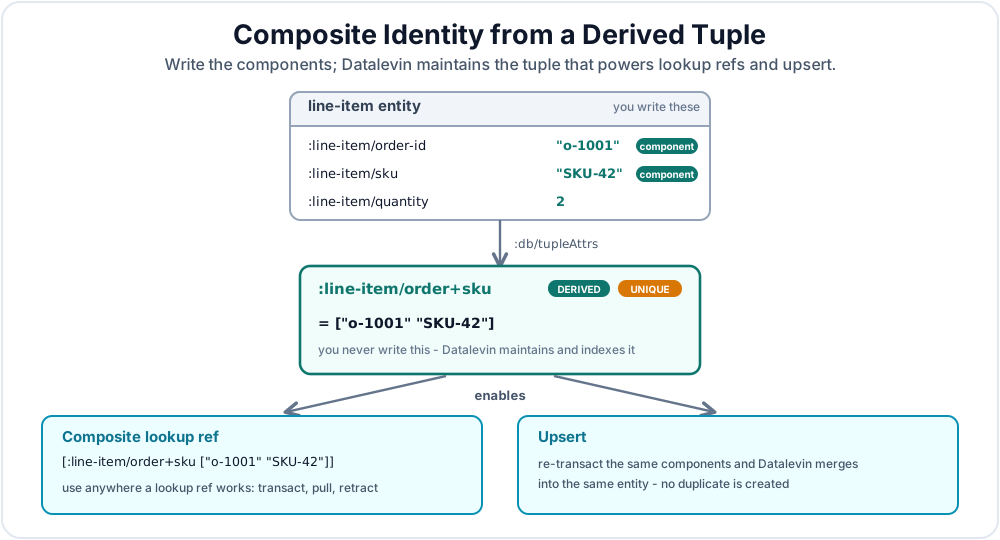
When people ask for a custom index in a Datalevin Datalog database, they often mean a composite lookup over several attributes, or a repeated query that reads the same attributes together. Datalevin's usual answer is a derived tuple attribute: define an attribute with :db/tupleAttrs, and Datalevin maintains a composite index entry from its component attributes. :db/unique is optional: add it when the combination is an identity or uniqueness constraint, but omit it when the tuple is only a non-unique query access path.
This is different from the transacted tuple data type. With :db/tupleAttrs, the application writes the component attributes, and Datalevin maintains the derived tuple value in the normal Datalog indexes. It is a composite access path over ordinary attributes, not a tuple value that application code transacts directly. Transacted tuple values use :db.type/tuple with :db/tupleType or :db/tupleTypes; those forms are covered in Appendix C.
Even though application code does not write the derived tuple directly, auto-maintained composite tuples use the same tuple value encoding as transacted tuple values, so the same tuple-element limitations apply.
A line item, for example, may be identified by the pair of order id and SKU. The application writes :line-item/order-id and :line-item/sku; Datalevin makes :line-item/order+sku available as a derived composite lookup, as illustrated in Figure 11.1.
(def schema
  {:line-item/order-id   {:db/valueType :db.type/string}
   :line-item/sku        {:db/valueType :db.type/string}
   :line-item/quantity   {:db/valueType :db.type/long}
   :line-item/order+sku  {:db/tupleAttrs [:line-item/order-id :line-item/sku]
                          :db/unique     :db.unique/identity}})
Schema schema = Datalevin.schema()
    .attr(":line-item/order-id", Schema.attribute()
        .valueType(Schema.ValueType.STRING))
    .attr(":line-item/sku", Schema.attribute()
        .valueType(Schema.ValueType.STRING))
    .attr(":line-item/quantity", Schema.attribute()
        .valueType(Schema.ValueType.LONG))
    .attr(":line-item/order+sku", Schema.attribute()
        .tupleAttrs(":line-item/order-id", ":line-item/sku")
        .unique(Schema.Unique.IDENTITY));
schema = {
    ":line-item/order-id": {":db/valueType": ":db.type/string"},
    ":line-item/sku": {":db/valueType": ":db.type/string"},
    ":line-item/quantity": {":db/valueType": ":db.type/long"},
    ":line-item/order+sku": {
        ":db/tupleAttrs": [":line-item/order-id", ":line-item/sku"],
        ":db/unique": ":db.unique/identity"}}
const schema = {
  ":line-item/order-id": {":db/valueType": ":db.type/string"},
  ":line-item/sku": {":db/valueType": ":db.type/string"},
  ":line-item/quantity": {":db/valueType": ":db.type/long"},
  ":line-item/order+sku": {
    ":db/tupleAttrs": [":line-item/order-id", ":line-item/sku"],
    ":db/unique": ":db.unique/identity"}
};
Now the composite key can be used anywhere a lookup ref can be used:
;; Create or update by component attributes. The tuple is maintained.
(d/transact! conn
  [{:line-item/order-id "o-1001"
    :line-item/sku      "SKU-42"
    :line-item/quantity 2}])

;; Update the same line item by composite lookup ref.
(d/transact! conn
  [[:db/add [:line-item/order+sku ["o-1001" "SKU-42"]]
            :line-item/quantity
            3]])

;; Pull by the same composite identity.
(d/pull (d/db conn)
        '[:line-item/sku :line-item/quantity]
        [:line-item/order+sku ["o-1001" "SKU-42"]])
// Create or update by component attributes. The tuple is maintained.
conn.transact(Datalevin.tx()
    .entity(Tx.entity()
        .put(":line-item/order-id", "o-1001")
        .put(":line-item/sku", "SKU-42")
        .put(":line-item/quantity", 2L)));

// Update the same line item by composite lookup ref.
conn.transact(Datalevin.tx()
    .add(List.of(":line-item/order+sku", List.of("o-1001", "SKU-42")),
         ":line-item/quantity",
         3L));

// Pull by the same composite identity.
Map<?, ?> item = conn.pull(
    "[:line-item/sku :line-item/quantity]",
    List.of(":line-item/order+sku", List.of("o-1001", "SKU-42")));
from datalevin import q, tx

# Create or update by component attributes. The tuple is maintained.
conn.transact(tx.data(tx.entity(attrs={
    "line-item/order-id": "o-1001",
    "line-item/sku": "SKU-42",
    "line-item/quantity": 2,
})))

# Update the same line item by composite lookup ref.
line_item = tx.lookup_ref("line-item/order+sku", ["o-1001", "SKU-42"])
conn.transact(tx.data(tx.add(line_item, "line-item/quantity", 3)))

# Pull by the same composite identity.
item = conn.pull(q.selector("line-item/sku", "line-item/quantity"),
                 line_item)
import { q, tx } from "datalevin-node";

// Create or update by component attributes. The tuple is maintained.
await conn.transact(tx.data(tx.entity({
  "line-item/order-id": "o-1001",
  "line-item/sku": "SKU-42",
  "line-item/quantity": 2
})));

// Update the same line item by composite lookup ref.
const lineItem = tx.lookupRef(
  "line-item/order+sku", ["o-1001", "SKU-42"]
);
await conn.transact(tx.data(
  tx.add(lineItem, "line-item/quantity", 3)
));

// Pull by the same composite identity.
const item = await conn.pull(
  q.selector("line-item/sku", "line-item/quantity"),
  lineItem
);
This pattern is useful for user-defined secondary access paths: tenant plus external id, account plus date, document plus section number, order plus SKU, or student plus course plus term. If the derived tuple attribute is also unique, it becomes a composite identity and participates in upsert.
Datalevin does not have a separate unique-composite schema property. A composite uniqueness constraint is expressed by combining :db/tupleAttrs with :db/unique on the derived tuple attribute. :db/tupleAttrs says how to derive the composite value from ordinary attributes; :db/unique says whether that derived value is a unique identity or unique value.
A maintained access path trades write and storage for faster reads. A derived tuple attribute materializes the joint relation among its components as one indexed value. Without it, a component plan reads the individual EAV datoms and joins them by entity, often emitting a large intermediate tuple relation. With it, a query can scan or probe already-correlated combinations directly. If the composite path emits C qualifying intermediate tuples while the component path emits E, the important saving is C versus E; for selective combinations, C is often much smaller. That lower cardinality also means less work for every later join, filter, and aggregate.
The saving is paid for on the write side. Every entity carrying the components gains another logical datom indexed in both EAV and AVE, and a write that changes any component must also maintain that derived datom.
If you only need occasional ad hoc filtering by the components, ordinary Datalog joins over the component attributes may be enough. If the combination is a domain identity or upsert key, use :db/tupleAttrs with :db/unique. If a known hot query repeatedly reads the components together, :db/tupleAttrs without :db/unique can be worthwhile. Do not add uniqueness merely to obtain the query access path; doing so also changes transaction semantics.
Do not use a transacted :db.type/tuple as a substitute for this unless the tuple itself is the application value. A stored tuple can be unique like any other attribute, but Datalevin will not derive it from separate component attributes or keep those components in sync for you.
There are a few important rules:
- Write the component attributes, not the derived tuple attribute. Datalevin updates the derived composite index when components change.
:db/tupleAttrsmust name cardinality-one attributes.- A derived tuple cannot depend on another derived tuple.
- If a component is missing, the derived tuple may contain
nilin that position. Datalevin still compares the whole tuple value structurally, so two tuples withnilin the same position and the same remaining values are not distinct for uniqueness checks. This differs from SQL databases that allow multipleNULLvalues in a unique index. Decide whether that is acceptable before making the tuple unique. - Composite lookup refs are simplest when the tuple components are scalar identity values such as tenant id, order id, SKU, date, or source-system id. If a component attribute is a reference, the tuple stores the resolved entity id; keep that in mind when constructing tuple lookup values.
- For ad hoc query-side tuple construction and destructuring, use the built-in
tupleanduntuplefunctions:
;; Build a tuple in the query and match it against the derived attribute.
(d/q '[:find ?line
       :where [?line :line-item/order-id ?order-id]
              [?line :line-item/sku ?sku]
              [(tuple ?order-id ?sku) ?order+sku]
              [?line :line-item/order+sku ?order+sku]]
     (d/db conn))

;; Destructure a tuple value back into its components.
(d/q '[:find ?line ?order-id ?sku
       :where [?line :line-item/order+sku ?order+sku]
              [(untuple ?order+sku) [?order-id ?sku]]]
     (d/db conn))
Object lines = conn.query(
    "[:find ?line " +
    " :where [?line :line-item/order-id ?order-id] " +
    "        [?line :line-item/sku ?sku] " +
    "        [(tuple ?order-id ?sku) ?order+sku] " +
    "        [?line :line-item/order+sku ?order+sku]]");

Object parts = conn.query(
    "[:find ?line ?order-id ?sku " +
    " :where [?line :line-item/order+sku ?order+sku] " +
    "        [(untuple ?order+sku) [?order-id ?sku]]]");
line = q.var("line")
order_id = q.var("order-id")
sku = q.var("sku")
order_sku = q.var("order+sku")

lines = conn.query(q.query(
    find=q.relation(line),
    where=[
        q.datom(line, "line-item/order-id", order_id),
        q.datom(line, "line-item/sku", sku),
        q.bind("tuple", order_sku, order_id, sku),
        q.datom(line, "line-item/order+sku", order_sku),
    ],
))

parts = conn.query(q.query(
    find=q.relation(line, order_id, sku),
    where=[
        q.datom(line, "line-item/order+sku", order_sku),
        q.bind("untuple", q.tuple_binding(order_id, sku), order_sku),
    ],
))
const line = q.var("line");
const orderId = q.var("order-id");
const sku = q.var("sku");
const orderSku = q.var("order+sku");

const lines = await conn.query(q.query({
  find: q.relation(line),
  where: [
    q.datom(line, "line-item/order-id", orderId),
    q.datom(line, "line-item/sku", sku),
    q.bind("tuple", orderSku, orderId, sku),
    q.datom(line, "line-item/order+sku", orderSku)
  ]
}));

const parts = await conn.query(q.query({
  find: q.relation(line, orderId, sku),
  where: [
    q.datom(line, "line-item/order+sku", orderSku),
    q.bind("untuple", q.tupleBinding(orderId, sku), orderSku)
  ]
}));
Composite Attributes for Known Hot Query Shapes
Composite attributes are also a deliberate denormalization for read performance. This works best when the workload is known: the same query repeatedly consumes several cardinality-one attributes from the same entity, and the saved read work justifies another maintained datom.
For example, the LDBC Social Network Benchmark (LDBC SNB) [3] includes the Interactive Complex 5 (IC5) query, in which a forum-membership entity carries a person, a forum, and the date the person joined. The Datalevin SF1 benchmark implementation is available with its query and bundled parameters [4]. A non-unique derived attribute can materialize those three values together:
{:hasMember/person+forum+date
 {:db/tupleAttrs [:hasMember/person
                  :hasMember/forum
                  :hasMember/joinDate]}}
Only the membership fragment changes between the two query variants. Without the composite attribute, IC5 reads three component patterns:
[?membership :hasMember/person ?person]
[?membership :hasMember/forum ?forum]
[?membership :hasMember/joinDate ?join-date]
[(> ?join-date ?min-date)]
With the composite attribute, the query reads and destructures the derived tuple instead:
[?membership :hasMember/person+forum+date ?membership-value]
[(untuple ?membership-value) [?person ?forum ?join-date]]
[(> ?join-date ?min-date)]
The benefit is the cardinality reduction, not merely replacing three clauses with one. The composite value has already correlated person, forum, and date. The notation [person, forum, date > min-date] is conceptual shorthand for that combined condition, not literal Datalog syntax.
The following comparison comes from one local diagnostic of the two membership plans against the LDBC SNB scale-factor-1 database. It used Datalevin's bundled IC5 parameter row, person-id = 100 and min-date = 2011-01-01T00:00:00Z. The unit in both rows is the number of intermediate membership tuples handed to subsequent joins:
| IC5 query variant | Membership access | Intermediate membership tuples |
|---|---|---|
| Without composite attribute | Three component patterns | 1,402,224 |
| With composite attribute | Derived :hasMember/person+forum+date pattern |
7,759 |
The composite query therefore sends fewer membership tuples into subsequent joins and aggregation: about 0.55% as many—roughly 1/181. These figures are plan cardinalities, not counts of index datoms read and not a wall-clock latency comparison. They isolate why the composite query makes the later work cheaper.
The exact reduction depends on the data distribution and supplied inputs. It is largest when the joint combination is much more selective than any component attribute by itself. The component attributes remain independently queryable; the tuple is an additional access path, not a replacement for the underlying facts.
Declaring the schema entry only causes Datalevin to maintain the derived value. The query must reference the composite attribute to use it; the optimizer does not automatically replace three component patterns with a tuple pattern. Check the changed plan with explain, benchmark representative parameters, and keep the composite only when the read improvement pays for its write amplification, additional index space, and cache footprint.
1.3 System-Wide Identifiers: :db/ident
While :db.unique/identity is used for attributes that uniquely identify a domain entity (like a user's email), :db/ident is a built-in attribute used to assign a globally unique keyword to an entity.
This is the standard way to represent enums or system-wide constants. Once an entity has a :db/ident, you can use that keyword anywhere you would use an entity id or a lookup ref.
;; Schema includes a ref attribute for the enum-valued field
(def schema {:order/id     {:db/valueType :db.type/string
                            :db/unique    :db.unique/identity}
             :order/status {:db/valueType :db.type/ref}})

;; Define an "enum" entity for order status
(d/transact! conn [{:db/ident :order.status/shipped}])

;; Use the keyword directly in another transaction
(d/transact! conn [{:order/id "123" :order/status :order.status/shipped}])
// Schema includes a ref attribute for the enum-valued field
Schema schema = Datalevin.schema()
    .attr(":order/id", Schema.attribute()
        .valueType(Schema.ValueType.STRING)
        .unique(Schema.Unique.IDENTITY))
    .attr(":order/status", Schema.attribute()
        .valueType(Schema.ValueType.REF));

// Define an "enum" entity for order status
conn.transact(Datalevin.tx()
    .entity(Tx.entity()
        .put(":db/ident", Datalevin.kw(":order.status/shipped"))));

// Use the keyword directly in another transaction
conn.transact(Datalevin.tx()
    .entity(Tx.entity()
        .put(":order/id", "123")
        .put(":order/status", Datalevin.kw(":order.status/shipped"))));
from datalevin import q, tx

shipped = q.kw("order.status/shipped")

# Schema includes a ref attribute for the enum-valued field
schema = {":order/id": {":db/valueType": ":db.type/string",
                        ":db/unique": ":db.unique/identity"},
          ":order/status": {":db/valueType": ":db.type/ref"}}

# Define an "enum" entity for order status
conn.transact(tx.data(tx.entity(attrs={"db/ident": shipped})))

# Use the keyword directly in another transaction
conn.transact(tx.data(tx.entity(attrs={
    "order/id": "123",
    "order/status": shipped,
})))
import { q, tx } from "datalevin-node";

const shipped = q.kw("order.status/shipped");

// Schema includes a ref attribute for the enum-valued field
const schema = {
  ":order/id": {":db/valueType": ":db.type/string",
                ":db/unique": ":db.unique/identity"},
  ":order/status": {":db/valueType": ":db.type/ref"}
};

// Define an "enum" entity for order status
await conn.transact(tx.data(tx.entity({ "db/ident": shipped })));

// Use the keyword directly in another transaction
await conn.transact(tx.data(tx.entity({
  "order/id": "123",
  "order/status": shipped
})));
The important point is that :order/status is a :db.type/ref, so it takes an entity id. Here a :db/ident serves the purpose of an entity id. Installing a :db/ident entity is an ordinary data write, not a schema change.
The advantage of using :db/ident over raw strings or keywords is that the enum itself is an ordinary entity. You can attach descriptive facts to it (like :order.status/label "Shipped") without changing your order data.
For example, later you can add display details to the status entity itself:
(d/transact! conn
  [{:db/ident :order.status/shipped
    :order.status/label "Shipped"
    :order.status/sort 30}])

(d/pull (d/db conn)
  [:db/ident :order.status/label :order.status/sort]
  :order.status/shipped)
;;=> {:db/ident :order.status/shipped
;;    :order.status/label "Shipped"
;;    :order.status/sort 30}
conn.transact(Datalevin.tx()
    .entity(Tx.entity()
        .put(":db/ident", Datalevin.kw(":order.status/shipped"))
        .put(":order.status/label", "Shipped")
        .put(":order.status/sort", 30L)));

Map<?, ?> status = conn.pull(
    "[:db/ident :order.status/label :order.status/sort]",
    Datalevin.kw(":order.status/shipped"));
// => {":db/ident": ":order.status/shipped",
//     ":order.status/label": "Shipped",
//     ":order.status/sort": 30}
shipped_status = q.kw("order.status/shipped")

conn.transact(tx.data(tx.entity(attrs={
    "db/ident": shipped_status,
    "order.status/label": "Shipped",
    "order.status/sort": 30,
})))

status = conn.pull(
    q.selector("db/ident", "order.status/label", "order.status/sort"),
    shipped_status)
# => {":db/ident": ":order.status/shipped",
#     ":order.status/label": "Shipped",
#     ":order.status/sort": 30}
const shippedStatus = q.kw("order.status/shipped");

await conn.transact(tx.data(tx.entity({
  "db/ident": shippedStatus,
  "order.status/label": "Shipped",
  "order.status/sort": 30
})));

const status = await conn.pull(
  q.selector("db/ident", "order.status/label", "order.status/sort"),
  shippedStatus
);
// => { ":db/ident": ":order.status/shipped",
//      ":order.status/label": "Shipped",
//      ":order.status/sort": 30 }
Existing orders still point at the same status entity. You added facts about the enum; you did not rewrite the order facts that refer to it.
2. Modeling Relationships: References and Cardinality
In Datalevin, relationships are ordinary facts. They are defined using the :db.type/ref value type and the :db/cardinality property. The stored value of a reference attribute is the entity id of the target entity. In transaction data, you can still use tempids, lookup refs, or :db/ident keywords as convenient inputs; Datalevin resolves them to entity ids when it writes the datoms.
One of the most important decisions when modeling a relationship is its cardinality [1], also called association multiplicity: one-to-one, one-to-many, or many-to-many.
2.1 One-to-One and One-to-Many
- One-to-One: Use
:db.type/refwith:db.cardinality/one.- Example: A
Userhas oneProfile.
- Example: A
- One-to-Many: Usually put a cardinality-one ref on the many side.
- Example: A
Posthas manyCommententities, so eachCommentcarries a reference to itsPostthrough:comment/post.
- Example: A
The one-to-many example is worth stating carefully: you do not need a :post/comments cardinality-many attribute only to find a post's comments. Store :comment/post on each comment, then query or pull the reverse direction when you need the collection. The broader performance rationale for normalized relationship facts is covered in the many-to-many discussion below.
2.2 Many-to-Many: Cardinality vs. Join Entities
For many-to-many relationships, you have two main ways to model them, as compared in Figure 11.2.
:db.cardinality/many: You can add an attribute with:db.cardinality/manyto one or both entities. Use this only for small, bounded sets that are normally read with their owner. It is convenient and can produce a compact shape ind/pullresults, but it is not the right default for large or queryable relationships.- Join Entities: You can create a third entity that "joins" the other two, similar to a join table in SQL.
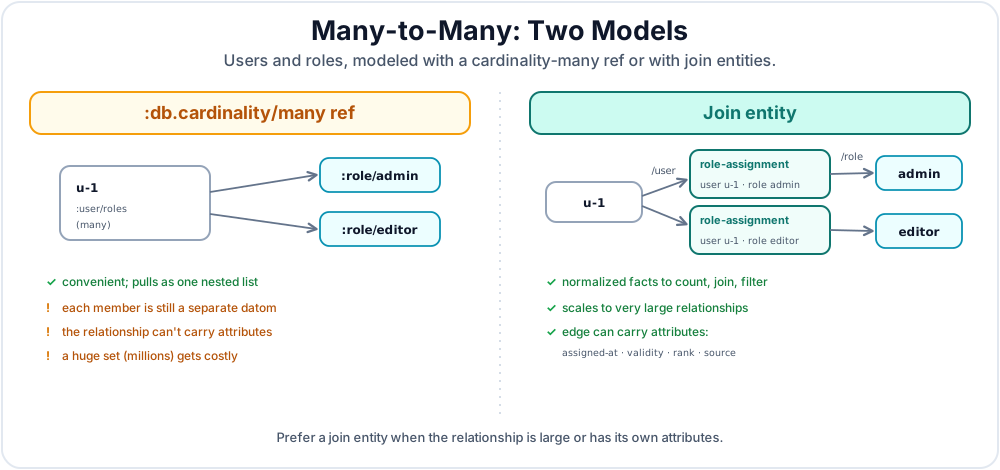
While :db.cardinality/many is convenient, it is not a compact array stored inside one datom. Each member is a separate datom, logically shaped like [entity attribute value], and it participates in the indexes. DUPSORT reduces some repeated-prefix cost at the storage layer, but a large many-valued attribute still carries real index-entry overhead and repeated entity/attribute structure. For large relationships, this shape behaves like non-normalized data and can impose a real index cost; Chapter 15 explains the EAV and AVE mechanics. Often the better model is to put a cardinality-one ref on the many side; when the relationship itself needs facts, use a join entity.
Datalevin performs best with normalized data [2]: small relationship facts whose access paths are explicit. For one-to-many relationships, this often means placing a cardinality-one reference on the many side. For many-to-many relationships, it often means creating a join entity.
This shape gives the query optimizer more granular facts to count, join, and filter. It also avoids treating a large relationship set as if it were a small property of one entity. If you expect a single entity to have hundreds, thousands, or millions of references, a join entity is the better default for query planning and operational clarity. This is not about minimizing raw datom count; a join entity usually stores more datoms than one cardinality-many ref. It is the right model when the relationship itself has attributes, such as role assignment time, quantity, rank, validity interval, or source system.
In the example below, :role/admin and :role/editor are :db/ident enum entities used as reference values, as described in Section 1.3.
;; Instead of many references in one entity:
{:user/id "u-1" :user/roles [:role/admin :role/editor]}

;; Use join entities for large or queryable relationships:
(d/transact! conn
  [{:role-assignment/user [:user/id "u-1"]
    :role-assignment/role :role/admin}
   {:role-assignment/user [:user/id "u-1"]
    :role-assignment/role :role/editor}])
// Instead of many references in one entity:
Tx.entity()
    .put(":user/id", "u-1")
    .put(":user/roles", List.of(Datalevin.kw(":role/admin"),
                               Datalevin.kw(":role/editor")));

// Use join entities for large or queryable relationships:
conn.transact(Datalevin.tx()
    .entity(Tx.entity()
        .put(":role-assignment/user", List.of(":user/id", "u-1"))
        .put(":role-assignment/role", Datalevin.kw(":role/admin")))
    .entity(Tx.entity()
        .put(":role-assignment/user", List.of(":user/id", "u-1"))
        .put(":role-assignment/role", Datalevin.kw(":role/editor"))));
# Instead of many references in one entity:
many_roles = tx.entity(attrs={
    "user/id": "u-1",
    "user/roles": [q.kw("role/admin"), q.kw("role/editor")],
})

# Use join entities for large or queryable relationships:
user_ref = tx.lookup_ref("user/id", "u-1")
conn.transact(tx.data(
    tx.entity(attrs={
        "role-assignment/user": user_ref,
        "role-assignment/role": q.kw("role/admin"),
    }),
    tx.entity(attrs={
        "role-assignment/user": user_ref,
        "role-assignment/role": q.kw("role/editor"),
    }),
))
const admin = q.kw("role/admin");
const editor = q.kw("role/editor");

// Instead of many references in one entity:
const manyRoles = tx.entity({
  "user/id": "u-1",
  "user/roles": [admin, editor]
});

// Use join entities for large or queryable relationships:
const userRef = tx.lookupRef("user/id", "u-1");
await conn.transact(tx.data(
  tx.entity({
    "role-assignment/user": userRef,
    "role-assignment/role": admin
  }),
  tx.entity({
    "role-assignment/user": userRef,
    "role-assignment/role": editor
  })
));
2.3 Reference Integrity
Datalevin represents a reference as an entity id, so a declared :db.type/ref always points to an entity id. This differs from a SQL foreign key: there is no required parent row whose continued existence gives the reference validity. Entities have no required attributes, and an entity id remains a valid target even when no facts currently describe that id.
Consequently, retracting all of an entity's own attributes does not retract facts on other entities that refer to its id. The reference still names the same id; its target simply has no current attributes. When you intend to remove the entity as a node in the graph, use [:db/retractEntity <eid>]. This operation retracts facts where the id is the entity, retracts facts where the id is the value of a declared :db.type/ref attribute, and recursively retracts component children.
3. Attribute Properties: Search and Ownership
Datalevin allows you to attach properties to attributes that change how the database indexes, searches, or interprets relationships. These are different from value types: :db/valueType says what kind of value an attribute stores, while properties such as :db/fulltext, :db/embedding, and :db/isComponent add behavior around that value.
3.1 Full-Text Search (:db/fulltext)
Setting :db/fulltext true tells Datalevin to maintain a specialized full-text index for that attribute, indexing values as text. This enables the (fulltext ...) predicate in Datalog (see Chapter 16).
3.2 Embedding Search (:db/embedding)
Setting :db/embedding true on a :db.type/string attribute tells Datalevin to compute text embeddings and maintain an embedding similarity index. Query it with embedding-neighbors using query text, not a vector (see Chapter 17).
3.3 Component Attributes (:db/isComponent)
When a reference attribute is marked as :db/isComponent true, it signals a single-owner parent-child relationship.
- Recursive Pull: A wildcard
d/pullon the parent will automatically include all attributes of the child component. - Cascading Deletes: When the parent entity is deleted (via the
:db/retractEntitytransaction function), the child component entities are also automatically deleted.
Components are not uniqueness constraints
:db/isComponent is not a uniqueness constraint. Datalevin will allow two parents to point at the same component child, but that database is not well-formed for component semantics.
If a parent is retracted with :db/retractEntity, or the component attribute is retracted with :db.fn/retractAttribute, Datalevin retracts the component child as owned data. Retracting that child also retracts declared reference datoms that point to it, so another parent that pointed at the same child loses its reference too. A value-specific [:db/retract parent component-attr child] only removes that one reference and does not cascade.
This is ideal for modeling owned data, like line items in an invoice or segments of a document. Use ordinary reference attributes for data that can be shared by several parents.
3.4 Choosing Which Attributes to Index
Datalevin indexes attributes by default so you can search by their values. Some fields, such as a document body, may only be displayed after you find the document by name. Declare :db/noindex true for those fields to reduce storage and write overhead.
You can still read the values with entity, pull, or a Datalog query that has already found the entity. The following example finds a document by name and reads its unindexed body. If you later need to find documents by their body value, index-attr enables that search for the existing data too:
(require '[datalevin.core :as d])

(let [conn (d/create-conn
             nil
             {:document/name {:db/valueType :db.type/string
                              :db/unique :db.unique/identity}
              :document/body {:db/valueType :db.type/string
                              :db/noindex true}}
             {:kv-opts {:inmemory? true}})]
  (try
    (d/transact! conn
      [{:document/name "notes" :document/body "Read by entity first."}])

    (d/q '[:find ?body
           :in $ ?name
           :where [?e :document/name ?name]
                  [?e :document/body ?body]]
         (d/db conn) "notes")
    ;; => #{["Read by entity first."]}

    ;; Enable searches by body value, including documents already stored.
    (d/index-attr conn :document/body)
    (d/q '[:find ?e
           :where [?e :document/body "Read by entity first."]]
         (d/db conn))
    ;; => #{[<document-eid>]}
    (finally
      (d/close conn))))
import datalevin.*;
import java.util.List;
import java.util.Map;

Schema schema = Datalevin.schema()
    .attr("document/name", Schema.attribute().valueType(Schema.ValueType.STRING)
        .unique(Schema.Unique.IDENTITY))
    .attr("document/body", Schema.attribute().valueType(Schema.ValueType.STRING)
        .noIndex(true));

try (Connection conn = Datalevin.createConn(
        null, schema, Map.of(":kv-opts", Map.of(":inmemory?", true)))) {
    conn.transact(Datalevin.tx().entity(Tx.entity()
        .put("document/name", "notes")
        .put("document/body", "Read by entity first.")));

    conn.query("[:find ?body :in $ ?name " +
               " :where [?e :document/name ?name] [?e :document/body ?body]]",
               List.of("notes"));
    // => #{["Read by entity first."]}

    conn.indexAttr("document/body");
    conn.query("[:find ?e :where [?e :document/body \"Read by entity first.\"]]");
    // => one row containing the document's entity id
}
from datalevin import connect, q, schema_attr, tx

schema = {
    "document/name": schema_attr(value_type=":db.type/string", unique=":db.unique/identity"),
    "document/body": schema_attr(value_type=":db.type/string", no_index=True),
}

with connect(None, schema=schema,
             opts={":kv-opts": {":inmemory?": True}}) as conn:
    conn.transact(tx.data(tx.entity(attrs={
        "document/name": "notes", "document/body": "Read by entity first."
    })))
    document, name, body = map(q.var, ("document", "name", "body"))
    conn.query(q.query(
        find=q.relation(body),
        inputs=[q.DB, name],
        where=[q.datom(document, "document/name", name),
               q.datom(document, "document/body", body)],
    ), "notes")
    # => [["Read by entity first."]]

    conn.index_attr("document/body")
    conn.query(q.query(
        find=q.relation(document),
        where=[q.datom(document, "document/body", "Read by entity first.")],
    ))
    # => one row containing the document's entity id
import { connect, q, schemaAttr, tx } from "datalevin-node";

const schema = {
  "document/name": schemaAttr({ valueType: ":db.type/string", unique: ":db.unique/identity" }),
  "document/body": schemaAttr({ valueType: ":db.type/string", noIndex: true })
};
const conn = await connect(null, {
  schema, opts: { ":kv-opts": { ":inmemory?": true } }
});
try {
  await conn.transact(tx.data(tx.entity({
    "document/name": "notes", "document/body": "Read by entity first."
  })));
  const document = q.var("document"), name = q.var("name"), body = q.var("body");
  await conn.query(q.query({
    find: q.relation(body),
    inputs: [q.DB, name],
    where: [q.datom(document, "document/name", name),
            q.datom(document, "document/body", body)]
  }), "notes");
  // => [["Read by entity first."]]

  await conn.indexAttr("document/body");
  await conn.query(q.query({
    find: q.relation(document),
    where: [q.datom(document, "document/body", "Read by entity first.")]
  }));
  // => one row containing the document's entity id
} finally {
  await conn.close();
}
Before index-attr, the last query throws because it tries to find documents using the unindexed body alone. Supply an entity id or find the entity through another attribute first, as the first query does. This rule also applies to prepared queries.
Keep unique and reference attributes indexed; they do not allow :db/noindex true. Choose the setting before storing values. Once an attribute has data, use index-attr to enable indexing instead of changing the flag through update-schema. It works locally and remotely, and calling it again is safe. Building a large index can delay other writes, so schedule it during a quiet period.
This setting controls searches by attribute value. Full-text, vector, embedding, and idoc search remain available when separately enabled.
4. Specialized Value Types
Vector values, indexed documents, and custom types extend how Datalevin stores and indexes attribute values. Select each with :db/valueType. The following sections explain when to use them.
4.1 Vector Values (:db.type/vec)
Use :db.type/vec when your application supplies vectors directly. Query these attributes with vec-neighbors. Vector dimensions and metric settings belong in store options such as :vector-opts or :vector-domains, not in each individual datom.
4.2 Indexed Documents (:db.type/idoc)
Use :db.type/idoc for maps or vectors that should be stored as one value but queried by path with idoc-match. This is useful for flexible metadata, JSON objects and arrays, and Markdown-derived structures. A root vector supports membership queries and zero-based positional paths (Chapter 14).
4.3 Custom Data Types
A custom data type lets you store an application value intact and index it by an order key derived from its content. You can use the complete value in exact lookups and joins, scan ranges by its order key, and retrieve it through pull or entities.
Register the type through the connection before adding it to the schema, then use its name as the attribute's :db/valueType. In this example, :app/task stores task maps ordered by priority. The attribute has cardinality many, so an entity can hold both the compile task and the test task even though they share priority 3:
(require '[datalevin.core :as d]
         '[datalevin.interpret :as i])

(def task-type
  {:index {:type :long
           :order-fn (i/inter-fn [task] (:priority task))}})

(def compile-task {:priority 3 :name "Compile"})
(def test-task {:priority 3 :name "Test"})
(def urgent-task {:priority 1 :name "Fix build"})

(let [conn (d/create-conn "/tmp/datalevin-custom-datalog")]
  (try
    (d/register-type conn :app/task task-type)
    (d/update-schema conn
                     {:task/data {:db/valueType :app/task
                                  :db/cardinality :db.cardinality/many}})
    (d/transact! conn [[:db/add 1 :task/data compile-task]
                       [:db/add 1 :task/data test-task]
                       [:db/add 2 :task/data urgent-task]])

    (d/q '[:find ?e :in $ ?task :where [?e :task/data ?task]]
         @conn compile-task)
    ;; => #{[1]}

    (set (map :v (d/index-range @conn :task/data
                                {:priority 3} {:priority 3})))
    ;; => a set containing compile-task and test-task

    (set (:task/data (d/entity @conn 1)))
    ;; => a set containing compile-task and test-task
    (finally (d/close conn))))
import datalevin.Connection;
import datalevin.Datalevin;
import datalevin.Schema;
import datalevin.UdfDescriptor;
import datalevin.UdfRegistry;
import java.util.List;
import java.util.Map;

UdfRegistry registry = Datalevin.udfRegistry()
    .orderFn("task/order", args -> ((Map<?, ?>) args.get(0)).get(":priority"));

Map<?, ?> taskType = Datalevin.mapOf(
    "index", Datalevin.mapOf("type", ":long",
                             "order-fn", UdfDescriptor.orderFn("task/order")));

Map<?, ?> compileTask = Datalevin.mapOf(":priority", 3L, ":name", "Compile");
Map<?, ?> testTask = Datalevin.mapOf(":priority", 3L, ":name", "Test");

try (Connection conn = Datalevin.createConn(
        "/tmp/datalevin-custom-datalog",
        Datalevin.mapOf(),
        Datalevin.mapOf("runtime-opts",
                        Datalevin.mapOf("udf-registry", registry)))) {
    conn.registerType(":app/task", taskType);
    conn.updateSchema(Datalevin.schema().attr(":task/data",
        Schema.attribute()
            .valueType(":app/task")
            .cardinality(Schema.Cardinality.MANY)));

    conn.transact(List.of(
        Datalevin.mapOf("db/id", 1L, "task/data", compileTask),
        Datalevin.mapOf("db/id", 1L, "task/data", testTask)));

    conn.query("[:find ?e :in $ ?task :where [?e :task/data ?task]]",
               compileTask);
    // => #{[1]}

    conn.indexRange(":task/data", compileTask, testTask);
    conn.entity(1L);
}
from datalevin import UdfDescriptor, connect, create_udf_registry

registry = create_udf_registry()
registry.order_udf("task/order")(lambda task: task["priority"])

task_type = {
    "index": {"type": ":long",
              "order-fn": UdfDescriptor.order_fn("task/order")},
}

compile_task = {"priority": 3, "name": "Compile"}
test_task = {"priority": 3, "name": "Test"}

with connect("/tmp/datalevin-custom-datalog",
             opts={":runtime-opts": {":udf-registry": registry}}) as conn:
    conn.register_type("app/task", task_type)
    conn.update_schema({"task/data": {
        ":db/valueType": ":app/task",
        ":db/cardinality": ":db.cardinality/many"}})
    conn.transact([{"db/id": 1, "task/data": compile_task},
                   {"db/id": 1, "task/data": test_task}])

    conn.query("[:find ?e :in $ ?task :where [?e :task/data ?task]]",
               compile_task)
    # => [[1]]

    conn.index_range("task/data", compile_task, test_task)

    conn.entity(1)["task/data"]
    # => a list containing compile_task and test_task
import { UdfDescriptor, connect, createUdfRegistry } from "datalevin-node";

const registry = await createUdfRegistry();
await registry.orderUdf("task/order", task => task.priority);

const taskType = {
  index: { type: ":long", "order-fn": UdfDescriptor.orderFn("task/order") }
};

const compileTask = { priority: 3n, name: "Compile" };
const testTask = { priority: 3n, name: "Test" };

const conn = await connect("/tmp/datalevin-custom-datalog", {
  opts: { ":runtime-opts": { ":udf-registry": registry } }
});
try {
  await conn.registerType("app/task", taskType);
  await conn.updateSchema({
    "task/data": { ":db/valueType": ":app/task",
                   ":db/cardinality": ":db.cardinality/many" }
  });
  await conn.transact([
    { "db/id": 1n, "task/data": compileTask },
    { "db/id": 1n, "task/data": testTask }
  ]);

  await conn.query(
    "[:find ?e :in $ ?task :where [?e :task/data ?task]]", compileTask);
  // => [[1n]]

  await conn.indexRange("task/data", compileTask, testTask);

  const entity = await conn.entity(1n);
  await entity.get("task/data");
  // => Set { compileTask, testTask }
} finally {
  await conn.close();
}
The query matches the complete compile task. The index-range call returns both tasks because both endpoints select priority 3. Likewise, (d/datoms db :ave :task/data compile-task) matches that specific task, while range endpoints include every value with the endpoint's order key.
Custom attributes support cardinality one and many, both uniqueness modes, lookup references, and retractions. Uniqueness applies to complete values: two different tasks can share a priority without violating a uniqueness constraint. Asserting the same complete task on another entity follows the usual :db.unique/identity or :db.unique/value rules. Reads return complete values.
Choose a custom type when the value belongs together and one derived order serves your access patterns. If you need to query and update its fields independently, model those fields as ordinary attributes. Custom attributes cannot use :db/fulltext indexing or serve as components of :db/tupleAttrs composite tuples.
Type registrations persist in the database. inter-fn source and captured values persist with them; UDF implementations and native class bindings must be supplied again when opening the database in a new process. Chapter 10, Section 3.4 explains order functions and registration; Appendix F, Section 12 lists the definition fields, payload functions, and native class bindings.
5. Best Practices: Designing for Evolution
Datalevin's flexibility makes schema maintenance an ongoing design task. These practices keep the schema understandable as the model evolves.
5.1 Namespace Everything
Always use namespaces for your attributes. A common pattern is [domain]/[property], such as :account/balance or :sensor/reading. This prevents collisions if you later integrate third-party data or modularize your application.
5.2 Prefer Flat Entities
While :db/isComponent is useful for true ownership, do not over-nest your data. Datalevin excels at flat, normalized facts. The query engine is designed to join flat facts efficiently, so you do not need to "pre-join" data into complex documents as you might in a document store like MongoDB.
5.3 Modeling Enums with :db/ident
For attributes that have a fixed set of values, such as status or type, prefer enum entities with :db/ident over raw keyword or string values. Section 1.3 shows the schema and transaction mechanics. The modeling payoff is:
- Descriptive facts: You can attach display names, descriptions, or translations directly to the enum entity, as shown in Section 1.3.
- Reference semantics: If you use a
:db.type/reffor the status attribute, Datalog joins and pulls treat the status as an entity reference rather than an arbitrary string. - Discovery: You can query for all possible statuses using Datalog.
6. Schema Evolution and Migration
Datalevin can create schema entries when new attributes appear in transaction data, but schema is still persistent operational state. A schema map supplied while opening a database is not a connection-local declaration that Datalevin checks against the store. The database stores one effective schema, and opening with a schema map can change it. Schema changes are not transacted as ordinary datoms.
6.1 Update Schema at a Glance
Use update-schema for deliberate changes to an open database. The smallest additive update looks like this:
(d/update-schema conn {:user/last-login {:db/valueType :db.type/instant}})
This adds a typed attribute or brings that named property to the supplied value. The Java, Python, and JavaScript bindings expose the same operation as updateSchema or update_schema; Section 6.4 shows complete examples.
The schema-update map and each nested property map are patches:
| Patch input | Effect |
|---|---|
| Omit an attribute or property | Retain its stored definition. |
| Supply a property value | Add or replace that property after validating the resulting complete attribute definition. |
Set a property to :db/retract |
Remove that property while retaining the attribute. |
Supply an attribute through del-attrs |
Delete its schema metadata after its datoms have been removed. |
| Supply an old and new name through the rename map | Rename the attribute while preserving its internal attribute id. |
These patch semantics make additive and corrective changes concise. The following sections explain how they interact with stored schema, validation, existing data, and production migration policy.
Keep intended schema in version control
Because a schema definition is EDN data, projects in any Datalevin language binding can keep the intended schema in a checked-in EDN file and load it at startup before creating a connection or calling update-schema. That keeps schema changes reviewable with code.
Treat that file as source for desired schema; the database still stores the effective schema, and live changes still go through update-schema.
6.2 Connection Schema and Stored Schema
When an existing store is opened with a non-nil schema map, Datalevin reconciles the supplied entries with the stored schema by attribute:
| Attribute state | Effective result |
|---|---|
| Present only in the store | Retained. Omitting an attribute never deletes or hides it. |
| Present only in the supplied map | Added to the stored schema immediately and assigned an internal attribute id. No datom needs to use it yet. |
| Present in both and all supplied properties already match | The effective definition is unchanged; omitted stored properties remain. |
| Present in both with different properties | Supplied properties replace properties with the same names. Omitted stored properties and the existing internal attribute id are retained. |
Both the top-level attribute map and each nested property map use patch semantics. Omitting an attribute preserves that attribute, and omitting a property preserves that property. For example, supplying only :db/unique for an existing typed attribute leaves its stored :db/valueType unchanged. To remove one property explicitly, set its value to :db/retract; deleting the whole attribute instead uses the del-attrs argument to update-schema.
Internal attribute ids remain owned by storage. An incoming :db/aid is ignored, so the result of d/schema is safe to reuse as schema input. A checked-in source schema will usually omit generated ids because they are not part of application intent.
Opening is not a schema-drift check
It is safe to omit stored attributes or properties and to declare genuinely
new attributes, but do not initialize an existing production store with
conflicting property values merely to see whether they match. The open can
mutate the stored definitions. Open with no application schema, inspect
d/schema, and apply intentional changes with
update-schema; that path performs
schema-mutation checks and the supported untyped-to-typed data migration.
There is one more connection-lifecycle wrinkle. get-conn can return the already-open, process-local connection for a path. A later get-conn call with a different schema may therefore reuse that connection rather than apply the new argument. Acquire the connection once at the application boundary and call update-schema on that connection. Chapter 22 explains connection ownership in more detail.
Use d/schema to inspect the current effective schema before and after a change:
(d/schema conn)
Map<?, ?> effectiveSchema = conn.schema();
effective_schema = conn.schema()
const effectiveSchema = await conn.schema();
The returned map includes the schema you supplied, built-in attributes such as :db/ident, and Datalevin's internal attribute ids. This is useful for checking what the database actually knows about an attribute, debugging unexpected value encoding or lookup-ref behavior, and verifying that a schema migration did what you expected.
Do not confuse d/schema with the Java helper Datalevin.schema() used in multi-language examples. d/schema reads schema from an open database connection; Datalevin.schema() is a host-language builder for constructing a schema map before passing it to Datalevin.
6.3 Explicit Updates Are Atomic and Retryable
Use update-schema for intentional changes to an open database. It follows the patch semantics in Section 6.1, retains existing :db/aid values, ignores supplied ids, and validates each resulting complete attribute definition. Adding a type to an untyped populated attribute invokes the conversion described below.
The complete request is safe to retry. Reapplying the same patch, property retraction, deletion, or completed rename is a no-op. Datalevin validates a request that combines patches, value re-encoding, deletions, and renames before writing, then commits it as one serialized transaction. A validation or commit failure leaves schema and data unchanged. Concurrent schema updates are serialized, so independent patches compose without losing one another.
Idempotence does not make ambiguous requests valid. A rename fails without overwriting when both the old and new names exist, and it fails as missing when neither exists. Rename chains, cycles, and duplicate targets are rejected, as are requests that try to patch and delete the same attribute or delete an attribute participating in a rename. These conflicts are detected before any part of the request is written.
6.4 Supported Schema Changes
Use update-schema to add, refine, or retract properties; rename an attribute; or delete schema metadata after its facts have been removed. A rename keeps the same internal attribute id, so existing datoms become readable under the new name. The examples below show each form:
;; Add or refine schema for an open connection.
(d/update-schema conn
                 {:user/last-login {:db/valueType :db.type/instant}})

;; Remove one property while retaining the attribute and its other properties.
(d/update-schema conn
                 {:user/email {:db/unique :db/retract}})

;; Rename an attribute. Existing facts are read as :user/contact-email.
(d/update-schema conn nil nil {:user/email :user/contact-email})

;; Delete schema metadata only after no facts remain for the attribute.
(d/update-schema conn nil #{:user/temporary-note})
// Add or refine schema for an open connection.
Schema update = Datalevin.schema()
    .attr(":user/last-login", Schema.attribute()
        .valueType(Schema.ValueType.INSTANT));

conn.updateSchema(update);

// Remove one property while retaining the attribute and its other properties.
Schema removeUnique = Datalevin.schema()
    .attr(":user/email", Schema.attribute().retract(":db/unique"));

conn.updateSchema(removeUnique);

// Rename an attribute. Existing facts are read as :user/contact-email.
conn.updateSchema((Schema) null, null,
    Map.of(":user/email", ":user/contact-email"));

// Delete schema metadata only after no facts remain for the attribute.
conn.updateSchema((Schema) null, List.of(":user/temporary-note"), null);
# Add or refine schema for an open connection.
conn.update_schema({":user/last-login":
                    {":db/valueType": ":db.type/instant"}})

# Remove one property while retaining the attribute and its other properties.
conn.update_schema({":user/email": {":db/unique": ":db/retract"}})

# Rename an attribute. Existing facts are read as :user/contact-email.
conn.update_schema(None,
                   rename_map={":user/email": ":user/contact-email"})

# Delete schema metadata only after no facts remain for the attribute.
conn.update_schema(None, del_attrs=[":user/temporary-note"])
// Add or refine schema for an open connection.
await conn.updateSchema({
  ":user/last-login": {":db/valueType": ":db.type/instant"}
});

// Remove one property while retaining the attribute and its other properties.
await conn.updateSchema({
  ":user/email": {":db/unique": ":db/retract"}
});

// Rename an attribute. Existing facts are read as :user/contact-email.
await conn.updateSchema(null, {
  renameMap: {":user/email": ":user/contact-email"}
});

// Delete schema metadata only after no facts remain for the attribute.
await conn.updateSchema(null, {delAttrs: [":user/temporary-note"]});
One especially useful evolution path is moving a prototype attribute from untyped EDN storage to a typed encoding. When you use update-schema to add :db/valueType to an existing attribute that was previously untyped, Datalevin migrates the stored values as part of the schema update:
- It reads the existing EDN binary values for the attribute.
- It attempts to decode each value into the new declared type.
- It rewrites the index entries to use the typed encoding, enabling efficient typed comparisons and range scans.
If any value cannot be coerced, the schema update fails before rewriting the attribute. Datalevin raises Cannot migrate attribute values to new type with the attribute, target type, and the entity/value pairs that failed conversion. Fix or retract those values, then run update-schema again.
This path supports the common workflow of starting flexible during prototyping and tightening the schema once access patterns are known. It applies to the untyped-to-typed case; changing one declared type to another declared type is a different, incompatible migration once data exists.
Registered custom types are outside this path. Datalevin does not convert a populated attribute to or from a custom type automatically, and changing a registered type's order function or payload encoding can make existing entries inaccessible. Treat such a change as a data migration: register a new type name and rewrite the values while the old reader is still available.
6.5 Mutation Boundaries
Not every schema change is safe once data exists. Datalevin validates these boundaries against stored datoms:
- Changing
:db/valueTypeis rejected when typed data already exists, except for migrating an untyped EDN attribute to a specific type. - Changing
:db/cardinalityfrom many to one is rejected when the attribute has existing datoms. - Adding
:db/uniqueis allowed only when the existing values are consistent with the requested uniqueness. - Changing a populated attribute to or from a registered custom type is rejected. Register a new type and migrate the values instead.
- Changing embedding-related schema on a populated attribute requires an explicit secondary-index rebuild.
- Changing idoc path-indexing schema on a populated attribute also requires an explicit rebuild.
For incompatible changes, treat the change as a data migration: introduce the new attribute, backfill it from the old one, move readers and writers, retract the old facts, then delete the old schema metadata. This is safer than changing a populated attribute in place.
6.6 Production Migration Models
For declarative schema convergence, a simple startup policy is enough:
- Open the database without an application schema so the stored schema is loaded unchanged.
- Call
update-schemawith the checked-in current property patches. Repeating this step is safe, and genuinely new attributes are added even before they have datoms. - Read
d/schemaand verify the patch's postconditions: ordinary property values must match, properties marked:db/retractmust be absent, and:db/aidcan be ignored. Do not expect properties omitted from the patch to disappear. Start application traffic only after these checks pass.
This needs no separate schema-version record when releases only add attributes or apply independently safe property patches. Supplying the latest schema directly while opening also adds genuinely new attributes and patches named properties, but the explicit open-then-update sequence gives existing-attribute changes the mutation checks of update-schema and leaves a clear place to verify the result. Renames, deletions, data backfills, and specialized secondary-index changes are not simple declarative convergence.
For ordered application migrations, keep migration state in the same database unless the surrounding system has a reason to store it elsewhere:
- Open without an application schema.
- Use
update-schemato ensure a small, stable migration-ledger schema, such as a unique migration id and an applied-at timestamp. This works for both a new database and an existing database whose application schema has more attributes; the extra stored attributes remain. - Read applied migration ids from ordinary Datalevin data, elect exactly one migrator, and run only missing migrations in order.
- For each migration, apply its schema transition, perform any data backfill, verify the resulting schema and data, and only then transact its completion record.
- After all migrations, verify the effective schema against the current checked-in patch postconditions before serving traffic.
An update-schema call is atomic and can be retried unchanged, but an application data transaction and the migration completion record are still separate operations. Make the application migration as a whole resumable after a crash: data backfills and completion-record writes must be idempotent or check their own postconditions. Test the full sequence on a restored production snapshot.
Do not open every database with a historical "v1" schema and replay all schema maps blindly. On a database already at a later version, old values can replace newer values for the properties that v1 names before the migration runner reads its ledger. Properties omitted by v1 are preserved, but that does not make a stale patch safe. Open from stored state and apply only missing transitions. A new database has no completion records, so the same runner can apply the full sequence without an out-of-band test for whether the directory is new.
7. Schema Validation and Coercion
Datalevin schema also participates in transaction preparation. Declared :db/valueType properties tell Datalevin how to encode values, and store options decide how strictly the transaction input is checked before those values are written.
Two store options are especially important:
:validate-data? truechecks transaction values against declared:db/valueTypebefore writing. With the defaultfalse, Datalevin still uses declared types to canonicalize values where it can.:closed-schema? truerejects transactions that mention attributes not already present in the schema. The defaultfalseallows new attributes to be added as data is written.
Datalevin does not store nil values. In JavaScript and Python client code, this also means application-level null or None must not be used as a stored attribute value. A missing value is represented by the absence of a datom, not by a stored null marker. If a value becomes unknown or inapplicable, retract the existing datom or omit the attribute in new transaction data.
Derived tuple attributes are the special case described in Section 1.2: Datalevin may maintain nil placeholders inside a derived tuple value when component attributes are missing. Application transaction data still cannot use nil as the value of an attribute.
With :validate-data? true, a transaction that writes "42" to :user/age, a string UUID to a :db.type/uuid attribute, or a timestamp string to a :db.type/instant attribute is rejected unless the value already has the declared runtime type. This is useful at system boundaries where you want malformed input to fail early.
With the default :validate-data? false, Datalevin still uses the declared type to canonicalize values where possible before encoding ordinary attribute values. For example, values may be converted to strings, numeric values may be narrowed to long, float, or double, strings may be parsed as UUIDs, integers may be converted to instants, keywords and symbols may be normalized, and tuple values are stored as vectors. This is convenient for trusted inputs, but it is not a substitute for application validation when user input quality matters. In particular, use correctly typed values for identities and lookup-facing attributes; Datalevin may need those values before general value correction.
Use :db.attr/preds for checks that depend only on one attribute value. An attribute predicate may be a qualified symbol, a predicate UDF descriptor, a registered UDF keyword id, or a non-empty sequence of those. Each predicate receives the normalized attribute value and must return exactly true.
The descriptor form is portable across embedded languages: register the predicate in the runtime, then reference the descriptor from schema:
(def routing-number
  {:udf/lang :clojure
   :udf/kind :predicate
   :udf/id   :payments/routing-number?})

(udf/register! registry routing-number
  #(boolean (and (string? %) (re-matches #"\d{9}" %))))

(def schema
  {:bank/routing-number {:db/valueType  :db.type/string
                         :db.attr/preds routing-number}})
UdfDescriptor routingNumber =
    Datalevin.predicateUdf(":payments/routing-number?");

registry.register(routingNumber, args -> {
    Object value = args.get(0);
    return value instanceof String
        && ((String) value).matches("\\d{9}");
});

Schema schema = Datalevin.schema()
    .attr(":bank/routing-number",
          Map.of(":db/valueType", ":db.type/string",
                 ":db.attr/preds", routingNumber));
from datalevin import UdfDescriptor

routing_number = UdfDescriptor.predicate("payments/routing-number?")


def routing_number_pred(value):
    return isinstance(value, str) and value.isdigit() and len(value) == 9


registry.register(routing_number, routing_number_pred)

schema = {
    ":bank/routing-number": {
        ":db/valueType": ":db.type/string",
        ":db.attr/preds": routing_number,
    },
}
import { UdfDescriptor } from "datalevin-node";

const routingNumber = UdfDescriptor.predicate("payments/routing-number?");

await registry.register(routingNumber, (value) =>
  typeof value === "string" && /^\d{9}$/.test(value));

const schema = {
  ":bank/routing-number": {
    ":db/valueType": ":db.type/string",
    ":db.attr/preds": routingNumber
  }
};
An attribute predicate runs when that attribute is present. It is not an entity shape rule: it does not decide that every bank account must have both a routing number and an account number, or that every Venmo account must have a handle. Use :db/ensure for entity invariants over the would-be transaction result.
A :db/ensure predicate receives the would-be database after applying the transaction followed by its resolved arguments, and should return truthy on success. It runs after transaction functions, tempid resolution, upserts, map expansion, retractions, and other transaction data have produced the would-be final datoms. Chapter 6 covers the full transaction mechanics; from a schema design point of view, the important distinction is simple: :db.attr/preds checks one value, while :db/ensure checks the would-be entity or transaction result.
The transaction shape is portable. Assume bank-account/bankAccount/ bank_account is a registered predicate descriptor that checks the would-be entity:
(d/transact! conn
  [{:db/id               "acct"
    :account/identity    "acct-1"
    :account/type        :account.type/bank
    :bank/routing-number "021000021"
    :bank/account-number "123456789"}
   [:db/ensure bank-account "acct"]])
conn.transact(List.of(
    Tx.entity("acct")
        .put(":account/identity", "acct-1")
        .put(":account/type", Datalevin.kw(":account.type/bank"))
        .put(":bank/routing-number", "021000021")
        .put(":bank/account-number", "123456789")
        .build(),
    List.of(Datalevin.kw(":db/ensure"), bankAccount.build(), "acct")));
conn.transact(tx.data(
    tx.entity("acct", {
        "account/identity": "acct-1",
        "account/type": q.kw("account.type/bank"),
        "bank/routing-number": "021000021",
        "bank/account-number": "123456789",
    }),
    tx.ensure(bank_account, "acct"),
))
await conn.transact(tx.data(
  tx.entity("acct", {
    "account/identity": "acct-1",
    "account/type": q.kw("account.type/bank"),
    "bank/routing-number": "021000021",
    "bank/account-number": "123456789"
  }),
  tx.ensure(bankAccount, "acct")
));
If a failing test wrote nil, null, or None for :bank/account-number, Datalevin's nil-value rejection would fail first. To demonstrate that the entity-shape invariant rejects a missing required fact, omit the datom and let :db/ensure inspect the would-be result before commit.
Summary: The Schema Checklist
When adding a new attribute to your Datalevin database, ask yourself:
- What is the type? Use a specific type (
:db.type/long,:db.type/string, etc.) for performance and range queries. - Is it a reference? Use
:db.type/refto enable joins and graph traversals. - Is it a stable application identity? Use
:db.unique/identityfor natural or synthetic keys that you will use to look up or upsert entities. Do not expose the database-local:db/idin URLs, APIs, or other external references. - Is it a system-wide constant? Use
:db/identto give a unique, globally namespaced keyword to an entity, well suited for enums and static system data. - Is it many-valued? Use
:db.cardinality/manyonly for small, bounded sets of values. Before adding it, ask whether the ref belongs on the many side as:db.cardinality/one; use join entities when the relationship needs its own facts. - Does it need keyword search? Use
:db/fulltextfor attributes you want to search as text. - Does it need semantic text search? Use
:db/embeddingfor string attributes Datalevin should embed. - Do you already have vectors? Use
:db.type/vecand configure vector domains. - Is it flexible nested data? Use
:db.type/idocfor path-indexed documents. - Is it a component? Use
:db/isComponentfor single-owner nested entities. - Does a known hot query read several attributes together? Consider a non-unique
:db/tupleAttrsaccess path after measuring the query, and budget for its additional write work and index storage. - How will it evolve? Use
update-schemaproperty patches for explicit changes,:db/retractfor property removal, and planned migrations for incompatible changes on populated attributes. - How strict should writes be? Use
:validate-data?and:closed-schema?when transaction input should be checked against the declared schema. - Where do invariants belong? Use
:db.attr/predsfor value-local checks, and:db/ensurefor invariants over the would-be transaction result. - Can it be absent? Represent absence by omitting or retracting datoms, not by storing
nil,null, or sentinel strings.
Applied consistently, these choices keep the schema flexible during development and stable enough for complex applications.
References
[1] Peter Pin-Shan Chen, "The Entity-Relationship Model: Toward a Unified View of Data," ACM Transactions on Database Systems 1(1):9-36, 1976. DOI: https://doi.org/10.1145/320434.320440.
[2] E. F. Codd, "Further Normalization of the Data Base Relational Model," IBM Research Report RJ909, August 31, 1971. Republished in Randall J. Rustin, ed., Data Base Systems: Courant Computer Science Symposia Series 6, Prentice-Hall, 1972.
[3] LDBC, "LDBC Social Network Benchmark (LDBC SNB)," official benchmark overview and links to the Interactive workload, datasets, and specification. URL: https://ldbcouncil.org/benchmarks/snb/.
[4] Datalevin project, "LDBC SNB Benchmark," SF1 benchmark implementation, queries, bundled parameters, and reproduction instructions. URL: https://github.com/datalevin/datalevin/tree/master/benchmarks/LDBC-SNB-bench.
User Examples
Log in to create examplesNo examples for this chapter yet.