
Chapter 10: Key-Value Store
As explored in Chapter 4, Datalevin is built on a high-performance key-value (KV) foundation. Datalog handles complex queries well, but sometimes a direct KV interface is faster, simpler, or more appropriate for specific data shapes.
This chapter covers practical use of the Datalevin KV API, including sub-database management, public data types, transactions, and range scans.
Because Datalog is the main focus of this guide, Part II introduces transactions, read APIs, Datalog, and rules before returning to direct KV access. Treat this chapter as the direct-storage chapter you reach for when you need sorted-key access, custom indexes, list DBIs, scripting primitives, or performance-critical storage structures. For a compact list of all public KV functions, see Appendix F.
1. Opening a KV Store
Opening a KV store is distinct from opening a Datalog connection. You specify a directory location when calling open-kv, and Datalevin initializes the LMDB environment there. The directory does not need to exist already, but the process must have permission to create it.
Although you open a directory, the main LMDB data lives in a single memory-mapped data file inside that directory, conventionally data.mdb. Auxiliary files, such as lock.mdb, track reader/lock state, and Datalevin may create additional support files for features such as WAL. DBIs are named logical sub-databases inside the same file; opening more DBIs does not create one data file per DBI.
Open KV handles at application scope
Like a Datalog connection, a KV handle is a stateful resource. A normal application should open one KV handle for a local store, share it with the code that needs direct KV access, and close it during application shutdown. Do not open and close the same local KV store repeatedly for individual operations or requests.
(require '[datalevin.core :as d])

;; Open the store
(def kv (d/open-kv "/tmp/my-kv-store"))

;; KV ops ...

;; Close it when the application shuts down.
(d/close-kv kv)
import datalevin.Datalevin;
import datalevin.KV;

// Open the store
try (KV kv = Datalevin.openKV("/tmp/my-kv-store")) {
    // KV ops ...
}
from datalevin import open_kv

# Open the store
with open_kv("/tmp/my-kv-store") as kv:
    ...  # KV ops
import { openKv } from "datalevin-node";

// Open the store
const kv = await openKv("/tmp/my-kv-store");
try {
  // KV ops ...
} finally {
  await kv.close();
}
The last parameter of open-kv can be an option map. The option map accepts many settings. Common options for open-kv include:
:mapsize: The maximum size the database can grow to (in MiB).:max-dbs: The maximum number of named sub-databases (DBIs).:max-readers: The maximum number of concurrent reader threads. The current default is 1024.:wal?: Set totrueto enable WAL mode that benefits from concurrent writers. WAL is disabled by default for both local KV stores and local embedded Datalog stores. Non-HA async read replicas require WAL on the primary; consensus-lease HA enables WAL automatically.:wal-durability-profile: Choose between:strict(standardfsync),:relaxed(batched syncs), and:extra(for example,F_FULLFSYNCon macOS). New WAL-enabled stores default to:strictwhen this option is omitted, including local and HA stores. Local stores can opt into:relaxed; consensus-lease HA accepts only:strictor:extra.:wal-retention-bytesand:wal-retention-ms: Set policies for how long to keep old WAL segments.:flags: A set of LMDB environment flags. The durability-relaxing write flags are:nometasync, which syncs data pages but not metadata pages on every commit;:nosync, which skips commit-timefsync; and:writemapwith:mapasync, which uses a writable memory map and defers dirty-page writeback to the operating system. These flags can improve write throughput for rebuildable data, but they move or weaken the crash boundary. Chapter 19 covers durability tuning guidance.:temp?: Create a temporary file-backed store.:inmemory?: Create a memory-only store.:spill-opts: Control when queries spill large intermediate results to temporary disk storage. Common keys are:spill-threshold, a heap-pressure percentage, and:spill-root, the directory for temporary spill files. Set:spill-thresholdto100to disable spill-to-disk.
;; Open an in-memory KV store (no file persistence), directory can be nil
(def mem-kv (d/open-kv nil {:inmemory? true}))
// Open an in-memory KV store (no file persistence), directory can be null
KV memKv = Datalevin.openKV(null, Map.of(":inmemory?", true));
# Open an in-memory KV store (no file persistence), directory can be None
mem_kv = open_kv(None, opts={":inmemory?": True})
// Open an in-memory KV store (no file persistence), directory can be null
const memKv = await openKv(null, { ":inmemory?": true });
Both :temp? and :inmemory? are for ephemeral stores, but they are not the same mode. A :temp? store is still an LMDB environment backed by files in a directory; Datalevin marks it for cleanup and disables synchronous flushing. Use it when you want temporary data but still want the normal file-backed behavior during the process lifetime. An :inmemory? store uses the native in-memory environment mode: the environment lives in memory, may be opened with a nil directory, and disappears when closed. Use it for small test databases, short-lived fixtures, scratch stores, session caches, intermediate computation results, or high-speed buffers where no filesystem-backed environment is needed.
Configure :spill-opts when opening a KV store:
(def kv
  (d/open-kv "/tmp/my-kv"
             {:spill-opts {:spill-threshold 100}}))
KV kv = Datalevin.openKV(
    "/tmp/my-kv",
    Map.of(":spill-opts", Map.of(":spill-threshold", 100)));
kv = open_kv(
    "/tmp/my-kv",
    opts={":spill-opts": {":spill-threshold": 100}})
const kv = await openKv("/tmp/my-kv", {
  ":spill-opts": { ":spill-threshold": 100 }
});
For a Datalog connection, pass the same setting through :kv-opts, because the Datalog store owns an underlying KV store:
(def conn
  (d/get-conn "/tmp/my-db" schema
              {:kv-opts {:spill-opts {:spill-threshold 100}}}))
Connection conn = Datalevin.getConn(
    "/tmp/my-db",
    schema,
    Map.of(":kv-opts",
           Map.of(":spill-opts",
                  Map.of(":spill-threshold", 100))));
conn = connect(
    "/tmp/my-db",
    schema=schema,
    opts={":kv-opts": {":spill-opts": {":spill-threshold": 100}}})
const conn = await connect("/tmp/my-db", {
  schema,
  opts: { ":kv-opts": { ":spill-opts": { ":spill-threshold": 100 } } }
});
2. Sub-Databases (DBIs) and DUPSORT
Datalevin allows multiple KV sub-databases (DBIs) to reside in the same KV store, where they can participate in the same store-scoped transaction. Each DBI requires a unique string name. A DBI needs to be opened before use, and DBI opening is idempotent: it is OK to open a DBI multiple times. There is no need to close a DBI.
Keep application DBIs separate
The same file can contain Datalevin's Datalog DBIs and application-defined KV DBIs. Use distinct names for your KV DBIs and do not write directly to internal Datalog DBIs such as datalevin/eav or datalevin/ave; those are maintained by the Datalog engine.
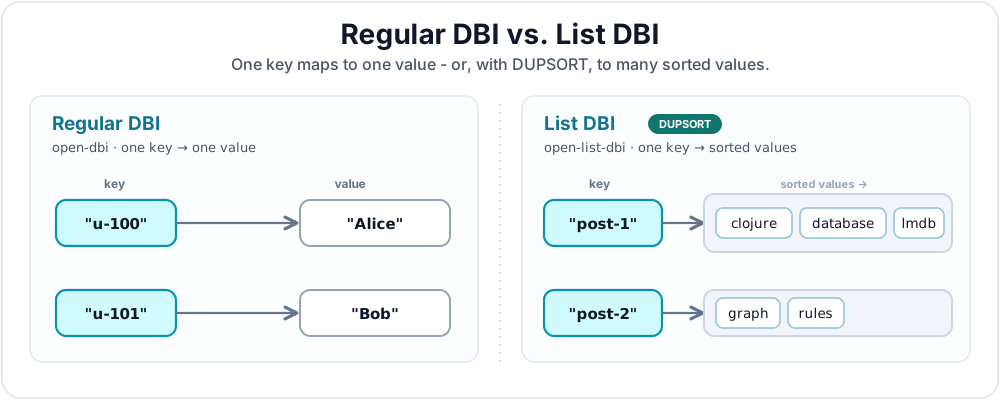
There are two types of DBI: a regular DBI and a list DBI. Figure 10.1 shows the difference.
2.1 Regular DBI
A regular DBI maps one key to exactly one value. It is opened with open-dbi.
;; Open a regular DBI called "people" in the KV store.
(d/open-dbi kv "people")
// Open a regular DBI called "people" in the KV store.
kv.openDbi("people");
# Open a regular DBI called "people" in the KV store.
kv.open_dbi("people")
// Open a regular DBI called "people" in the KV store.
await kv.openDbi("people");
2.2 List DBI
A list DBI uses LMDB's DUPSORT feature. A single key can map to multiple sorted values: that is, a list. This is effectively a B+Tree of B+Trees. A list DBI is opened with open-list-dbi.
;; Open a list DBI (DUPSORT DBI) called "tags".
(d/open-list-dbi kv "tags")
// Open a list DBI (DUPSORT DBI) called "tags".
kv.openListDbi("tags");
# Open a list DBI (DUPSORT DBI) called "tags".
kv.open_list_dbi("tags")
// Open a list DBI (DUPSORT DBI) called "tags".
await kv.openListDbi("tags");
3. Data Types
LMDB deals with raw bytes. Datalevin encodes and decodes typed values so those bytes sort correctly and store efficiently. These types can be specified as key-type or value-type parameters in KV operations.
KV type validation is separate from Datalog schema validation. In Datalog, :db/valueType belongs to an attribute schema. In the KV API, types are passed as operation descriptors or DBI options for keys and values. A DBI opened with :validate-data? true checks KV writes against those key/value types instead of checking Datalog attributes.
KV writes are more than "put this value somewhere." A write must also tell Datalevin how to encode the key, and usually how to encode the value. The encoding determines equality, ordering, range-scan behavior, and whether a value can fit in an LMDB key position.
3.1 Scalar types
The table below shows the scalar KV data types.
| Type | Runtime Data | Notes |
|---|---|---|
:data |
Any EDN data | Default. Stored as opaque binary; not sortable for range queries. |
:string |
String |
UTF-8 encoded, lexicographically sorted. |
:long |
Long (64-bit) |
Numerically sorted. |
:id |
Long (64-bit) |
Specialized id encoding used for entity ids. |
:int |
Integer (32-bit) |
Numerically sorted. |
:float |
Float (32-bit) |
IEEE 754 floating point. |
:double |
Double (64-bit) |
IEEE 754 floating point. |
:bigint |
java.math.BigInteger |
Arbitrary-precision integer within Datalevin's encoded range; numerically sorted. |
:bigdec |
java.math.BigDecimal |
Arbitrary-precision decimal within Datalevin's encoded range; numerically sorted. |
:keyword |
clojure.lang.Keyword |
EDN keyword, sorted by encoded namespace/name. |
:symbol |
clojure.lang.Symbol |
EDN symbol, sorted by encoded namespace/name. |
:boolean |
Boolean |
|
:instant |
Date/time value | Chronologically sorted. |
:uuid |
java.util.UUID |
|
:bytes |
byte[] |
Raw binary payloads. |
If no KV type is specified, the default is :data, which stores an EDN binary blob, unless the DBI declares a custom type (Section 3.4).
3.2 Tuple types
Tuple types are composite KV type descriptors. They are used when a key or DUPSORT value needs to sort by more than one field, such as [customer-id created-at] or [tenant-id order-total order-id].
Do not confuse these KV type descriptors with Datalog schema composite :db.type/tuple. Here, the descriptor controls how a vector is encoded in the KV layer. In the KV API, a tuple type is written as a vector of scalar KV types. There are two forms:
- A heterogeneous descriptor gives one scalar type per position.
- A homogeneous descriptor gives one scalar type that repeats for every element.
Some examples:
| Type Descriptor | Meaning |
|---|---|
[:string :instant] |
Heterogeneous tuple: exactly two elements, first a string, second an instant. |
[:keyword :long :string] |
Heterogeneous tuple: exactly three elements with the listed types. |
[:long] |
Homogeneous tuple: any number of elements, all encoded as longs. |
Tuple values are ordinary vectors whose shape must match the type descriptor. Heterogeneous tuple descriptors are fixed arity: [:string :instant] matches ["acct-42" #inst "2026-05-31T00:00:00.000-00:00"]. Homogeneous descriptors have one element type and can encode vectors such as [2026 5 31].
Datalevin encodes typed KV keys and values into byte buffers internally. Tuple elements must use encodings that preserve the intended sort order in those buffers: :string, :int, :long, :float, :double, :bigint, :bigdec, :keyword, :symbol, :boolean, :instant, and :uuid. Do not use :data or :bytes inside a tuple; arbitrary EDN data and byte arrays are not sortable tuple components. Use :int for signed 32-bit components, for example [:int :string] or [:int], and :long when a component needs a 64-bit range. Tuple :int components preserve signed ordering; out-of-range values are rejected. The KV-only :id encoding remains unsupported inside tuples. This does not add a Datalog :db.type/int schema type.
Tuples sort lexicographically by their encoded elements: first element first, then the second element to break ties, and so on. Put the field you most often range over or group by at the front of the tuple.
The example below uses a range expression before the full range API reference in Section 4.3. Read [:closed start end] as "scan from start through end, including both endpoints." Because the keys are tuples, the start and end values are tuple keys too.
(def event-key-type [:string :instant])

(d/open-dbi kv "events")

(d/transact-kv kv
  [[:put "events"
    ["acct-42" #inst "2026-05-31T10:00:00.000-00:00"]
    {"event/type" "login"}
    event-key-type
    :data]
   [:put "events"
    ["acct-42" #inst "2026-05-31T12:00:00.000-00:00"]
    {"event/type" "purchase"}
    event-key-type
    :data]])

;; Scan one account for a time window.
(d/get-range kv
  "events"
  [:closed
   ["acct-42" #inst "2026-05-31T00:00:00.000-00:00"]
   ["acct-42" #inst "2026-06-01T00:00:00.000-00:00"]]
  event-key-type)
import datalevin.Datalevin;
import datalevin.KVType;
import java.time.Instant;
import java.util.List;
import java.util.Map;

KVType eventKeyType = KVType.tuple(KVType.STRING, KVType.INSTANT);

kv.openDbi("events");

kv.transact(
    "events",
    List.of(
        List.of(Datalevin.kw(":put"),
                List.of("acct-42", Instant.parse("2026-05-31T10:00:00Z")),
                Map.of("event/type", "login")),
        List.of(Datalevin.kw(":put"),
                List.of("acct-42", Instant.parse("2026-05-31T12:00:00Z")),
                Map.of("event/type", "purchase"))),
    eventKeyType,
    KVType.DATA);

// Scan one account for a time window.
List<?> events = kv.getRange(
    "events",
    List.of(Datalevin.kw(":closed"),
            List.of("acct-42", Instant.parse("2026-05-31T00:00:00Z")),
            List.of("acct-42", Instant.parse("2026-06-01T00:00:00Z"))),
    eventKeyType,
    KVType.DATA,
    null,
    null);
from datetime import datetime, timezone

event_key_type = [":string", ":instant"]

kv.open_dbi("events")

kv.transact([
    [":put",
     ["acct-42", datetime(2026, 5, 31, 10, tzinfo=timezone.utc)],
     {"event/type": "login"}],
    [":put",
     ["acct-42", datetime(2026, 5, 31, 12, tzinfo=timezone.utc)],
     {"event/type": "purchase"}],
], dbi_name="events", k_type=event_key_type, v_type=":data")

# Scan one account for a time window.
events = kv.get_range(
    "events",
    [":closed",
     ["acct-42", datetime(2026, 5, 31, tzinfo=timezone.utc)],
     ["acct-42", datetime(2026, 6, 1, tzinfo=timezone.utc)]],
    k_type=event_key_type,
    v_type=":data")
const eventKeyType = [":string", ":instant"];

await kv.openDbi("events");

await kv.transact([
  [":put",
    ["acct-42", new Date("2026-05-31T10:00:00Z")],
    { "event/type": "login" }],
  [":put",
    ["acct-42", new Date("2026-05-31T12:00:00Z")],
    { "event/type": "purchase" }]
], {
  dbiName: "events",
  kType: eventKeyType,
  vType: ":data"
});

// Scan one account for a time window.
const events = await kv.getRange("events", [
  ":closed",
  ["acct-42", new Date("2026-05-31T00:00:00Z")],
  ["acct-42", new Date("2026-06-01T00:00:00Z")]
], { kType: eventKeyType, vType: ":data" });
In list DBIs, tuple values are useful for sorted secondary lists:
(def score-type [:double :string])

(d/open-list-dbi kv "scores-by-board")

(d/transact-kv kv
  [[:put "scores-by-board" "daily" [98.5 "alice"] :string score-type]
   [:put "scores-by-board" "daily" [87.0 "bob"] :string score-type]])

(d/get-list kv "scores-by-board" "daily" :string score-type)
;; => ([87.0 "bob"] [98.5 "alice"])
KVType scoreType = KVType.tuple(KVType.DOUBLE, KVType.STRING);

kv.openListDbi("scores-by-board");

kv.transact(
    "scores-by-board",
    List.of(
        List.of(Datalevin.kw(":put"), "daily", List.of(98.5, "alice")),
        List.of(Datalevin.kw(":put"), "daily", List.of(87.0, "bob"))),
    KVType.STRING,
    scoreType);

List<?> scores = kv.getList(
    "scores-by-board", "daily", KVType.STRING, scoreType);
// => [[87.0, "bob"], [98.5, "alice"]]
score_type = [":double", ":string"]

kv.open_list_dbi("scores-by-board")

kv.transact([
    [":put", "daily", [98.5, "alice"]],
    [":put", "daily", [87.0, "bob"]],
], dbi_name="scores-by-board", k_type=":string", v_type=score_type)

scores = kv.get_list(
    "scores-by-board", "daily", ":string", score_type)
# => [[87.0, "bob"], [98.5, "alice"]]
const scoreType = [":double", ":string"];

await kv.openListDbi("scores-by-board");

await kv.transact([
  [":put", "daily", [98.5, "alice"]],
  [":put", "daily", [87.0, "bob"]]
], {
  dbiName: "scores-by-board",
  kType: ":string",
  vType: scoreType
});

const scores = await kv.getList("scores-by-board", "daily", {
  kType: ":string",
  vType: scoreType
});
// => [[87.0, "bob"], [98.5, "alice"]]
3.3 Important Constraints: Key Size Limit
LMDB, and therefore Datalevin, has a hard key-size limit. In Datalevin, the maximum key size is 511 bytes. Keep KV keys compact and put large payloads in values rather than keys.
When using composite keys, the sum of the encoded tuple parts must stay within this limit. In a list DBI, values are stored in a secondary B+Tree where they essentially act as keys, so each value in a list DBI is also subject to the 511-byte limit. Regular DBI values are not subject to this key-size limit and can grow up to 2 GB.
3.4 Custom data types
Use a custom data type to store a complete application value and sort it by an order key derived from its content. For example, you can store task maps as keys and order them by priority.
Each custom type has an order key and a payload:
- The order function computes the order key using a built-in scalar or tuple type.
- The payload stores the complete value. Datalevin handles serialization by default; you can also supply your own serializer and deserializer.
Register the type under a namespaced keyword before using it in a DBI. The example below registers :app/task, declares it as the key type for "tasks", and stores a status under each task. Exact lookup uses the complete task map; a range scan returns tasks in priority order.
(require '[datalevin.core :as d]
         '[datalevin.interpret :as i])

(def task-type
  {:index {:type :long
           :order-fn (i/inter-fn [task] (:priority task))}})

(def compile-task {:priority 3 :name "Compile"})
(def urgent-task {:priority 1 :name "Fix build"})

(let [kv (d/open-kv "/tmp/datalevin-custom-kv")]
  (try
    (d/register-type kv :app/task task-type)
    (d/open-dbi kv "tasks" {:key-type :app/task})
    (d/transact-kv kv "tasks"
                   [[:put compile-task :queued]
                    [:put urgent-task :running]])

    (d/get-value kv "tasks" compile-task)
    ;; => :queued

    (mapv (comp :priority first) (d/get-range kv "tasks" [:all]))
    ;; => [1 3]
    (finally (d/close-kv kv))))
import datalevin.Datalevin;
import datalevin.KV;
import datalevin.KVType;
import datalevin.RangeSpec;
import datalevin.UdfDescriptor;
import datalevin.UdfRegistry;
import java.util.List;
import java.util.Map;

UdfRegistry registry = Datalevin.udfRegistry()
    .orderFn("task/order", args -> ((Map<?, ?>) args.get(0)).get(":priority"));

Map<?, ?> taskType = Map.of(
    ":index", Map.of(":type", KVType.LONG,
                     ":order-fn", UdfDescriptor.orderFn("task/order")));

Map<?, ?> compileTask = Map.of(":priority", 3L, ":name", "Compile");
Map<?, ?> urgentTask = Map.of(":priority", 1L, ":name", "Fix build");

try (KV kv = Datalevin.openKV("/tmp/datalevin-custom-kv",
        Map.of(":runtime-opts", Map.of(":udf-registry", registry)))) {
    kv.registerType(":app/task", taskType);
    kv.openDbi("tasks", Map.of(":key-type", ":app/task"));

    kv.transact("tasks",
        List.of(List.of(Datalevin.kw(":put"), compileTask, "queued"),
                List.of(Datalevin.kw(":put"), urgentTask, "running")));

    kv.getValue("tasks", compileTask);
    // => "queued"

    List<?> priorities = kv.getRange("tasks", RangeSpec.all()).stream()
        .map(row -> ((Map<?, ?>) ((List<?>) row).get(0)).get(":priority"))
        .toList();
    // => [1, 3]
}
from datalevin import UdfDescriptor, create_udf_registry, open_kv

registry = create_udf_registry()
registry.order_udf("task/order")(lambda task: task["priority"])

task_type = {
    "index": {"type": ":long",
              "order-fn": UdfDescriptor.order_fn("task/order")},
}

compile_task = {"priority": 3, "name": "Compile"}
urgent_task = {"priority": 1, "name": "Fix build"}

with open_kv("/tmp/datalevin-custom-kv",
             opts={":runtime-opts": {":udf-registry": registry}}) as kv:
    kv.register_type("app/task", task_type)
    kv.open_dbi("tasks", {":key-type": ":app/task"})
    kv.transact([(":put", compile_task, "queued"),
                 (":put", urgent_task, "running")], dbi_name="tasks")
    assert kv.get_value("tasks", compile_task) == "queued"

    priorities = [task["priority"] for task, status in kv.get_range("tasks", [":all"])]
    assert priorities == [1, 3]
import { UdfDescriptor, createUdfRegistry, openKv } from "datalevin-node";

const registry = await createUdfRegistry();
await registry.orderUdf("task/order", task => task.priority);

const taskType = {
  index: { type: ":long", "order-fn": UdfDescriptor.orderFn("task/order") }
};

const compileTask = { priority: 3n, name: "Compile" };
const urgentTask = { priority: 1n, name: "Fix build" };

const kv = await openKv("/tmp/datalevin-custom-kv", {
  ":runtime-opts": { ":udf-registry": registry }
});
try {
  await kv.registerType("app/task", taskType);
  await kv.openDbi("tasks", { ":key-type": ":app/task" });
  await kv.transact([[":put", compileTask, "queued"],
                     [":put", urgentTask, "running"]], { dbiName: "tasks" });
  console.log(await kv.getValue("tasks", compileTask)); // queued

  const priorities = (await kv.getRange("tasks", [":all"]))
    .map(([task, status]) => task.priority);
  console.log(priorities); // [1n, 3n]
} finally {
  await kv.close();
}
In the definition, :index :type declares the order key's type, and :index :order-fn computes it. Use KV type names such as :long. In Clojure, datalevin.interpret/inter-fn stores the function's source and captured values; an ordinary fn cannot be stored. The Java, Python, and JavaScript examples use a UDF descriptor to identify a function supplied by the runtime registry. Appendix F, Section 12 lists the supported order key types, definition fields, and payload options.
The registration is shared by all DBIs and Datalog attributes in the same database and survives closing and reopening it. UDF implementations must be supplied again when opening the database in a new process.
Declare custom types when opening a DBI:
| Use | DBI declaration |
|---|---|
| Custom keys | (d/open-dbi kv "tasks" {:key-type :app/task}) |
| Ordered custom list items | (d/open-list-dbi kv "tasks-by-owner" {:value-type :app/task}) |
| Both custom keys and items | (d/open-list-dbi kv "related" {:key-type :app/task :value-type :app/task}) |
A custom :value-type requires a list DBI. An ordinary DBI's associated value uses the built-in KV value types, as the status does in the example. Custom declarations persist. Omitting an operation's type argument, or passing the default :data, selects the declared custom type. Other explicit types must match the declaration. Passing a custom type name for an undeclared key or list item raises an error.
Values that share an order key form an order group. Two different tasks with priority 3 belong to the same group. Exact lookup, deletion, and list membership still distinguish them by their complete values. An inclusive range endpoint at priority 3 includes both tasks; an exclusive endpoint excludes both. To order tasks within a priority, return a tuple such as priority followed by name.
Choose the order function for the operations your application needs:
- Equal values must produce the same order key on every call, including after reopening the database.
- Do not mutate fields that determine the order or equality while a transaction uses the value.
- Include enough information in the order key to narrow exact lookups. Many values with the same order key require more candidate comparisons.
- Supply every field the order function reads in a range endpoint. For the example above,
{:priority 3}is sufficient.
Keep order keys compact. Custom entries reserve part of the 511-byte key limit for a payload reference, so a long encoded order key may be truncated. Values whose encoded keys share that prefix then belong to the same range group, though exact operations still distinguish them. The backing type's size and value limits also apply. Custom DBIs require ordinary byte ordering; they do not support reverse-ordering, integer-comparison, or fixed-size duplicate flags.
Open the first custom DBI, or install the first custom attribute, outside an explicit write transaction. Subsequent data operations use the normal transaction APIs: payload and index updates commit or roll back together. Registration also participates in a write transaction when passed its transaction handle. Deleting a key or item, retracting a fact, or clearing a DBI removes the associated payloads.
Treat a registered definition as immutable. Registering the same definition again is safe; a conflicting definition is rejected. To change the order or payload encoding, register a new type and migrate the values into a new DBI or attribute. Increasing :version alone does not migrate stored data.
Reading a custom value requires loading and decoding its payload. Counts and scans that omit custom values can avoid that cost. For example, a scan that returns only task statuses can skip decoding the custom task keys. Chapter 11, Section 4.3 covers custom Datalog attributes, and Chapter 15, Section 4 explains how custom entries fit into the index model.
4. KV Operations
Under the hood, LMDB uses transactions for both reads and writes. In this section, transaction means a write transaction: a batch of changes that commits atomically. Read transactions are called queries.
4.1 Transactions
Data is written to a KV store with transact-kv. One call applies a batch of operations atomically: either all items commit or none of them do. A single KV transaction may write to several DBIs in the same store, but it cannot span two different stores or database files.
Transaction items are vectors. Datalevin accepts two public layouts for KV transaction data.
The self-contained shape is used with (d/transact-kv kv txs). Each item names the DBI and may carry its own key and value types:
[:put dbi-name key value]
[:put dbi-name key value key-type value-type]
[:put dbi-name key value key-type value-type flags]
[:del dbi-name key]
[:del dbi-name key key-type]
When key-type or value-type is omitted, Datalevin uses the DBI's declared custom type if there is one (Section 3.4), and :data otherwise. :data is fine for opaque EDN values, but it is usually the wrong choice for keys you plan to scan by range. Use explicit sortable types such as :string, :long, :instant, or tuple descriptors for range-oriented DBIs.
The optional flags slot applies to :put operations and is rarely needed. The common flag worth knowing is :append, a hint for trusted bulk loading when keys are already in ascending order. Most transactions should omit flags.
;; Add multiple values to the same key in a list DBI.
(d/transact-kv kv
  [[:put "tags" "clojure" "fast" :string :string]
   [:put "tags" "clojure" "expressive" :string :string]])
// Add multiple values to the same key in a list DBI.
kv.transact(List.of(
    List.of(Datalevin.kw(":put"), "tags", "clojure", "fast", ":string", ":string"),
    List.of(Datalevin.kw(":put"), "tags", "clojure", "expressive", ":string", ":string")));
# Add multiple values to the same key in a list DBI.
kv.transact([
    [":put", "tags", "clojure", "fast", ":string", ":string"],
    [":put", "tags", "clojure", "expressive", ":string", ":string"]])
// Add multiple values to the same key in a list DBI.
await kv.transact([
  [":put", "tags", "clojure", "fast", ":string", ":string"],
  [":put", "tags", "clojure", "expressive", ":string", ":string"]
]);
The single-DBI shape (d/transact-kv kv dbi-name txs) is used when every item targets the same DBI and uses the same key/value types. Pull the DBI name and types out to the function call, then each item contains only the operation, key, and value:
(d/transact-kv kv
  "people"
  [[:put 1 "Alice"]
   [:put 2 "Bob"]
   [:del 3]]
  :long
  :string)
kv.transact(
    "people",
    List.of(
        List.of(Datalevin.kw(":put"), 1L, "Alice"),
        List.of(Datalevin.kw(":put"), 2L, "Bob"),
        List.of(Datalevin.kw(":del"), 3L)),
    ":long",
    ":string");
kv.transact([
    [":put", 1, "Alice"],
    [":put", 2, "Bob"],
    [":del", 3],
], dbi_name="people", k_type=":long", v_type=":string")
await kv.transact([
  [":put", 1, "Alice"],
  [":put", 2, "Bob"],
  [":del", 3]
], {
  dbiName: "people",
  kType: ":long",
  vType: ":string"
});
This call is equivalent to:
(d/transact-kv kv
  [[:put "people" 1 "Alice" :long :string]
   [:put "people" 2 "Bob" :long :string]
   [:del "people" 3 :long]])
kv.transact(List.of(
    List.of(Datalevin.kw(":put"), "people", 1L, "Alice", ":long", ":string"),
    List.of(Datalevin.kw(":put"), "people", 2L, "Bob", ":long", ":string"),
    List.of(Datalevin.kw(":del"), "people", 3L, ":long")));
kv.transact([
    [":put", "people", 1, "Alice", ":long", ":string"],
    [":put", "people", 2, "Bob", ":long", ":string"],
    [":del", "people", 3, ":long"],
])
await kv.transact([
  [":put", "people", 1, "Alice", ":long", ":string"],
  [":put", "people", 2, "Bob", ":long", ":string"],
  [":del", "people", 3, ":long"]
]);
Use the self-contained shape when a batch touches multiple DBIs or mixed data types. Use the single-DBI shape when you are bulk-writing one typed DBI; it is shorter, clearer, and avoids repeating the same descriptors on every item.
For list DBIs, :put adds one sorted value under the key. To add or delete many list values under one key, the dedicated put-list-items and del-list-items helpers are often clearer; Appendix F lists the full list-DBI API.
4.2 Point query
The value for a key can be retrieved with get-value. If the DBI is a list DBI, the sorted values for a key can be retrieved with get-list. These are single-key point queries.
For a regular DBI, read one key:
(d/get-value kv "people" 1 :long :string true)
;; => "Alice"
Object name = kv.getValue("people", 1L, ":long", ":string", true);
// => "Alice"
name = kv.get_value("people", 1, ":long", ":string", ignore_key=True)
# => "Alice"
const name = await kv.getValue("people", 1, {
  kType: ":long",
  vType: ":string",
  ignoreKey: true
});
// => "Alice"
For a list DBI, read all sorted values under one key:
;; Get all values for a key
(d/get-list kv "tags" "clojure" :string :string)
;; => ("expressive" "fast") ; sorted values
// Get all values for a key
List<?> values = kv.getList("tags", "clojure", ":string", ":string");
// => ["expressive", "fast"] ; sorted values
# Get all values for a key
values = kv.get_list("tags", "clojure", ":string", ":string")
# => ["expressive", "fast"] ; sorted values
// Get all values for a key
const values = await kv.getList("tags", "clojure", {
  kType: ":string",
  vType: ":string"
});
// => ["expressive", "fast"] ; sorted values
4.3 Range query
Because Datalevin keeps keys (and DUPSORT values) sorted, you can perform highly efficient range scans. Datalevin provides a rich set of range keywords that specify how the scan should start, end, and in which direction it should move.
A range is specified as a vector: [range-type start-value end-value].
| Range Type | Direction | Bounds |
|---|---|---|
:all / :all-back |
Forward / Backward | Entire keyspace. |
:at-least / :at-most-back |
Forward / Backward | Inclusive start. |
:at-most / :at-least-back |
Forward / Backward | Inclusive end. |
:closed / :closed-back |
Forward / Backward | Inclusive start, inclusive end. |
:closed-open / :closed-open-back |
Forward / Backward | Inclusive start, exclusive end. |
:open-closed / :open-closed-back |
Forward / Backward | Exclusive start, inclusive end. |
:open / :open-back |
Forward / Backward | Exclusive start, exclusive end. |
:greater-than / :less-than-back |
Forward / Backward | Exclusive start. |
:less-than / :greater-than-back |
Forward / Backward | Exclusive end. |
Common range query functions are:
(d/get-range kv dbi range key-type): Returns an eager sequence of KV pairs.(d/range-count kv dbi range key-type): Counts entries in a range without returning them.(d/range-filter kv dbi pred range key-type): Scans a range and keeps pairs whose predicate matches.(d/range-seq kv dbi range key-type): Returns a closeable lazy sequence of the range.
Technically, one DBI can contain keys encoded with different KV data types. Datalevin uses that capability internally in several places. For application DBIs, avoid mixed key types unless you have a deliberate encoding plan. Range queries operate on the encoded byte ordering, so a DBI that mixes strings, numbers, keywords, tuples, and raw data can produce ranges that are surprising to read and hard to maintain. In most application DBIs, pick one key type, or one tuple key type, and use it consistently.
get-range and range-filter are eager APIs: they realize the requested range as a result collection. For large ranges, Datalevin's spillable collections can move intermediate data to temporary disk storage under memory pressure. Section 1 shows how to configure :spill-opts. If you want to process a large range without realizing it eagerly, prefer range-seq and close the returned sequence when finished.
4.4 Visitor and Filter Functions
Sometimes you do not want a sequence at all: you want to stream over a range, update a counter, write to an output file, build a summary, or stop as soon as enough data has been seen. For those cases, use the visitor APIs.
The main visitor families are:
visit-key-range, which visits keys only.visit, which visits key-value pairs in a regular DBI.visit-list, which visits the values stored under one list-DBI key.visit-list-range, which visits key-value pairs across a list-DBI range.
Visitors return no result from the outer call and are intended for side effects. In Clojure, a visitor callback may return :datalevin/terminate-visit to stop a scan early. Java, Python, and JavaScript expose visitor wrappers as side-effect callbacks in the host language. For search-style short-circuiting, use a narrow range; for list DBIs, use list-range-some in Clojure, listRangeSome in Java and JavaScript, or list_range_some in Python.
At the Clojure API level, visitors run in raw mode by default unless the final raw-mode flag is false. The Java, Python, and JavaScript wrappers split that choice into decoded methods such as visit and raw methods such as visitRaw/visit_raw; list DBIs follow the same pattern with methods such as visitListRange/visit_list_range and visitListRangeRaw/visit_list_range_raw.
In raw mode, the callback argument depends on the visitor. visit-key-range receives a key buffer directly. visit-list receives a value buffer directly. visit and visit-list-range receive an IKV pair, because both key and value are available. Clojure exposes raw callbacks as ByteBuffer values or IKV key/value pairs. Java exposes RawBuffer and RawKV wrappers; Python and JavaScript expose analogous RawBuffer and RawKV objects with read, read_key/readKey, read_value/readValue, and byte-copy helpers.
For a portable range visitor over a regular DBI, use decoded visit when you want application values in the callback. The examples below reuse the events DBI from Section 3.2, where each key is [account instant] and each value is an event map.
(def event-types (atom []))

(d/visit kv "events"
  (fn [[_account at] event]
    (swap! event-types conj [at (get event "event/type")]))
  [:closed
   ["acct-42" #inst "2026-05-31T00:00:00.000-00:00"]
   ["acct-42" #inst "2026-06-01T00:00:00.000-00:00"]]
  event-key-type
  :data
  false)

@event-types
;; => [[#inst "2026-05-31T10:00:00.000-00:00" "login"]
;;     [#inst "2026-05-31T12:00:00.000-00:00" "purchase"]]
List<List<?>> eventTypes = new ArrayList<>();

kv.visit(
    "events",
    (key, value) -> {
        List<?> eventKey = (List<?>) key;
        Instant at = (Instant) eventKey.get(1);
        Map<?, ?> event = (Map<?, ?>) value;

        eventTypes.add(List.of(at, event.get("event/type")));
    },
    List.of(Datalevin.kw(":closed"),
            List.of("acct-42", Instant.parse("2026-05-31T00:00:00Z")),
            List.of("acct-42", Instant.parse("2026-06-01T00:00:00Z"))),
    eventKeyType,
    KVType.DATA);

// eventTypes => [[2026-05-31T10:00:00Z, login],
//                [2026-05-31T12:00:00Z, purchase]]
event_types = []

def collect(event_key, event):
    _account, at = event_key
    event_types.append([at, event["event/type"]])

kv.visit(
    "events",
    collect,
    [":closed",
     ["acct-42", datetime(2026, 5, 31, tzinfo=timezone.utc)],
     ["acct-42", datetime(2026, 6, 1, tzinfo=timezone.utc)]],
    event_key_type,
    ":data")

# event_types => [[datetime(2026, 5, 31, 10, tzinfo=timezone.utc), "login"],
#                 [datetime(2026, 5, 31, 12, tzinfo=timezone.utc), "purchase"]]
const eventTypes = [];

await kv.visit("events", (eventKey, event) => {
  const [, at] = eventKey;
  eventTypes.push([at, event["event/type"]]);
}, [
  ":closed",
  ["acct-42", new Date("2026-05-31T00:00:00Z")],
  ["acct-42", new Date("2026-06-01T00:00:00Z")]
], {
  kType: eventKeyType,
  vType: ":data"
});

// eventTypes => [[2026-05-31T10:00:00.000Z, "login"],
//                [2026-05-31T12:00:00.000Z, "purchase"]]
read-buffer is the inverse of Datalevin's KV encoding. It reads a value out of the current position of a ByteBuffer according to the type descriptor you provide: :string, :long, :instant, :data, a tuple descriptor such as [:string :instant], and so on. put-buffer goes the other direction: it writes an application value into a ByteBuffer using the same type descriptor. This is useful when a raw visitor or raw range predicate wants to compare encoded values without decoding every item.
For raw regular-DBI visits, the callback receives a raw key/value pair. Decode or copy what you need inside the callback:
(d/visit kv "events"
  (fn [kvp]
    (let [[_account at] (d/read-buffer (d/k kvp) event-key-type)
          event         (d/read-buffer (d/v kvp) :data)]
      (println at (get event "event/type"))))
  [:closed
   ["acct-42" #inst "2026-05-31T00:00:00.000-00:00"]
   ["acct-42" #inst "2026-06-01T00:00:00.000-00:00"]]
  event-key-type
  :data
  true)
kv.visitRaw(
    "events",
    raw -> {
        List<?> eventKey = (List<?>) raw.readKey(eventKeyType);
        Map<?, ?> event = (Map<?, ?>) raw.readValue(KVType.DATA);
        System.out.println(eventKey.get(1) + " " + event.get("event/type"));
    },
    List.of(Datalevin.kw(":closed"),
            List.of("acct-42", Instant.parse("2026-05-31T00:00:00Z")),
            List.of("acct-42", Instant.parse("2026-06-01T00:00:00Z"))),
    eventKeyType,
    KVType.DATA);
kv.visit_raw(
    "events",
    lambda raw: print(
        raw.read_key(event_key_type)[1],
        raw.read_value(":data")["event/type"]),
    [":closed",
     ["acct-42", datetime(2026, 5, 31, tzinfo=timezone.utc)],
     ["acct-42", datetime(2026, 6, 1, tzinfo=timezone.utc)]],
    event_key_type,
    ":data")
await kv.visitRaw("events", async (raw) => {
  const eventKey = await raw.readKey(eventKeyType);
  const event = await raw.readValue(":data");
  console.log(eventKey[1], event["event/type"]);
}, [
  ":closed",
  ["acct-42", new Date("2026-05-31T00:00:00Z")],
  ["acct-42", new Date("2026-06-01T00:00:00Z")]
], {
  kType: eventKeyType,
  vType: ":data"
});
Raw filters over list ranges receive a raw key/value pair. The predicate can decode only the parts it needs:
(d/list-range-filter kv "scores-by-board"
  (fn [kvp]
    (let [[score _user] (d/read-buffer (d/v kvp) score-type)]
      (>= score 90.0)))
  [:all]
  :string
  [:all]
  score-type
  true)
;; => [["daily" [98.5 "alice"]]]
List<?> highScores = kv.listRangeFilterRaw(
    "scores-by-board",
    raw -> {
        List<?> row = (List<?>) raw.readValue(scoreType);
        return ((Number) row.get(0)).doubleValue() >= 90.0;
    },
    List.of(Datalevin.kw(":all")),
    KVType.STRING,
    List.of(Datalevin.kw(":all")),
    scoreType,
    null,
    null);
high_scores = kv.list_range_filter_raw(
    "scores-by-board",
    lambda raw: raw.read_value(score_type)[0] >= 90.0,
    [":all"],
    ":string",
    [":all"],
    score_type)
const highScores = await kv.listRangeFilterRaw(
  "scores-by-board",
  async (raw) => {
    const [score] = await raw.readValue(scoreType);
    return score >= 90.0;
  },
  [":all"],
  { kType: ":string", vRange: [":all"], vType: scoreType }
);
Raw visitor buffers are callback-local
Clojure code that drops to the raw JVM buffer API can use put-buffer to encode a cutoff once and compare raw ByteBuffer values. Raw byte comparison is meaningful only when both buffers use the same type descriptor.
Read or copy what you need inside the visitor; do not retain raw buffers outside the callback.
Raw mode avoids decoding data that the visitor may not need. If you prefer a simpler callback and are willing to decode every visited item, use decoded visitor methods. In Clojure, this means passing false as the final raw-mode flag; in Java, Python, and JavaScript, call the decoded wrapper rather than the Raw wrapper:
(d/visit-list kv "scores-by-board"
  (fn [[score user]]
    (println user score))
  "daily"
  :string
  score-type
  false)
kv.visitList(
    "scores-by-board",
    value -> {
        List<?> row = (List<?>) value;
        System.out.println(row.get(1) + " " + row.get(0));
    },
    "daily",
    KVType.STRING,
    scoreType);
kv.visit_list(
    "scores-by-board",
    lambda row: print(row[1], row[0]),
    "daily",
    ":string",
    score_type)
await kv.visitList("scores-by-board", (row) => {
  console.log(row[1], row[0]);
}, "daily", {
  kType: ":string",
  vType: scoreType
});
Use decoded mode for clarity. Use raw mode when you are doing a large scan, need to skip many items cheaply, or need direct control over decoding.
4.5 Other Data Access Functions
Beyond point and range queries, Datalevin provides several specialized functions for the KV layer:
| Function | Purpose |
|---|---|
get-first |
Get the first key-value pair in a DBI. |
get-first-n |
Get the first N key-value pairs in a DBI. |
get-rank |
Find the numerical rank (position) of a key in the sorted order. |
get-by-rank |
Retrieve the key at a specific numerical index. |
sample-kv |
Take a random sample of KV pairs from a DBI. |
sample-kv is useful for quick inspection, smoke tests after import, or getting representative examples without scanning a whole DBI. By default it returns values only. Pass false as ignore-key? when you want [key value] pairs.
Java exposes this helper through DatalevinInterop.kvSample; Python and JavaScript expose it as a method on the KV handle.
(d/open-dbi kv "people")

(d/transact-kv kv
  [[:put "people" 1 "Alice" :long :string]
   [:put "people" 2 "Bob" :long :string]
   [:put "people" 3 "Cara" :long :string]])

(d/sample-kv kv "people" 2 :long :string false)
;; => [[2 "Bob"] [1 "Alice"]] ; example only, samples are random
import datalevin.DatalevinInterop;

kv.openDbi("people");

kv.transact(
    "people",
    List.of(
        List.of(Datalevin.kw(":put"), 1L, "Alice"),
        List.of(Datalevin.kw(":put"), 2L, "Bob"),
        List.of(Datalevin.kw(":put"), 3L, "Cara")),
    ":long",
    ":string");

List<?> sample = DatalevinInterop.kvSample(
    kv.handle(), "people", 2, ":long", ":string", false);
// => [[2, "Bob"], [1, "Alice"]] ; example only, samples are random
kv.open_dbi("people")

kv.transact([
    [":put", 1, "Alice"],
    [":put", 2, "Bob"],
    [":put", 3, "Cara"],
], dbi_name="people", k_type=":long", v_type=":string")

sample = kv.sample_kv(
    "people", 2, k_type=":long", v_type=":string", ignore_key=False)
# => [[2, "Bob"], [1, "Alice"]] ; example only, samples are random
await kv.openDbi("people");

await kv.transact([
  [":put", 1, "Alice"],
  [":put", 2, "Bob"],
  [":put", 3, "Cara"]
], {
  dbiName: "people",
  kType: ":long",
  vType: ":string"
});

const sample = await kv.sampleKv("people", 2, {
  kType: ":long",
  vType: ":string",
  ignoreKey: false
});
// => [[2, "Bob"], [1, "Alice"]] ; example only, samples are random
If n is larger than the number of entries in the DBI, sample-kv returns no result (nil, null, or None, depending on the language).
5. Explicit Transaction with-transaction-kv
transact-kv is the standard way to write data. However, for complex logic involving reads and writes that must be atomic, use with-transaction-kv in Clojure or the corresponding explicit transaction helper in each host-language binding.
(d/open-dbi kv "counters")

(d/with-transaction-kv [tx kv]
  (let [current (or (d/get-value tx "counters" "hits" :string :long) 0)
        new-val (inc current)]
    (d/transact-kv tx
      "counters"
      [[:put "hits" new-val]]
      :string
      :long)))
kv.openDbi("counters");

kv.withTransaction(tx -> {
    Object value = tx.getValue(
        "counters", "hits", ":string", ":long", true);
    long current = value == null ? 0L : ((Number) value).longValue();

    tx.transact(
        "counters",
        List.of(List.of(Datalevin.kw(":put"), "hits", current + 1)),
        ":string",
        ":long");
    return null;
});
kv.open_dbi("counters")

def increment(tx):
    current = tx.get_value(
        "counters", "hits", ":string", ":long", ignore_key=True) or 0
    tx.transact(
        [[":put", "hits", current + 1]],
        dbi_name="counters",
        k_type=":string",
        v_type=":long")

kv.with_transaction(increment)
await kv.openDbi("counters");

await kv.withTransaction(async (tx) => {
  const current = await tx.getValue("counters", "hits", {
    kType: ":string",
    vType: ":long",
    ignoreKey: true
  }) ?? 0;

  await tx.transact([[":put", "hits", current + 1]], {
    dbiName: "counters",
    kType: ":string",
    vType: ":long"
  });
});
This helper ensures that:
- All reads and writes inside the block share the same transaction snapshot.
- The transaction is automatically committed at the end of the block.
- If an exception occurs, the transaction is safely aborted.
Inside the body, use the tx handle anywhere you would normally use kv. transact-kv accepts the same self-contained and single-DBI transaction shapes inside an explicit transaction.
Explicit KV transactions also support timeouts:
(d/with-transaction-kv [tx kv {:timeout-ms 5000}]
  (d/transact-kv tx "counters" [[:put "hits" 1]] :string :long))
kv.withTransaction(5000L, tx -> {
    tx.transact(
        "counters",
        List.of(List.of(Datalevin.kw(":put"), "hits", 1L)),
        ":string",
        ":long");
    return null;
});
kv.with_transaction(
    lambda tx: tx.transact(
        [[":put", "hits", 1]],
        dbi_name="counters",
        k_type=":string",
        v_type=":long"),
    timeout_ms=5000)
await kv.withTransaction(async (tx) => {
  await tx.transact([[":put", "hits", 1]], {
    dbiName: "counters",
    kType: ":string",
    vType: ":long"
  });
}, { timeoutMs: 5000 });
KV explicit transactions use the same timeout machinery as Datalog explicit transactions, described in Chapter 6. A timeout aborts the transaction and reports :type :transaction/timeout; code that ignores interruption, or an already-running JavaScript async body, may continue until it returns.
Use with-transaction-kv for KV-only work. When one atomic operation needs to write both Datalog data and custom KV DBIs in the same store, use Datalog with-transaction and access the transactional KV instance from inside that block; Chapter 6 shows the pattern.
5.1 Atomic Updates to One Key
Use d/update-kv to increment a counter or change a stored value based on its current value. The read and write are atomic, so concurrent callers do not overwrite each other's updates. It works with local and remote KV stores:
(require '[datalevin.core :as d]
         '[datalevin.interpret :as inter])

(let [kv (d/open-kv nil {:inmemory? true})
      increment-counter
      (inter/inter-fn [old amount]
        (+ (long (or old 0)) (long amount)))]
  (try
    (d/open-dbi kv "counters")
    (d/update-kv kv "counters" "hits"
                 increment-counter :string :long 2)
    ;; => :transacted
    (d/get-value kv "counters" "hits" :string :long)
    ;; => 2
    (finally
      (d/close-kv kv))))
// kv and remoteKv are open KV handles with a "counters" DBI.
kv.update("counters", "hits",
          old -> (old == null ? 0L : ((Number) old).longValue()) + 2L,
          KVType.STRING, KVType.LONG);
remoteKv.update("counters", "hits",
                "(fn [old amount] (+ (long (or old 0)) (long amount)))",
                KVType.STRING, KVType.LONG, 2L);
# kv and remote_kv are open KV handles with a "counters" DBI.
kv.update("counters", "hits", lambda old: (old or 0) + 2,
          ":string", ":long")
remote_kv.update("counters", "hits",
                 "(fn [old amount] (+ (long (or old 0)) (long amount)))",
                 ":string", ":long", 2)
// kv and remoteKv are open KV handles with a "counters" DBI.
await kv.update("counters", "hits", old => (old ?? 0n) + 2n,
                { kType: ":string", vType: ":long" });
await remoteKv.update("counters", "hits",
  "(fn [old amount] (+ (long (or old 0)) (long amount)))",
  { kType: ":string", vType: ":long", args: [2] });
The update function receives the old value, or nil when the key is absent, followed by any extra arguments. Its result must be a valid, non-nil value of the declared type. An exception or invalid result aborts the update. The return value is :transacted, not the new value; a later read can observe a subsequent writer's update.
For a remote store, define the function with inter-fn as above. Embedded calls also accept ordinary Clojure functions. The function may run more than once, so use it only to compute the new value; keep actions such as sending email outside it.
The Java, Python, and JavaScript wrappers are available in 1.2.3. Embedded stores accept host-language callbacks; remote stores accept restricted Clojure function source as shown above. Missing keys supply null in Java and JavaScript, or None in Python. JavaScript callbacks receive JVM long values as BigInt, so the example uses BigInt arithmetic. Standalone helpers are Datalevin.updateKv, update_kv, and updateKv, with the KV handle first.
For repeated Clojure updates with the same function and arguments, prepare once and pass only the changing key:
(def increment-counter
  (inter/inter-fn [old amount]
    (+ (long (or old 0)) (long amount))))
;; kv is an open local or remote store with a "counters" DBI.
(def add-two (d/prepare-update-kv kv "counters" increment-counter
                                  :string :long 2))
(add-two "hits")
;; => :transacted
(d/execute-prepared add-two "visits")
;; => :transacted
The preparation fixes the DBI, function, types, and extra arguments. It reuses the serialized function on remote connections, registering again after reconnect or handle eviction. Keep the owning store open while reusing it.
Use this API with regular DBIs that store one value per key. For changes to several keys that must succeed together, use with-transaction-kv and pass its tx handle to each update.
Summary
The Datalevin KV API is the direct sorted-storage layer beneath Datalog.
- Stores and DBIs: A KV store can contain many named DBIs. Regular DBIs map one key to one value; list DBIs use DUPSORT for one key with many sorted values.
- Typed encoding: Choose key and value types deliberately. Sortable scalar and tuple encodings make range scans predictable;
:datais for opaque EDN values, not ordered access paths. - Custom data types: Register a type with an order function and a payload to index complete application values as keys or ordered list items. Exact operations compare complete values; range operations follow the order key.
- Point and range reads: Use
get-valueandget-listfor single-key reads, andget-range,range-count,range-filter, orrange-seqfor ordered ranges. - Large scans: Eager range APIs may use spillable collections under memory pressure. Configure
:spill-optsat open time, or userange-seqwhen you want lazy range processing. - Visitors: Use visitor APIs when you want to stream through a range, stop early, or work in raw buffer mode without building a result collection.
- Specialized access: Rank, sample, and first-N helpers expose useful order-statistics operations over sorted DBIs.
- Explicit transactions:
with-transaction-kvgives KV-only read-modify-write logic one atomic transaction, with optional timeout support.
User Examples
Log in to create examplesNo examples for this chapter yet.