
Chapter 8: Datalog Fundamentals
Datalevin's primary query language is Datalog: a declarative way to ask which facts must be true for an answer to exist.
In Datalevin, a Datalog query is EDN data. It is built from vectors, keywords, symbols, lists, and maps, using the classic Datalog ideas of variables, shared constraints, predicates, rules, and recursive reasoning.
Python and JavaScript expose the same grammar through the pure q namespace. The examples use q.var for variables, q.datom for fact patterns, and other typed helpers for clauses and result shapes. Calling as_data() in Python or asData() in JavaScript reveals the corresponding Datalog form without starting the JVM. EDN strings remain supported when an application already has a static query in that representation.
This chapter starts with basic filters and joins, then builds toward predicates, rules, recursion, query planning, and performance.
1. Basic Attribute Filters
Datalog is declarative. The :where clauses define a set of constraints: conditions the answer must satisfy, not a step-by-step procedure for the database to follow.
1.1 A Single Filter on an Entity
A Datalog query usually starts with :find, which says what to return, and :where, which says what facts must match. The most common :where clause is a triple pattern:
(d/q '[:find ?user-eid
       :where [?user-eid :user/name "Alice"]]
     db)
Object result = conn.query("[:find ?user-eid " +
    ":where [?user-eid :user/name \"Alice\"]]");
from datalevin import q

user_eid = q.var("user-eid")
result = conn.query(q.query(
    find=q.relation(user_eid),
    where=[q.datom(user_eid, "user/name", "Alice")],
))
import { q } from "datalevin-node";

const userEid = q.var("user-eid");
const result = await conn.query(q.query({
  find: q.relation(userEid),
  where: [q.datom(userEid, "user/name", "Alice")]
}));
A triple pattern is positional: entity, attribute, then value. The pattern above asks for every entity ?user-eid that has the attribute :user/name with value "Alice".
1.2 Two Filters on the Same Entity
To add another condition on the same entity, reuse the same variable:
(d/q '[:find ?user-eid
       :where [?user-eid :user/name "Alice"]
              [?user-eid :user/city "London"]]
     db)
Object result = conn.query("[:find ?user-eid " +
    ":where [?user-eid :user/name \"Alice\"] " +
    "       [?user-eid :user/city \"London\"]]");
user_eid = q.var("user-eid")
result = conn.query(q.query(
    find=q.relation(user_eid),
    where=[
        q.datom(user_eid, "user/name", "Alice"),
        q.datom(user_eid, "user/city", "London"),
    ],
))
const userEid = q.var("user-eid");
const result = await conn.query(q.query({
  find: q.relation(userEid),
  where: [
    q.datom(userEid, "user/name", "Alice"),
    q.datom(userEid, "user/city", "London")
  ]
}));
This query asks for entities that have a name of "Alice" and a city of "London". Each occurrence of ?user-eid must refer to the same entity within a result row.1 That shared variable is the logical connection between the two clauses.
The clause order is not a procedure. The query does not mean "first find people named Alice, then filter by city." It means both constraints must hold. Switching the order of these clauses does not change the result; the optimizer is free to choose the same physical plan either way.
1.3 Leaving Out Trailing Positions
Datalevin allows trailing positions to be omitted when you do not need them. The pattern [?user-eid :user/name] means "some datom exists for entity ?user-eid and attribute :user/name, regardless of value."
(d/q '[:find ?user-eid
       :where [?user-eid :user/name]]
     db)
This is different from binding the value to a variable. Use [?user-eid :user/name ?name] when the value matters later in the query or should be returned from :find.
1.4 Ignoring Positions with _
When the position you want to ignore is not trailing, use _ as a non-binding placeholder. For example, this query asks for all user names. Each matching entity must have some entity id, but the query does not need to name it:
(d/q '[:find ?name
       :where [_ :user/name ?name]]
     db)
Each _ is independent. In [?user-eid _ _], the first _ means "some attribute" and the second _ means "some value"; they are not the same variable. If two positions need to be the same, or if a value must be reused in another clause, give it a normal variable name:
(d/q '[:find ?edge-eid
       :where [?edge-eid :edge/from ?node-eid]
              [?edge-eid :edge/to ?node-eid]]
     db)
Use _ when a position must be present but should not bind a variable. Use omission when later positions of a triple pattern are simply not part of the question.
2. Joins Across Entities
A join is just another use of shared variables. When two data patterns mention the same variable, they must agree on its value. If those patterns describe different entities, the shared variable relates those entities.
Before adding more query features, it is useful to walk through one ordinary Datalog query mechanically.
Assume :order/customer is a ref attribute and the database contains these facts2, shown as [e a v] datoms. The names alice, bob, cara, and order-1 through order-4 are explanatory labels; Datalevin stores numeric entity ids internally.
[[alice   :user/name      "Alice"]
 [alice   :user/city      "London"]
 [bob     :user/name      "Bob"]
 [bob     :user/city      "London"]
 [cara    :user/name      "Cara"]
 [cara    :user/city      "Paris"]
 [order-1 :order/customer alice]
 [order-1 :order/total    125]
 [order-2 :order/customer alice]
 [order-2 :order/total    60]
 [order-3 :order/customer bob]
 [order-3 :order/total    200]
 [order-4 :order/customer cara]
 [order-4 :order/total    300]]
Now ask for London users with orders over 100. For now, read [(> ?total 100)] as a filter clause; Section 3.2 introduces these more formally as predicate clauses.
(d/q '[:find ?name ?total
       :where
       [?user-eid :user/city "London"]
       [?user-eid :user/name ?name]
       [?order-eid :order/customer ?user-eid]
       [?order-eid :order/total ?total]
       [(> ?total 100)]]
     db)
;; => #{["Alice" 125] ["Bob" 200]}
Conceptually, read the clauses as constraints over a set of variable bindings. The optimizer may evaluate the physical query in a different order, but the logical meaning is the same.
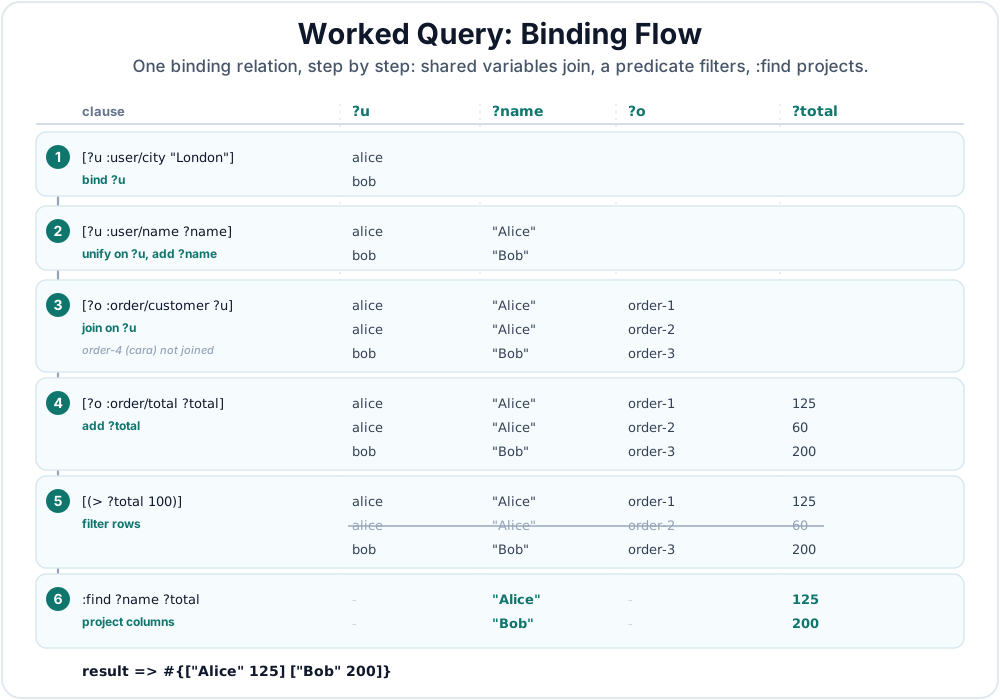
Figure 8.1 illustrates a possible variable binding flow that resolves this query. The steps below trace that relation one clause at a time.
The first clause finds entities whose city is London:
after [?user-eid :user/city "London"]
{?user-eid alice}
{?user-eid bob}
The second clause reuses ?user-eid and adds ?name. Each occurrence of ?user-eid must refer to the same entity within a row.
after [?user-eid :user/name ?name]
{?user-eid alice, ?name "Alice"}
{?user-eid bob,   ?name "Bob"}
The third clause finds orders whose customer is the same ?user-eid. The ?user-eid in [:order/customer ?user-eid] must agree with the ?user-eid already bound by the user clauses.
after [?order-eid :order/customer ?user-eid]
{?user-eid alice, ?name "Alice", ?order-eid order-1}
{?user-eid alice, ?name "Alice", ?order-eid order-2}
{?user-eid bob,   ?name "Bob",   ?order-eid order-3}
order-4 is not present because its customer is cara, and cara was not in the London-user rows.
The fourth clause adds totals for those orders:
after [?order-eid :order/total ?total]
{?user-eid alice, ?name "Alice", ?order-eid order-1, ?total 125}
{?user-eid alice, ?name "Alice", ?order-eid order-2, ?total 60}
{?user-eid bob,   ?name "Bob",   ?order-eid order-3, ?total 200}
The final filter keeps only rows whose total is greater than 100:
after [(> ?total 100)]
{?user-eid alice, ?name "Alice", ?order-eid order-1, ?total 125}
{?user-eid bob,   ?name "Bob",   ?order-eid order-3, ?total 200}
Finally, :find ?name ?total keeps only the requested values from each surviving row. Intermediate variables such as ?user-eid and ?order-eid helped express the query, but they are not returned:
["Alice" 125]
["Bob"   200]
This is the core Datalog mental model: data patterns create candidate bindings, shared variables keep those bindings consistent, filter clauses remove rows, and :find shapes the surviving values into the result.
The join also affects result cardinality. Alice has two orders in the source facts, so the intermediate relation has two Alice rows after joining users to orders. The later predicate removes the smaller order, but without that predicate both Alice orders would contribute rows.
3. Variables and Functions in :where
Triple patterns are the foundation, but :where clauses can also use variables in the attribute position, call predicates to filter rows, and call functions that bind new values.
3.1 Variable Attributes
The attribute position can be a variable, so you can ask questions about the shape of your data:
(d/q '[:find ?attr
       :where
       [?person-eid :person/name]
       [?person-eid ?attr]]
     db)
Object attrs = conn.query("[:find ?attr " +
    ":where [?person-eid :person/name] " +
    "       [?person-eid ?attr]]");
person_eid = q.var("person-eid")
attr = q.var("attr")
attrs = conn.query(q.query(
    find=q.relation(attr),
    where=[
        q.pattern(person_eid, "person/name"),
        q.pattern(person_eid, attr),
    ],
))
const personEid = q.var("person-eid");
const attr = q.var("attr");
const attrs = await conn.query(q.query({
  find: q.relation(attr),
  where: [
    q.pattern(personEid, "person/name"),
    q.pattern(personEid, attr)
  ]
}));
The first clause finds people with a :person/name. The second clause reuses the same entity variable and binds ?attr to every attribute asserted for those entities. With :find ?attr, the result is a one-column relation. If you also need the values, write [?person-eid ?attr ?value] and include ?value in :find.
3.2 Predicate Clauses
A predicate clause filters results based on a function that returns true or false.
;; Find users older than 30
(d/q '[:find ?name ?age
       :where [?user-eid :user/name ?name]
              [?user-eid :user/age ?age]
              [(> ?age 30)]]
     db)
// Find users older than 30
Object result = conn.query("[:find ?name ?age " +
    ":where [?user-eid :user/name ?name] " +
    "       [?user-eid :user/age ?age] " +
    "       [(> ?age 30)]]");
# Find users older than 30
user_eid = q.var("user-eid")
name = q.var("name")
age = q.var("age")
result = conn.query(q.query(
    find=q.relation(name, age),
    where=[
        q.datom(user_eid, "user/name", name),
        q.datom(user_eid, "user/age", age),
        q.predicate(">", age, 30),
    ],
))
// Find users older than 30
const userEid = q.var("user-eid");
const name = q.var("name");
const age = q.var("age");
const result = await conn.query(q.query({
  find: q.relation(name, age),
  where: [
    q.datom(userEid, "user/name", name),
    q.datom(userEid, "user/age", age),
    q.predicate(">", age, 30)
  ]
}));
This returns only users who are older than 30. Notice that the single predicate function call is wrapped in a vector form. Common built-in predicates include comparisons such as =, <, >, <=, and >=, and Datalevin-specific helpers such as like and in. Appendix D lists the built-in query and aggregate functions.
3.3 Binding Clauses
You can also use functions to compute and bind new variables.
;; Compute an order total from subtotal and tax, and bind the result to ?total
(d/q '[:find ?order-id ?total
       :where [?order-eid :order/id ?order-id]
              [?order-eid :order/subtotal ?subtotal]
              [?order-eid :order/tax ?tax]
              [(+ ?subtotal ?tax) ?total]]
     db)
// Compute an order total from subtotal and tax
Object result = conn.query("[:find ?order-id ?total " +
    ":where [?order-eid :order/id ?order-id] " +
    "       [?order-eid :order/subtotal ?subtotal] " +
    "       [?order-eid :order/tax ?tax] " +
    "       [(+ ?subtotal ?tax) ?total]]");
# Compute an order total from subtotal and tax
order_eid = q.var("order-eid")
order_id = q.var("order-id")
subtotal = q.var("subtotal")
tax = q.var("tax")
total = q.var("total")
result = conn.query(q.query(
    find=q.relation(order_id, total),
    where=[
        q.datom(order_eid, "order/id", order_id),
        q.datom(order_eid, "order/subtotal", subtotal),
        q.datom(order_eid, "order/tax", tax),
        q.bind("+", total, subtotal, tax),
    ],
))
// Compute an order total from subtotal and tax
const orderEid = q.var("order-eid");
const orderId = q.var("order-id");
const subtotal = q.var("subtotal");
const tax = q.var("tax");
const total = q.var("total");
const result = await conn.query(q.query({
  find: q.relation(orderId, total),
  where: [
    q.datom(orderEid, "order/id", orderId),
    q.datom(orderEid, "order/subtotal", subtotal),
    q.datom(orderEid, "order/tax", tax),
    q.bind("+", total, subtotal, tax)
  ]
}));
?total is a new variable that takes the result of (+ ?subtotal ?tax) as its value. This binding clause vector has two elements. Read from left to right: the value flows from the function call into the bound variable.
Some query functions return tuples or relations rather than a scalar value. Use a binding pattern on the right side to describe how the returned values should bind to variables. _ works in these binding patterns too:
;; Assumes :doc/body has :db/fulltext true and :db.fulltext/autoDomain true.
(d/q '[:find ?doc-eid
       :where [(fulltext $ :doc/body "clojure") [[?doc-eid _ _]]]]
     db)
The fulltext function is covered in Chapter 16. It appears here because its return binding is compact: bind the entity id to ?doc-eid, and ignore the attribute and value positions.
3.4 Built-In Logic Helpers
Several built-in functions are especially useful when a query needs to reason about optional facts, literal values, and tuple-shaped values.
Use get-else, get-some, get-some-else, and missing? for attributes that may or may not be present. The predicate name is missing?, with a question mark.
(d/q '[:find ?name ?display ?contact-attr ?contact
       :where [?user-eid :user/name ?name]
              [(get-else $ ?user-eid :user/display-name "Anonymous") ?display]
              [(get-some $ ?user-eid :profile/email :user/email :user/phone)
               [?contact-attr ?contact]]
              [(missing? $ ?user-eid :user/deleted-at)]]
     db)
Object result = conn.query("[:find ?name ?display ?contact-attr ?contact " +
    ":where [?user-eid :user/name ?name] " +
    "       [(get-else $ ?user-eid :user/display-name \"Anonymous\") ?display] " +
    "       [(get-some $ ?user-eid :profile/email :user/email :user/phone) " +
    "        [?contact-attr ?contact]] " +
    "       [(missing? $ ?user-eid :user/deleted-at)]]");
user_eid = q.var("user-eid")
name = q.var("name")
display = q.var("display")
contact_attr = q.var("contact-attr")
contact = q.var("contact")

result = conn.query(q.query(
    find=q.relation(name, display, contact_attr, contact),
    where=[
        q.datom(user_eid, "user/name", name),
        q.bind(
            "get-else",
            display,
            q.DB,
            user_eid,
            q.kw("user/display-name"),
            "Anonymous",
        ),
        q.bind(
            "get-some",
            q.tuple_binding(contact_attr, contact),
            q.DB,
            user_eid,
            q.kw("profile/email"),
            q.kw("user/email"),
            q.kw("user/phone"),
        ),
        q.predicate(
            "missing?", q.DB, user_eid, q.kw("user/deleted-at")),
    ],
))
const userEid = q.var("user-eid");
const name = q.var("name");
const display = q.var("display");
const contactAttr = q.var("contact-attr");
const contact = q.var("contact");

const result = await conn.query(q.query({
  find: q.relation(name, display, contactAttr, contact),
  where: [
    q.datom(userEid, "user/name", name),
    q.bind(
      "get-else",
      display,
      q.DB,
      userEid,
      q.kw("user/display-name"),
      "Anonymous"
    ),
    q.bind(
      "get-some",
      q.tupleBinding(contactAttr, contact),
      q.DB,
      userEid,
      q.kw("profile/email"),
      q.kw("user/email"),
      q.kw("user/phone")
    ),
    q.predicate(
      "missing?", q.DB, userEid, q.kw("user/deleted-at"))
  ]
}));
To keep a user in the result when none of the contact attributes is present, replace the get-some binding clause with its total variant:
[(get-some-else $ ?user-eid "No contact"
                :profile/email :user/email :user/phone)
 [?contact-attr ?contact]]
When no listed attribute exists, this binds ?contact-attr to nil and ?contact to "No contact" instead of removing the user's row.
get-else binds the attribute value when present; otherwise it binds the non-nil default. get-some tries the listed cardinality-one attributes in order and returns [attribute value] for the first one present. If none is present, that binding clause produces no row. get-some-else takes a fallback before the attribute list and returns [nil fallback] instead, so the entity remains in the result; the fallback may be nil. missing? filters for entities that do not have a value for the attribute.
Use ground, tuple, and untuple when a query needs literal data or an explicit tuple-shaped value. These are query-time value helpers; they are different from schema features such as :db/tupleAttrs and :db.type/tuple.
(d/q '[:find ?sku ?region
       :where [(ground [["book" "us"] ["pen" "eu"]])
               [[?sku ?region] ...]]
              [(tuple ?sku ?region) ?key]
              [(untuple ?key) [?sku2 ?region2]]
              [(= ?sku ?sku2)]
              [(= ?region ?region2)]])
Object pairs = conn.query("[:find ?sku ?region " +
    ":where [(ground [[\"book\" \"us\"] [\"pen\" \"eu\"]]) " +
    "        [[?sku ?region] ...]] " +
    "       [(tuple ?sku ?region) ?key] " +
    "       [(untuple ?key) [?sku2 ?region2]] " +
    "       [(= ?sku ?sku2)] " +
    "       [(= ?region ?region2)]]");
sku = q.var("sku")
region = q.var("region")
key = q.var("key")
sku2 = q.var("sku2")
region2 = q.var("region2")

pairs = conn.query(q.query(
    find=q.relation(sku, region),
    where=[
        q.bind(
            "ground",
            q.collection_binding(q.tuple_binding(sku, region)),
            [["book", "us"], ["pen", "eu"]],
        ),
        q.bind("tuple", key, sku, region),
        q.bind("untuple", q.tuple_binding(sku2, region2), key),
        q.predicate("=", sku, sku2),
        q.predicate("=", region, region2),
    ],
))
const sku = q.var("sku");
const region = q.var("region");
const key = q.var("key");
const sku2 = q.var("sku2");
const region2 = q.var("region2");

const pairs = await conn.query(q.query({
  find: q.relation(sku, region),
  where: [
    q.bind(
      "ground",
      q.collectionBinding(q.tupleBinding(sku, region)),
      [["book", "us"], ["pen", "eu"]]
    ),
    q.bind("tuple", key, sku, region),
    q.bind("untuple", q.tupleBinding(sku2, region2), key),
    q.predicate("=", sku, sku2),
    q.predicate("=", region, region2)
  ]
}));
ground returns its argument unchanged. The argument may be a literal, as above, or an otherwise-bound variable; an unbound argument is an insufficient binding. Here the collection binding on the right expands the literal pairs into rows. tuple constructs one vector from its arguments and binds that value to ?key. untuple also returns its argument unchanged; the tuple binding [?sku2 ?region2] on the right is what destructures the value. In other words, the functions produce values, while the binding shapes control how those values enter the query.
3.5 User-Defined Query Functions
For portable custom logic, register a descriptor-backed UDF in the runtime registry and call it through Datalevin's built-in udf function. The same query shape works in embedded bindings and server deployments:
(require '[datalevin.udf :as udf])

(def adult-pred
  {:udf/lang :clojure
   :udf/kind :predicate
   :udf/id   :user/adult?})

(def registry
  (doto (udf/create-registry)
    (udf/register! adult-pred #(>= % 18))))

;; Open the connection with {:runtime-opts {:udf-registry registry}}.
(d/q '[:find ?name
       :in $ ?adult-pred
       :where [?user-eid :user/name ?name]
              [?user-eid :user/age ?age]
              [(udf ?adult-pred ?age)]]
     db adult-pred)
import datalevin.Datalevin;
import datalevin.UdfDescriptor;
import datalevin.UdfRegistry;

UdfDescriptor adultPred = Datalevin.predicateUdf(":user/adult?");
UdfRegistry registry = Datalevin.udfRegistry()
    .register(adultPred,
              args -> ((Number) args.get(0)).longValue() >= 18);

// Open the connection with Map.of(":runtime-opts",
//                                Map.of(":udf-registry", registry)).
Object result = conn.query("[:find ?name " +
    ":in $ ?adult-pred " +
    ":where [?user-eid :user/name ?name] " +
    "       [?user-eid :user/age ?age] " +
    "       [(udf ?adult-pred ?age)]]",
    adultPred);
from datalevin import UdfDescriptor, create_udf_registry, q

adult_pred = UdfDescriptor.predicate("user/adult?")

registry = create_udf_registry()
registry.register(adult_pred, lambda age: age >= 18)

# Open the connection with opts={":runtime-opts": {":udf-registry": registry}}.
name = q.var("name")
adult_pred_var = q.var("adult-pred")
user_eid = q.var("user-eid")
age = q.var("age")
adult_query = q.query(
    find=q.relation(name),
    inputs=[q.DB, adult_pred_var],
    where=[
        q.datom(user_eid, "user/name", name),
        q.datom(user_eid, "user/age", age),
        q.udf_predicate(adult_pred_var, age),
    ],
)
result = conn.query(adult_query, adult_pred)
import {
  UdfDescriptor,
  createUdfRegistry,
  q
} from "datalevin-node";

const adultPred = UdfDescriptor.predicate("user/adult?");

const registry = await createUdfRegistry();
await registry.register(adultPred, (age) => Number(age) >= 18);

// Open the connection with opts: { ":runtime-opts": { ":udf-registry": registry } }.
const name = q.var("name");
const adultPredVar = q.var("adult-pred");
const userEid = q.var("user-eid");
const age = q.var("age");
const adultQuery = q.query({
  find: q.relation(name),
  inputs: [q.DB, adultPredVar],
  where: [
    q.datom(userEid, "user/name", name),
    q.datom(userEid, "user/age", age),
    q.udfPredicate(adultPredVar, age)
  ]
});
const result = await conn.query(adultQuery, adultPred);
For a custom binding function, use the same udf form with a descriptor whose :udf/kind is :query-fn, then bind its return value with a clause such as [(udf ?normalize ?raw) ?normalized]. The typed equivalents are q.bind_udf(...) in Python and q.bindUdf(...) in JavaScript.
In embedded Clojure, a Clojure function can appear directly in a predicate or binding clause, but it must be fully qualified with its namespace:
(ns my-app.queries
  (:require [datalevin.core :as d]))

(defn adult? [age]
  (> age 18))

(d/q '[:find ?name
       :where [?user-eid :user/name ?name]
              [?user-eid :user/age ?age]
              [(my-app.queries/adult? ?age)]]
     db)
The adult? function is not built in, so the query includes my-app.queries/adult?. Without that namespace, Datalevin cannot resolve the function. This shortcut is useful inside a trusted embedded Clojure process.
Direct host-function resolution is an embedded-mode feature. Remote server queries run in server-safe resolver mode: they may call Datalevin's built-in query functions and aggregates, and they may call descriptor-backed UDFs through the built-in udf function, but they do not resolve arbitrary host-language vars, method calls, or function-valued query inputs as call targets. This prevents a client query from becoming arbitrary code execution inside the server process. For custom query logic in server deployments, register a UDF on the server and call it with udf.
3.6 Predicate Performance
Predicate clauses are constraints, but not all constraints give the optimizer the same information. When a simple built-in comparison applies to a value from a triple pattern, Datalevin can turn it into an index range:
(d/q '[:find ?name
       :where [?user-eid :user/name ?name]
              [?user-eid :user/age ?age]
              [(> ?age 18)]]
     db)
Object result = conn.query("[:find ?name " +
    ":where [?user-eid :user/name ?name] " +
    "       [?user-eid :user/age ?age] " +
    "       [(> ?age 18)]]");
user_eid = q.var("user-eid")
name = q.var("name")
age = q.var("age")
result = conn.query(q.query(
    find=q.relation(name),
    where=[
        q.datom(user_eid, "user/name", name),
        q.datom(user_eid, "user/age", age),
        q.predicate(">", age, 18),
    ],
))
const userEid = q.var("user-eid");
const name = q.var("name");
const age = q.var("age");
const result = await conn.query(q.query({
  find: q.relation(name),
  where: [
    q.datom(userEid, "user/name", name),
    q.datom(userEid, "user/age", age),
    q.predicate(">", age, 18)
  ]
}));
Here [(> ?age 18)] can narrow the scan over :user/age values. A predicate that involves one data variable can also be pushed down to the scan as a value filter, even when it is a custom predicate. The difference is that a custom predicate is opaque to the range planner:
(d/q '[:find ?name
       :in $ ?adult-pred
       :where [?user-eid :user/name ?name]
              [?user-eid :user/age ?age]
              [(udf ?adult-pred ?age)]]
     db adult-pred)
Object result = conn.query("[:find ?name " +
    ":in $ ?adult-pred " +
    ":where [?user-eid :user/name ?name] " +
    "       [?user-eid :user/age ?age] " +
    "       [(udf ?adult-pred ?age)]]",
    adultPred);
result = conn.query(adult_query, adult_pred)
const result = await conn.query(adultQuery, adultPred);
In this query, the descriptor input is already bound by :in; the data variable being filtered is ?age. Datalevin can attach this predicate to the :user/age scan, so it is evaluated as candidate age values are read. It still cannot look inside the registered predicate implementation and convert its body into an index range. Predicates that involve more than one data variable, such as [(udf ?eligible-pred ?age ?status)], cannot be attached to a single attribute scan and are handled later, after the needed variables have been bound.
Performance: predicates and indexes
Use built-in comparisons, equality, like, and in for simple value tests when possible. Keep custom predicates for logic that cannot be expressed directly, and combine them with selective data patterns so they run over a small candidate set.
4. Alternatives and Negation
By default, all :where clauses are joined with an implicit and. Datalog also provides forms for alternatives and exclusion:
or: one of several alternative branches may match.or-join: likeor, but explicitly lists the variables that connect the alternatives to the surrounding query.not: excludes rows that match a negative pattern.not-join: likenot, but explicitly lists the variables that connect the negative pattern to the surrounding query.
4.1 or
Use or when each branch is an alternative way to bind the same logical variables. For example, this query finds users whose status is either :user.status/pending or :user.status/flagged:
(d/q '[:find ?user-eid
       :where (or [?user-eid :user/status :user.status/pending]
                  [?user-eid :user/status :user.status/flagged])]
     db)
Object result1 = conn.query("[:find ?user-eid " +
    ":where (or [?user-eid :user/status :user.status/pending] " +
    "           [?user-eid :user/status :user.status/flagged])]");
user_eid = q.var("user-eid")
result1 = conn.query(q.query(
    find=q.relation(user_eid),
    where=[q.or_(
        q.datom(
            user_eid, "user/status", q.kw("user.status/pending")),
        q.datom(
            user_eid, "user/status", q.kw("user.status/flagged")),
    )],
))
const userEid = q.var("user-eid");
const result1 = await conn.query(q.query({
  find: q.relation(userEid),
  where: [q.or(
    q.datom(userEid, "user/status", q.kw("user.status/pending")),
    q.datom(userEid, "user/status", q.kw("user.status/flagged"))
  )]
}));
When an alternative needs more than one clause, wrap those clauses in (and ...):
(d/q '[:find ?user-eid
       :where
       (or (and [?user-eid :user/status :user.status/pending]
                [?user-eid :user/priority :high])
           (and [?user-eid :user/status :user.status/flagged]
                [?user-eid :user/review-required? true]))]
     db)
Object result2 = conn.query("[:find ?user-eid " +
    ":where " +
    "(or (and [?user-eid :user/status :user.status/pending] " +
    "         [?user-eid :user/priority :high]) " +
    "    (and [?user-eid :user/status :user.status/flagged] " +
    "         [?user-eid :user/review-required? true]))]");
result2 = conn.query(q.query(
    find=q.relation(user_eid),
    where=[q.or_(
        q.and_(
            q.datom(
                user_eid, "user/status", q.kw("user.status/pending")),
            q.datom(user_eid, "user/priority", q.kw("high")),
        ),
        q.and_(
            q.datom(
                user_eid, "user/status", q.kw("user.status/flagged")),
            q.datom(user_eid, "user/review-required?", True),
        ),
    )],
))
const result2 = await conn.query(q.query({
  find: q.relation(userEid),
  where: [q.or(
    q.and(
      q.datom(userEid, "user/status", q.kw("user.status/pending")),
      q.datom(userEid, "user/priority", q.kw("high"))
    ),
    q.and(
      q.datom(userEid, "user/status", q.kw("user.status/flagged")),
      q.datom(userEid, "user/review-required?", true)
    )
  )]
}));
Plain or requires the branches to use the same set of free variables. That is what lets the rest of the query continue with a consistent binding shape.
4.2 or-join
Use or-join when an alternative branch needs variables that should stay local to that branch. The vector after or-join names the variables that connect the alternatives to the surrounding query.
(d/q '[:find ?user-eid
       :where [?user-eid :user/name]
              (or-join [?user-eid]
                [?user-eid :user/status :user.status/flagged]
                (and [?user-eid :user/manager ?manager-eid]
                     [?manager-eid :user/status :user.status/flagged]))]
     db)
Object result = conn.query("[:find ?user-eid " +
    ":where [?user-eid :user/name] " +
    "       (or-join [?user-eid] " +
    "         [?user-eid :user/status :user.status/flagged] " +
    "         (and [?user-eid :user/manager ?manager-eid] " +
    "              [?manager-eid :user/status :user.status/flagged]))]");
user_eid = q.var("user-eid")
manager_eid = q.var("manager-eid")
result = conn.query(q.query(
    find=q.relation(user_eid),
    where=[
        q.pattern(user_eid, "user/name"),
        q.or_join(
            q.join_vars(user_eid),
            q.datom(
                user_eid, "user/status", q.kw("user.status/flagged")),
            q.and_(
                q.datom(user_eid, "user/manager", manager_eid),
                q.datom(
                    manager_eid,
                    "user/status",
                    q.kw("user.status/flagged"),
                ),
            ),
        ),
    ],
))
const userEid = q.var("user-eid");
const managerEid = q.var("manager-eid");
const result = await conn.query(q.query({
  find: q.relation(userEid),
  where: [
    q.pattern(userEid, "user/name"),
    q.orJoin(
      q.joinVars(userEid),
      q.datom(userEid, "user/status", q.kw("user.status/flagged")),
      q.and(
        q.datom(userEid, "user/manager", managerEid),
        q.datom(managerEid, "user/status", q.kw("user.status/flagged"))
      )
    )
  ]
}));
This query finds users who are flagged directly or whose manager is flagged. The variable ?manager-eid is needed only inside the second branch. With plain or, the first branch would bind ?user-eid while the second branch would bind both ?user-eid and ?manager-eid, so the branch shapes would not match. or-join [?user-eid] states that only ?user-eid is the branch result that must unify with the rest of the query.
4.3 not
Use not to remove rows that match a negative pattern. A not clause is a test against bindings already produced by surrounding positive clauses; it does not introduce new rows by itself. At least one variable in the negated pattern must already be bound by the surrounding query.
(d/q '[:find ?user-eid
       :where [?user-eid :user/name]
              (not [?user-eid :user/is-admin? true])]
     db)
Object result2 = conn.query("[:find ?user-eid " +
    ":where [?user-eid :user/name] " +
    "       (not [?user-eid :user/is-admin? true])]");
user_eid = q.var("user-eid")
result2 = conn.query(q.query(
    find=q.relation(user_eid),
    where=[
        q.pattern(user_eid, "user/name"),
        q.not_(q.datom(user_eid, "user/is-admin?", True)),
    ],
))
const userEid = q.var("user-eid");
const result2 = await conn.query(q.query({
  find: q.relation(userEid),
  where: [
    q.pattern(userEid, "user/name"),
    q.not(q.datom(userEid, "user/is-admin?", true))
  ]
}));
A single not form with multiple clauses negates their conjunction: the row is excluded only when all clauses inside the not match together.
4.4 not-join
Use not-join when the negative pattern needs local variables or when only some variables should connect the negative pattern to the surrounding query. The vector after not-join names those connecting variables. Variables not listed there are local to the negative pattern. The listed variables must already be bound before the not-join runs. Section 6.3 shows a complete example.
5. Query Inputs
So far, most examples have omitted :in. When a query has no explicit :in, Datalevin behaves as if it had :in $, where $ names the default data source.
Real application queries usually take values from function arguments, request parameters, or UI state. Use :in when the query needs inputs beyond the default data source. The simplest explicit declaration with a scalar input is :in $ ?city:
(d/q '[:find ?name
       :in $ ?city
       :where [?user-eid :user/city ?city]
              [?user-eid :user/name ?name]]
     db
     "London")
Object result = conn.query("[:find ?name " +
    " :in $ ?city " +
    " :where [?user-eid :user/city ?city] " +
    "        [?user-eid :user/name ?name]]",
    "London");
user_eid = q.var("user-eid")
name = q.var("name")
city = q.var("city")
users_in_city = q.query(
    find=q.relation(name),
    inputs=[q.DB, city],
    where=[
        q.datom(user_eid, "user/city", city),
        q.datom(user_eid, "user/name", name),
    ],
)
result = conn.query(users_in_city, "London")
const userEid = q.var("user-eid");
const name = q.var("name");
const city = q.var("city");
const usersInCity = q.query({
  find: q.relation(name),
  inputs: [q.DB, city],
  where: [
    q.datom(userEid, "user/city", city),
    q.datom(userEid, "user/name", name)
  ]
});
const result = await conn.query(usersInCity, "London");
The $ symbol names the default data source: the database, or other EAV data source, being queried. Variables after $ are input bindings. They are bound from the remaining arguments in the same order as they appear in :in. In the Clojure call above, db fills $ and "London" fills ?city. In the connection APIs, the connection supplies $, and the extra arguments fill the remaining inputs.
Inputs are just bindings. Once ?city or ?min-total is bound, the rest of the query treats it like any other variable:
(d/q '[:find ?name ?total
       :in $ ?city ?min-total
       :where [?user-eid :user/city ?city]
              [?user-eid :user/name ?name]
              [?order-eid :order/customer ?user-eid]
              [?order-eid :order/total ?total]
              [(> ?total ?min-total)]]
     db
     "London"
     100)
Object result = conn.query("[:find ?name ?total " +
    ":in $ ?city ?min-total " +
    ":where [?user-eid :user/city ?city] " +
    "       [?user-eid :user/name ?name] " +
    "       [?order-eid :order/customer ?user-eid] " +
    "       [?order-eid :order/total ?total] " +
    "       [(> ?total ?min-total)]]",
    "London",
    100);
user_eid = q.var("user-eid")
order_eid = q.var("order-eid")
name = q.var("name")
total = q.var("total")
city = q.var("city")
min_total = q.var("min-total")

orders_in_city = q.query(
    find=q.relation(name, total),
    inputs=[q.DB, city, min_total],
    where=[
        q.datom(user_eid, "user/city", city),
        q.datom(user_eid, "user/name", name),
        q.datom(order_eid, "order/customer", user_eid),
        q.datom(order_eid, "order/total", total),
        q.predicate(">", total, min_total),
    ],
)
result = conn.query(orders_in_city, "London", 100)
const userEid = q.var("user-eid");
const orderEid = q.var("order-eid");
const name = q.var("name");
const total = q.var("total");
const city = q.var("city");
const minTotal = q.var("min-total");

const ordersInCity = q.query({
  find: q.relation(name, total),
  inputs: [q.DB, city, minTotal],
  where: [
    q.datom(userEid, "user/city", city),
    q.datom(userEid, "user/name", name),
    q.datom(orderEid, "order/customer", userEid),
    q.datom(orderEid, "order/total", total),
    q.predicate(">", total, minTotal)
  ]
});
const result = await conn.query(ordersInCity, "London", 100);
Data sources are inputs too. The default source is named $, and additional sources can be given their own source symbols, such as $users, $orders, or $data. Section 10 returns to that general case after the rest of the basic query forms have been introduced.
6. When You Think You Need a Subquery
Readers coming from SQL often reach for a subquery when they want to filter outer rows by related facts. Datalevin can run a nested q, but ordinary queries are usually clearer and faster when you express that logic directly in Datalog. Use not-join for "no matching related fact" checks, and or-join for branching existence checks with branch-local variables. Nested q is useful when the problem genuinely has two query stages, however. A common example is computing an aggregate result in an inner query and joining that result to facts in the outer query.
6.1 The Performance Trap: Correlated Nested q
It is technically possible to run a nested q subquery inside a predicate, but avoid correlating it with every candidate when ordinary Datalog clauses express the same operation. The example below asks for London users with no orders by running an inner query from a predicate clause. This is the shape to avoid: the inner query runs once for each candidate tuple from the outer query instead of being planned as part of one Datalog query.
;; Anti-pattern: runs the inner query for every candidate user.
(d/q '[:find ?user-eid
       :where [?user-eid :user/city "London"]
              [(empty? (q (quote [:find ?order-eid
                                   :in $ ?user-eid
                                   :where [?order-eid :order/customer ?user-eid]])
                          $ ?user-eid))]] ; This subquery runs for each London user
     db)
// Anti-pattern: runs the inner query for every candidate user.
Object result = conn.query("[:find ?user-eid " +
    ":where [?user-eid :user/city \"London\"] " +
    "       [(empty? (q (quote [:find ?order-eid " +
    "                            :in $ ?user-eid " +
    "                            :where [?order-eid :order/customer ?user-eid]]) " +
    "                   $ ?user-eid))]]");
# Anti-pattern: runs the inner query for every candidate user.
user_eid = q.var("user-eid")
order_eid = q.var("order-eid")
inner = q.query(
    find=q.relation(order_eid),
    inputs=[q.DB, user_eid],
    where=[q.datom(order_eid, "order/customer", user_eid)],
)
result = conn.query(q.query(
    find=q.relation(user_eid),
    where=[
        q.datom(user_eid, "user/city", "London"),
        q.predicate(
            "empty?", q.call("q", q.quote(inner), q.DB, user_eid),
        ),
    ],
))
// Anti-pattern: runs the inner query for every candidate user.
const userEid = q.var("user-eid");
const orderEid = q.var("order-eid");
const inner = q.query({
  find: q.relation(orderEid),
  inputs: [q.DB, userEid],
  where: [q.datom(orderEid, "order/customer", userEid)]
});
const result = await conn.query(q.query({
  find: q.relation(userEid),
  where: [
    q.datom(userEid, "user/city", "London"),
    q.predicate(
      "empty?", q.call("q", q.quote(inner), q.DB, userEid)
    )
  ]
}));
That repeated work is usually both harder to read and much more expensive than expressing the logic directly in Datalog. The problem is the per-candidate correlation, not the mere presence of q inside another query.
6.2 Factoring an Aggregate Result
A nested q is appropriate when the inner query produces a small result that the outer query consumes as a relation. For example, finding the minimum age is an aggregate operation, while finding every user having that age is a fact lookup. Keeping those stages separate avoids accidentally grouping by user in the aggregate query:
;; Find every user tied for the minimum age.
(d/q '[:find ?user-eid
       :where [(q (quote [:find (min ?age)
                          :where [_ :user/age ?age]])
                  $)
               [[?minimum-age]]]
              [?user-eid :user/age ?minimum-age]]
     db)
// Find every user tied for the minimum age.
Object result = conn.query("[:find ?user-eid " +
    ":where [(q (quote [:find (min ?age) " +
    "                   :where [_ :user/age ?age]]) " +
    "           $) " +
    "        [[?minimum-age]]] " +
    "       [?user-eid :user/age ?minimum-age]]");
# Find every user tied for the minimum age.
user_eid = q.var("user-eid")
age = q.var("age")
minimum_age = q.var("minimum-age")
inner = q.query(
    find=q.relation(q.aggregate("min", age)),
    where=[q.datom(q.IGNORE, "user/age", age)],
)
result = conn.query(q.query(
    find=q.relation(user_eid),
    where=[
        q.bind(
            "q",
            q.relation_binding(minimum_age),
            q.quote(inner),
            q.DB,
        ),
        q.datom(user_eid, "user/age", minimum_age),
    ],
))
// Find every user tied for the minimum age.
const userEid = q.var("user-eid");
const age = q.var("age");
const minimumAge = q.var("minimum-age");
const inner = q.query({
  find: q.relation(q.aggregate("min", age)),
  where: [q.datom(q.IGNORE, "user/age", age)]
});
const result = await conn.query(q.query({
  find: q.relation(userEid),
  where: [
    q.bind(
      "q",
      q.relationBinding(minimumAge),
      q.quote(inner),
      q.DB
    ),
    q.datom(userEid, "user/age", minimumAge)
  ]
}));
The inner query is not correlated with ?user-eid; it computes a one-column relation containing the global minimum, and [[?minimum-age]] binds that relation into the outer query. The outer fact clause then returns all ties. In contrast, putting both ?user-eid and (min ?age) in the same :find would group by ?user-eid and would not compute the global minimum.
This pattern also applies when an inner query deliberately factors out a small aggregated or otherwise shaped result relation for a later join. Variables used only inside the nested query are locally scoped; the result binding is the explicit boundary between the two stages. Keep the inner result small, and check whether a direct join, rule, aggregate, not-join, or or-join expresses the operation more simply before introducing that boundary.
Python and JavaScript use q.quote(inner) to preserve the EDN list required by the nested query form. The inner query remains an ordinary typed q.query value, so variables, clauses, and result bindings can still be assembled with host-language control flow.
6.3 Excluding Matches with not-join
For this kind of "find things with no matching related facts" question, express the exclusion directly with not-join. The optimizer can plan it together with the surrounding data patterns.
;; Find users in London with no orders
(d/q '[:find ?user-eid
       :where [?user-eid :user/city "London"]
              (not-join [?user-eid]
                [?order-eid :order/customer ?user-eid])]
     db)
// Find users in London with no orders
Object result = conn.query("[:find ?user-eid " +
    ":where [?user-eid :user/city \"London\"] " +
    "       (not-join [?user-eid] " +
    "         [?order-eid :order/customer ?user-eid])]");
# Find users in London with no orders
user_eid = q.var("user-eid")
order_eid = q.var("order-eid")
result = conn.query(q.query(
    find=q.relation(user_eid),
    where=[
        q.datom(user_eid, "user/city", "London"),
        q.not_join(
            q.join_vars(user_eid),
            q.datom(order_eid, "order/customer", user_eid),
        ),
    ],
))
// Find users in London with no orders
const userEid = q.var("user-eid");
const orderEid = q.var("order-eid");
const result = await conn.query(q.query({
  find: q.relation(userEid),
  where: [
    q.datom(userEid, "user/city", "London"),
    q.notJoin(
      q.joinVars(userEid),
      q.datom(orderEid, "order/customer", userEid)
    )
  ]
}));
Here, not-join declares that ?user-eid is the variable shared with the surrounding query. Datalevin can plan the negative pattern together with the positive clauses, so it can exclude users with matching orders without invoking a separate query for each candidate user. This is much more efficient than the nested q approach.
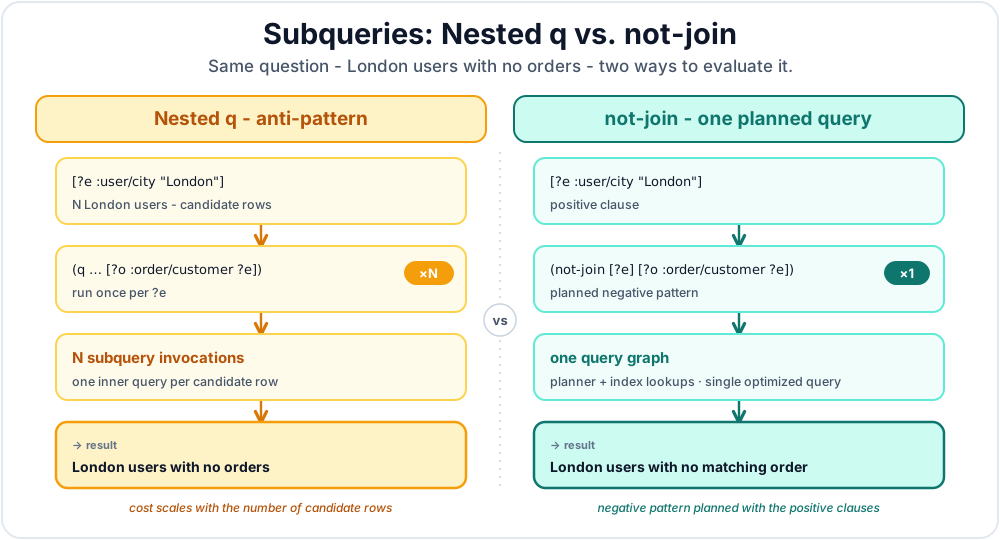
Figure 8.2 shows the difference visually: the nested q version runs one inner query per candidate user, while the not-join version keeps the exclusion in one planned Datalog query.
6.4 Branching Checks with or-join
Use or-join when you want to keep an outer row if any of several related patterns exists. The branch-local variables stay inside the branch, and the declared join variables connect the branch result back to the surrounding query.
;; Find London users who either have a large order or an open support ticket.
(d/q '[:find ?user-eid
       :where [?user-eid :user/city "London"]
              (or-join [?user-eid]
                (and [?order-eid :order/customer ?user-eid]
                     [?order-eid :order/total ?total]
                     [(> ?total 1000)])
                (and [?ticket-eid :ticket/customer ?user-eid]
                     [?ticket-eid :ticket/status :open]))]
     db)
// Find London users who either have a large order or an open support ticket.
Object result = conn.query("[:find ?user-eid " +
    ":where [?user-eid :user/city \"London\"] " +
    "       (or-join [?user-eid] " +
    "         (and [?order-eid :order/customer ?user-eid] " +
    "              [?order-eid :order/total ?total] " +
    "              [(> ?total 1000)]) " +
    "         (and [?ticket-eid :ticket/customer ?user-eid] " +
    "              [?ticket-eid :ticket/status :open]))]");
# Find London users who either have a large order or an open support ticket.
user_eid = q.var("user-eid")
order_eid = q.var("order-eid")
ticket_eid = q.var("ticket-eid")
total = q.var("total")

result = conn.query(q.query(
    find=q.relation(user_eid),
    where=[
        q.datom(user_eid, "user/city", "London"),
        q.or_join(
            q.join_vars(user_eid),
            q.and_(
                q.datom(order_eid, "order/customer", user_eid),
                q.datom(order_eid, "order/total", total),
                q.predicate(">", total, 1000),
            ),
            q.and_(
                q.datom(ticket_eid, "ticket/customer", user_eid),
                q.datom(ticket_eid, "ticket/status", q.kw("open")),
            ),
        ),
    ],
))
// Find London users who either have a large order or an open support ticket.
const userEid = q.var("user-eid");
const orderEid = q.var("order-eid");
const ticketEid = q.var("ticket-eid");
const total = q.var("total");

const result = await conn.query(q.query({
  find: q.relation(userEid),
  where: [
    q.datom(userEid, "user/city", "London"),
    q.orJoin(
      q.joinVars(userEid),
      q.and(
        q.datom(orderEid, "order/customer", userEid),
        q.datom(orderEid, "order/total", total),
        q.predicate(">", total, 1000)
      ),
      q.and(
        q.datom(ticketEid, "ticket/customer", userEid),
        q.datom(ticketEid, "ticket/status", q.kw("open"))
      )
    )
  ]
}));
Here ?order-eid, ?total, and ?ticket-eid are local to their branches. Only ?user-eid is joined back to the outer query. A nested q version would ask a separate question for each candidate user; or-join keeps the alternatives in one query plan.
7. Declarative Power: The Query Optimizer
Because Datalog is declarative, the order of your :where clauses does not matter. Datalevin has a sophisticated query optimizer that analyzes your clauses and automatically determines the most efficient execution plan.
The optimizer uses the order statistics from the underlying storage layer (see Chapter 4) to make informed decisions. For example, if there are only 3 users in "London" but 10,000 users named "Alice", it will almost certainly start by finding the London users first, because it is a much smaller set to filter.
State constraints clearly
Do not try to manually optimize your queries by reordering :where clauses. State your constraints clearly and let the optimizer do its job.
8. The :find Specification: Shaping Your Results
The :find clause determines the shape of the query result. Its basic use is to return a collection of values, but it has several powerful variations for aggregation and shaping data.
8.1 Result Shapes
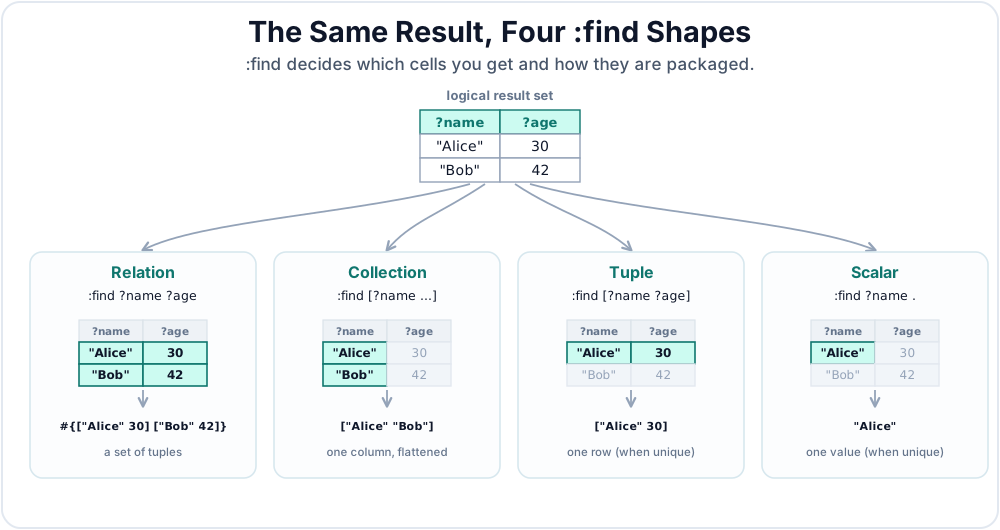
By default, :find returns a relation: a set of tuples, where each tuple contains the values named in the :find clause.
The word set is important. Even if two different internal rows produce the same :find tuple, that tuple appears only once in the final result set.
;; Returns: #{["Alice" 30] ["Bob" 42]}
(d/q '[:find ?name ?age
       :where [?user-eid :user/name ?name]
              [?user-eid :user/age ?age]]
     db)
Object result = conn.query("[:find ?name ?age " +
    ":where [?user-eid :user/name ?name] " +
    "       [?user-eid :user/age ?age]]");
user_eid = q.var("user-eid")
name = q.var("name")
age = q.var("age")
result = conn.query(q.query(
    find=q.relation(name, age),
    where=[
        q.datom(user_eid, "user/name", name),
        q.datom(user_eid, "user/age", age),
    ],
))
const userEid = q.var("user-eid");
const name = q.var("name");
const age = q.var("age");
const result = await conn.query(q.query({
  find: q.relation(name, age),
  where: [
    q.datom(userEid, "user/name", name),
    q.datom(userEid, "user/age", age)
  ]
}));
Set semantics describe which rows belong to the relation, not the foreign language container used to carry them. Python materializes a relation as a list of row lists, and JavaScript materializes it as an Array of row Arrays. Without order_by/orderBy, the rows remain unordered even though the bridge uses an indexable sequence.
Datalevin supports these find shapes:
| Shape | Syntax | Result shape |
|---|---|---|
| Relation | :find ?name ?age |
A set of tuples, for example #{["Alice" 30] ["Bob" 42]}. |
| Collection | :find [?name ...] |
A collection of scalar values, for example ["Alice" "Bob"]. |
| Tuple | :find [?name ?age] |
One tuple, for example ["Alice" 30]. |
| Scalar | :find ?name . |
One scalar value, for example "Alice". |
Figure 8.3 shows the differences graphically.
Use the collection find form when you only need one value from each result tuple:
(d/q '[:find [?name ...]
       :where [?user-eid :user/name ?name]]
     db)
Object names = conn.query("[:find [?name ...] " +
    ":where [?user-eid :user/name ?name]]");
user_eid = q.var("user-eid")
name = q.var("name")
names = conn.query(q.query(
    find=q.collection(name),
    where=[q.datom(user_eid, "user/name", name)],
))
const userEid = q.var("user-eid");
const name = q.var("name");
const names = await conn.query(q.query({
  find: q.collection(name),
  where: [q.datom(userEid, "user/name", name)]
}));
Use tuple or scalar find only when the query logically identifies one result, for example through a unique attribute or an entity id:
;; One tuple
(d/q '[:find [?name ?email]
       :in $ ?user-id
       :where [?user-id :user/name ?name]
              [?user-id :user/email ?email]]
     db user-id)

;; One scalar
(d/q '[:find ?email .
       :in $ ?user-id
       :where [?user-id :user/email ?email]]
     db user-id)
// One tuple
Object user = conn.query("[:find [?name ?email] " +
    ":in $ ?user-id " +
    ":where [?user-id :user/name ?name] " +
    "       [?user-id :user/email ?email]]",
    userId);

// One scalar
Object email = conn.query("[:find ?email . " +
    ":in $ ?user-id " +
    ":where [?user-id :user/email ?email]]",
    userId);
# One tuple
user = q.var("user")
name = q.var("name")
email_value = q.var("email")
user_details = q.query(
    find=q.tuple_find(name, email_value),
    inputs=[q.DB, user],
    where=[
        q.datom(user, "user/name", name),
        q.datom(user, "user/email", email_value),
    ],
)
user_row = conn.query(user_details, user_id)

# One scalar
email_query = q.query(
    find=q.scalar(email_value),
    inputs=[q.DB, user],
    where=[q.datom(user, "user/email", email_value)],
)
email = conn.query(email_query, user_id)
// One tuple
const user = q.var("user");
const name = q.var("name");
const emailValue = q.var("email");
const userDetails = q.query({
  find: q.tuple(name, emailValue),
  inputs: [q.DB, user],
  where: [
    q.datom(user, "user/name", name),
    q.datom(user, "user/email", emailValue)
  ]
});
const userRow = await conn.query(userDetails, userId);

// One scalar
const emailQuery = q.query({
  find: q.scalar(emailValue),
  inputs: [q.DB, user],
  where: [q.datom(user, "user/email", emailValue)]
});
const email = await conn.query(emailQuery, userId);
Tuple and scalar find need unique answers
If more than one result matches a tuple or scalar find, Datalevin returns one matching result. Do not rely on which one you get unless the query itself is unique.
For relation and tuple results, you can also ask Datalevin to return maps with :keys, :strs, or :syms. The number of names must match the number of :find elements, and return maps are not valid with collection or scalar find.
;; Returns: #{{:name "Alice" :age 30} {:name "Bob" :age 42}}
(d/q '[:find ?name ?age
       :keys name age
       :where [?user-eid :user/name ?name]
              [?user-eid :user/age ?age]]
     db)
Object users = conn.query("[:find ?name ?age " +
    ":keys name age " +
    ":where [?user-eid :user/name ?name] " +
    "       [?user-eid :user/age ?age]]");
user_eid = q.var("user-eid")
name = q.var("name")
age = q.var("age")
users = conn.query(q.query(
    find=q.relation(name, age),
    keys=["name", "age"],
    where=[
        q.datom(user_eid, "user/name", name),
        q.datom(user_eid, "user/age", age),
    ],
))
const userEid = q.var("user-eid");
const name = q.var("name");
const age = q.var("age");
const users = await conn.query(q.query({
  find: q.relation(name, age),
  keys: ["name", "age"],
  where: [
    q.datom(userEid, "user/name", name),
    q.datom(userEid, "user/age", age)
  ]
}));
Use :keys for keyword keys, :strs for string keys, and :syms for symbol keys.
8.2 Pull in Queries
When a query discovers the matching entities, pull can shape those entities immediately in the :find clause. This is the usual pattern for "find the matching entities and return application maps":
(d/q '[:find [(pull ?user-eid [:user/name {:user/orders [:order/id]}]) ...]
       :where [?user-eid :user/city "London"]]
     db)
Object result = conn.query("[:find [(pull ?user-eid [:user/name {:user/orders [:order/id]}]) ...] " +
    ":where [?user-eid :user/city \"London\"]]");
user_eid = q.var("user-eid")
user_summary = q.selector(
    "user/name",
    q.pull_nested("user/orders", q.selector("order/id")),
)
result = conn.query(q.query(
    find=q.collection(q.pull(user_eid, user_summary)),
    where=[q.datom(user_eid, "user/city", "London")],
))
const userEid = q.var("user-eid");
const userSummary = q.selector(
  "user/name",
  q.pullNested("user/orders", q.selector("order/id"))
);
const result = await conn.query(q.query({
  find: q.collection(q.pull(userEid, userSummary)),
  where: [q.datom(userEid, "user/city", "London")]
}));
This query finds all users in London and, for each one, pulls their name and a nested list of their orders. The important point is that :where discovers the entities and pull shapes only the entities that survived the query. Chapter 7 covers pull in more detail.
8.3 Aggregation
Datalog supports aggregate functions directly in the :find clause. Aggregates compute over the found result set and can produce summaries similar to SQL GROUP BY. Grouping is determined by the non-aggregate variables that remain in :find: :find ?city (count ?user-eid) groups by ?city and returns one count per city. If :find contains only aggregate expressions, Datalevin treats the whole result as one group.
;; Find the average age of all users
(d/q '[:find (avg ?age) . ; The dot returns a single scalar result
       :where [_ :user/age ?age]]
     db)

;; Find the count of users per city
(d/q '[:find ?city (count ?user-eid)
       :where [?user-eid :user/city ?city]]
     db)
// Find the average age of all users
Object avgAge = conn.query("[:find (avg ?age) . " +
    ":where [_ :user/age ?age]]");

// Find the count of users per city
Object cityCounts = conn.query("[:find ?city (count ?user-eid) " +
    ":where [?user-eid :user/city ?city]]");
# Find the average age of all users
age = q.var("age")
avg_age = conn.query(q.query(
    find=q.scalar(q.aggregate("avg", age)),
    where=[q.datom(q.IGNORE, "user/age", age)],
))

# Find the count of users per city
user_eid = q.var("user-eid")
city = q.var("city")
city_counts = conn.query(q.query(
    find=q.relation(city, q.aggregate("count", user_eid)),
    where=[q.datom(user_eid, "user/city", city)],
))
// Find the average age of all users
const age = q.var("age");
const avgAge = await conn.query(q.query({
  find: q.scalar(q.aggregate("avg", age)),
  where: [q.datom(q.IGNORE, "user/age", age)]
}));

// Find the count of users per city
const userEid = q.var("user-eid");
const city = q.var("city");
const cityCounts = await conn.query(q.query({
  find: q.relation(city, q.aggregate("count", userEid)),
  where: [q.datom(userEid, "user/city", city)]
}));
Common built-in aggregates include sum, avg, count, min, max, median, distinct, and vec. Use distinct when you want to collect the distinct values in each group into a set. Use vec when you want to collect the values in each group into a vector. It collects the values that reach the aggregate, including duplicates that remain in the query basis. Do not rely on the vector's order as a semantic sort order unless the aggregate function itself imposes one.
Arithmetic expressions over aggregate results can also appear in :find. The expression is evaluated after grouping, so each aggregate operand sees the same group it would see if it appeared as a separate :find column. In this query, ?customer-eid is the grouping key, and the final column adds two aggregate results:
(d/q '[:find ?customer-eid
              (sum ?subtotal)
              (sum ?tax)
              (+ (sum ?subtotal) (sum ?tax))
       :where [?order-eid :order/customer ?customer-eid]
              [?order-eid :order/subtotal ?subtotal]
              [?order-eid :order/tax ?tax]]
     db)
Object totals = conn.query("[:find ?customer-eid " +
    "(sum ?subtotal) (sum ?tax) " +
    "(+ (sum ?subtotal) (sum ?tax)) " +
    ":where [?order-eid :order/customer ?customer-eid] " +
    "       [?order-eid :order/subtotal ?subtotal] " +
    "       [?order-eid :order/tax ?tax]]");
order_eid = q.var("order-eid")
customer_eid = q.var("customer-eid")
subtotal = q.var("subtotal")
tax = q.var("tax")
subtotal_sum = q.aggregate("sum", subtotal)
tax_sum = q.aggregate("sum", tax)

totals = conn.query(q.query(
    find=q.relation(
        customer_eid,
        subtotal_sum,
        tax_sum,
        q.expression("+", subtotal_sum, tax_sum),
    ),
    where=[
        q.datom(order_eid, "order/customer", customer_eid),
        q.datom(order_eid, "order/subtotal", subtotal),
        q.datom(order_eid, "order/tax", tax),
    ],
))
const orderEid = q.var("order-eid");
const customerEid = q.var("customer-eid");
const subtotal = q.var("subtotal");
const tax = q.var("tax");
const subtotalSum = q.aggregate("sum", subtotal);
const taxSum = q.aggregate("sum", tax);

const totals = await conn.query(q.query({
  find: q.relation(
    customerEid,
    subtotalSum,
    taxSum,
    q.expression("+", subtotalSum, taxSum)
  ),
  where: [
    q.datom(orderEid, "order/customer", customerEid),
    q.datom(orderEid, "order/subtotal", subtotal),
    q.datom(orderEid, "order/tax", tax)
  ]
}));
Aggregate expressions support +, -, *, /, mod, rem, and quot. Their arguments may be aggregate calls, constants, or nested aggregate expressions, for example (* 2 (+ (sum ?x) (sum ?y))).
9. Query Modifiers and Post-Processing
Beyond the core :where clauses, Datalog provides additional clauses to refine, filter, order, and paginate your query results.
9.1 :with: Preserving Rows for Aggregates
Datalog query results have set semantics. Duplicate result tuples collapse. The :with clause exists for cases where you need a variable to remain part of the intermediate row identity even though it should not be returned.
This most often matters with aggregates. Suppose three orders have amounts 20, 20, and 15. If the query only finds ?amount, the two 20 rows are indistinguishable and collapse before sum sees them:
;; Wrong for revenue: duplicate amount values collapse.
(d/q '[:find (sum ?amount) .
       :where [?order-eid :order/amount ?amount]]
     db)
;; => 35
// Wrong for revenue: duplicate amount values collapse.
Object total = conn.query("[:find (sum ?amount) . " +
    ":where [?order-eid :order/amount ?amount]]");
# Wrong for revenue: duplicate amount values collapse.
order_eid = q.var("order-eid")
amount = q.var("amount")
total = conn.query(q.query(
    find=q.scalar(q.aggregate("sum", amount)),
    where=[q.datom(order_eid, "order/amount", amount)],
))
// Wrong for revenue: duplicate amount values collapse.
const orderEid = q.var("order-eid");
const amount = q.var("amount");
const total = await conn.query(q.query({
  find: q.scalar(q.aggregate("sum", amount)),
  where: [q.datom(orderEid, "order/amount", amount)]
}));
Add :with ?order-eid to keep each order distinct while still returning only the aggregate:
;; Correct: each order contributes its amount.
(d/q '[:find (sum ?amount) .
       :with ?order-eid
       :where [?order-eid :order/amount ?amount]]
     db)
;; => 55
// Correct: each order contributes its amount.
Object total = conn.query("[:find (sum ?amount) . " +
    ":with ?order-eid " +
    ":where [?order-eid :order/amount ?amount]]");
# Correct: each order contributes its amount.
order_eid = q.var("order-eid")
amount = q.var("amount")
total = conn.query(q.query(
    find=q.scalar(q.aggregate("sum", amount)),
    with_=[order_eid],
    where=[q.datom(order_eid, "order/amount", amount)],
))
// Correct: each order contributes its amount.
const orderEid = q.var("order-eid");
const amount = q.var("amount");
const total = await conn.query(q.query({
  find: q.scalar(q.aggregate("sum", amount)),
  with: [orderEid],
  where: [q.datom(orderEid, "order/amount", amount)]
}));
:with does not make a hidden column in the returned result. It only changes the set of variables that define distinct intermediate rows for aggregation. For a non-aggregate query, adding :with often has no observable effect because the final :find result is still a set.
9.2 :having: Filtering Aggregated Results
Like SQL's HAVING clause, :having filters results that have been aggregated in the :find clause by applying additional conditions.
;; Find customers whose total spend and largest order both pass thresholds.
(d/q '[:find ?customer-eid (sum ?total) (max ?total)
       :with ?order-eid
       :where [?order-eid :order/customer ?customer-eid]
              [?order-eid :order/total ?total]
       :having [(> (sum ?total) 1000)]
               [(>= (max ?total) 250)]]
     db)
// Find customers whose total spend and largest order both pass thresholds.
Object result = conn.query("[:find ?customer-eid (sum ?total) (max ?total) " +
    ":with ?order-eid " +
    ":where [?order-eid :order/customer ?customer-eid] " +
    "       [?order-eid :order/total ?total] " +
    ":having [(> (sum ?total) 1000)] " +
    "        [(>= (max ?total) 250)]]");
# Find customers whose total spend and largest order both pass thresholds.
order_eid = q.var("order-eid")
customer_eid = q.var("customer-eid")
total = q.var("total")
total_sum = q.aggregate("sum", total)
largest_total = q.aggregate("max", total)

result = conn.query(q.query(
    find=q.relation(customer_eid, total_sum, largest_total),
    with_=[order_eid],
    where=[
        q.datom(order_eid, "order/customer", customer_eid),
        q.datom(order_eid, "order/total", total),
    ],
    having=[
        q.predicate(">", total_sum, 1000),
        q.predicate(">=", largest_total, 250),
    ],
))
// Find customers whose total spend and largest order both pass thresholds.
const orderEid = q.var("order-eid");
const customerEid = q.var("customer-eid");
const total = q.var("total");
const totalSum = q.aggregate("sum", total);
const largestTotal = q.aggregate("max", total);

const result = await conn.query(q.query({
  find: q.relation(customerEid, totalSum, largestTotal),
  with: [orderEid],
  where: [
    q.datom(orderEid, "order/customer", customerEid),
    q.datom(orderEid, "order/total", total)
  ],
  having: [
    q.predicate(">", totalSum, 1000),
    q.predicate(">=", largestTotal, 250)
  ]
}));
Multiple :having predicates are conjunctive: a group is returned only if all of them are true. In the example above, :with ?order-eid preserves each order as a distinct contributing row, so repeated order totals are still included in the sum.
9.3 :order-by: Sorting Results
The :order-by clause sorts your results based on specified variables. You can specify ascending or descending order.
;; Find users, ordered by age descending, then name ascending
(d/q '[:find ?name ?age
       :where [?user-eid :user/name ?name]
              [?user-eid :user/age ?age]
       :order-by [?age :desc ?name :asc]]
     db)
// Find users, ordered by age descending, then name ascending
Object result = conn.query("[:find ?name ?age " +
    ":where [?user-eid :user/name ?name] " +
    "       [?user-eid :user/age ?age] " +
    ":order-by [?age :desc ?name :asc]]");
# Find users, ordered by age descending, then name ascending
user_eid = q.var("user-eid")
name = q.var("name")
age = q.var("age")
result = conn.query(q.query(
    find=q.relation(name, age),
    where=[
        q.datom(user_eid, "user/name", name),
        q.datom(user_eid, "user/age", age),
    ],
    order_by=[q.desc(age), q.asc(name)],
))
// Find users, ordered by age descending, then name ascending
const userEid = q.var("user-eid");
const name = q.var("name");
const age = q.var("age");
const result = await conn.query(q.query({
  find: q.relation(name, age),
  where: [
    q.datom(userEid, "user/name", name),
    q.datom(userEid, "user/age", age)
  ],
  orderBy: [q.desc(age), q.asc(name)]
}));
When sorting by aggregate output, :order-by can also use zero-based result column indices. This is useful because aggregate expressions are result columns, not variables you can name later in :order-by:
;; Sort customers by total spend descending, then customer ascending.
(d/q '[:find ?customer-eid (sum ?total)
       :with ?order-eid
       :where [?order-eid :order/customer ?customer-eid]
              [?order-eid :order/total ?total]
       :order-by [1 :desc 0 :asc]]
     db)
// Sort customers by total spend descending, then customer ascending.
Object result = conn.query("[:find ?customer-eid (sum ?total) " +
    ":with ?order-eid " +
    ":where [?order-eid :order/customer ?customer-eid] " +
    "       [?order-eid :order/total ?total] " +
    ":order-by [1 :desc 0 :asc]]");
# Sort customers by total spend descending, then customer ascending.
order_eid = q.var("order-eid")
customer_eid = q.var("customer-eid")
total = q.var("total")
result = conn.query(q.query(
    find=q.relation(customer_eid, q.aggregate("sum", total)),
    with_=[order_eid],
    where=[
        q.datom(order_eid, "order/customer", customer_eid),
        q.datom(order_eid, "order/total", total),
    ],
    order_by=[q.desc(1), q.asc(0)],
))
// Sort customers by total spend descending, then customer ascending.
const orderEid = q.var("order-eid");
const customerEid = q.var("customer-eid");
const total = q.var("total");
const result = await conn.query(q.query({
  find: q.relation(customerEid, q.aggregate("sum", total)),
  with: [orderEid],
  where: [
    q.datom(orderEid, "order/customer", customerEid),
    q.datom(orderEid, "order/total", total)
  ],
  orderBy: [q.desc(1), q.asc(0)]
}));
Here column 0 is ?customer-eid, and column 1 is (sum ?total). The :order-by clause sorts by total spend first, then uses customer as a stable tie-breaker.
9.4 :limit and :offset: Pagination
For pagination, you can use :limit to restrict the number of results and :offset to skip a certain number of results.
;; Get the second page of users (limit 10, offset 10)
(d/q '[:find ?name ?age
       :where [?user-eid :user/name ?name]
              [?user-eid :user/age ?age]
       :order-by [?name :asc]
       :limit 10
       :offset 10]
     db)
// Get the second page of users (limit 10, offset 10)
Object result = conn.query("[:find ?name ?age " +
    ":where [?user-eid :user/name ?name] " +
    "       [?user-eid :user/age ?age] " +
    ":order-by [?name :asc] " +
    ":limit 10 " +
    ":offset 10]");
# Get the second page of users (limit 10, offset 10)
user_eid = q.var("user-eid")
name = q.var("name")
age = q.var("age")
result = conn.query(q.query(
    find=q.relation(name, age),
    where=[
        q.datom(user_eid, "user/name", name),
        q.datom(user_eid, "user/age", age),
    ],
    order_by=[q.asc(name)],
    limit=10,
    offset=10,
))
// Get the second page of users (limit 10, offset 10)
const userEid = q.var("user-eid");
const name = q.var("name");
const age = q.var("age");
const result = await conn.query(q.query({
  find: q.relation(name, age),
  where: [
    q.datom(userEid, "user/name", name),
    q.datom(userEid, "user/age", age)
  ],
  orderBy: [q.asc(name)],
  limit: 10,
  offset: 10
}));
Bounded sorting
Every finite ordered relation query keeps only the best :offset + :limit distinct tuples in a bounded priority queue. This reduces sort memory even when every candidate must still be examined.
Query-level :offset and :limit apply to distinct final tuples after the query's other clauses have run. Search functions can also have source-local bounds, such as full-text or vector :top; those bounds determine which candidates enter the Datalog query and are never widened to satisfy its final limit. Chapter 21, Section 1.4 explains when the optimizer can avoid unused source work and how explain reports that choice.
9.5 Programmatic Query Construction
The compact vector form is convenient for static EDN. Python and JavaScript use the typed q namespace for the same query, making runtime options ordinary function arguments or object properties:
[:find ?name ?age
 :where [?user-eid :user/name ?name]
        [?user-eid :user/age ?age]
 :order-by [?name :asc]
 :limit 10]
String query =
    "[:find ?name ?age " +
    ":where [?user-eid :user/name ?name] " +
    "       [?user-eid :user/age ?age] " +
    ":order-by [?name :asc] " +
    ":limit 10]";
user_eid = q.var("user-eid")
name = q.var("name")
age = q.var("age")
query = q.query(
    find=q.relation(name, age),
    where=[
        q.datom(user_eid, "user/name", name),
        q.datom(user_eid, "user/age", age),
    ],
    order_by=[q.asc(name)],
    limit=10,
)
const userEid = q.var("user-eid");
const name = q.var("name");
const age = q.var("age");
const query = q.query({
  find: q.relation(name, age),
  where: [
    q.datom(userEid, "user/name", name),
    q.datom(userEid, "user/age", age)
  ],
  orderBy: [q.asc(name)],
  limit: 10
});
Datalevin also accepts a map form. This is the engine's internal query representation and is useful when application code needs to build options such as :limit, :offset, or :order-by. A fixed query can also name scalar :in variables in :limit and :offset, supplying their values with each call. Dynamic limits must be positive integers and offsets nonnegative integers. Chapter 7, Section 5.4 shows how to reuse a prepared query this way. Python's keyword arguments and JavaScript's options object provide the idiomatic binding equivalent:
(defn page-users
  [conn {:keys [offset limit]
         :or   {offset 0
                limit  50}}]
  (d/q {:find     '[?name ?age]
        :in       '[$]
        :where    '[[?user-eid :user/name ?name]
                    [?user-eid :user/age ?age]]
        :order-by '[?name :asc]
        :limit    limit
        :offset   offset}
       (d/db conn)))
Object pageUsers(Connection conn, long offset, long limit) {
    Map<Object, Object> query = new LinkedHashMap<>();
    query.put(Datalevin.kw(":find"),
              List.of(Datalevin.sym("?name"), Datalevin.sym("?age")));
    query.put(Datalevin.kw(":in"), List.of(Datalevin.sym("$")));
    query.put(Datalevin.kw(":where"), List.of(
        List.of(Datalevin.sym("?user-eid"), Datalevin.kw(":user/name"),
                Datalevin.sym("?name")),
        List.of(Datalevin.sym("?user-eid"), Datalevin.kw(":user/age"),
                Datalevin.sym("?age"))));
    query.put(Datalevin.kw(":order-by"),
              List.of(Datalevin.sym("?name"), Datalevin.kw(":asc")));
    query.put(Datalevin.kw(":limit"), limit);
    query.put(Datalevin.kw(":offset"), offset);

    return conn.queryForm(query, List.of());
}
def page_users(conn, offset=0, limit=50):
    user_eid = q.var("user-eid")
    name = q.var("name")
    age = q.var("age")
    return conn.query(q.query(
        find=q.relation(name, age),
        inputs=[q.DB],
        where=[
            q.datom(user_eid, "user/name", name),
            q.datom(user_eid, "user/age", age),
        ],
        order_by=[q.asc(name)],
        limit=limit,
        offset=offset,
    ))
async function pageUsers(conn, { offset = 0, limit = 50 } = {}) {
  const userEid = q.var("user-eid");
  const name = q.var("name");
  const age = q.var("age");
  return await conn.query(q.query({
    find: q.relation(name, age),
    inputs: [q.DB],
    where: [
      q.datom(userEid, "user/name", name),
      q.datom(userEid, "user/age", age)
    ],
    orderBy: [q.asc(name)],
    limit,
    offset
  }));
}
In map form, the query clauses are ordinary data. Clojure code quotes static query fragments such as :find, :in, :where, and :order-by, but leaves runtime values such as limit and offset unquoted. In Java, mark query keywords and symbols with Datalevin.kw and Datalevin.sym. Python and JavaScript use the typed q.query builder: attribute positions accept ordinary strings, while q.var, q.DB, and helpers such as q.asc make grammar tokens explicit. This avoids string concatenation and keeps pagination, sorting, and optional clauses easy to assemble with normal host-language code.
The same ordering rules apply in both forms: an :order-by variable must appear in the query's result columns. When ordering by an aggregate result, use the appropriate result-column index in :order-by, as shown earlier in this section.
10. Flexible Data Sources: Beyond a Single Database
Section 5 introduced query inputs and the default source symbol $. Datalevin's Datalog engine generalizes that idea: sources are inputs too. A query can read from more than one database, or from any sequence of EAV tuples. This is why the Clojure d/q API takes data sources rather than a connection: queries run over data, while transactions run through connections.
10.1 Multiple Databases
You can pass multiple Datalevin databases to a single query, referenced by different symbols in :in:
;; Join across two databases: a user db and an orders db
(d/q '[:find ?name ?order-total
       :in $users $orders ?min-total
       :where [$users ?user-eid :user/name ?name]
              [$orders ?order-eid :order/customer ?user-eid]
              [$orders ?order-eid :order/total ?order-total]
              [(> ?order-total ?min-total)]]
     (d/db users-conn) (d/db orders-conn) 100)
// Join across two databases: a user db and an orders db.
Object result = usersConn.query(
    "[:find ?name ?order-total " +
    " :in $users $orders ?min-total " +
    " :where [$users ?user-eid :user/name ?name] " +
    "        [$orders ?order-eid :order/customer ?user-eid] " +
    "        [$orders ?order-eid :order/total ?order-total] " +
    "        [(> ?order-total ?min-total)]]",
    ordersConn,
    100);
# Join across two databases: a user db and an orders db.
users = q.source("users")
orders = q.source("orders")
user_eid = q.var("user-eid")
order_eid = q.var("order-eid")
name = q.var("name")
order_total = q.var("order-total")
min_total = q.var("min-total")

cross_database_orders = q.query(
    find=q.relation(name, order_total),
    inputs=[users, orders, min_total],
    where=[
        q.datom(user_eid, "user/name", name, from_source=users),
        q.datom(order_eid, "order/customer", user_eid,
                from_source=orders),
        q.datom(order_eid, "order/total", order_total,
                from_source=orders),
        q.predicate(">", order_total, min_total),
    ],
)
result = users_conn.query(cross_database_orders, orders_conn, 100)
// Join across two databases: a user db and an orders db.
const users = q.source("users");
const orders = q.source("orders");
const userEid = q.var("user-eid");
const orderEid = q.var("order-eid");
const name = q.var("name");
const orderTotal = q.var("order-total");
const minTotal = q.var("min-total");

const crossDatabaseOrders = q.query({
  find: q.relation(name, orderTotal),
  inputs: [users, orders, minTotal],
  where: [
    q.datom(userEid, "user/name", name, { source: users }),
    q.datom(orderEid, "order/customer", userEid, { source: orders }),
    q.datom(orderEid, "order/total", orderTotal, { source: orders }),
    q.predicate(">", orderTotal, minTotal)
  ]
});
const result = await usersConn.query(crossDatabaseOrders, ordersConn, 100);
$users and $orders stand for two different database sources. The triple patterns accept an extra position in front for a source symbol.
This is invaluable when:
- Keeping separate databases for different tenants or domains
- Performing migration or reconciliation between systems
10.2 EAV Sequences as Data Sources
Even more flexibly, the query engine accepts any sequence of EAV tuples as a data source. If you can represent your data as [entity attribute value] triples, you can query it with Datalog, no database required.
In each query below, $data is the source symbol for the tuple sequence.
;; Query an in-memory collection of tuples
(def my-data
  [[1 :user/name "Alice"]
   [1 :user/age 30]
   [2 :user/name "Bob"]
   [2 :user/age 25]])

(d/q '[:find ?name
       :in $data ?min-age
       :where [$data ?user-eid :user/name ?name]
              [$data ?user-eid :user/age ?age]
              [(>= ?age ?min-age)]]
     my-data 28)
;; => #{["Alice"]}
// Query an in-memory collection of tuples
List<?> myData = List.of(
    List.of(1, Datalevin.kw(":user/name"), "Alice"),
    List.of(1, Datalevin.kw(":user/age"), 30),
    List.of(2, Datalevin.kw(":user/name"), "Bob"),
    List.of(2, Datalevin.kw(":user/age"), 25));

Object result = conn.query("[:find ?name " +
    ":in $ $data ?min-age " +
    ":where [$data ?user-eid :user/name ?name] " +
    "       [$data ?user-eid :user/age ?age] " +
    "       [(>= ?age ?min-age)]]",
    myData,
    28);
// => [["Alice"]]
# Query an in-memory collection of tuples
my_data = [
    [1, q.kw("user/name"), "Alice"],
    [1, q.kw("user/age"), 30],
    [2, q.kw("user/name"), "Bob"],
    [2, q.kw("user/age"), 25],
]

data = q.source("data")
user_eid = q.var("user-eid")
name = q.var("name")
age = q.var("age")
min_age = q.var("min-age")
in_memory_users = q.query(
    find=q.relation(name),
    inputs=[q.DB, data, min_age],
    where=[
        q.datom(user_eid, "user/name", name, from_source=data),
        q.datom(user_eid, "user/age", age, from_source=data),
        q.predicate(">=", age, min_age),
    ],
)
result = conn.query(in_memory_users, my_data, 28)
# => [["Alice"]]
// Query an in-memory collection of tuples
const myData = [
  [1, q.kw("user/name"), "Alice"],
  [1, q.kw("user/age"), 30],
  [2, q.kw("user/name"), "Bob"],
  [2, q.kw("user/age"), 25]
];

const data = q.source("data");
const userEid = q.var("user-eid");
const name = q.var("name");
const age = q.var("age");
const minAge = q.var("min-age");
const inMemoryUsers = q.query({
  find: q.relation(name),
  inputs: [q.DB, data, minAge],
  where: [
    q.datom(userEid, "user/name", name, { source: data }),
    q.datom(userEid, "user/age", age, { source: data }),
    q.predicate(">=", age, minAge)
  ]
});
const result = await conn.query(inMemoryUsers, myData, 28);
// => [["Alice"]]
This capability enables:
- Ad-hoc analysis: Query CSV files, JSON data, or API responses by transforming them into EAV tuples
- Testing: Write Datalog queries against fixture data without setting up a test database
- Data transformation: Use Datalog's pattern matching to reshape or filter in-memory collections
- Prototyping: Experiment with query logic on sample data before committing to a schema
The EAV model is not only a storage format; it is also a universal data representation that makes Datalevin's query engine applicable far beyond traditional database use cases.
Summary
Datalog queries start with simple facts: match an entity, match an attribute, bind a value, and reuse variables when facts must agree. From there, the same mental model scales to joins, pull expressions, predicates, aggregates, alternatives, and multiple data sources. State the constraints clearly and let Datalevin's optimizer choose the physical path to the data.
The next chapter explores Rules and Recursion, which allow you to encapsulate logic for reuse and traverse complex, hierarchical, or graph-shaped data structures.
-
In logic programming, making repeated variables agree is called unification. In database language, a shared variable across clauses acts as a join condition, and keeping only the requested
:findvalues is a projection. ↩ -
Datalog literature often calls stored input facts the EDB (extensional database). Relations derived by rules are the IDB (intensional database). Chapter 9 uses those terms when it discusses rules and recursion. ↩
User Examples
Log in to create examplesNo examples for this chapter yet.