
Chapter 17: Vector Search
Modern applications often need to search by semantic relatedness, not only by exact values or graph structure. In Datalevin, vector search is another indexed access path beside EAV, AVE, full-text search, and idoc indexes. Datalevin provides two related similarity-search features:
:db.type/vecstores user-supplied dense vectors and indexes them for nearest-neighbor search.:db/embedding trueindexes string datoms by embedding similarity. Datalevin computes the vectors during transaction processing and returns the original source datoms in queries.
This chapter explains how to configure both paths, perform semantic searches, and understand the underlying Hierarchical Navigable Small World (HNSW) engine.
A vector is an ordered array of numbers. A dense vector usually has a fixed number of dimensions, such as 384, 768, or 1536, and every position has a numeric value. An embedding is a vector produced by a model from some input, often text. Texts with similar meanings should land near each other in the embedding space.
Vector search is nearest-neighbor search: given a query vector, find stored vectors that are closest under a chosen metric. The metric defines what "closest" means. For example, cosine distance compares direction, Euclidean distance compares geometric distance, and dot product is often used when vectors have already been normalized by the model or application.
1. Configuring Vector Indexes
To store vectors in Datalevin, define an attribute with type :db.type/vec. Vector dimensions and similarity metrics are configured at the domain level (see Section 1.2):
(def conn (d/create-conn
           "/tmp/mydb"
           {:id        {:db/valueType :db.type/string
                        :db/unique    :db.unique/identity}
            :embedding {:db/valueType :db.type/vec}}
           {:vector-opts {:dimensions  300
                          :metric-type :cosine}}))
Schema schema = Datalevin.schema()
    .attr(":id",
          Schema.attribute()
              .valueType(Schema.ValueType.STRING)
              .unique(Schema.Unique.IDENTITY))
    .attr(":embedding",
          Schema.attribute().valueType(Schema.ValueType.VEC));

Connection conn = Datalevin.createConn(
    "/tmp/mydb",
    schema,
    Map.of(":vector-opts", Map.of(
        ":dimensions", 300,
        ":metric-type", ":cosine"
    ))
);
from datalevin import connect

conn = connect(
    "/tmp/mydb",
    schema={
        ":id": {":db/valueType": ":db.type/string",
                ":db/unique": ":db.unique/identity"},
        ":embedding": {":db/valueType": ":db.type/vec"}
    },
    opts={":vector-opts": {":dimensions": 300,
                           ":metric-type": ":cosine"}}
)
import { connect } from "datalevin-node";

const conn = await connect(
  '/tmp/mydb',
  {
    schema: {
      ':id': { ':db/valueType': ':db.type/string',
               ':db/unique': ':db.unique/identity' },
      ':embedding': { ':db/valueType': ':db.type/vec' }
    },
    opts: { ':vector-opts': { ':dimensions': 300,
                              ':metric-type': ':cosine' } }
  }
);
With this schema, a transaction that adds or replaces :embedding stores the vector as the datom value and updates the corresponding HNSW vector index. The datom remains ordinary Datalog data, while the vector index is a secondary index used by vec-neighbors.
1.1 Vector Options
Configure these in :vector-opts:
:dimensions- Number of dimensions. Required.:metric-type- Similarity metric::euclidean(default) - Euclidean distance:cosine- Cosine-based distance, comparing vector direction:dot-product- Dot product:haversine- Great-circle distance for geo coordinates:divergence- Jensen-Shannon divergence for probability distributions:pearson,:jaccard,:hamming,:tanimoto,:sorensen- other specialized metrics
:quantization- Scalar type::float(default),:double,:float16,:int8,:byte:connectivity- Connections per node (default 16). Range 5-48.:expansion-add- Candidates during indexing (default 128):expansion-search- Candidates during search (default 64)
Quantization controls how vector numbers are stored. :float and :double preserve more numeric precision. Smaller formats such as :float16, :int8, and :byte reduce memory and storage, but may slightly reduce search quality because each coordinate is represented less precisely.
1.2 Vector and Embedding Domains
Chapter 16 introduced domains as named secondary indexes. Vector search uses the same idea, but the backing index is an HNSW index rather than an inverted full-text index, so the operational rules are different.
The most important difference is that vector search is always domain-scoped. Unlike fulltext, vec-neighbors and embedding-neighbors do not search every domain when no domain is specified. Use either the attribute-specific form or an explicit :domains option.
Vector search always chooses a domain
Full-text search can search all initialized domains by default. Vector and embedding search do not: use an attribute-specific call for the attribute domain or pass `:domains` when searching named vector or embedding domains.
For :db.type/vec attributes:
- Every raw vector attribute has an attribute domain, and raw vector writes always participate in it.
- Namespaced attributes use underscores in domain names:
:embeddingbecomes"embedding", and:user/profilebecomes"user_profile". :db.vec/domainslists shared vector domains in addition to the attribute domain. Datalevin indexes writes into all listed domains and the attribute domain, so configure every participating domain with compatible vector options when using per-domain overrides.- All vectors in a vector domain must have the same dimensions, metric, and quantization settings.
For :db/embedding attributes:
- Embedding domains are configured separately from raw vector domains.
- If no
:db.embedding/domainsis specified, the attribute participates in the default"datalevin"embedding domain. :db.embedding/autoDomain trueadds the attribute domain and enables attribute-specificembedding-neighbors.- Each embedding domain is tied to an embedding provider as well as vector search options such as metric and dimensions.
Configure defaults with :vector-opts and :embedding-opts; use :vector-domains and :embedding-domains for per-domain overrides. The same domain string can appear in full-text, vector, and embedding configuration, but those are separate indexes.
2. Text Embedding Indexes
Use :db/embedding true when the source data is text and you want Datalevin to maintain the embedding vector index for you. Unlike :db.type/vec, the stored datom remains the original string. The embedding vector is a secondary index detail.
An embedding index has two moving parts:
- An embedding provider turns text into vectors. It may be the built-in local llama.cpp provider or an OpenAI-compatible HTTP provider.
- A vector index stores those generated vectors and finds nearest neighbors.
Figure 17.1 shows the text embedding indexing pipeline.
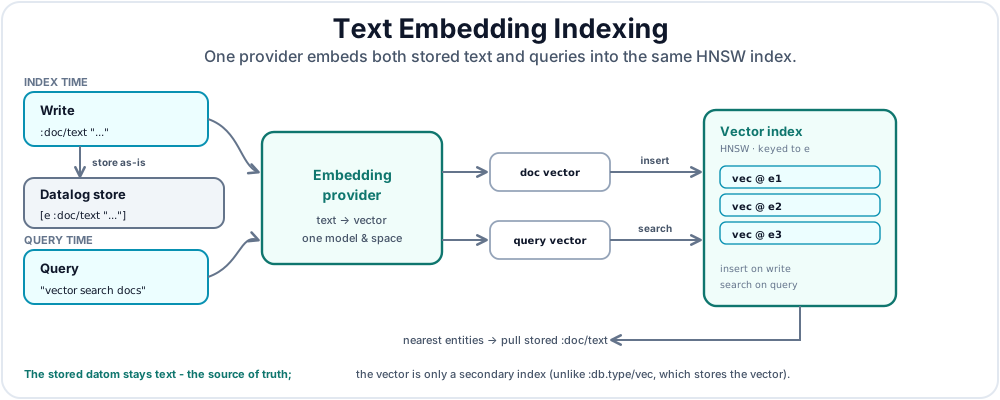
The provider, model, dimensions, metric, and quantization together define an embedding space.
Keep one embedding space per domain
Values from different providers, models, dimensions, metrics, or quantization settings should not be mixed in one domain. If any of those settings change for populated data, rebuild or re-index before trusting nearest neighbors.
(def embedding-schema
  {:doc/id   {:db/valueType :db.type/string
              :db/unique    :db.unique/identity}
   :doc/text {:db/valueType            :db.type/string
              :db/embedding            true
              :db.embedding/domains    ["docs"]
              :db.embedding/autoDomain true}})

(def conn
  (d/create-conn
    "/tmp/embedding-db"
    embedding-schema
    {:embedding-opts {:provider    :default
                      :metric-type :cosine}}))
Schema embeddingSchema = Datalevin.schema()
    .attr(":doc/id",
          Schema.attribute()
              .valueType(Schema.ValueType.STRING)
              .unique(Schema.Unique.IDENTITY))
    .attr(":doc/text",
          Schema.attribute()
              .valueType(Schema.ValueType.STRING)
              .prop(":db/embedding", true)
              .prop(":db.embedding/domains", List.of("docs"))
              .prop(":db.embedding/autoDomain", true));

Connection conn = Datalevin.createConn(
    "/tmp/embedding-db",
    embeddingSchema,
    Map.of(":embedding-opts", Map.of(
        ":provider", ":default",
        ":metric-type", ":cosine"
    ))
);
from datalevin import connect, embedding_attr, embedding_options

embedding_schema = {
    ":doc/id": {
        ":db/valueType": ":db.type/string",
        ":db/unique": ":db.unique/identity",
    },
    ":doc/text": embedding_attr(domains=["docs"], auto_domain=True),
}

conn = connect(
    "/tmp/embedding-db",
    schema=embedding_schema,
    opts={":embedding-opts": embedding_options(provider=":default",
                                               metric_type=":cosine")},
)
import { connect, embeddingAttr, embeddingOptions } from "datalevin-node";

const embeddingSchema = {
  ":doc/id": {
    ":db/valueType": ":db.type/string",
    ":db/unique": ":db.unique/identity"
  },
  ":doc/text": embeddingAttr({
    domains: ["docs"],
    autoDomain: true
  })
};

const conn = await connect("/tmp/embedding-db", {
  schema: embeddingSchema,
  opts: {
    ":embedding-opts": embeddingOptions({
      provider: ":default",
      metricType: ":cosine"
    })
  }
});
With this schema, a transaction that adds or replaces :doc/text stores the string datom as-is, sends the text through the configured embedding provider, and inserts the resulting vector into the embedding domain's HNSW index. The generated vector is not the source of truth; it is a secondary index derived from the stored text.
Embeddings are derived index data
For :db/embedding, the durable fact is still the source string
datom. The generated vector exists so the secondary HNSW index can answer
similarity queries; application code should treat the text as the canonical
value.
The built-in default provider uses the local llama.cpp embedder bundled through dtlvnative. If no model path is supplied, Datalevin uses multilingual-e5-small-Q8_0.gguf; the model is downloaded under the database root on first use when missing. GGUF is the local model file format used by llama.cpp. For larger models or hosted embedding APIs, use an OpenAI-compatible provider:
{:embedding-opts
 {:provider           :openai-compatible
  :model              "text-embedding-3-small"
  :base-url           "https://api.openai.com/v1"
  :api-key-env        "OPENAI_API_KEY"
  :request-dimensions 1536
  :metric-type        :cosine}}
Map<String, Object> opts = Map.of(
    ":embedding-opts", Map.of(
        ":provider", ":openai-compatible",
        ":model", "text-embedding-3-small",
        ":base-url", "https://api.openai.com/v1",
        ":api-key-env", "OPENAI_API_KEY",
        ":request-dimensions", 1536,
        ":metric-type", ":cosine"
    )
);
from datalevin import embedding_options

opts = {
    ":embedding-opts": embedding_options(
        provider=":openai-compatible",
        model="text-embedding-3-small",
        base_url="https://api.openai.com/v1",
        api_key_env="OPENAI_API_KEY",
        request_dimensions=1536,
        metric_type=":cosine")
}
import { embeddingOptions } from "datalevin-node";

const opts = {
  ":embedding-opts": embeddingOptions({
    provider: ":openai-compatible",
    model: "text-embedding-3-small",
    baseUrl: "https://api.openai.com/v1",
    apiKeyEnv: "OPENAI_API_KEY",
    requestDimensions: 1536,
    metricType: ":cosine"
  })
};
Important rules:
:db/embeddingapplies to string attributes.- If no embedding domain is specified, the attribute participates in the default
"datalevin"embedding domain. :db/embeddingmay coexist with:db/fulltexton the same attribute.- Changing embedding-related schema on populated attributes requires an explicit rebuild workflow. In practice, changing the provider, model, dimensions, metric, or quantization means old indexed vectors were produced in a different embedding space; rebuild or re-index before relying on search results. Test the embedding configuration separately before adding it to the production database.
2.1 Direct Embedding Provider API
Most applications use :db/embedding and let Datalevin embed string datoms during transactions. The direct provider API is useful when application code needs embeddings before a transaction, wants to check token counts, or needs to truncate text to a model limit.
(def provider
  (d/new-embedding-provider
    {:provider :llama.cpp
     :model    "/models/embed.gguf"}))

(try
  {:metadata   (d/embedding-metadata provider)
   :dimensions (d/embedding-dimensions provider)
   :tokens     (d/token-count provider "Datalevin vector search")
   :vectors    (d/embed-texts
                 provider
                 [(d/truncate-text provider
                                   "Datalevin vector search"
                                   512)])}
  (finally
    (d/close-embedding-provider provider)))
try (LlamaEmbedder embedder =
         Datalevin.newLlamaEmbedder("/models/embed.gguf")) {
    int dimensions = embedder.dimensions();
    int tokens = embedder.tokenCount("Datalevin vector search");
    float[] vector = embedder.embed(
        embedder.truncateText("Datalevin vector search", 512));
}
from datalevin import new_llama_embedder

with new_llama_embedder("/models/embed.gguf") as embedder:
    result = {
        "dimensions": embedder.dimensions(),
        "tokens": embedder.token_count("Datalevin vector search"),
        "vectors": [
            embedder.embed(
                embedder.truncate_text("Datalevin vector search", 512)
            )
        ],
    }
import { newLlamaEmbedder } from "datalevin-node";

const embedder = await newLlamaEmbedder("/models/embed.gguf");
try {
  const result = {
    dimensions: await embedder.dimensions(),
    tokens: await embedder.tokenCount("Datalevin vector search"),
    vectors: [
      await embedder.embed(
        await embedder.truncateText("Datalevin vector search", 512)
      )
    ]
  };
} finally {
  await embedder.close();
}
embed-text returns one float array. embed-texts returns one float array per input string. token-count, token-counts, truncate-item, and truncate-text are the Clojure provider helpers for preparing inputs before indexing or prompt assembly. The Java, Python, and JavaScript local llama.cpp wrappers expose the same concepts as language-native methods such as embed, tokenCount / token_count, and truncateText / truncate_text.
3. Querying Vector and Embedding Indexes
Once the vector or embedding index exists, Datalog queries use neighbor functions to turn similarity search results into ordinary query rows. Raw vector attributes use vec-neighbors; text embedding attributes use embedding-neighbors.
3.1 Similarity Search with vec-neighbors
The Datalog built-in vec-neighbors function takes a query vector and returns matching datoms as [e a v] triples, ordered by similarity:
(d/q '[:find ?i ?v
       :in $ ?q
       :where
       [(vec-neighbors $ :embedding ?q {:top 4}) [[?e ?a ?v]]]
       [?e :id ?i]]
     (d/db conn) query-vector)
conn.query("[:find ?i ?v " +
           " :in $ ?q " +
           " :where " +
           " [(vec-neighbors $ :embedding ?q {:top 4}) [[?e ?a ?v]]] " +
           " [?e :id ?i]]",
           queryVector);
from datalevin import q

e, a, value, item_id, query = map(
    q.var, ("e", "a", "v", "i", "q"))
conn.query(q.query(
    find=q.relation(item_id, value),
    inputs=[q.DB, query],
    where=[
        q.vec_neighbors(
            query,
            [e, a, value],
            attribute="embedding",
            options=q.vector_search_options(top=4),
        ),
        q.datom(e, "id", item_id),
    ],
), query_vector)
import { q } from "datalevin-node";

const e = q.var("e");
const a = q.var("a");
const value = q.var("v");
const itemId = q.var("i");
const query = q.var("q");
await conn.query(q.query({
  find: q.relation(itemId, value),
  inputs: [q.DB, query],
  where: [
    q.vecNeighbors(
      query,
      [e, a, value],
      {
        attribute: "embedding",
        options: q.vectorSearchOptions({ top: 4 })
      }
    ),
    q.datom(e, "id", itemId)
  ]
}), queryVector);
In Datalog vector search, the returned reference is the datom itself. Similar to fulltext, the returned triples are destructured and bound to variables, so Datalog joins can use them.
3.2 Search Options
Both neighbor functions accept these common options:
:top- Number of results (default 10):domains- List of domains to search:display- Result format::refs(default) -[e a v]triples:refs+dists-[e a v dist]with the metric distance
For raw vector search, vec-neighbors also accepts :vec-filter, a predicate applied to each candidate vector reference before the chosen display shape is returned.
Python's q.vector_search_options and JavaScript's q.vectorSearchOptions build these maps for both neighbor functions. The dedicated q.vec_neighbors/q.vecNeighbors clause also checks that a static display mode matches the result binding width.
When :display :refs+dists is used, dist is a metric distance. Datalevin returns nearest neighbors first. Lower distances usually mean closer neighbors, but the numeric scale depends on the metric, model, quantization, and domain.
Do not mix distance scales
Vector distances are not comparable to full-text scores, and distances from one embedding space are not comparable to another. Fuse ranked lists by rank or evidence, or keep one index as the candidate generator and the other as a filter.
3.3 Domain-Specific Vector Search
The attribute-specific form from Section 3.1, such as (vec-neighbors $ :embedding ?q ...), searches only the attribute domain for :embedding. Use :domains when the query should search named vector domains directly:
(d/q '[:find ?e ?id ?dist
       :in $ ?q
       :where [(vec-neighbors $ ?q
                              {:top 100
                               :domains ["embedding"]
                               :display :refs+dists})
               [[?e _ _ ?dist]]]
              [?e :id ?id]
       :order-by [?dist :asc ?id :asc ?e :asc]
       :limit 4]
     db
     query-vec)
conn.query("[:find ?e ?id ?dist " +
           " :in $ ?q " +
           " :where [(vec-neighbors $ ?q " +
           "                          {:top 100 " +
           "                           :domains [\"embedding\"] " +
           "                           :display :refs+dists}) " +
           "         [[?e _ _ ?dist]]] " +
           "        [?e :id ?id] " +
           " :order-by [?dist :asc ?id :asc ?e :asc] " +
           " :limit 4]",
           queryVector);
from datalevin import q

e, item_id, distance, query = map(q.var, ("e", "id", "dist", "q"))
options = q.vector_search_options(
    top=100, domains=["embedding"], display="refs+dists")
conn.query(q.query(
    find=q.relation(e, item_id, distance),
    inputs=[q.DB, query],
    where=[
        q.vec_neighbors(
            query,
            [e, q.IGNORE, q.IGNORE, distance],
            options=options,
        ),
        q.datom(e, "id", item_id),
    ],
    order_by=[q.asc(distance), q.asc(item_id), q.asc(e)],
    limit=4,
), query_vector)
import { q } from "datalevin-node";

const e = q.var("e");
const itemId = q.var("id");
const distance = q.var("dist");
const query = q.var("q");
const options = q.vectorSearchOptions({
  top: 100, domains: ["embedding"], display: "refs+dists"
});
await conn.query(q.query({
  find: q.relation(e, itemId, distance),
  inputs: [q.DB, query],
  where: [
    q.vecNeighbors(
      query,
      [e, q.IGNORE, q.IGNORE, distance],
      { options }
    ),
    q.datom(e, "id", itemId)
  ],
  orderBy: [q.asc(distance), q.asc(itemId), q.asc(e)],
  limit: 4
}), queryVector);
Source-local and query-level bounds
The structured :id clause keeps only neighbors attached to an entity with an application identifier and supplies that identifier to the result. The vector function's :top 100 is the source-local approximate result window; :limit 4 is the final Datalog window after that join, projection, and deduplication. The optimizer never widens the source-local window, so :top remains a recall-versus-search-cost choice when surrounding clauses prune candidates.
Chapter 21, Section 1.4 explains when the optimizer can consume this source incrementally and preserve its distance order. That optimization can reduce downstream Datalog work, but it does not improve recall beyond :top.
3.4 Text Search with embedding-neighbors
Query an embedding index with embedding-neighbors. The query input is text, not a vector. Datalevin embeds the query text with the same provider and embedding space configured for the target domain, then searches the HNSW index:
(d/q '[:find ?id ?text
       :in $ ?q
       :where
       [(embedding-neighbors $ ?q {:domains ["docs"] :top 5})
        [[?e _ ?text]]]
       [?e :doc/id ?id]]
     (d/db conn)
     "vector search docs")
conn.query("[:find ?id ?text " +
           " :in $ ?q " +
           " :where " +
           " [(embedding-neighbors $ ?q {:domains [\"docs\"] :top 5}) " +
           "  [[?e _ ?text]]] " +
           " [?e :doc/id ?id]]",
           "vector search docs");
from datalevin import q

e, doc_id, text, query = map(q.var, ("e", "id", "text", "q"))
options = q.vector_search_options(domains=["docs"], top=5)
conn.query(q.query(
    find=q.relation(doc_id, text),
    inputs=[q.DB, query],
    where=[
        q.bind(
            "embedding-neighbors",
            q.relation_binding(e, q.IGNORE, text),
            q.DB,
            query,
            options,
        ),
        q.datom(e, "doc/id", doc_id),
    ],
), "vector search docs")
import { q } from "datalevin-node";

const e = q.var("e");
const docId = q.var("id");
const text = q.var("text");
const query = q.var("q");
const options = q.vectorSearchOptions({ domains: ["docs"], top: 5 });
await conn.query(q.query({
  find: q.relation(docId, text),
  inputs: [q.DB, query],
  where: [
    q.bind(
      "embedding-neighbors",
      q.relationBinding(e, q.IGNORE, text),
      q.DB,
      query,
      options
    ),
    q.datom(e, "doc/id", docId)
  ]
}), "vector search docs");
3.5 Attribute-Specific Embedding Search
Attribute-specific embedding search requires :db.embedding/autoDomain true:
(d/q '[:find ?id ?dist
       :in $ ?q
       :where
       [(embedding-neighbors $ :doc/text ?q {:top 5 :display :refs+dists})
        [[?e _ _ ?dist]]]
       [?e :doc/id ?id]]
     (d/db conn)
     "semantic database")
conn.query("[:find ?id ?dist " +
           " :in $ ?q " +
           " :where " +
           " [(embedding-neighbors $ :doc/text ?q " +
           "                      {:top 5 :display :refs+dists}) " +
           "  [[?e _ _ ?dist]]] " +
           " [?e :doc/id ?id]]",
           "semantic database");
from datalevin import q

e, doc_id, distance, query = map(q.var, ("e", "id", "dist", "q"))
options = q.vector_search_options(top=5, display="refs+dists")
conn.query(q.query(
    find=q.relation(doc_id, distance),
    inputs=[q.DB, query],
    where=[
        q.bind(
            "embedding-neighbors",
            q.relation_binding(e, q.IGNORE, q.IGNORE, distance),
            q.DB,
            q.kw("doc/text"),
            query,
            options,
        ),
        q.datom(e, "doc/id", doc_id),
    ],
), "semantic database")
import { q } from "datalevin-node";

const e = q.var("e");
const docId = q.var("id");
const distance = q.var("dist");
const query = q.var("q");
const options = q.vectorSearchOptions({ top: 5, display: "refs+dists" });
await conn.query(q.query({
  find: q.relation(docId, distance),
  inputs: [q.DB, query],
  where: [
    q.bind(
      "embedding-neighbors",
      q.relationBinding(e, q.IGNORE, q.IGNORE, distance),
      q.DB,
      q.kw("doc/text"),
      query,
      options
    ),
    q.datom(e, "doc/id", docId)
  ]
}), "semantic database");
4. Standalone Vector Database
Datalevin can be used as a standalone vector database. Use the standalone vector-index API when you want a KV-backed vector index without a Datalog schema attribute.
(def lmdb (d/open-kv "/tmp/vector-db"))
(def index (d/new-vector-index lmdb {:dimensions 300}))

(d/add-vec index "cat" cat-vector)
(d/add-vec index "dog" dog-vector)

(d/search-vec index query-vector {:top 2})
;=> ("cat" "dog")
try (KV kv = Datalevin.openKV("/tmp/vector-db");
     VectorIndex index =
         Datalevin.newVectorIndex(
             kv,
             RetrievalOptions.vector(300).build())) {
    index.addVec("cat", catVector);
    index.addVec("dog", dogVector);

    index.searchVec(queryVector, Map.of(":top", 2));
    // => ["cat", "dog"]
}
from datalevin import new_vector_index, open_kv, vector_options

with open_kv("/tmp/vector-db") as kv:
    index = new_vector_index(kv, vector_options(dimensions=300))
    index.add_vec("cat", cat_vector)
    index.add_vec("dog", dog_vector)

    index.search_vec(query_vector, opts={":top": 2})
    # => ["cat", "dog"]
import { newVectorIndex, openKv, vectorOptions } from "datalevin-node";

const kv = await openKv("/tmp/vector-db");
try {
  const index = await newVectorIndex(
    kv,
    vectorOptions({ dimensions: 300 })
  );
  await index.addVec("cat", catVector);
  await index.addVec("dog", dogVector);

  await index.searchVec(queryVector, { ":top": 2 });
  // => ["cat", "dog"]
} finally {
  await kv.close();
}
Vector References: In Datalog's vec-neighbors, results are datoms [e a v]. In standalone mode, vec-ref can be any bridge-supported value whose encoded key is at most 511 bytes: strings, numbers, maps, or any identifier meaningful to your application.
Multiple vectors can share the same vec-ref. For example, different image embeddings might all reference the same tag "cat", or document chunks in a RAG system might all reference the same document ID.
4.1 Vector Index Lifecycle and Introspection
Standalone vector indexes also expose cleanup and inspection functions:
(d/vector-index-info index)
;=> {:size 2, :dimensions 300, :metric-type :euclidean, ...}

(d/remove-vec index "dog")

(d/force-vec-checkpoint! index)
(d/vector-checkpoint-state index)

(d/close-vector-index index)
index.info();
// => {size=2, dimensions=300, metric-type=:euclidean, ...}

index.removeVec("dog");

index.forceCheckpoint();
index.checkpointState();

index.close();
index.info()
# => {":size": 2, ":dimensions": 300, ":metric-type": ":euclidean", ...}

index.remove_vec("dog")

index.force_checkpoint()
index.checkpoint_state()

index.close()
await index.info();
// => { ":size": 2, ":dimensions": 300, ":metric-type": ":euclidean", ... }

await index.removeVec("dog");

await index.forceCheckpoint();
await index.checkpointState();

await index.close();
remove-vec removes all vectors associated with a vec-ref. clear-vector-index closes the index and deletes all vectors. close-vector-index only releases index resources. vector-index-info reports size, memory, configuration, hardware, domain, and checkpoint metadata.
5. The Core Engine: HNSW
Datalevin's vector search uses Hierarchical Navigable Small World (HNSW) graphs, the graph-based approximate nearest-neighbor method introduced by Malkov and Yashunin [1], implemented via the usearch library with SIMD optimizations.1
5.1 Performance Trade-offs
HNSW is an approximate nearest-neighbor index. It trades exactness for faster search on large vector sets: depending on tuning and data shape, it may miss an exact nearest vector. The quality measure for this trade-off is recall: the fraction of true nearest neighbors that the approximate search returns. Higher recall usually costs more memory, indexing time, or query time.
Tune for recall, memory, and latency
HNSW settings are workload knobs, not universal constants. Validate recall against examples that represent your product's retrieval needs, then trade memory, indexing time, and query latency deliberately.
:connectivity(M) - Higher = better recall, more memory:expansion-add(efConstruction) - Higher = better index quality, slower writes:expansion-search(ef) - Higher = better recall, slower queries
connectivity controls how many graph neighbors each vector can keep. expansion-add controls how thoroughly the graph is searched while inserting a new vector. expansion-search controls how many candidates are explored during a query. If recall is too low, raise :expansion-search first; if newly inserted data has poor recall, tune :connectivity and :expansion-add before rebuilding.
5.2 How HNSW Works
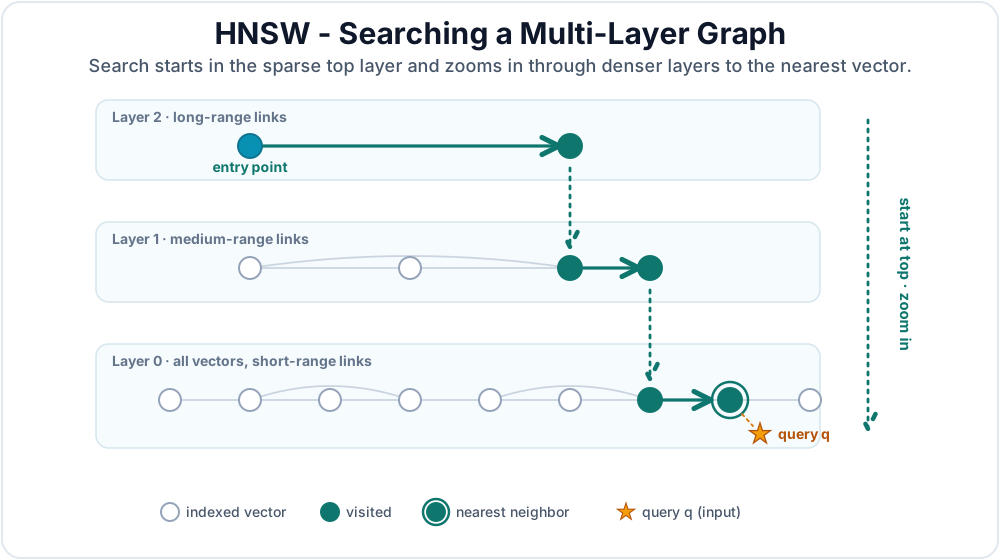
HNSW builds a multi-layer graph where each node is a vector:
- Higher layers have long-range connections for fast "skipping"
- Lower layers have short-range connections for precision
Search starts at the top layer and "zooms in" through descending layers to find nearest neighbors. Figure 17.2 shows the search process.
5.3 Storage Layout
Datalevin does not store each HNSW graph edge as an ordinary datom or as a separate LMDB key. Each vector domain has a native usearch HNSW index, optimized for nearest-neighbor search. Datalevin keeps that native index open in memory while the database is open, and persists it into the same LMDB environment as checkpoint data.
The durable storage has three main pieces:
- A per-domain reference map, stored in an LMDB list database named like
<domain>/vec-refs, maps each application-levelvec-refto one or more internal vector ids. - The serialized native HNSW index is stored as chunked blobs in the
datalevin/vec-indexdatabase. Chunking avoids requiring one large contiguous byte buffer for very large indexes. - Checkpoint metadata is stored in
datalevin/vec-meta. It records information such as chunk count, total serialized bytes, checkpoint LSNs, and vector replay state.
On open, Datalevin reconstructs the in-memory native index from the LMDB checkpoint and reloads the vec-id -> vec-ref map from the per-domain reference database. If the transaction log is enabled, the checkpoint metadata also records the replay floor so Datalevin can apply vector changes that happened after the last checkpoint.
This design keeps vector search responsive while keeping the index tied to the same database lifecycle as the rest of Datalevin. Adding or removing a vector first updates the durable LMDB reference mapping, then mutates the native HNSW index. Periodic or explicit vector checkpoints serialize the native index back into LMDB. For :db.type/vec, the vector value is also the datom value in the Datalog store. For :db/embedding, the source datom remains text, and the generated embedding vector lives only in the secondary vector index.
6. Hybrid Retrieval: Combining Logic and Similarity
Vector search integrates with Datalog, enabling hybrid queries that combine semantic similarity with structured filters:
(d/q '[:find ?title ?v
       :in $ ?target-vec
       :where
       [(vec-neighbors $ :product/embedding ?target-vec {:top 10}) [[?e _ ?v]]]
       [?e :product/title ?title]
       [?e :product/status :product.status/in-stock]
       [?e :product/price ?price]
       [(< ?price 100.0)]]
     db query-vec)
conn.query("[:find ?title ?v " +
           " :in $ ?target-vec " +
           " :where " +
           " [(vec-neighbors $ :product/embedding ?target-vec {:top 10}) [[?e _ ?v]]] " +
           " [?e :product/title ?title] " +
           " [?e :product/status :product.status/in-stock] " +
           " [?e :product/price ?price] " +
           " [(< ?price 100.0)]]",
           queryVec);
from datalevin import q

e, title, value, target, price = map(
    q.var, ("e", "title", "v", "target-vec", "price"))
conn.query(q.query(
    find=q.relation(title, value),
    inputs=[q.DB, target],
    where=[
        q.vec_neighbors(
            target,
            [e, q.IGNORE, value],
            attribute="product/embedding",
            options=q.vector_search_options(top=10),
        ),
        q.datom(e, "product/title", title),
        q.datom(e, "product/status", q.kw("product.status/in-stock")),
        q.datom(e, "product/price", price),
        q.predicate("<", price, 100.0),
    ],
), query_vec)
import { q } from "datalevin-node";

const e = q.var("e");
const title = q.var("title");
const value = q.var("v");
const target = q.var("target-vec");
const price = q.var("price");
await conn.query(q.query({
  find: q.relation(title, value),
  inputs: [q.DB, target],
  where: [
    q.vecNeighbors(
      target,
      [e, q.IGNORE, value],
      {
        attribute: "product/embedding",
        options: q.vectorSearchOptions({ top: 10 })
      }
    ),
    q.datom(e, "product/title", title),
    q.datom(e, "product/status", q.kw("product.status/in-stock")),
    q.datom(e, "product/price", price),
    q.predicate("<", price, 100.0)
  ]
}), queryVec);
This is a common Retrieval-Augmented Generation (RAG) pattern: find semantically similar documents, then filter by metadata, access control, or recency. Chapter 18 develops these hybrid retrieval patterns in depth.
7. Asynchronous Vector and Embedding Indexing
Vector and embedding indexing are synchronous by default. A transaction updates the source datoms and the secondary index before returning.
For ingestion-heavy workloads, configure async indexing:
{:vector-opts {:dimensions    300
               :metric-type   :cosine
               :indexing-mode :async}}
Map<String, Object> opts = Map.of(
    ":vector-opts", Map.of(
        ":dimensions", 300,
        ":metric-type", ":cosine",
        ":indexing-mode", ":async"
    )
);
opts = {
    ":vector-opts": {
        ":dimensions": 300,
        ":metric-type": ":cosine",
        ":indexing-mode": ":async",
    }
}
const opts = {
  ':vector-opts': {
    ':dimensions': 300,
    ':metric-type': ':cosine',
    ':indexing-mode': ':async'
  }
};
or for embedding providers:
{:embedding-opts
 {:provider      :openai-compatible
  :model         "text-embedding-3-small"
  :api-key-env   "OPENAI_API_KEY"
  :metric-type   :cosine
  :indexing-mode :async}}
Map<String, Object> opts = Map.of(
    ":embedding-opts", Map.of(
        ":provider", ":openai-compatible",
        ":model", "text-embedding-3-small",
        ":api-key-env", "OPENAI_API_KEY",
        ":metric-type", ":cosine",
        ":indexing-mode", ":async"
    )
);
from datalevin import embedding_options

opts = {
    ":embedding-opts": embedding_options(
        provider=":openai-compatible",
        model="text-embedding-3-small",
        api_key_env="OPENAI_API_KEY",
        metric_type=":cosine",
        indexing_mode=":async")
}
import { embeddingOptions } from "datalevin-node";

const opts = {
  ":embedding-opts": embeddingOptions({
    provider: ":openai-compatible",
    model: "text-embedding-3-small",
    apiKeyEnv: "OPENAI_API_KEY",
    metricType: ":cosine",
    indexingMode: ":async"
  })
};
Async vector indexes can lag
In async mode, newly committed vectors or text may not affect neighbor search until the background worker has applied the index job. Failed jobs retry with bounded backoff and worker leases, so a later worker can reclaim stalled work.
Chapter 22 covers testing and waiting for async secondary indexes, and Appendix E lists the helper APIs.
Summary
Vector search adds semantic similarity as another Datalevin access path:
- Raw vectors: Use
:db.type/vecandvec-neighborswhen your application owns vectors directly. - Text embeddings: Use
:db/embeddingandembedding-neighborswhen Datalevin should embed string datoms and maintain the vector index for you. - Domains: Vector and embedding queries are domain-scoped. Use attribute domains for focused searches and named domains when several attributes share a vector search surface.
- Standalone indexes: Use standalone vector indexes when vectors are not part of a Datalog schema or when an application needs direct lifecycle control.
- HNSW tuning: Dimensions, metric, quantization, connectivity, and expansion settings define the search space and the speed, memory, and recall tradeoffs.
- Hybrid retrieval: Combine nearest-neighbor results with Datalog filters, joins, and access-control facts for application search and RAG.
- Query bounds: Vector or embedding
:topdefines the approximate source window, while a final Datalog limit applies after surrounding clauses. Chapter 21, Section 1.4 explains how the optimizer costs these access paths. - Async indexing: Keep the default synchronous path for immediate consistency; use async indexing for ingestion-heavy workloads and monitor pending secondary-index jobs explicitly.
References
[1] Yu. A. Malkov and D. A. Yashunin, "Efficient and Robust Approximate Nearest Neighbor Search Using Hierarchical Navigable Small World Graphs," arXiv:1603.09320, 2016; IEEE Transactions on Pattern Analysis and Machine Intelligence 42(4):824-836, 2020. URL: https://arxiv.org/abs/1603.09320. DOI: https://doi.org/10.1109/TPAMI.2018.2889473.
-
SIMD means "single instruction, multiple data": CPU vector instructions that operate on several numeric coordinates at once. It is an implementation detail, but it is one reason vector distance calculations can be fast on modern CPUs. ↩
User Examples
Log in to create examplesNo examples for this chapter yet.