
Chapter 16: Full-Text Search
Many database applications add a separate engine like Lucene, Elasticsearch, or Solr for full-text search. Datalevin includes an integrated search engine built directly on top of its KV substrate.
This is a deliberate design choice. Lucene is an excellent general-purpose information-retrieval library, and systems such as Elasticsearch and Solr build large search platforms around it. Datalevin has a narrower goal: make search a native secondary index of an embedded logical database. For that goal, an integrated engine has practical advantages. Search updates can participate in the same transaction boundary as datom updates, backup and restore stay within one LMDB environment, query results can be datoms that join directly with Datalog clauses, and the application does not need to operate or reconcile a separate search index beside the database.
The tradeoff is intentional. Datalevin is not trying to replace the Lucene ecosystem for every search problem. If an application needs a large distributed search cluster, a specialized Lucene analyzer stack, or search features outside Datalevin's scope, using a dedicated search system can be the right choice. Datalevin's built-in engine is for the common case where search should be a transactional capability of the database itself.
This chapter explains how to enable full-text search, write boolean search queries, and understand the underlying ranking algorithm.
1. Enabling Full-Text Search
Full-text search is search over text rather than exact database values. Instead of asking whether one stored value equals another, a full-text engine breaks text documents into searchable terms, normalizes those terms, records where they occur, and ranks matching documents by relevance. This is what lets a user search for words, phrases, prefixes, or boolean combinations across longer fields such as titles, comments, articles, documentation pages, and messages. Full-text search is also used for searching logs and other textual information.
To enable full-text search for an attribute, declare :db/fulltext true in your schema:
(def schema
  {:post/title   {:db/valueType :db.type/string
                  :db/fulltext  true
                  :db.fulltext/autoDomain true}
   :post/content {:db/valueType :db.type/string
                  :db/fulltext  true}})
Schema schema = Datalevin.schema()
    .attr(":post/title",
          Schema.attribute()
              .valueType(Schema.ValueType.STRING)
              .fulltext(true)
              .prop(":db.fulltext/autoDomain", true))
    .attr(":post/content",
          Schema.attribute()
              .valueType(Schema.ValueType.STRING)
              .fulltext(true));
schema = {
    ":post/title": {
        ":db/valueType": ":db.type/string",
        ":db/fulltext": True,
        ":db.fulltext/autoDomain": True
    },
    ":post/content": {
        ":db/valueType": ":db.type/string",
        ":db/fulltext": True
    }
}
const schema = {
  ":post/title": {
    ":db/valueType": ":db.type/string",
    ":db/fulltext": true,
    ":db.fulltext/autoDomain": true
  },
  ":post/content": {
    ":db/valueType": ":db.type/string",
    ":db/fulltext": true
  }
};
With this schema, normal transactions update two things: the ordinary Datalog datoms and the full-text index entries for the marked attributes. When a value is added to :post/title or :post/content, Datalevin converts the value to text, runs the configured analyzer, records the resulting searchable terms, and links those terms back to the matching datom. When such a value is retracted or replaced, the corresponding index entries are updated as part of transaction processing. In the default synchronous indexing mode, a committed transaction is immediately visible to fulltext queries.
The examples use :db.type/string because full-text search is usually applied to string. It is not a hard requirement of :db/fulltext: during transaction processing, Datalevin converts the value to string. :db.fulltext/autoDomain will be explained in Section 5.
2. The Default Analyzer Pipeline
An analyzer is the function that turns source text into search terms. During indexing, Datalevin stores the analyzer output in the inverted index, a lookup structure that maps each term to the datoms that contain it. During querying, Datalevin analyzes the query text in the same term space, so the stored terms and query terms can be compared.
That "same term space" requirement is important. For ordinary full-text search, the index analyzer and the query analyzer should be the same analyzer. If documents are stemmed, lowercased, or filtered one way at index time but queries are analyzed another way at search time, the query may look for terms that were never stored, or may miss phrase and proximity matches because positions no longer mean the same thing.
The default English analyzer performs three steps:
- Tokenization: split text on whitespace and English punctuation.
- Normalization: lowercase token text.
- Stop-word removal: remove common English words such as
"the"and"in".
The analyzer output is a sequence of [term position offset]. The term is the key in the inverted index. The position is the token number used for phrase and proximity matching. The offset is the character offset in the original text, used for highlighting.
For example, the default English analyzer treats this text:
Running runners in databases
conceptually like this:
| Original token | Indexed term | Position | Offset |
|---|---|---|---|
Running |
running |
0 | 0 |
runners |
runners |
1 | 8 |
in |
filtered stop word | 2 | 16 |
databases |
databases |
3 | 19 |
Notice that stop-word removal does not renumber the surrounding terms. The removed token leaves a position gap. That matters for phrase search: phrases match analyzed terms at consecutive positions, so analyzer choices affect both what terms are searchable and which phrase queries can match.
3. Customizing Analyzers
The default analyzer is intentionally conservative. Applications often need different behavior: stemming for morphology, prefix terms for autocomplete, ngrams for substring-style matching, or different token filters for a specific language or corpus.
Custom analyzers can be provided when creating a standalone search engine or configuring a Datalog full-text domain. The :analyzer option is the index analyzer: Datalevin applies it to document text before storing terms in the inverted index. The :query-analyzer option is the query analyzer: Datalevin applies it to the user's search text before matching it against the index. If :query-analyzer is omitted, the query side uses the same analyzer as the index side.
The usual rule is simple: use the same analyzer for indexing and querying. A separate :query-analyzer is an advanced option. It should produce terms that are intentionally compatible with the indexed terms, not an unrelated analysis pipeline.
Keep analyzer term spaces compatible
An analyzer choice is part of the index contract. If indexing stems, lowercases, filters, prefixes, or stores positions one way, the query analyzer must produce terms and positions that make sense against that stored index.
As shown in Figure 16.1, a custom analyzer is still a pipeline from text to a [term position offset] collection. The example pipeline lowercases terms, removes the stop word "in", and stems the remaining terms.
![Analyzer pipeline: document d1 "Running runners in databases" is split by a regexp tokenizer into tokens with positions and offsets; token filters lower-case, drop the stop word "in", and stem the rest, preserving positions to yield ["run" 0 0], ["runner" 1 8], ["databas" 3 19]; a second document d2 "database run" runs through the same analyzer, and both are indexed by term in the inverted index, which maps each term to the documents and positions where it appears (run to d1·0 and d2·1, runner to d1·1, databas to d1·3 and d2·0)](/images/diagrams/analyzer-pipeline.svg)
Custom analyzers can be direct functions or runtime UDF descriptors. For the UDF route, register a function with kind :analyzer or :query-analyzer, pass the UDF registry in :runtime-opts :udf-registry, and put the descriptor in the full-text domain options. The analyzer callable receives one string and returns a sequence of [term position offset] triples.
3.1 Stemming and Stop Words
Datalevin provides tokenizer and token-filter helpers for building analyzers: datalevin.search-utils in Clojure, SearchUtils in Java, and matching top-level helpers in Python and JavaScript. Utility functions for stemming, ngrams, stop-word removal, and regular-expression tokenization are included.
The next example creates an analyzer that splits on non-word characters, lowercases tokens, removes English stop words, and applies English stemming. Across languages, the search-utils helpers return Datalevin analyzer, tokenizer, and token-filter objects that are passed back into search options:
(require '[datalevin.search-utils :as su])

(def stem-analyzer
  (su/create-analyzer
    {:tokenizer (su/create-regexp-tokenizer #"\W+")
     :token-filters [su/lower-case-token-filter
                     su/en-stop-words-token-filter
                     (su/create-stemming-token-filter "english")]}))

(mapv vec (stem-analyzer "Running runners in databases"))
;; => [["run" 0 0] ["runner" 1 8] ["databas" 3 19]]
Object stemAnalyzer = SearchUtils.createAnalyzer(Map.of(
    "tokenizer", SearchUtils.createRegexpTokenizer("\\W+"),
    ":token-filters", List.of(
        SearchUtils.lowerCaseTokenFilter(),
        SearchUtils.enStopWordsTokenFilter(),
        SearchUtils.createStemmingTokenFilter("english"))));
from datalevin import (
    create_analyzer,
    create_regexp_tokenizer,
    create_stemming_token_filter,
    en_stop_words_token_filter,
    lower_case_token_filter,
)

stem_analyzer = create_analyzer(
    tokenizer=create_regexp_tokenizer(r"\W+"),
    token_filters=[
        lower_case_token_filter(),
        en_stop_words_token_filter(),
        create_stemming_token_filter("english"),
    ],
)
import {
  createAnalyzer,
  createRegexpTokenizer,
  createStemmingTokenFilter,
  enStopWordsTokenFilter,
  lowerCaseTokenFilter
} from "datalevin-node";

const stemAnalyzer = await createAnalyzer({
  tokenizer: await createRegexpTokenizer("\\W+"),
  tokenFilters: [
    await lowerCaseTokenFilter(),
    await enStopWordsTokenFilter(),
    await createStemmingTokenFilter("english")
  ]
});
Datalevin provides about 30 named Snowball stemmers, selected by name when creating a stemming token filter. Snowball is a family of small rule-based stemming algorithms; a stemmer reduces related word forms to a common stem, so "running" can index as "run". The English analyzer above uses one of them.
Use the analyzer in Datalog full-text options when the search domain should use the same normalization at index time and query time. :search-opts configures the default search domain; :search-domains configures named domains. Section 5 covers domains in detail:
(def conn
  (d/create-conn
    "/tmp/posts"
    {:post/body {:db/valueType :db.type/string
                 :db/fulltext  true}}
    {:search-opts {:analyzer stem-analyzer}}))

(d/transact! conn
  [{:db/id 10 :post/body "Runners are running fast"}
   {:db/id 11 :post/body "Databases store data"}])

(d/q '[:find [?e ...]
       :where [(fulltext $ "run") [[?e _ _]]]]
     (d/db conn))
;; => [10]
Schema schema = Datalevin.schema()
    .attr(":post/body",
          Schema.attribute()
              .valueType(Schema.ValueType.STRING)
              .fulltext(true));

Connection conn = Datalevin.createConn(
    "/tmp/posts",
    schema,
    Map.of(":search-opts",
           RetrievalOptions.searchDomain()
               .prop(":analyzer", stemAnalyzer)
               .build()));

conn.transact(List.of(
    Map.of(":db/id", 10L, ":post/body", "Runners are running fast"),
    Map.of(":db/id", 11L, ":post/body", "Databases store data")));

conn.query("[:find [?e ...] "
           + ":where [(fulltext $ \"run\") [[?e _ _]]]]");
// => [10]
from datalevin import connect, q, search_domain, tx

schema = {
    ":post/body": {
        ":db/valueType": ":db.type/string",
        ":db/fulltext": True,
    }
}

conn = connect(
    "/tmp/posts",
    schema=schema,
    opts={":search-opts": search_domain(
        analyzer=stem_analyzer
    )},
)

conn.transact(tx.data(
    tx.entity(10, {"post/body": "Runners are running fast"}),
    tx.entity(11, {"post/body": "Databases store data"}),
))

e = q.var("e")
conn.query(q.query(
    find=q.collection(e),
    where=[q.fulltext("run", [e, q.IGNORE, q.IGNORE])],
))
# => [10]
import { connect, q, searchDomain, tx } from "datalevin-node";

const schema = {
  ":post/body": {
    ":db/valueType": ":db.type/string",
    ":db/fulltext": true
  }
};

const conn = await connect("/tmp/posts", {
  schema,
  opts: {
    ":search-opts": searchDomain({
      analyzer: stemAnalyzer
    })
  }
});

await conn.transact(tx.data(
  tx.entity(10, { "post/body": "Runners are running fast" }),
  tx.entity(11, { "post/body": "Databases store data" })
));

const e = q.var("e");
await conn.query(q.query({
  find: q.collection(e),
  where: [q.fulltext("run", [e, q.IGNORE, q.IGNORE])]
}));
// => [10]
3.2 Prefix and N-Gram Indexing
Autocomplete is a controlled exception to the "same analyzer" rule. Apply prefix-token-filter at index time, but use a normal query analyzer that still produces compatible lowercase terms. This indexes "search" as "s", "se", "sea", and so on, while a query for "sea" remains a single token that can match one of the indexed prefixes.
(def prefix-index-analyzer
  (su/create-analyzer
    {:tokenizer (su/create-regexp-tokenizer #"\W+")
     :token-filters [su/lower-case-token-filter
                     su/prefix-token-filter]}))

(def query-analyzer
  (su/create-analyzer
    {:tokenizer (su/create-regexp-tokenizer #"\W+")
     :token-filters [su/lower-case-token-filter]}))

(def engine
  (d/new-search-engine
    (d/open-kv "/tmp/search-autocomplete")
    {:analyzer       prefix-index-analyzer
     :query-analyzer query-analyzer}))

(d/add-doc engine 1 "search")
(d/search engine "sea")
;; => (1)
Object prefixIndexAnalyzer = SearchUtils.createAnalyzer(Map.of(
    "tokenizer", SearchUtils.createRegexpTokenizer("\\W+"),
    ":token-filters", List.of(
        SearchUtils.lowerCaseTokenFilter(),
        SearchUtils.prefixTokenFilter())));

Object queryAnalyzer = SearchUtils.createAnalyzer(Map.of(
    "tokenizer", SearchUtils.createRegexpTokenizer("\\W+"),
    ":token-filters", List.of(SearchUtils.lowerCaseTokenFilter())));

KV kv = Datalevin.openKV("/tmp/search-autocomplete");
SearchEngine engine = Datalevin.newSearchEngine(
    kv,
    RetrievalOptions.searchDomain()
        .prop(":analyzer", prefixIndexAnalyzer)
        .prop(":query-analyzer", queryAnalyzer)
        .build());

engine.addDoc(1, "search");
engine.search("sea");
// => [1]
from datalevin import (
    create_analyzer,
    create_regexp_tokenizer,
    lower_case_token_filter,
    new_search_engine,
    open_kv,
    prefix_token_filter,
    search_domain,
)

prefix_index_analyzer = create_analyzer(
    tokenizer=create_regexp_tokenizer(r"\W+"),
    token_filters=[
        lower_case_token_filter(),
        prefix_token_filter(),
    ],
)

query_analyzer = create_analyzer(
    tokenizer=create_regexp_tokenizer(r"\W+"),
    token_filters=[lower_case_token_filter()],
)

kv = open_kv("/tmp/search-autocomplete")
engine = new_search_engine(
    kv,
    search_domain(analyzer=prefix_index_analyzer,
                  query_analyzer=query_analyzer),
)

engine.add_doc(1, "search")
engine.search("sea")
# => [1]
import {
  createAnalyzer,
  createRegexpTokenizer,
  lowerCaseTokenFilter,
  newSearchEngine,
  openKv,
  prefixTokenFilter,
  searchDomain
} from "datalevin-node";

const prefixIndexAnalyzer = await createAnalyzer({
  tokenizer: await createRegexpTokenizer("\\W+"),
  tokenFilters: [
    await lowerCaseTokenFilter(),
    await prefixTokenFilter()
  ]
});

const queryAnalyzer = await createAnalyzer({
  tokenizer: await createRegexpTokenizer("\\W+"),
  tokenFilters: [await lowerCaseTokenFilter()]
});

const kv = await openKv("/tmp/search-autocomplete");
const engine = await newSearchEngine(
  kv,
  searchDomain({
    analyzer: prefixIndexAnalyzer,
    queryAnalyzer
  })
);

await engine.addDoc(1, "search");
await engine.search("sea");
// => [1]
For fuzzy or substring-style matching, use ngrams. The example below indexes 3-character grams, so "Datalevin" contributes tokens such as "dat", "ata", "tal", and "ale".
Short n-grams grow quickly
Prefer ngrams of 3 characters or longer unless the domain is small and tightly controlled. One- and two-character grams generate many short, high-frequency tokens, which makes posting lists less selective and can grow the full-text index quickly.
(def trigram-analyzer
  (su/create-analyzer
    {:tokenizer (su/create-regexp-tokenizer #"\W+")
     :token-filters [su/lower-case-token-filter
                     (su/create-min-length-token-filter 3)
                     (su/create-ngram-token-filter 3)]}))

(def trigram-engine
  (d/new-search-engine
    (d/open-kv "/tmp/search-trigrams")
    {:analyzer       trigram-analyzer
     :query-analyzer trigram-analyzer}))

(d/add-doc trigram-engine 1 "Datalevin")
(d/add-doc trigram-engine 2 "Search")
(d/search trigram-engine "tale")
;; => (1)
Object trigramAnalyzer = SearchUtils.createAnalyzer(Map.of(
    "tokenizer", SearchUtils.createRegexpTokenizer("\\W+"),
    ":token-filters", List.of(
        SearchUtils.lowerCaseTokenFilter(),
        SearchUtils.createMinLengthTokenFilter(3),
        SearchUtils.createNgramTokenFilter(3))));

KV kv = Datalevin.openKV("/tmp/search-trigrams");
SearchEngine trigramEngine = Datalevin.newSearchEngine(
    kv,
    RetrievalOptions.searchDomain()
        .prop(":analyzer", trigramAnalyzer)
        .prop(":query-analyzer", trigramAnalyzer)
        .build());

trigramEngine.addDoc(1, "Datalevin");
trigramEngine.addDoc(2, "Search");
trigramEngine.search("tale");
// => [1]
from datalevin import (
    create_analyzer,
    create_min_length_token_filter,
    create_ngram_token_filter,
    create_regexp_tokenizer,
    lower_case_token_filter,
    new_search_engine,
    open_kv,
    search_domain,
)

trigram_analyzer = create_analyzer(
    tokenizer=create_regexp_tokenizer(r"\W+"),
    token_filters=[
        lower_case_token_filter(),
        create_min_length_token_filter(3),
        create_ngram_token_filter(3),
    ],
)

kv = open_kv("/tmp/search-trigrams")
trigram_engine = new_search_engine(
    kv,
    search_domain(analyzer=trigram_analyzer,
                  query_analyzer=trigram_analyzer),
)

trigram_engine.add_doc(1, "Datalevin")
trigram_engine.add_doc(2, "Search")
trigram_engine.search("tale")
# => [1]
import {
  createAnalyzer,
  createMinLengthTokenFilter,
  createNgramTokenFilter,
  createRegexpTokenizer,
  lowerCaseTokenFilter,
  newSearchEngine,
  openKv,
  searchDomain
} from "datalevin-node";

const trigramAnalyzer = await createAnalyzer({
  tokenizer: await createRegexpTokenizer("\\W+"),
  tokenFilters: [
    await lowerCaseTokenFilter(),
    await createMinLengthTokenFilter(3),
    await createNgramTokenFilter(3)
  ]
});

const trigramKv = await openKv("/tmp/search-trigrams");
const trigramEngine = await newSearchEngine(
  trigramKv,
  searchDomain({
    analyzer: trigramAnalyzer,
    queryAnalyzer: trigramAnalyzer
  })
);

await trigramEngine.addDoc(1, "Datalevin");
await trigramEngine.addDoc(2, "Search");
await trigramEngine.search("tale");
// => [1]
3.3 Analyzer UDFs
For Datalog full-text domains, :analyzer and :query-analyzer may be normal functions, UDF descriptor maps, or registered UDF id keywords. Use descriptor maps when the analyzer implementation should be resolved through a runtime registry.
Analyzer UDFs run during full-text indexing, including normal transactions, re-indexing, and DB-open recovery for pending async jobs. Query-analyzer UDFs run during fulltext query evaluation. The registry is process-local runtime state: the descriptor can be stored in options, but the process that indexes or queries must register the callable implementation before opening or using the database.
The pattern is:
- Create a UDF registry.
- Create an analyzer descriptor with kind
:analyzer. - Optionally create a query-analyzer descriptor with kind
:query-analyzer. - Register functions that return
[term position offset]triples. - Pass the registry in
:runtime-opts. - Put the descriptors in the target search domain's
:analyzerand:query-analyzeroptions.
Here is the descriptor-backed shape. The tokenizer implementation is intentionally simple: the index analyzer stores only words that appear with a leading #, with the # removed. For example, alpha #needle indexes the term needle but not alpha. The query analyzer splits ordinary query text on whitespace.
The same descriptor-backed shape works in each embedded language. Direct analyzer functions are still fine for embedded-only programs, but descriptors are useful when options need to name a process-local registered implementation.
(require '[clojure.string :as str]
         '[datalevin.core :as d]
         '[datalevin.udf :as udf])

(def schema
  {:text {:db/valueType :db.type/string
          :db/fulltext true
          :db.fulltext/autoDomain true}})

(def analyzer-desc
  {:udf/lang :clojure
   :udf/kind :analyzer
   :udf/id   :text/hashtags})

(def query-analyzer-desc
  {:udf/lang :clojure
   :udf/kind :query-analyzer
   :udf/id   :text/plain-query})

(defn hashtag-analyzer
  [^String text]
  (let [matcher (re-matcher #"#\w+" text)]
    (loop [position 0
           tokens []]
      (if (.find matcher)
        (recur (inc position)
               (conj tokens [(subs (.group matcher) 1)
                             position
                             (.start matcher)]))
        tokens))))

(defn plain-query-analyzer
  [^String text]
  (->> (str/split text #"\s+")
       (remove str/blank?)
       (map-indexed (fn [position token]
                      [token position position]))
       vec))

(def registry
  (doto (udf/create-registry)
    (udf/register! analyzer-desc hashtag-analyzer)
    (udf/register! query-analyzer-desc plain-query-analyzer)))

(def conn
  (d/create-conn
    "/tmp/fulltext-udf"
    schema
    {:runtime-opts {:udf-registry registry}
     :search-domains
     {"text" {:index-position? true
              :analyzer analyzer-desc
              :query-analyzer query-analyzer-desc}}}))
Schema schema = Datalevin.schema()
    .attr(":text",
          Schema.attribute()
              .valueType(Schema.ValueType.STRING)
              .fulltext(true)
              .prop(":db.fulltext/autoDomain", true));

UdfRegistry registry = Datalevin.createUdfRegistry();
UdfDescriptor analyzer = Datalevin.analyzerUdf(":text/hashtags");
UdfDescriptor queryAnalyzer =
    Datalevin.queryAnalyzerUdf(":text/plain-query");

registry.analyzer(":text/hashtags", args ->
    hashtagTokens((String) args.get(0)));       // [[term, pos, offset], ...]

registry.queryAnalyzer(":text/plain-query", args ->
    plainTokens((String) args.get(0)));         // [[term, pos, offset], ...]

Connection conn = Datalevin.createConn(
    "/tmp/fulltext-udf",
    schema,
    Map.of(
        ":runtime-opts", Map.of(":udf-registry", registry),
        ":search-domains",
        Map.of("text",
               RetrievalOptions.searchDomain()
                   .indexPosition(true)
                   .prop(":analyzer", analyzer)
                   .prop(":query-analyzer", queryAnalyzer)
                   .build())));
import re
from datalevin import (
    UdfDescriptor, connect, create_udf_registry, search_domain
)

schema = {
    ":text": {
        ":db/valueType": ":db.type/string",
        ":db/fulltext": True,
        ":db.fulltext/autoDomain": True,
    }
}

registry = create_udf_registry()
analyzer = UdfDescriptor.analyzer("text/hashtags")
query_analyzer = UdfDescriptor.query_analyzer("text/plain-query")

@registry.register(analyzer)
def hashtags(text):
    return [[m.group(0)[1:], pos, m.start()]
            for pos, m in enumerate(re.finditer(r"#\w+", text))]

@registry.register(query_analyzer)
def plain_query(text):
    return [[token, pos, pos]
            for pos, token in enumerate(text.split())]

conn = connect(
    "/tmp/fulltext-udf",
    schema=schema,
    opts={
        ":runtime-opts": {":udf-registry": registry},
        ":search-domains": {
            "text": search_domain(
                index_position=True,
                analyzer=analyzer,
                query_analyzer=query_analyzer)
        },
    })
import {
  UdfDescriptor,
  connect,
  createUdfRegistry,
  searchDomain
} from "datalevin-node";

const schema = {
  ":text": {
    ":db/valueType": ":db.type/string",
    ":db/fulltext": true,
    ":db.fulltext/autoDomain": true
  }
};

const registry = await createUdfRegistry();
const analyzer = UdfDescriptor.analyzer("text/hashtags");
const queryAnalyzer = UdfDescriptor.queryAnalyzer("text/plain-query");

await registry.register(analyzer, (text) => {
  const tokens = [];
  const pattern = /#\w+/g;
  const source = String(text);
  let match;
  while ((match = pattern.exec(source)) !== null) {
    tokens.push([match[0].slice(1), tokens.length, match.index]);
  }
  return tokens;
});

await registry.register(queryAnalyzer, (text) =>
  String(text).trim().split(/\s+/).filter(Boolean)
    .map((token, position) => [token, position, position]));

const conn = await connect("/tmp/fulltext-udf", {
  schema,
  opts: {
    ":runtime-opts": { ":udf-registry": registry },
    ":search-domains": {
      text: searchDomain({
        indexPosition: true,
        analyzer,
        queryAnalyzer
      })
    }
  }
});
When the analyzer is used for Datalog full-text indexing, transaction code can stay ordinary. The custom domain analyzer controls what terms are indexed, and the custom query analyzer controls how the user's query is translated into the same term space. The following example searches for "needle" after indexing two strings; only the string containing #needle matches, because plain needle was not stored by the index analyzer.
(d/transact! conn
  [{:db/id 1 :text "alpha #needle"}
   {:db/id 2 :text "needle without hash"}])

(d/q '[:find [?e ...]
       :in $ ?q
       :where [(fulltext $ :text ?q) [[?e ?a ?v]]]]
     (d/db conn)
     "needle")
;; => [1]
conn.transact(List.of(
    Map.of(":db/id", 1L, ":text", "alpha #needle"),
    Map.of(":db/id", 2L, ":text", "needle without hash")));

conn.query(
    "[:find [?e ...] :in $ ?q "
    + ":where [(fulltext $ :text ?q) [[?e ?a ?v]]]]",
    "needle");
// => [1]
conn.transact(tx.data(
    tx.entity(1, {"text": "alpha #needle"}),
    tx.entity(2, {"text": "needle without hash"}),
))

e = q.var("e")
a = q.var("a")
v = q.var("v")
query_text = q.var("q")
conn.query(q.query(
    find=q.collection(e),
    inputs=[q.DB, query_text],
    where=[q.fulltext(
        query_text, [e, a, v], attribute="text",
    )],
), "needle")
# => [1]
await conn.transact(tx.data(
  tx.entity(1, { "text": "alpha #needle" }),
  tx.entity(2, { "text": "needle without hash" })
));

const e = q.var("e");
const a = q.var("a");
const v = q.var("v");
const queryText = q.var("q");
await conn.query(q.query({
  find: q.collection(e),
  inputs: [q.DB, queryText],
  where: [q.fulltext(
    queryText, [e, a, v], { attribute: "text" }
  )]
}), "needle");
// => [1]
4. Querying with fulltext
In a Datalog query, the built-in fulltext function returns matching datoms as [e a v] triples, ordered by relevance. These triples can then be destructured and bound into variables in the query.
In a query, fulltext behaves like a relation-producing function: it takes a database and a search expression, then yields rows that can be joined with ordinary Datalog clauses through shared variables such as ?e.
(d/q '[:find ?e ?a ?v
       :in $ ?q
       :where [(fulltext $ ?q) [[?e ?a ?v]]]]
     db
     "red fox")
conn.query("[:find ?e ?a ?v " +
           " :in $ ?q " +
           " :where [(fulltext $ ?q) [[?e ?a ?v]]]]",
           "red fox");
from datalevin import q

e, attribute, value, search = map(q.var, ("e", "a", "v", "q"))
conn.query(q.query(
    find=q.relation(e, attribute, value),
    inputs=[q.DB, search],
    where=[q.fulltext(search, [e, attribute, value])],
), "red fox")
import { q } from "datalevin-node";

const e = q.var("e");
const attribute = q.var("a");
const value = q.var("v");
const search = q.var("q");
await conn.query(q.query({
  find: q.relation(e, attribute, value),
  inputs: [q.DB, search],
  where: [q.fulltext(search, [e, attribute, value])]
}), "red fox");
Use fulltext-datoms / fulltextDatoms / fulltext_datoms when you want matching datom triples directly instead of joining through a Datalog query. It accepts ranking and paging options such as :top, :limit, :offset, and :domains. Display modes that add scores, text, or offsets belong in the Datalog fulltext relation or standalone search.
(d/fulltext-datoms db "red fox" {:limit 10 :offset 20})
;=> ([123 :post/body "The red fox ..."] ...)
import java.util.Map;

conn.fulltextDatoms("red fox", Map.of(":limit", 10, ":offset", 20));
conn.fulltext_datoms("red fox", opts={":limit": 10, ":offset": 20})
await conn.fulltextDatoms("red fox", {
  opts: { ":limit": 10, ":offset": 20 }
});
4.1 Attribute-Specific Search
To search within a specific attribute, that attribute must have :db.fulltext/autoDomain true in the schema. An auto domain is a separate per-attribute full-text index, so :post/title can be searched without also searching :post/content; Section 5 explains domains in detail.
(d/q '[:find ?e ?a ?v
       :in $ ?q
       :where [(fulltext $ :post/title ?q) [[?e ?a ?v]]]]
     db
     "clojure")
conn.query("[:find ?e ?a ?v " +
           " :in $ ?q " +
           " :where [(fulltext $ :post/title ?q) [[?e ?a ?v]]]]",
           "clojure");
from datalevin import q

e, attribute, value, search = map(q.var, ("e", "a", "v", "q"))
conn.query(q.query(
    find=q.relation(e, attribute, value),
    inputs=[q.DB, search],
    where=[q.fulltext(
        search, [e, attribute, value], attribute="post/title",
    )],
), "clojure")
import { q } from "datalevin-node";

const e = q.var("e");
const attribute = q.var("a");
const value = q.var("v");
const search = q.var("q");
await conn.query(q.query({
  find: q.relation(e, attribute, value),
  inputs: [q.DB, search],
  where: [q.fulltext(
    search, [e, attribute, value], { attribute: "post/title" }
  )]
}), "clojure");
4.2 Search Options
Pass search options as the last argument. Python and JavaScript use q.fulltext_options/q.fulltextOptions so option names, display modes, and non-negative bounds are checked while the query is composed:
(d/q '[:find ?e ?a ?v
       :in $ ?q
       :where [(fulltext $ ?q {:top 5}) [[?e ?a ?v]]]]
     db
     "database")
conn.query("[:find ?e ?a ?v " +
           " :in $ ?q " +
           " :where [(fulltext $ ?q {:top 5}) [[?e ?a ?v]]]]",
           "database");
from datalevin import q

e, attribute, value, search = map(q.var, ("e", "a", "v", "q"))
conn.query(q.query(
    find=q.relation(e, attribute, value),
    inputs=[q.DB, search],
    where=[q.fulltext(
        search,
        [e, attribute, value],
        options=q.fulltext_options(top=5),
    )],
), "database")
import { q } from "datalevin-node";

const e = q.var("e");
const attribute = q.var("a");
const value = q.var("v");
const search = q.var("q");
await conn.query(q.query({
  find: q.relation(e, attribute, value),
  inputs: [q.DB, search],
  where: [q.fulltext(
    search,
    [e, attribute, value],
    { options: q.fulltextOptions({ top: 5 }) }
  )]
}), "database");
Available options:
| Option | Default | Meaning |
|---|---|---|
:top |
10 |
Number of results when :limit is not supplied. |
:limit |
none | Page size; when supplied, this overrides :top as the number of returned results. |
:offset |
0 |
Number of ranked results to skip before returning results. |
:paging-cache-pages |
10 |
Number of :limit-sized pages to score and cache as one top-k window for paged search. |
:display |
:refs |
Result shape: :refs, :refs+scores, :texts, :offsets, or :texts+offsets. |
:domains |
all initialized domains | List of search domains to query. |
:doc-filter |
none | Predicate function to filter results. |
Use :top for one bounded result set, such as the first page of a search UI. Use :limit and :offset when the interface needs stable page-sized slices of the ranked result list. For example, {:limit 20 :offset 40} returns the third page when each page contains 20 results. The offset is applied to the full-text ranked result stream before the rows are destructured and joined by the surrounding Datalog query. It is therefore different from a top-level Datalog :limit or :offset, which would page the final query result after all clauses have run.
When :limit is present, Datalevin scores and caches a top-k window of max(:offset + :limit, :limit * :paging-cache-pages) candidates. This lets ordinary page-by-page access reuse a ranked window instead of rescoring each page in isolation. When :limit is not present, Datalevin scores :offset + :top candidates and returns up to :top results after the offset.
:doc-filter receives each document reference as results are converted to the requested display shape. In Datalog, that reference is the indexed datom [e a v]. The filter runs after ranking and paging, so it is best for final visibility checks, not for changing the ranking itself; a restrictive filter may return fewer rows than the requested page size.
(d/q '[:find ?e ?a ?v
       :in $ ?q
       :where [(fulltext $ ?q {:limit 20 :offset 40})
               [[?e ?a ?v]]]]
     db
     "database")
conn.query("[:find ?e ?a ?v " +
           " :in $ ?q " +
           " :where [(fulltext $ ?q {:limit 20 :offset 40}) " +
           "         [[?e ?a ?v]]]]",
           "database");
from datalevin import q

e, attribute, value, search = map(q.var, ("e", "a", "v", "q"))
page = q.fulltext_options(limit=20, offset=40)
conn.query(q.query(
    find=q.relation(e, attribute, value),
    inputs=[q.DB, search],
    where=[q.fulltext(search, [e, attribute, value], options=page)],
), "database")
import { q } from "datalevin-node";

const e = q.var("e");
const attribute = q.var("a");
const value = q.var("v");
const search = q.var("q");
const page = q.fulltextOptions({ limit: 20, offset: 40 });
await conn.query(q.query({
  find: q.relation(e, attribute, value),
  inputs: [q.DB, search],
  where: [q.fulltext(search, [e, attribute, value], { options: page })]
}), "database");
Now consider :display options:
:refs returns document references. As mentioned, the document reference is the indexed datom itself, so it can be destructured into ?e, ?a, and ?v component variables.
:refs+scores add relevance scores for the full-text query. Higher scores mean a better match within that query.
Search scores are local
Treat a relevance score as meaningful only within the query, domain, analyzer, and ranking settings that produced it. Do not compare raw scores across unrelated searches or use them as stable identifiers.
:texts are the original texts, available only when the search engine stores raw text with :include-text? true.
:offsets report where matched terms occur in the original document text. They are useful for highlighting snippets. This requires :index-position? true (default is false) because the index must store term positions and character offsets at indexing time.
By default, a full-text domain stores the inverted index and document references, not a second copy of the original document text. The source datom remains in the Datalog database, but :display :texts and :display :texts+offsets require the domain option :include-text? true. Section 5.2 shows how to configure it.
When :display is not :refs, destructure the extra values in the returned tuple. For example, relevance scores use [e a v score]:
(d/q '[:find ?e ?title ?score
       :in $ ?q
       :where [(fulltext $ ?q {:top 100 :display :refs+scores})
               [[?e _ _ ?score]]]
              [?e :post/title ?title]
       :order-by [?score :desc ?title :asc ?e :asc]
       :limit 5]
     db
     "database")
conn.query("[:find ?e ?title ?score " +
           " :in $ ?q " +
           " :where [(fulltext $ ?q " +
           "                  {:top 100 :display :refs+scores}) " +
           "         [[?e _ _ ?score]]] " +
           "        [?e :post/title ?title] " +
           " :order-by [?score :desc ?title :asc ?e :asc] " +
           " :limit 5]",
           "database");
from datalevin import q

e, title, score, search = map(q.var, ("e", "title", "score", "q"))
options = q.fulltext_options(top=100, display="refs+scores")
conn.query(q.query(
    find=q.relation(e, title, score),
    inputs=[q.DB, search],
    where=[
        q.fulltext(
            search,
            [e, q.IGNORE, q.IGNORE, score],
            options=options,
        ),
        q.datom(e, "post/title", title),
    ],
    order_by=[q.desc(score), q.asc(title), q.asc(e)],
    limit=5,
), "database")
import { q } from "datalevin-node";

const e = q.var("e");
const title = q.var("title");
const score = q.var("score");
const search = q.var("q");
const options = q.fulltextOptions({ top: 100, display: "refs+scores" });
await conn.query(q.query({
  find: q.relation(e, title, score),
  inputs: [q.DB, search],
  where: [
    q.fulltext(
      search,
      [e, q.IGNORE, q.IGNORE, score],
      { options }
    ),
    q.datom(e, "post/title", title)
  ],
  orderBy: [q.desc(score), q.asc(title), q.asc(e)],
  limit: 5
}), "database");
Source-local and query-level bounds
The structured :post/title clause keeps only hits whose entity has a title and supplies that title to the result. The :top 100 above is the full-text function's candidate window; :limit 5 is the final Datalog window after that join, projection, and deduplication. The optimizer never widens the source-local window, so choose :top large enough to preserve recall after surrounding clauses prune candidates.
Chapter 21, Section 1.4 explains when the optimizer can consume this source incrementally and preserve its score order.
4.3 Search Expressions and Boolean Logic
Datalevin uses EDN data structures for search expressions, enabling arbitrary boolean combinations of search terms. A string query is analyzed into search terms; a structured expression lets you say how those terms should combine. A term is the normalized token produced by the analyzer, not necessarily the exact word typed by the user. For example, a stemming analyzer may turn "running" into "run".
The simplest expression is a plain string, which the analyzer splits into terms. To control how those terms combine, wrap them in one of three boolean operators, :and, :or, and :not:
[:and "clojure" "database"]              ; both terms
[:or "fox" "red"]                        ; either term
[:not "java"]                            ; exclude term
[:and "clojure" [:not "java"]]           ; clojure but not java
String bothTerms = "[:and \"clojure\" \"database\"]";
String eitherTerm = "[:or \"fox\" \"red\"]";
String excludeTerm = "[:not \"java\"]";
String clojureNotJava = "[:and \"clojure\" [:not \"java\"]]";
from datalevin import q

both_terms = [q.kw("and"), "clojure", "database"]
either_term = [q.kw("or"), "fox", "red"]
exclude_term = [q.kw("not"), "java"]
clojure_not_java = [q.kw("and"), "clojure", exclude_term]
import { q } from "datalevin-node";

const bothTerms = [q.kw("and"), "clojure", "database"];
const eitherTerm = [q.kw("or"), "fox", "red"];
const excludeTerm = [q.kw("not"), "java"];
const clojureNotJava = [q.kw("and"), "clojure", excludeTerm];
Each operator takes one or more sub-expressions, where a sub-expression can be a bare term, a phrase map (Section 4.4), or another nested operator:
:andmatches documents that satisfy every sub-expression.:ormatches documents that satisfy at least one sub-expression.:notexcludes documents that satisfy its sub-expression. It is a filter, so combine it with at least one positive term; on its own it has nothing to retrieve or rank.
A search expression goes in the same argument position as a plain query string. For example, to find posts that mention Clojure but not Java:
(d/q '[:find ?e ?a ?v
       :where [(fulltext $ [:and "clojure" [:not "java"]])
               [[?e ?a ?v]]]]
     db)
conn.query("[:find ?e ?a ?v " +
           " :where [(fulltext $ [:and \"clojure\" [:not \"java\"]]) " +
           "         [[?e ?a ?v]]]]");
from datalevin import q

e, attribute, value = map(q.var, ("e", "a", "v"))
expression = [
    q.kw("and"),
    "clojure",
    [q.kw("not"), "java"],
]
conn.query(q.query(
    find=q.relation(e, attribute, value),
    where=[q.fulltext(expression, [e, attribute, value])],
))
import { q } from "datalevin-node";

const e = q.var("e");
const attribute = q.var("a");
const value = q.var("v");
const expression = [
  q.kw("and"),
  "clojure",
  [q.kw("not"), "java"]
];
await conn.query(q.query({
  find: q.relation(e, attribute, value),
  where: [q.fulltext(expression, [e, attribute, value])]
}));
When a query is a plain string with several words, the terms are combined with coverage-based ranking (Section 8.3): documents that match more of the terms rank higher, but no term is strictly required. Reach for the boolean operators when you need explicit control over how terms must combine rather than relying on ranking alone.
4.4 Phrase Search
Phrase search looks for analyzed terms that appear at consecutive token positions in the same order. A phrase query for "little lamb" should match text such as "Mary had a little lamb" but not "the little boy has a lamb", where "little" and "lamb" occur apart. The phrase text is analyzed by the query analyzer before matching, so analyzer choices such as stemming and stop-word removal affect phrase behavior.
Phrases are encoded as maps inside the search expression:
[:and {:phrase "little lamb"} "fleece"]
String expression = "[:and {:phrase \"little lamb\"} \"fleece\"]";
from datalevin import q

expression = [
    q.kw("and"),
    {q.kw("phrase"): "little lamb"},
    "fleece",
]
import { q } from "datalevin-node";

const expression = [
  q.kw("and"),
  new Map([[q.kw("phrase"), "little lamb"]]),
  "fleece"
];
Phrase search is enabled by an index option, not by a special query option. The search engine must store term positions, which means the relevant full-text domain or standalone search engine must be created with :index-position? true. For Datalog full-text search, set this in :search-opts for the default "datalevin" domain or in :search-domains for a named domain:
(d/create-conn
  "/tmp/search-phrases"
  schema
  {:search-domains {"public" {:index-position? true}}})
Connection conn = Datalevin.createConn(
    "/tmp/search-phrases",
    schema,
    Map.of(":search-domains",
           Map.of("public",
                  RetrievalOptions.searchDomain()
                      .indexPosition(true)
                      .build())));
conn = connect(
    "/tmp/search-phrases",
    schema=schema,
    opts={":search-domains": {
        "public": search_domain(index_position=True)
    }}
)
const conn = await connect("/tmp/search-phrases", {
  schema,
  opts: {
    ":search-domains": {
      public: searchDomain({ indexPosition: true })
    }
  }
});
At query time, the usual search options still apply.
(d/q '[:find ?e ?a ?v
       :where [(fulltext $ {:phrase "little lamb"}
                         {:domains ["public"]
                          :top 10})
               [[?e ?a ?v]]]]
     db)
conn.query("[:find ?e ?a ?v " +
           " :where [(fulltext $ {:phrase \"little lamb\"} " +
           "                  {:domains [\"public\"] " +
           "                   :top 10}) " +
           "         [[?e ?a ?v]]]]");
from datalevin import q

e, attribute, value = map(q.var, ("e", "a", "v"))
phrase = {q.kw("phrase"): "little lamb"}
options = q.fulltext_options(domains=["public"], top=10)
conn.query(q.query(
    find=q.relation(e, attribute, value),
    where=[q.fulltext(phrase, [e, attribute, value], options=options)],
))
import { q } from "datalevin-node";

const e = q.var("e");
const attribute = q.var("a");
const value = q.var("v");
const phrase = new Map([[q.kw("phrase"), "little lamb"]]);
const options = q.fulltextOptions({ domains: ["public"], top: 10 });
await conn.query(q.query({
  find: q.relation(e, attribute, value),
  where: [q.fulltext(phrase, [e, attribute, value], { options })]
}));
Using a phrase query against a search engine that was not created with :index-position? true raises an error.
4.5 Complex Expressions
Boolean operators can be arbitrarily nested to express complex search requirements:
[:or
 "fox"
 {:phrase "red fox"}
 [:and "black" "sheep" [:not "yellow"]]]
String expression =
    "[:or \"fox\" " +
    "      {:phrase \"red fox\"} " +
    "      [:and \"black\" \"sheep\" [:not \"yellow\"]]]";
from datalevin import q

expression = [
    q.kw("or"),
    "fox",
    {q.kw("phrase"): "red fox"},
    [q.kw("and"), "black", "sheep", [q.kw("not"), "yellow"]],
]
import { q } from "datalevin-node";

const expression = [
  q.kw("or"),
  "fox",
  new Map([[q.kw("phrase"), "red fox"]]),
  [q.kw("and"), "black", "sheep", [q.kw("not"), "yellow"]]
];
5. Search Domains
A search domain is a named full-text index. Each domain has its own search engine, term statistics, analyzer settings, position index setting, and indexing mode. Domains let one database support different search surfaces without running a separate service: public site search, private draft search, autocomplete, admin-only search, or an attribute-specific index can all live in the same Datalevin store.
Domains are strings. They are not Datalog namespaces, and they are not inferred from an attribute namespace unless you ask Datalevin to create an automatic attribute domain.
Domains are index names
A domain name selects a full-text index with its own analyzer, term statistics, position setting, and indexing mode. It may look like an attribute name, but it is still an index configuration name, not an EAV namespace.
There are two separate decisions:
- Schema properties assign attributes to domains.
- Store options configure the search engine used by each domain.
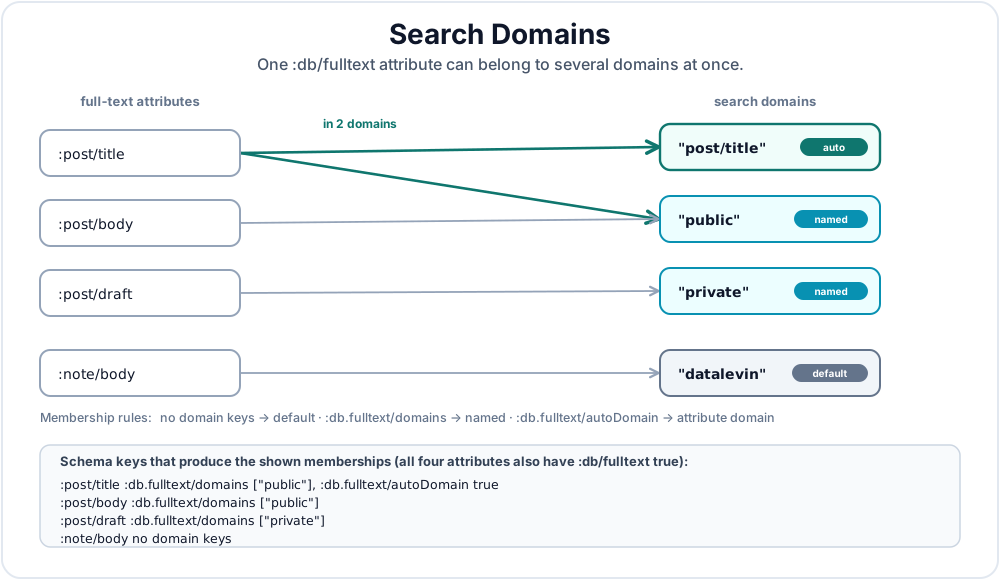
Figure 16.2 shows an example of assigning attributes to search domains.
5.1 Assigning Attributes to Domains
Full-text attributes enter domains according to these rules:
Schema on a :db/fulltext attribute |
Domain membership |
|---|---|
Neither :db.fulltext/domains nor :db.fulltext/autoDomain |
The default "datalevin" domain |
:db.fulltext/autoDomain true, with no :db.fulltext/domains |
The default "datalevin" domain plus the attribute domain, such as "post/title" |
:db.fulltext/domains ["public"] |
Only the listed domains |
:db.fulltext/domains ["datalevin" "public"] |
The default domain plus public |
:db.fulltext/domains ["public"] plus :db.fulltext/autoDomain true |
public plus the attribute domain, such as "post/title" |
:db.fulltext/autoDomain true does not replace the default domain by itself; it adds an attribute domain. When :db.fulltext/domains is present, the attribute participates in the listed domains. If :db.fulltext/autoDomain true is also present, it also participates in its attribute domain. Include "datalevin" in :db.fulltext/domains when an attribute with listed domains should also be searched through the default domain.
Full-text attribute domains use the attribute name without the leading colon: :title becomes "title" and :post/title becomes "post/title". This rule is specific to full-text search. Vector and embedding domains use a different storage naming rule for namespaced attributes.
(def search-schema
  {:post/title {:db/valueType :db.type/string
                :db/fulltext  true
                :db.fulltext/domains ["public"]
                :db.fulltext/autoDomain true}
   :post/body  {:db/valueType :db.type/string
                :db/fulltext  true
                :db.fulltext/domains ["public"]}
   :post/draft {:db/valueType :db.type/string
                :db/fulltext  true
                :db.fulltext/domains ["private"]}
   :note/body  {:db/valueType :db.type/string
                :db/fulltext  true}})
Schema searchSchema = Datalevin.schema()
    .attr(":post/title",
          Schema.attribute()
              .valueType(Schema.ValueType.STRING)
              .fulltext(true)
              .prop(":db.fulltext/domains", List.of("public"))
              .prop(":db.fulltext/autoDomain", true))
    .attr(":post/body",
          Schema.attribute()
              .valueType(Schema.ValueType.STRING)
              .fulltext(true)
              .prop(":db.fulltext/domains", List.of("public")))
    .attr(":post/draft",
          Schema.attribute()
              .valueType(Schema.ValueType.STRING)
              .fulltext(true)
              .prop(":db.fulltext/domains", List.of("private")))
    .attr(":note/body",
          Schema.attribute()
              .valueType(Schema.ValueType.STRING)
              .fulltext(true));
search_schema = {
    ":post/title": {
        ":db/valueType": ":db.type/string",
        ":db/fulltext": True,
        ":db.fulltext/domains": ["public"],
        ":db.fulltext/autoDomain": True
    },
    ":post/body": {
        ":db/valueType": ":db.type/string",
        ":db/fulltext": True,
        ":db.fulltext/domains": ["public"]
    },
    ":post/draft": {
        ":db/valueType": ":db.type/string",
        ":db/fulltext": True,
        ":db.fulltext/domains": ["private"]
    },
    ":note/body": {
        ":db/valueType": ":db.type/string",
        ":db/fulltext": True
    }
}
const searchSchema = {
  ":post/title": {
    ":db/valueType": ":db.type/string",
    ":db/fulltext": true,
    ":db.fulltext/domains": ["public"],
    ":db.fulltext/autoDomain": true
  },
  ":post/body": {
    ":db/valueType": ":db.type/string",
    ":db/fulltext": true,
    ":db.fulltext/domains": ["public"]
  },
  ":post/draft": {
    ":db/valueType": ":db.type/string",
    ":db/fulltext": true,
    ":db.fulltext/domains": ["private"]
  },
  ":note/body": {
    ":db/valueType": ":db.type/string",
    ":db/fulltext": true
  }
};
In this schema, :post/title is indexed in "public" and "post/title", :post/body is indexed in "public", :post/draft is indexed in "private", and :note/body is indexed in the default "datalevin" domain.
5.2 Configuring Domains
Use :search-domains to configure named domains. A domain mentioned in schema but omitted from :search-domains is still created with default search-engine settings. Use :search-opts for the default "datalevin" domain.
These are index-time settings. For example, :index-position? true stores term positions and offsets, :include-text? true stores raw text for :display :texts, :display :texts+offsets, and re-indexing, and :indexing-mode :async enables asynchronous indexing for a domain.
(def conn
  (d/create-conn
    "/tmp/search-domains"
    search-schema
    {:search-opts
     {:index-position? true
      :include-text? true}

     :search-domains
     {"public"     {:index-position? true
                    :include-text? true}
      "private"    {:indexing-mode :async}
      "post/title" {:index-position? true}}}))
Connection conn = Datalevin.createConn(
    "/tmp/search-domains",
    searchSchema,
    Map.of(
        ":search-opts",
        RetrievalOptions.searchDomain()
            .indexPosition(true)
            .includeText(true)
            .build(),
        ":search-domains",
        Map.of(
            "public",
            RetrievalOptions.searchDomain()
                .indexPosition(true)
                .includeText(true)
                .build(),
            "private",
            RetrievalOptions.searchDomain()
                .indexingMode("async")
                .build(),
            "post/title",
            RetrievalOptions.searchDomain()
                .indexPosition(true)
                .build())));
conn = connect(
    "/tmp/search-domains",
    schema=search_schema,
    opts={
        ":search-opts": search_domain(index_position=True,
                                      include_text=True),
        ":search-domains": {
            "public": search_domain(index_position=True,
                                    include_text=True),
            "private": search_domain(indexing_mode="async"),
            "post/title": search_domain(index_position=True)
        }
    }
)
const conn = await connect("/tmp/search-domains", {
  schema: searchSchema,
  opts: {
    ":search-opts": searchDomain({
      indexPosition: true,
      includeText: true
    }),
    ":search-domains": {
      public: searchDomain({
        indexPosition: true,
        includeText: true
      }),
      private: searchDomain({ indexingMode: "async" }),
      "post/title": searchDomain({ indexPosition: true })
    }
  }
});
Use per-domain configuration when search surfaces need different behavior. For example, a public documentation domain may enable phrase search with :index-position? true, while a high-ingestion private domain may use :indexing-mode :async. Autocomplete can be another domain over the same attribute with a prefix analyzer.
5.3 Querying Domains
An unqualified fulltext call searches all full-text domains in the database. Use :domains to limit the query to one or more named domains:
;; Search every full-text domain.
(d/q '[:find ?e ?a ?v
       :where [(fulltext $ "clojure") [[?e ?a ?v]]]]
     db)

;; Search only public text.
(d/q '[:find ?e ?a ?v
       :where [(fulltext $ "clojure" {:domains ["public"]}) [[?e ?a ?v]]]]
     db)

;; Search only private drafts.
(d/q '[:find ?e ?a ?v
       :where [(fulltext $ "roadmap" {:domains ["private"]}) [[?e ?a ?v]]]]
     db)

;; Search only :post/title through its auto-created attribute domain.
(d/q '[:find ?e ?v
       :where [(fulltext $ :post/title "clojure") [[?e _ ?v]]]]
     db)
// Search every full-text domain.
conn.query("[:find ?e ?a ?v " +
           " :where [(fulltext $ \"clojure\") [[?e ?a ?v]]]]");

// Search only public text.
conn.query("[:find ?e ?a ?v " +
           " :where [(fulltext $ \"clojure\" " +
           "                  {:domains [\"public\"]}) " +
           "         [[?e ?a ?v]]]]");

// Search only private drafts.
conn.query("[:find ?e ?a ?v " +
           " :where [(fulltext $ \"roadmap\" " +
           "                  {:domains [\"private\"]}) " +
           "         [[?e ?a ?v]]]]");

// Search only :post/title through its auto-created attribute domain.
conn.query("[:find ?e ?v " +
           " :where [(fulltext $ :post/title \"clojure\") [[?e _ ?v]]]]");
from datalevin import q

e, attribute, value = map(q.var, ("e", "a", "v"))
hits = q.relation_binding(e, attribute, value)

def fulltext_query(search, *, domains=None, attribute_name=None):
    options = (q.fulltext_options(domains=domains)
               if domains is not None else None)
    return q.query(
        find=(q.relation(e, value) if attribute_name is not None
              else q.relation(e, attribute, value)),
        where=[q.fulltext(
            search,
            hits,
            attribute=attribute_name,
            options=options,
        )],
    )

# Search every full-text domain.
conn.query(fulltext_query("clojure"))

# Search only public text.
conn.query(fulltext_query("clojure", domains=["public"]))

# Search only private drafts.
conn.query(fulltext_query("roadmap", domains=["private"]))

# Search only :post/title through its auto-created attribute domain.
conn.query(fulltext_query("clojure", attribute_name="post/title"))
import { q } from "datalevin-node";

const e = q.var("e");
const attribute = q.var("a");
const value = q.var("v");
const hits = q.relationBinding(e, attribute, value);

function fulltextQuery(search, { domains = null, attributeName = null } = {}) {
  const options = domains === null
    ? null
    : q.fulltextOptions({ domains });
  return q.query({
    find: attributeName === null
      ? q.relation(e, attribute, value)
      : q.relation(e, value),
    where: [q.fulltext(search, hits, { attribute: attributeName, options })]
  });
}

// Search every full-text domain.
await conn.query(fulltextQuery("clojure"));

// Search only public text.
await conn.query(fulltextQuery("clojure", { domains: ["public"] }));

// Search only private drafts.
await conn.query(fulltextQuery("roadmap", { domains: ["private"] }));

// Search only :post/title through its auto-created attribute domain.
await conn.query(fulltextQuery("clojure", { attributeName: "post/title" }));
The attribute-specific form is a convenience for querying the attribute domain. It is available only when the attribute has :db.fulltext/autoDomain true. Domain-specific search is more general: it can search any named domain, including domains that combine several attributes.
5.4 Application Pattern: Typed Search Records
For application search, do not assume that the thing you index must be the original domain entity. Often the better model is to create explicit search records: ordinary Datalevin entities whose job is to represent searchable units of the application.
Index the thing users can open
Search records work well when a hit should land on a section, rendered block, example, API entry, or other user-facing unit. The indexed entity can be a purpose-built search entity that points back to the larger domain object.
A documentation site is a good example. If you index an entire Markdown chapter as one string, a hit tells you that the chapter matched somewhere, and offsets are accurate only inside that Markdown source. They do not necessarily line up with rendered HTML, generated anchors, syntax-highlighted code, or extracted examples. A more precise design is to index the units users can actually land on: sections, examples, figures, API entries, and other rendered blocks.
The :search/type attribute is application metadata. It tells the result renderer what kind of thing matched. Full-text domains are index configuration. They decide which analyzer, visibility boundary, and search surface should be used.
The pattern is ordinary schema, transaction data, and query data:
(def search-schema
  {:search/key    {:db/valueType :db.type/string
                   :db/unique :db.unique/identity}
   :search/type   {:db/valueType :db.type/keyword}
   :search/doc    {:db/valueType :db.type/string}
   :search/anchor {:db/valueType :db.type/string}

   :search/title  {:db/valueType :db.type/string
                   :db/fulltext  true
                   :db.fulltext/domains ["site"]
                   :db.fulltext/autoDomain true}

   :search/text   {:db/valueType :db.type/string
                   :db/fulltext  true
                   :db.fulltext/domains ["site"]}

   :search/code   {:db/valueType :db.type/string
                   :db/fulltext  true
                   :db.fulltext/domains ["code"]}})
Schema searchSchema = Datalevin.schema()
    .attr(":search/key",
          Schema.attribute()
              .valueType(Schema.ValueType.STRING)
              .unique(Schema.Unique.IDENTITY))
    .attr(":search/type",
          Schema.attribute().valueType(Schema.ValueType.KEYWORD))
    .attr(":search/doc",
          Schema.attribute().valueType(Schema.ValueType.STRING))
    .attr(":search/anchor",
          Schema.attribute().valueType(Schema.ValueType.STRING))
    .attr(":search/title",
          Schema.attribute()
              .valueType(Schema.ValueType.STRING)
              .fulltext(true)
              .prop(":db.fulltext/domains", List.of("site"))
              .prop(":db.fulltext/autoDomain", true))
    .attr(":search/text",
          Schema.attribute()
              .valueType(Schema.ValueType.STRING)
              .fulltext(true)
              .prop(":db.fulltext/domains", List.of("site")))
    .attr(":search/code",
          Schema.attribute()
              .valueType(Schema.ValueType.STRING)
              .fulltext(true)
              .prop(":db.fulltext/domains", List.of("code")));
search_schema = {
    ":search/key": {
        ":db/valueType": ":db.type/string",
        ":db/unique": ":db.unique/identity",
    },
    ":search/type": {":db/valueType": ":db.type/keyword"},
    ":search/doc": {":db/valueType": ":db.type/string"},
    ":search/anchor": {":db/valueType": ":db.type/string"},
    ":search/title": {
        ":db/valueType": ":db.type/string",
        ":db/fulltext": True,
        ":db.fulltext/domains": ["site"],
        ":db.fulltext/autoDomain": True,
    },
    ":search/text": {
        ":db/valueType": ":db.type/string",
        ":db/fulltext": True,
        ":db.fulltext/domains": ["site"],
    },
    ":search/code": {
        ":db/valueType": ":db.type/string",
        ":db/fulltext": True,
        ":db.fulltext/domains": ["code"],
    },
}
const searchSchema = {
  ":search/key": {
    ":db/valueType": ":db.type/string",
    ":db/unique": ":db.unique/identity"
  },
  ":search/type": { ":db/valueType": ":db.type/keyword" },
  ":search/doc": { ":db/valueType": ":db.type/string" },
  ":search/anchor": { ":db/valueType": ":db.type/string" },
  ":search/title": {
    ":db/valueType": ":db.type/string",
    ":db/fulltext": true,
    ":db.fulltext/domains": ["site"],
    ":db.fulltext/autoDomain": true
  },
  ":search/text": {
    ":db/valueType": ":db.type/string",
    ":db/fulltext": true,
    ":db.fulltext/domains": ["site"]
  },
  ":search/code": {
    ":db/valueType": ":db.type/string",
    ":db/fulltext": true,
    ":db.fulltext/domains": ["code"]
  }
};
An indexing job can infer the type from the source structure. A heading becomes a section record. A code fence becomes an example record. A figure caption becomes a figure record. The user still types one search query; the application uses the type internally to render better results.
(d/transact! conn
  [{:search/key "08-query#rules"
    :search/type :section
    :search/doc "08-query"
    :search/anchor "rules"
    :search/title "Rules"
    :search/text "Rules let you name reusable query logic..."}

   {:search/key "08-query#rules:example-basic"
    :search/type :example
    :search/doc "08-query"
    :search/anchor "rules"
    :search/title "Basic rule query"
    :search/code "(d/q '[:find ?e :where ...] db)"}])
conn.transact(Datalevin.tx()
    .entity(Tx.entity()
        .put(":search/key", "08-query#rules")
        .put(":search/type", Datalevin.kw(":section"))
        .put(":search/doc", "08-query")
        .put(":search/anchor", "rules")
        .put(":search/title", "Rules")
        .put(":search/text",
             "Rules let you name reusable query logic..."))
    .entity(Tx.entity()
        .put(":search/key", "08-query#rules:example-basic")
        .put(":search/type", Datalevin.kw(":example"))
        .put(":search/doc", "08-query")
        .put(":search/anchor", "rules")
        .put(":search/title", "Basic rule query")
        .put(":search/code", "(d/q '[:find ?e :where ...] db)")));
from datalevin import q, tx

conn.transact(tx.data(
    tx.entity(attrs={
        "search/key": "08-query#rules",
        "search/type": q.kw("section"),
        "search/doc": "08-query",
        "search/anchor": "rules",
        "search/title": "Rules",
        "search/text": "Rules let you name reusable query logic...",
    }),
    tx.entity(attrs={
        "search/key": "08-query#rules:example-basic",
        "search/type": q.kw("example"),
        "search/doc": "08-query",
        "search/anchor": "rules",
        "search/title": "Basic rule query",
        "search/code": "(d/q '[:find ?e :where ...] db)",
    }),
))
import { q, tx } from "datalevin-node";

await conn.transact(tx.data(
  tx.entity({
    "search/key": "08-query#rules",
    "search/type": q.kw("section"),
    "search/doc": "08-query",
    "search/anchor": "rules",
    "search/title": "Rules",
    "search/text": "Rules let you name reusable query logic..."
  }),
  tx.entity({
    "search/key": "08-query#rules:example-basic",
    "search/type": q.kw("example"),
    "search/doc": "08-query",
    "search/anchor": "rules",
    "search/title": "Basic rule query",
    "search/code": "(d/q '[:find ?e :where ...] db)"
  })
));
Now the result entity already knows where it should send the user: /docs/08-query#rules. The snippet can be built from the same normalized text that was indexed, while the page link jumps to a stable rendered anchor.
Queries can search one domain or merge several domains. The offset display below assumes the "site" and "code" domains were created with :index-position? true:
(d/q '[:find (pull ?hit [:search/type
                         :search/doc
                         :search/anchor
                         :search/title])
              ?offsets
       :in $ ?q
       :where [(fulltext $ ?q {:domains ["site" "code"]
                               :top 20
                               :display :offsets})
               [[?hit _ _ ?offsets]]]]
     (d/db conn)
     "rules")
Object results = conn.query(
    "[:find (pull ?hit [:search/type " +
    "                   :search/doc " +
    "                   :search/anchor " +
    "                   :search/title]) " +
    "        ?offsets " +
    " :in $ ?q " +
    " :where [(fulltext $ ?q {:domains [\"site\" \"code\"] " +
    "                         :top 20 " +
    "                         :display :offsets}) " +
    "         [[?hit _ _ ?offsets]]]]",
    "rules");
from datalevin import q

hit, offsets, search = map(q.var, ("hit", "offsets", "q"))
selector = q.selector(
    "search/type", "search/doc", "search/anchor", "search/title")
options = q.fulltext_options(
    domains=["site", "code"], top=20, display="offsets")
results = conn.query(q.query(
    find=q.relation(q.pull(hit, selector), offsets),
    inputs=[q.DB, search],
    where=[q.fulltext(
        search,
        [hit, q.IGNORE, q.IGNORE, offsets],
        options=options,
    )],
), "rules")
import { q } from "datalevin-node";

const hit = q.var("hit");
const offsets = q.var("offsets");
const search = q.var("q");
const selector = q.selector(
  "search/type", "search/doc", "search/anchor", "search/title"
);
const options = q.fulltextOptions({
  domains: ["site", "code"], top: 20, display: "offsets"
});
const results = await conn.query(q.query({
  find: q.relation(q.pull(hit, selector), offsets),
  inputs: [q.DB, search],
  where: [q.fulltext(
    search,
    [hit, q.IGNORE, q.IGNORE, offsets],
    { options }
  )]
}), "rules");
Use this pattern when search results need precise destinations, type-aware rendering, or different analyzers for prose and code. Keep using the original domain entities directly when the searchable field naturally belongs to the thing being returned, such as a post title, product description, or customer message.
6. Standalone Search Engine
Datalevin can be used as a standalone embedded search engine outside of Datalog:
(def lmdb (d/open-kv "/tmp/search-db"))
(def engine (d/new-search-engine lmdb {:index-position? true}))

(d/add-doc engine 1 "The quick red fox jumped over the lazy red dogs.")
(d/add-doc engine 2 "Mary had a little lamb whose fleece was red as fire.")

(d/search engine "red")
;=> (1 2)

(d/search engine "red" {:limit 1 :offset 1})
;=> (2)

(d/search engine "red" {:display :offsets})
;=> ([1 (["red" [10 39]])] [2 (["red" [40]])])
KV kv = Datalevin.openKV("/tmp/search-db");
SearchEngine engine = Datalevin.newSearchEngine(
    kv,
    RetrievalOptions.searchDomain()
        .indexPosition(true)
        .build());

engine.addDoc(1, "The quick red fox jumped over the lazy red dogs.");
engine.addDoc(2, "Mary had a little lamb whose fleece was red as fire.");

engine.search("red");
// => [1, 2]

engine.search(
    "red",
    RetrievalOptions.search()
        .prop(":limit", 1)
        .prop(":offset", 1)
        .build());
// => [2]

engine.search(
    "red",
    RetrievalOptions.search()
        .display("offsets")
        .build());
// => [[1, [["red", [10, 39]]]], [2, [["red", [40]]]]]
from datalevin import new_search_engine, open_kv, search_domain

kv = open_kv("/tmp/search-db")
engine = new_search_engine(kv, search_domain(index_position=True))

engine.add_doc(1, "The quick red fox jumped over the lazy red dogs.")
engine.add_doc(2, "Mary had a little lamb whose fleece was red as fire.")

engine.search("red")
# => [1, 2]

engine.search("red", opts={":limit": 1, ":offset": 1})
# => [2]

engine.search("red", opts={":display": ":offsets"})
# => [[1, [["red", [10, 39]]]], [2, [["red", [40]]]]]
import { newSearchEngine, openKv, searchDomain } from "datalevin-node";

const kv = await openKv("/tmp/search-db");
const engine = await newSearchEngine(
  kv,
  searchDomain({ indexPosition: true })
);

await engine.addDoc(1, "The quick red fox jumped over the lazy red dogs.");
await engine.addDoc(2, "Mary had a little lamb whose fleece was red as fire.");

await engine.search("red");
// => [1, 2]

await engine.search("red", { ":limit": 1, ":offset": 1 });
// => [2]

await engine.search("red", { ":display": ":offsets" });
// => [[1, [["red", [10, 39]]]], [2, [["red", [40]]]]]
Document References: Full-text search returns document references by default. In Datalog's fulltext, the document reference is the datom [e a v]. In standalone mode, the doc-ref can be any value, including numbers, strings, maps, or whatever uniquely identifies a document in your application. This flexibility lets you index external content without storing source text in the search index.
Standalone search engines follow the same rule: by default they store the doc-ref and the inverted index, assuming the application can recover the source document from doc-ref. Enable :include-text? true when the search engine should keep raw text for :display :texts, :display :texts+offsets, or re-index:
(def engine
  (d/new-search-engine
    lmdb
    {:include-text? true
     :index-position? true}))
SearchEngine engine = Datalevin.newSearchEngine(
    kv,
    RetrievalOptions.searchDomain()
        .includeText(true)
        .indexPosition(true)
        .build());
engine = new_search_engine(
    kv,
    search_domain(include_text=True, index_position=True)
)
const engine = await newSearchEngine(
  kv,
  searchDomain({ includeText: true, indexPosition: true })
);
6.1 Document Lifecycle and Bulk Loading
The standalone search engine exposes the normal lifecycle operations you expect from a search index:
(d/doc-indexed? engine 1)
;=> true

(d/doc-count engine)
;=> 2

(d/remove-doc engine 2)

(d/clear-docs engine)
engine.docIndexed(1);
// => true

engine.docCount();
// => 2

engine.removeDoc(2);

engine.clearDocs();
engine.doc_indexed(1)
# => True

engine.doc_count()
# => 2

engine.remove_doc(2)

engine.clear_docs()
await engine.docIndexed(1);
// => true

await engine.docCount();
// => 2

await engine.removeDoc(2);

await engine.clearDocs();
add-doc checks for an existing doc-ref by default and updates the index when the document is already present. During a trusted initial import, pass false as the fourth argument to skip that existence check:
(d/add-doc engine doc-ref doc-text false)
engine.addDoc(docRef, docText, false);
engine.add_doc(doc_ref, doc_text, check_exist=False)
await engine.addDoc(docRef, docText, { checkExist: false });
For larger embedded imports, use search-index-writer, write, and commit. The writer batches index changes and flushes final term metadata on commit, so call commit before relying on search results:
(def lmdb (d/open-kv "/tmp/search-db"))
(def writer
  (d/search-index-writer
    lmdb
    {:domain "docs"
     :index-position? true
     :include-text? true}))

(doseq [[doc-ref doc-text] docs]
  (d/write writer doc-ref doc-text))

(d/commit writer)

(def engine
  (d/new-search-engine
    lmdb
    {:domain "docs"
     :index-position? true
     :include-text? true}))
KV kv = Datalevin.openKV("/tmp/search-db");
Map<Object, Object> opts = RetrievalOptions.searchDomain()
    .domain("docs")
    .indexPosition(true)
    .includeText(true)
    .build();

SearchIndexWriter writer = Datalevin.searchIndexWriter(kv, opts);
for (Map.Entry<Object, String> doc : docs.entrySet()) {
    writer.write(doc.getKey(), doc.getValue());
}
writer.commit();

SearchEngine engine = Datalevin.newSearchEngine(kv, opts);
from datalevin import (
    new_search_engine,
    open_kv,
    search_domain,
    search_index_writer,
)

kv = open_kv("/tmp/search-db")
opts = search_domain(
    domain="docs",
    index_position=True,
    include_text=True
)

writer = search_index_writer(kv, opts)
for doc_ref, doc_text in docs:
    writer.write(doc_ref, doc_text)
writer.commit()

engine = new_search_engine(kv, opts)
import {
  newSearchEngine,
  openKv,
  searchDomain,
  searchIndexWriter
} from "datalevin-node";

const kv = await openKv("/tmp/search-db");
const opts = searchDomain({
  domain: "docs",
  indexPosition: true,
  includeText: true
});

const writer = await searchIndexWriter(kv, opts);
for (const [docRef, docText] of docs) {
  await writer.write(docRef, docText);
}
await writer.commit();

const engine = await newSearchEngine(kv, opts);
The bulk writer is an embedded local API. It is not available through the Datalevin client/server API; use Datalog full-text attributes and normal transactions there, or run the writer in a local indexing process.
Treat the bulk writer as a short-lived loading handle for one search domain. In all APIs, commit is the required final flush. After commit, treat the writer as finished and create a new writer for a later bulk load. Do not keep multiple active writers for the same domain; use one writer for the load, then query with a search engine or use normal add-doc / remove-doc operations for incremental changes.
7. Asynchronous Indexing
Full-text indexing is synchronous by default: a transaction updates source datoms and the full-text index before returning. This preserves read-your-writes behavior for fulltext.
For high-ingestion workloads, a search domain can opt into async indexing:
(def conn
  (d/create-conn
    "/tmp/search-db"
    {:post/content {:db/valueType :db.type/string
                    :db/fulltext  true}}
    {:search-opts {:indexing-mode :async}}))
Connection conn = Datalevin.createConn(
    "/tmp/search-db",
    Datalevin.schema()
        .attr(":post/content",
              Schema.attribute()
                  .valueType(Schema.ValueType.STRING)
                  .fulltext(true)),
    Map.of(":search-opts",
           RetrievalOptions.searchDomain()
               .indexingMode("async")
               .build()));
schema = {
    ":post/content": {
        ":db/valueType": ":db.type/string",
        ":db/fulltext": True
    }
}

conn = connect(
    "/tmp/search-db",
    schema=schema,
    opts={":search-opts": search_domain(indexing_mode="async")}
)
const schema = {
  ":post/content": {
    ":db/valueType": ":db.type/string",
    ":db/fulltext": true
  }
};

const conn = await connect("/tmp/search-db", {
  schema,
  opts: {
    ":search-opts": searchDomain({ indexingMode: "async" })
  }
});
or per domain, when the attribute is assigned to that domain:
(def conn
  (d/create-conn
    "/tmp/search-db"
    {:post/content {:db/valueType :db.type/string
                    :db/fulltext  true
                    :db.fulltext/domains ["content"]}}
    {:search-domains
     {"content" {:index-position? true
                 :indexing-mode   :async}}}))
Connection conn = Datalevin.createConn(
    "/tmp/search-db",
    Datalevin.schema()
        .attr(":post/content",
              Schema.attribute()
                  .valueType(Schema.ValueType.STRING)
                  .fulltext(true)
                  .prop(":db.fulltext/domains", List.of("content"))),
    Map.of(":search-domains",
           Map.of("content",
                  RetrievalOptions.searchDomain()
                      .indexPosition(true)
                      .indexingMode("async")
                      .build())));
schema = {
    ":post/content": {
        ":db/valueType": ":db.type/string",
        ":db/fulltext": True,
        ":db.fulltext/domains": ["content"]
    }
}

conn = connect(
    "/tmp/search-db",
    schema=schema,
    opts={":search-domains": {
        "content": search_domain(index_position=True,
                                 indexing_mode="async")
    }}
)
const schema = {
  ":post/content": {
    ":db/valueType": ":db.type/string",
    ":db/fulltext": true,
    ":db.fulltext/domains": ["content"]
  }
};

const conn = await connect("/tmp/search-db", {
  schema,
  opts: {
    ":search-domains": {
      content: searchDomain({
        indexPosition: true,
        indexingMode: "async"
      })
    }
  }
});
Async search is eventually consistent
In async mode, newly committed text may not be searchable until the background worker has applied the search-index job, including after DB-open recovery. Use this mode only for ingestion paths that can tolerate that lag.
Chapter 22 covers testing and waiting for async secondary indexes, and Appendix E lists the helper APIs.
8. Implementation Details
Because Datalevin implements full-text search on its own KV substrate instead of embedding Lucene, the storage layout and ranking algorithm are part of the database design. This section explains the main pieces.
8.1 Storage Layout
The search indices are stored in LMDB sub-databases:
terms- map of term → term-info (id, max-weight, doc-frequency list)docs- map of document id → doc reference and normpositions- inverted lists for proximity (optional)rawtext- original document text (optional, only when:include-text? true)
An inverted index maps from a term to the documents that contain it. A document frequency list is the posting list for one term: the set of documents where the term appears, plus enough statistics to rank them. A norm is a precomputed document-length normalization factor used during ranking. Datalevin loads norms into memory on initialization and loads term information as queries need it. Document frequency lists use compressed bitmaps (Roaring Bitmaps) for efficient intersection and union operations.
8.2 Scoring: TF-IDF and the Vector Space Model
Full-text ranking uses a different kind of vector from Chapter 17's embedding vectors. In the full-text Vector Space Model, a document is a sparse vector whose coordinates are terms. A query is another sparse vector over the same term space. Ranking asks: which document vectors are most similar to the query vector?
Datalevin uses TF-IDF weighting described by Manning, Raghavan, and Schütze in Introduction to Information Retrieval [2], with the lnu.ltn weighting scheme. The important ideas are:
- Term frequency (TF): a term that appears more often in a document is more important to that document, with logarithmic damping so repetition does not dominate.
- Inverse document frequency (IDF): a term that appears in fewer documents is more discriminating than a term that appears almost everywhere.
- Normalization: document length affects ranking, so Datalevin normalizes document vectors to avoid blindly favoring longer documents.
In lnu.ltn notation, the document side and query side use different weighting:
- Document vectors: log-weighted term frequency, no idf, pivoted unique normalization
- Query vectors: log-weighted term frequency, idf weighting, no normalization
This weighting scheme is designed to handle document length without blindly penalizing longer documents.
This subsection defines the score. The next subsection explains how Datalevin uses that score to retrieve the top results without scoring every matching document.
8.3 Top-k Retrieval: T-Wand Algorithm
Datalevin uses Tiered WAND (T-Wand) to find the highest-scoring documents efficiently. The algorithm is described in the T-Wand blog post [3]. To understand what T-Wand adds, first understand ordinary WAND [4].
WAND is a top-k retrieval algorithm. A query such as "red fox database" has one posting iterator per query term. Each iterator walks the document references that contain that term, and each term has an upper bound: the largest score that term could possibly contribute to any document. During search, the engine keeps a priority heap of the current best k documents. Once the heap is full, its lowest score becomes the threshold a new document must beat to enter the results.
Operationally, WAND repeatedly asks which document id is still worth scoring. It orders the posting iterators by their current document id, then accumulates each term's maximum possible contribution in that order. The first iterator whose accumulated bound can beat the current top-k threshold is the pivot, and the pivot's document id becomes the next candidate. Any smaller document id can appear only in iterators before the pivot, whose combined upper bound is too low to enter the heap, so those iterators can jump directly to the pivot document id. If every iterator up to the pivot is now positioned on that same id, the engine computes the real score and updates the heap if needed. Otherwise it reorders the iterators and repeats. No result quality is traded away: a document is skipped only after its maximum possible score has been proven too low.
T-Wand keeps that WAND score pruning and adds a relevance constraint based on term coverage. It divides matching documents into tiers:
- First, documents containing all
nquery terms. - Then documents containing
n - 1query terms. - Then documents containing
n - 2query terms, and so on until enough results are found.
Within a tier, documents are still ranked by TF-IDF score. Across tiers, term coverage wins: a document that contains all query terms is considered before documents that contain only some of them. This addresses a common search frustration where a high-scoring partial match outranks a complete match.
The tiering also gives the engine more ways to prune. Suppose a query has n terms and the current tier requires at least t matching terms. Sort the query terms from rarest to most common. Any document with t matches must contain at least one of the rarest n - t + 1 terms. If it contained none of those rare terms, it could match at most the remaining t - 1 terms. Therefore the engine can use the union of those rare-term posting lists as the candidate set for the tier, instead of considering every document that matches any query term.
There is a second tier-specific pruning rule while checking a candidate. If the candidate has matched h terms so far and only r unchecked query terms remain, then its best possible final coverage is h + r. If h + r < t, the candidate can no longer reach the tier and can be discarded before exact scoring. Combined with WAND's score upper bounds, this lets Datalevin avoid both low-coverage candidates and high-coverage candidates that still cannot enter the current top-k result set. This coverage check is one of the key optimizations in the T-Wand algorithm.
8.4 Term Proximity Scoring
When :index-position? true is enabled, a two-stage ranking applies:
- TF-IDF scoring produces top
m * kcandidates. - Proximity scoring re-ranks those candidates and returns the top
kresults.
This reflects the intuition that query terms appearing closer together indicate higher relevance. Here k is the requested result count, normally :top. m is controlled by :proximity-expansion; raising it considers more candidates before re-ranking, which can improve quality at higher cost. :proximity-max-dist controls how far apart terms may be while still contributing to a proximity span.
Benchmark context. Datalevin's self-published comparison with Apache Lucene 8.10.1 indexed 4.1 million English Wikipedia articles and ran 40,000 TREC queries [1]. On the reported six-core Linux machine, Datalevin's median and mean query latencies were 0.8 and 3.5 ms versus Lucene's 2.7 and 4.7 ms, and Datalevin had higher throughput at every tested concurrency level.
Lucene indexed faster and had better tail latency on broad queries. This is a single-machine snapshot, not a general performance result; see [1] for the full protocol.
Summary
Full-text search in Datalevin is a native database capability: integrated with Datalog, synchronous by default, and configurable by domain. Enable :db/fulltext, use the fulltext function with EDN boolean expressions, choose analyzers that match your data, and use search domains for organized indexing without operating a separate search cluster. Within a Datalog query, the full-text function's ranking and paging bounds remain separate from the final query bounds. Chapter 21, Section 1.4 explains the corresponding physical access paths.
References
[1] Datalevin project, "Datalevin Search Benchmark," benchmark implementation. URL: https://github.com/datalevin/datalevin/tree/master/benchmarks/search-bench.
[2] Christopher D. Manning, Prabhakar Raghavan, and Hinrich Schütze, Introduction to Information Retrieval, Cambridge University Press, 2008, Chapter 6, "Scoring, Term Weighting and the Vector Space Model." URL: https://nlp.stanford.edu/IR-book/html/htmledition/scoring-term-weighting-and-the-vector-space-model-1.html. Section 6.3, "The Vector Space Model for Scoring." URL: https://nlp.stanford.edu/IR-book/html/htmledition/the-vector-space-model-for-scoring-1.html.
[3] Huahai Yang, "T-Wand: Beat Lucene in Less Than 600 Lines of Code," yyhh.org, November 5, 2021. URL: https://yyhh.org/blog/2021/11/t-wand-beat-lucene-in-less-than-600-lines-of-code/.
[4] Andrei Z. Broder, David Carmel, Michael Herscovici, Aya Soffer, and Jason Zien, "Efficient Query Evaluation Using a Two-Level Retrieval Process," in Proceedings of the Twelfth International Conference on Information and Knowledge Management (CIKM '03), 2003. DOI: https://doi.org/10.1145/956863.956944.
User Examples
Log in to create examplesNo examples for this chapter yet.