
Chapter 14: Document Modeling
Datalevin gives you two ways to model document-shaped data: logical documents, built from normal datoms and component references, and indexed documents (idoc), stored as single values with path-level indexes. By default an idoc indexes every scalar leaf path, and schema or domain options can restrict indexing to selected path prefixes.
Figure 14.1 contrasts the two representations.
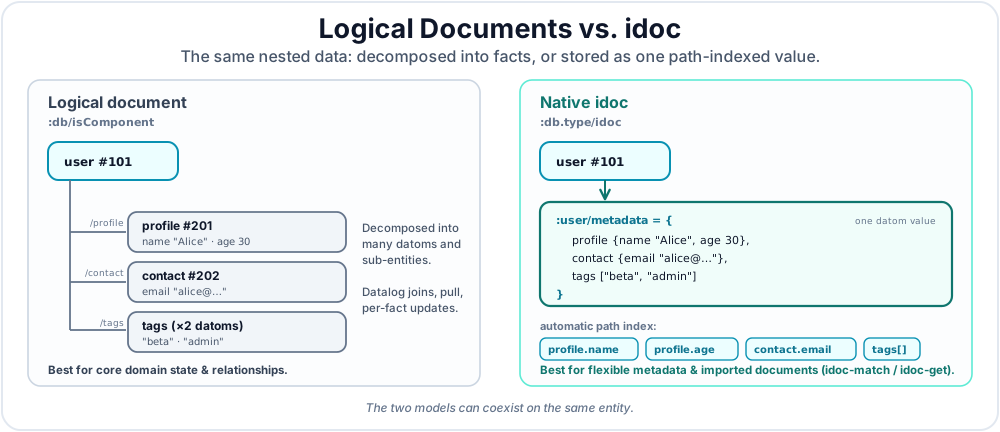
Use logical documents when the nested structure is part of your core domain model. Use idoc when the nested structure is flexible metadata, imported JSON, Markdown-derived structure, or application-defined data that should be searched by path without forcing every field into the schema. Section 6 shows a boundary technique for querying nested data without storing it at all.
1. Logical Documents with :db/isComponent
The most common way to model durable domain documents in Datalevin is to use component attributes. A component reference stores a nested entity as ordinary datoms, but treats that entity as owned by its parent.
Components require single ownership
Use component attributes for single-owner logical documents. If a nested record can be shared by more than one parent, model it with ordinary references or as an idoc value instead.
1.1 Example: A Nested Blog Post
;; Schema: :post/comments owns comment entities.
{:post/slug     {:db/valueType :db.type/string
                 :db/unique    :db.unique/identity}
 :post/comments {:db/valueType   :db.type/ref
                 :db/cardinality :db.cardinality/many
                 :db/isComponent true}
 :user/email    {:db/valueType :db.type/string
                 :db/unique    :db.unique/identity}
 :comment/author {:db/valueType :db.type/ref}}
Schema schema = Datalevin.schema()
    .attr(":post/slug",
          Schema.attribute()
              .valueType(Schema.ValueType.STRING)
              .unique(Schema.Unique.IDENTITY))
    .attr(":post/comments",
          Schema.attribute()
              .valueType(Schema.ValueType.REF)
              .cardinality(Schema.Cardinality.MANY)
              .isComponent(true))
    .attr(":user/email",
          Schema.attribute()
              .valueType(Schema.ValueType.STRING)
              .unique(Schema.Unique.IDENTITY))
    .attr(":comment/author",
          Schema.attribute()
              .valueType(Schema.ValueType.REF));
schema = {
    ":post/slug": {
        ":db/valueType": ":db.type/string",
        ":db/unique": ":db.unique/identity"
    },
    ":post/comments": {
        ":db/valueType": ":db.type/ref",
        ":db/cardinality": ":db.cardinality/many",
        ":db/isComponent": True
    },
    ":user/email": {
        ":db/valueType": ":db.type/string",
        ":db/unique": ":db.unique/identity"
    },
    ":comment/author": {
        ":db/valueType": ":db.type/ref"
    }
}
const schema = {
  ":post/slug": {
    ":db/valueType": ":db.type/string",
    ":db/unique": ":db.unique/identity"
  },
  ":post/comments": {
    ":db/valueType": ":db.type/ref",
    ":db/cardinality": ":db.cardinality/many",
    ":db/isComponent": true
  },
  ":user/email": {
    ":db/valueType": ":db.type/string",
    ":db/unique": ":db.unique/identity"
  },
  ":comment/author": {
    ":db/valueType": ":db.type/ref"
  }
};
Logical documents are still normal facts. Every nested field can be typed, indexed, joined, pulled, and updated independently. This is useful when nested data has identity, relationships, constraints, or a lifecycle that should remain visible to Datalog.
For example, comments can be modeled as components of a post while their authors remain separate top-level entities, addressed through a unique email lookup ref:
(d/transact! conn
  [{:user/name "Ada"
    :user/email "ada@example.com"}
   {:post/slug "indexes-as-capabilities"
    :post/title "Indexes as Capabilities"
    :post/comments [{:comment/body "This clarifies the mental model."
                     :comment/author [:user/email "ada@example.com"]}]}])
Object ada = List.of(":user/email", "ada@example.com");

conn.transact(Datalevin.tx()
    .entity(Tx.entity()
        .put(":user/name", "Ada")
        .put(":user/email", "ada@example.com"))
    .entity(Tx.entity()
        .put(":post/slug", "indexes-as-capabilities")
        .put(":post/title", "Indexes as Capabilities")
        .put(":post/comments", List.of(
            Tx.entity()
                .put(":comment/body", "This clarifies the mental model.")
                .put(":comment/author", ada)
                .build()))));
from datalevin import tx

conn.transact(tx.data(
    tx.entity(attrs={
        "user/name": "Ada",
        "user/email": "ada@example.com",
    }),
    tx.entity(attrs={
        "post/slug": "indexes-as-capabilities",
        "post/title": "Indexes as Capabilities",
        "post/comments": [tx.entity(attrs={
            "comment/body": "This clarifies the mental model.",
            "comment/author": tx.lookup_ref(
                "user/email", "ada@example.com"
            ),
        })],
    }),
))
import { tx } from "datalevin-node";

await conn.transact(tx.data(
  tx.entity({
    "user/name": "Ada",
    "user/email": "ada@example.com"
  }),
  tx.entity({
    "post/slug": "indexes-as-capabilities",
    "post/title": "Indexes as Capabilities",
    "post/comments": [tx.entity({
      "comment/body": "This clarifies the mental model.",
      "comment/author": tx.lookupRef("user/email", "ada@example.com")
    })]
  })
));
For logical documents, use pull patterns to navigate nested paths:
(d/pull db
        [:post/title {:post/comments [:comment/body {:comment/author [:user/name]}]}]
        [:post/slug "indexes-as-capabilities"])
conn.pull(
    "[:post/title {:post/comments [:comment/body {:comment/author [:user/name]}]}]",
    List.of(":post/slug", "indexes-as-capabilities"));
from datalevin import q, tx

author = q.pull_nested("comment/author", q.selector("user/name"))
comments = q.pull_nested(
    "post/comments", q.selector("comment/body", author))
conn.pull(
    q.selector("post/title", comments),
    tx.lookup_ref("post/slug", "indexes-as-capabilities"),
)
import { q, tx } from "datalevin-node";

const author = q.pullNested("comment/author", q.selector("user/name"));
const comments = q.pullNested(
  "post/comments", q.selector("comment/body", author)
);
await conn.pull(
  q.selector("post/title", comments),
  tx.lookupRef("post/slug", "indexes-as-capabilities")
);
2. Native Indexed Documents with idoc
An idoc stores a nested document as one datom value, while Datalevin maintains an index for paths inside the document, as shown in Figure 14.2. This gives you document-database-style path queries while still using Datalog joins and transactions.
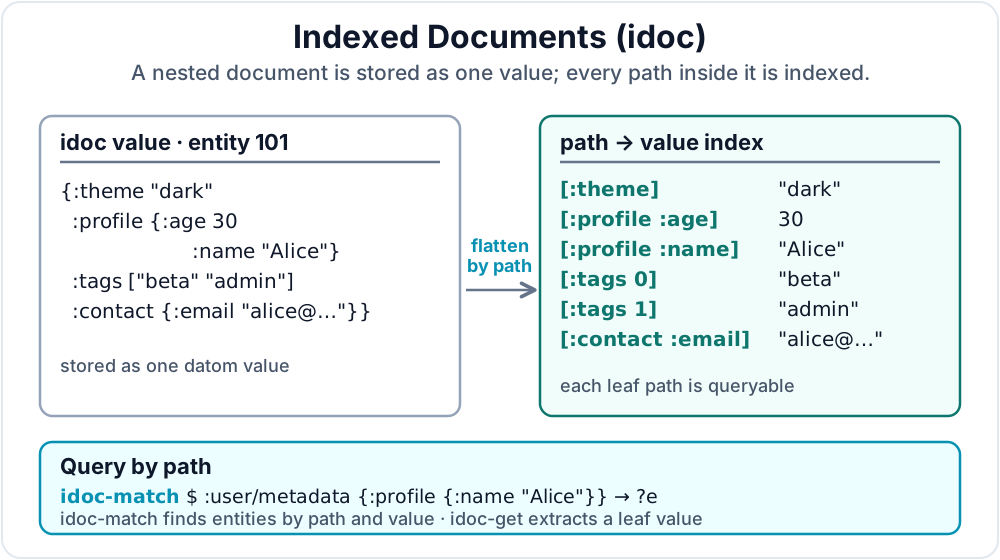
idoc indexes are orthogonal to full-text and vector indexes. The same entity can have structured facts, full-text fields, embeddings, and idoc metadata, and a single Datalog query can combine all of those constraints.
2.1 Defining an idoc Attribute
Declare an idoc attribute with :db/valueType :db.type/idoc. The optional :db/idocFormat controls how payloads are interpreted, the optional :db/domain gives the backing index a stable domain name, and the optional :db.idoc/indexedPaths / :db.idoc/excludedPaths keys control which path prefixes are indexed. Section 2.3 explains path selectors.
(def schema
  {:user/metadata {:db/valueType :db.type/idoc
                   :db/domain    "user_metadata"
                   :db.idoc/indexedPaths [:theme :profile :tags :contact]
                   :db.idoc/excludedPaths [[:profile :secret]]}
   :user/raw-json {:db/valueType  :db.type/idoc
                   :db/idocFormat :json}
   :doc/title     {:db/valueType :db.type/string}
   :doc/markdown  {:db/valueType  :db.type/idoc
                   :db/idocFormat :markdown}})
Schema schema = Datalevin.schema()
    .attr(":user/metadata",
          Schema.attribute()
              .valueType(Schema.ValueType.IDOC)
              .prop(":db/domain", "user_metadata")
              .idocIndexedPaths("theme", "profile", "tags", "contact")
              .idocExcludedPaths(
                  List.of("profile", "secret")))
    .attr(":user/raw-json",
          Schema.attribute()
              .valueType(Schema.ValueType.IDOC)
              .prop(":db/idocFormat", Datalevin.kw(":json")))
    .attr(":doc/title",
          Schema.attribute()
              .valueType(Schema.ValueType.STRING))
    .attr(":doc/markdown",
          Schema.attribute()
              .valueType(Schema.ValueType.IDOC)
              .prop(":db/idocFormat", Datalevin.kw(":markdown")));
from datalevin import idoc_attr

schema = {
    ":user/metadata": idoc_attr(
        domain="user_metadata",
        indexed_paths=["theme", "profile", "tags", "contact"],
        excluded_paths=[["profile", "secret"]]),
    ":user/raw-json": idoc_attr(format=":json"),
    ":doc/title": {
        ":db/valueType": ":db.type/string"
    },
    ":doc/markdown": idoc_attr(format=":markdown")
}
import { idocAttr } from "datalevin-node";

const schema = {
  ":user/metadata": idocAttr({
    domain: "user_metadata",
    indexedPaths: ["theme", "profile", "tags", "contact"],
    excludedPaths: [["profile", "secret"]]
  }),
  ":user/raw-json": idocAttr({ format: ":json" }),
  ":doc/title": {
    ":db/valueType": ":db.type/string"
  },
  ":doc/markdown": idocAttr({ format: ":markdown" })
};
Supported :db/idocFormat values are :edn (the default), :json, and :markdown. If :db/domain is omitted, Datalevin derives a domain from the attribute name without the leading colon; for example, :user/metadata becomes "user/metadata". If no path controls are supplied, Datalevin indexes all scalar leaf paths in the document.
2.2 idoc Domains
An idoc domain names the backing path index for one idoc attribute. If :db/domain is omitted, Datalevin derives the domain from the attribute name. Most schemas can treat this as an internal index name and query documents by attribute.
This is related to, but not the same as, full-text, vector, or embedding domains. Those indexes use domain lists or store-level domain maps to configure retrieval and indexing behavior, and some support default or automatic domains (Chapters 16 and 17).
idoc has no :db.idoc/domains list or autoDomain flag. An idoc attribute has one idoc domain, selected by :db/domain or derived from the attribute name. Several idoc attributes may intentionally share the same domain, but that is an index design choice, not a ranking or retrieval policy.
Store-level :idoc-opts and :idoc-domains can configure which paths a domain indexes (Section 2.3), but they do not make one attribute participate in multiple domains. Markdown idoc values normalize heading text into path segments, so they should usually live in their own domains instead of sharing a domain with EDN or JSON idoc values. Section 3 focuses on attribute-scoped idoc-match queries; Chapter 31 lists the domain-scoped and full-DB forms.
2.3 Selective Path Indexing
By default, an idoc domain indexes every scalar leaf path in each document. For large or user-defined documents, this can index more paths than the application needs. Selective path indexing lets you keep only the path prefixes your queries use.
Path selectors may be a top-level keyword, a top-level string, or a vector of keywords, strings, and non-negative integer array positions. They are prefix selectors: :profile includes leaf paths such as [:profile :age] and [:profile :name]. For a root vector, [0] selects its first element; [:tags 1] selects the second element of a nested :tags vector. :db.idoc/indexedPaths is the include list for an attribute's domain. When it is absent, all paths are included. :db.idoc/excludedPaths is the omit list and wins over included paths.
The original document is still stored as the datom value. Selective indexing only controls which leaf paths enter the path dictionary and inverted index. A query cannot use idoc-match to find documents by an omitted path, but once a document has been found by another indexed path, idoc-get can still extract any value from the stored document.
Use schema-level path controls when the indexing policy belongs to one attribute. The same controls can also be supplied as store options: :idoc-opts applies defaults to every idoc domain, schema keys configure the domain used by an idoc attribute, and :idoc-domains configures a named domain directly.
For a single attribute and domain, later layers override earlier ones: :idoc-opts, then schema keys, then the matching :idoc-domains entry. If several idoc attributes share the same domain, Datalevin combines their include and exclude selectors. Excluded paths are still applied after included paths. The example below expresses the same policy as the schema keys in Section 2.1 at the store level; use one mechanism or the other for ordinary schemas.
(d/create-conn
  "/tmp/idoc-db"
  schema
  {:idoc-domains
   {"user_metadata" {:indexed-paths [:theme :profile :tags :contact]
                     :excluded-paths [[:profile :secret]]}}})
Connection conn = Datalevin.createConn(
    "/tmp/idoc-db",
    schema,
    Map.of(":idoc-domains",
           Map.of("user_metadata",
                  Map.of(":indexed-paths",
                         List.of("theme", "profile", "tags", "contact"),
                         ":excluded-paths",
                         List.of(List.of("profile", "secret"))))));
from datalevin import connect, idoc_domain

conn = connect(
    "/tmp/idoc-db",
    schema=schema,
    opts={":idoc-domains": {
        "user_metadata": idoc_domain(
            indexed_paths=["theme", "profile", "tags", "contact"],
            excluded_paths=[["profile", "secret"]])
    }})
import { connect, idocDomain } from "datalevin-node";

const conn = await connect("/tmp/idoc-db", {
  schema,
  opts: {
    ":idoc-domains": {
      user_metadata: idocDomain({
        indexedPaths: ["theme", "profile", "tags", "contact"],
        excludedPaths: [["profile", "secret"]]
      })
    }
  }
});
Path indexing choices are part of index configuration. Changing :db.idoc/indexedPaths, :db.idoc/excludedPaths, :idoc-opts, or :idoc-domains after data has been indexed requires an explicit rebuild, because the existing path dictionary and inverted index were built under the old selection policy.
2.4 Transacting Documents
idoc values may have a map or vector at the root. Vectors are treated as arrays, both at the root and inside nested documents. EDN string payloads may yield either shape, and JSON string payloads may contain an object or an array. For example, {:db/id 102 :user/raw-json "[1,2,5,3,5]"} stores the vector [1 2 5 3 5]. An EDN attribute can accept that vector directly.
With cardinality one, the whole vector is one datom value. With cardinality many, an entity-map transaction uses an outer collection of document values: {:db/id 102 :doc/arrays [[1 5 5] [2 5]]} stores two vector documents when :doc/arrays is declared as a cardinality-many idoc attribute.
(d/transact! conn
  [{:db/id 101
    :user/metadata {:theme "dark"
                    :profile {:age 30 :name "Alice" :secret "internal"}
                    :tags ["beta" "admin"]
                    :contact {:email "alice@example.com"}}
    :user/raw-json "{\"middle\":null,\"theme\":\"dark\"}"}])
conn.transact(Datalevin.tx()
    .entity(Tx.entity(101)
        .put(":user/metadata", Map.of(
            "theme", "dark",
            "profile", Map.of("age", 30, "name", "Alice",
                              "secret", "internal"),
            "tags", List.of("beta", "admin"),
            "contact", Map.of("email", "alice@example.com")))
        .put(":user/raw-json", "{\"middle\":null,\"theme\":\"dark\"}")));
conn.transact(tx.data(tx.entity(101, {
    "user/metadata": {
        "theme": "dark",
        "profile": {"age": 30, "name": "Alice", "secret": "internal"},
        "tags": ["beta", "admin"],
        "contact": {"email": "alice@example.com"},
    },
    "user/raw-json": '{"middle":null,"theme":"dark"}',
})))
await conn.transact(tx.data(tx.entity(101, {
  "user/metadata": {
    theme: "dark",
    profile: { age: 30, name: "Alice", secret: "internal" },
    tags: ["beta", "admin"],
    contact: { email: "alice@example.com" }
  },
  "user/raw-json": "{\"middle\":null,\"theme\":\"dark\"}"
})));
Because [:profile :secret] is excluded, (idoc-match $ :user/metadata {:profile {:secret "internal"}}) does not find this document. A query that finds the document by another indexed path, such as {:theme "dark"}, can still bind ?doc and read (idoc-get ?doc :profile :secret).
idoc input rules
- The top-level value must be a map or vector; scalar roots are rejected.
- Map keys may be keywords or strings, depending on the format and client language.
- Lists are not allowed; use vectors for arrays.
nilvalues are normalized to:json/null.:json/nullis reserved and rejected on input.- For
:ednformat, string payloads are read as EDN and must yield a map or vector. - JSON attributes accept object or array string payloads. Markdown string payloads produce maps organized by headings.
The Python and JavaScript transaction above stores native string keys, so the matching query examples below also use ordinary strings for paths such as "profile" and "age". Use q.kw instead when the stored document actually contains EDN keyword keys; query operators such as :or, :?, and :* remain keywords regardless of the document's key type.
2.5 Markdown Documents
Markdown idoc values are useful when the source data is authored as prose but you still want to query by section. Datalevin parses Markdown headings into nested map paths and stores the section text as values.
(d/transact! conn
  [{:db/id 201
    :doc/title "Search Guide"
    :doc/markdown
    "# Guide

## Install

Run `clj -M:dev`.

## Configure Search

Set `:index-position? true` for phrase search."}])
String markdown = "# Guide\n\n" +
    "## Install\n\n" +
    "Run `clj -M:dev`.\n\n" +
    "## Configure Search\n\n" +
    "Set `:index-position? true` for phrase search.";

conn.transact(Datalevin.tx()
    .entity(Tx.entity(201)
        .put(":doc/title", "Search Guide")
        .put(":doc/markdown", markdown)));
markdown = """# Guide

## Install

Run `clj -M:dev`.

## Configure Search

Set `:index-position? true` for phrase search."""

conn.transact(tx.data(tx.entity(201, {
    "doc/title": "Search Guide",
    "doc/markdown": markdown,
})))
const markdown = `# Guide

## Install

Run \`clj -M:dev\`.

## Configure Search

Set \`:index-position? true\` for phrase search.`;

await conn.transact(tx.data(tx.entity(201, {
  "doc/title": "Search Guide",
  "doc/markdown": markdown
})));
The parsed idoc value is equivalent to the following nested structure:
{:guide {:install "Run clj -M:dev."
         :configure-search "Set :index-position? true for phrase search."}}
Map<Object, Object> parsed = Map.of(
    Datalevin.kw(":guide"), Map.of(
        Datalevin.kw(":install"), "Run clj -M:dev.",
        Datalevin.kw(":configure-search"),
        "Set :index-position? true for phrase search."));
parsed = {
    ":guide": {
        ":install": "Run clj -M:dev.",
        ":configure-search": "Set :index-position? true for phrase search."}}
const parsed = {
  ":guide": {
    ":install": "Run clj -M:dev.",
    ":configure-search": "Set :index-position? true for phrase search."
  }
};
Heading text is normalized to keyword-like paths: case is folded, leading numbering is removed, punctuation is dropped, and spaces become hyphens. Inline Markdown markup is stripped from the stored text. Content before the first heading is rejected, because Datalevin needs a heading path for the text.
You can match a section and extract its text in the same query:
(d/q '[:find ?title ?install
       :where
       [?e :doc/title ?title]
       [(idoc-match $ :doc/markdown
                    {:guide {:install "Run clj -M:dev."}})
        [[?e _ ?doc]]]
       [(idoc-get ?doc :guide :install) ?install]]
     db)
Object sections = conn.query(
    "[:find ?title ?install " +
    " :where [?e :doc/title ?title] " +
    "        [(idoc-match $ :doc/markdown " +
    "                     {:guide {:install \"Run clj -M:dev.\"}}) " +
    "         [[?e _ ?doc]]] " +
    "        [(idoc-get ?doc :guide :install) ?install]]");
from datalevin import q

e, title, document, install = map(
    q.var, ("e", "title", "doc", "install"))
markdown_match = {
    q.kw("guide"): {q.kw("install"): "Run clj -M:dev."},
}
sections = conn.query(q.query(
    find=q.relation(title, install),
    where=[
        q.datom(e, "doc/title", title),
        q.idoc_match(
            markdown_match,
            [e, q.IGNORE, document],
            attribute="doc/markdown",
        ),
        q.bind(
            "idoc-get", install, document,
            q.kw("guide"), q.kw("install"),
        ),
    ],
))
import { q } from "datalevin-node";

const e = q.var("e");
const title = q.var("title");
const document = q.var("doc");
const install = q.var("install");
const markdownMatch = new Map([
  [q.kw("guide"), new Map([
    [q.kw("install"), "Run clj -M:dev."]
  ])]
]);
const sections = await conn.query(q.query({
  find: q.relation(title, install),
  where: [
    q.datom(e, "doc/title", title),
    q.idocMatch(
      markdownMatch,
      [e, q.IGNORE, document],
      { attribute: "doc/markdown" }
    ),
    q.bind(
      "idoc-get", install, document,
      q.kw("guide"), q.kw("install")
    )
  ]
}));
For Markdown idoc values, query paths are normalized too. This means string paths that look like headings work:
(d/q '[:find ?e
       :where
       [(idoc-match $ :doc/markdown
                    {"Guide" {"Configure Search"
                              "Set :index-position? true for phrase search."}})
        [[?e _ _]]]]
     db)
Object matches = conn.query(
    "[:find ?e " +
    " :where [(idoc-match $ :doc/markdown " +
    "          {\"Guide\" {\"Configure Search\" " +
    "                    \"Set :index-position? true for phrase search.\"}}) " +
    "         [[?e _ _]]]]");
from datalevin import q

e = q.var("e")
heading_match = {
    "Guide": {
        "Configure Search":
            "Set :index-position? true for phrase search.",
    },
}
matches = conn.query(q.query(
    find=q.relation(e),
    where=[q.idoc_match(
        heading_match,
        [e, q.IGNORE, q.IGNORE],
        attribute="doc/markdown",
    )],
))
import { q } from "datalevin-node";

const e = q.var("e");
const headingMatch = {
  Guide: {
    "Configure Search":
      "Set :index-position? true for phrase search."
  }
};
const matches = await conn.query(q.query({
  find: q.relation(e),
  where: [q.idocMatch(
    headingMatch,
    [e, q.IGNORE, q.IGNORE],
    { attribute: "doc/markdown" }
  )]
}));
Use Markdown idoc values for section-level lookup over authored documents. If a section needs independent identity, permissions, relationships, or versioning, model it as normal component entities instead.
2.6 Patching Documents
Use :db.fn/patchIdoc for partial updates when you do not want to resend the whole document.
(d/transact! conn
  [[:db.fn/patchIdoc 101 :user/metadata
    [[:set    [:profile :display-name] "Alice A."]
     [:unset  [:profile :middle]]
     [:update [:tags] :conj "active"]]]])
conn.transact(Datalevin.tx()
    .raw(Datalevin.edn(
        "[:db.fn/patchIdoc 101 :user/metadata " +
        " [[:set [:profile :display-name] \"Alice A.\"] " +
        "  [:unset [:profile :middle]] " +
        "  [:update [:tags] :conj \"active\"]]]")));
conn.transact(tx.data(tx.patch_idoc(
    101,
    "user/metadata",
    [
        tx.patch_set(["profile", "display-name"], "Alice A."),
        tx.patch_unset(["profile", "middle"]),
        tx.patch_update(["tags"], "conj", "active"),
    ],
)))
await conn.transact(tx.data(tx.patchIdoc(
  101,
  "user/metadata",
  [
    tx.patchSet(["profile", "display-name"], "Alice A."),
    tx.patchUnset(["profile", "middle"]),
    tx.patchUpdate(["tags"], "conj", "active")
  ]
)));
Patch paths are vectors of map keys and vector indices. Supported operations are:
:setsets the value at a path.:unsetremoves a map key or vector element.:updateapplies these operations::conjappends one or more values to a vector. If the path is absent, it starts from an empty vector.:mergemerges one or more maps into the map at the path. If the path is absent, it starts from an empty map.:assocsets one or more key/value pairs in the map at the path. If the path is absent, it starts from an empty map.:dissocremoves one or more keys from the map at the path. If the path is absent, it starts from an empty map.:incincrements an integer counter at the path. If the path is absent, it starts from0.:decdecrements an integer counter at the path. If the path is absent, it starts from0.
For a root vector, a patch path begins with a zero-based position. Applying [[:set [0] 7] [:unset [1]]] to [1 2 5 3 5] produces [7 5 3 5]. Removing an element shifts later positions, and the path index is updated with the new positions and membership values.
Patching cardinality-many documents needs the old value
For cardinality-many idoc attributes, provide the old document value so Datalevin can identify which value should be patched.
3. Querying Path-Indexed Documents
Use idoc-match inside Datalog to find entities with matching nested document content. It returns matching datoms as [e a v] triples, so the result can be joined with ordinary facts.
;; Find users with a dark theme in their metadata document.
(d/q '[:find ?e
       :where [(idoc-match $ :user/metadata {:theme "dark"}) [[?e _ _]]]
       :limit 20]
     db)
conn.query("[:find ?e " +
           " :where [(idoc-match $ :user/metadata {:theme \"dark\"}) [[?e _ _]]]" +
           " :limit 20]");
from datalevin import q

e = q.var("e")
conn.query(q.query(
    find=q.relation(e),
    where=[q.idoc_match(
        {"theme": "dark"},
        [e, q.IGNORE, q.IGNORE],
        attribute="user/metadata",
    )],
    limit=20,
))
import { q } from "datalevin-node";

const e = q.var("e");
await conn.query(q.query({
  find: q.relation(e),
  where: [q.idocMatch(
    { theme: "dark" },
    [e, q.IGNORE, q.IGNORE],
    { attribute: "user/metadata" }
  )],
  limit: 20
}));
idoc-match provides no ranked order, so a limited result without :order-by has no ordering guarantee and an offset does not define stable pagination. Query-level :offset and :limit apply after surrounding joins and filters, not to raw document matches. Chapter 21, Section 1.4 explains when the optimizer can avoid reading the entire matching relation.
Nested maps express nested path matches:
(d/q '[:find ?e
       :where [(idoc-match $ :user/metadata
                            {:profile {:age 30 :name "Alice"}})
               [[?e _ _]]]]
     db)
conn.query("[:find ?e " +
           " :where [(idoc-match $ :user/metadata " +
           "          {:profile {:age 30 :name \"Alice\"}}) [[?e _ _]]]]");
from datalevin import q

e = q.var("e")
profile_match = {
    "profile": {
        "age": 30,
        "name": "Alice",
    },
}
conn.query(q.query(
    find=q.relation(e),
    where=[q.idoc_match(
        profile_match,
        [e, q.IGNORE, q.IGNORE],
        attribute="user/metadata",
    )],
))
import { q } from "datalevin-node";

const e = q.var("e");
const profileMatch = {
  profile: { age: 30, name: "Alice" }
};
await conn.query(q.query({
  find: q.relation(e),
  where: [q.idocMatch(
    profileMatch,
    [e, q.IGNORE, q.IGNORE],
    { attribute: "user/metadata" }
  )]
}));
Vectors are treated as arrays. A match succeeds if any element matches:
(d/q '[:find ?e
       :where [(idoc-match $ :user/metadata {:tags "admin"}) [[?e _ _]]]]
     db)
conn.query("[:find ?e " +
           " :where [(idoc-match $ :user/metadata {:tags \"admin\"}) [[?e _ _]]]]");
from datalevin import q

e = q.var("e")
conn.query(q.query(
    find=q.relation(e),
    where=[q.idoc_match(
        {"tags": "admin"},
        [e, q.IGNORE, q.IGNORE],
        attribute="user/metadata",
    )],
))
import { q } from "datalevin-node";

const e = q.var("e");
await conn.query(q.query({
  find: q.relation(e),
  where: [q.idocMatch(
    { tags: "admin" },
    [e, q.IGNORE, q.IGNORE],
    { attribute: "user/metadata" }
  )]
}));
Querying Root Vectors
The query argument to idoc-match describes a match against a stored document. For vectors, a scalar tests membership, a map with integer keys selects positions, a logical vector combines conditions, and a predicate list tests values at a path. Positions are zero-based.
Assume :doc/array is declared with :db/valueType :db.type/idoc, and these four documents have been transacted:
| Entity | :doc/array value |
|---|---|
201 |
[1 2 5 3 5] |
202 |
[2 4] |
203 |
[] |
204 |
[0 6] |
A reusable Datalog query can take the match expression as an input. These examples return the full [e a v] triple, including the complete stored vector:
(def array-query
  '[:find ?e ?a ?doc
    :in $ ?match
    :where [(idoc-match $ :doc/array ?match) [[?e ?a ?doc]]]])

(d/q array-query db 5)
;; => #{[201 :doc/array [1 2 5 3 5]]}

(d/q array-query db {1 2})
;; => #{[201 :doc/array [1 2 5 3 5]]}

(d/q array-query db [:and 1 5])
;; => #{[201 :doc/array [1 2 5 3 5]]}

(d/q array-query db '(> [] 3))
;; => #{[201 :doc/array [1 2 5 3 5]] [202 :doc/array [2 4]] [204 :doc/array [0 6]]}
var arrayQuery = "[:find ?e ?a ?doc :in $ ?match " +
    " :where [(idoc-match $ :doc/array ?match) [[?e ?a ?doc]]]]";

conn.query(arrayQuery, 5);
conn.query(arrayQuery, Datalevin.edn("{1 2}"));
conn.query(arrayQuery, Datalevin.edn("[:and 1 5]"));
conn.query(arrayQuery, Datalevin.edn("(> [] 3)"));
from datalevin import q

e, attribute, document = q.var("e"), q.var("a"), q.var("doc")
match = q.var("match")
array_query = q.query(
    find=q.relation(e, attribute, document),
    inputs=[q.DB, match],
    where=[q.idoc_match(
        match, [e, attribute, document], attribute="doc/array",
    )],
)

conn.query(array_query, 5)
conn.query(array_query, {1: 2})
conn.query(array_query, [q.kw("and"), 1, 5])
conn.query(array_query, q.edn_list(q.sym(">"), [], 3))
import { q } from "datalevin-node";

const e = q.var("e"), attribute = q.var("a"), document = q.var("doc");
const match = q.var("match");
const arrayQuery = q.query({
  find: q.relation(e, attribute, document),
  inputs: [q.DB, match],
  where: [q.idocMatch(
    match, [e, attribute, document], { attribute: "doc/array" }
  )]
});

await conn.query(arrayQuery, 5);
await conn.query(arrayQuery, new Map([[1, 2]]));
await conn.query(arrayQuery, [q.kw("and"), 1, 5]);
await conn.query(arrayQuery, q.ednList(q.sym(">"), [], 3));
JavaScript positional maps need Map with numeric keys: an object such as {1: 2} has a string key "1", which does not select array position 1. Python uses integer dictionary keys. In every language, logical operators are keywords; predicate operators are symbols in EDN lists.
The following match expressions use the same four documents. Predicate lists in this table are data: quote them when passing them from Clojure, as above.
| Match expression | Meaning | Matching entity ids |
|---|---|---|
5 |
Any element equals 5. |
201 |
{1 2} |
Position 1 equals 2. |
201 |
{0 2, 1 4} |
Both specified positions match. | 202 |
{1 3} |
Position 1 equals 3. |
None |
{5 3} |
Position 5 equals 3; an absent position does not match. |
None |
[:and 1 5] |
Contains both 1 and 5, possibly at different positions. |
201 |
[:or 2 4] |
Contains 2 or 4. |
201, 202 |
[:not 5] |
Does not contain 5; this includes an empty vector. |
202, 203, 204 |
[:and 2 [:not 5]] |
Contains 2 and does not contain 5. |
202 |
(> [] 3) |
Any root element is greater than 3. |
201, 202, 204 |
(>= [] 5) |
Any root element is at least 5. |
201, 204 |
(> [1] 3) |
The element at position 1 is greater than 3. |
202, 204 |
(< 0 [1] 4) |
Position 1 is strictly between 0 and 4. |
201 |
(< 2 [] 5) |
Any one root element is strictly between 2 and 5. |
201, 202 |
[:and (> [] 5) (< [] 1)] |
Some element exceeds 5 and some element is below 1. |
204 |
The empty path [] addresses the root array for membership predicates; [1] addresses one position. A chained comparison such as (< 2 [] 5) requires one element to satisfy both bounds. Two predicates joined with :and can match different elements. Empty arrays have no elements satisfying a positive membership, positional, or range condition.
For a root value [1 nil], normalized on storage to [1 :json/null], (nil? []) finds a null anywhere in the array and (nil? [1]) tests its second element. Use nil? predicates to match nulls.
Each matching document is returned once as [e a v], even if several array elements match. Here v is the complete vector, preserving order and duplicate elements. For a cardinality-many attribute, each matching vector document has its own result triple.
A query vector must start with :and, :or, or :not. Passing [1 5] or [] as the match expression is invalid. To match the whole value exactly, including order, length, and duplicates, use an ordinary datom clause such as [?e :doc/array [1 2 5 3 5]]. A positional pattern such as {0 1, 1 2} only constrains those positions and allows additional elements.
Vectors of Maps: Matching One Element
A map pattern without positional keys matches one array element. Consider a root vector [{:sku "A" :qty 1} {:sku "B" :qty 10}]:
| Match expression | Meaning | Matches? |
|---|---|---|
{:sku "A"} |
Some element has SKU "A". |
Yes |
{:sku "A" :qty 10} |
One element has both SKU "A" and quantity 10. |
No |
[:and {:sku "A"} {:qty 10}] |
Some element has SKU "A" and some element has quantity 10. |
Yes |
{:sku "B" :qty (> 5)} |
One element has SKU "B" and quantity greater than 5. |
Yes |
{1 {:sku "B" :qty (> 5)}} |
The second element satisfies both field conditions. | Yes |
[:not {:sku "A"}] |
No element has SKU "A". |
No |
{:? {:qty (> 5)}} |
Some immediate array element has quantity greater than 5. |
Yes |
Keep conditions in one map when they must refer to the same element. Separate map patterns under :and allow different elements to satisfy each pattern. Use keyword or string field keys to match the keys stored in the document. For example, JSON objects use {"sku" "B" "qty" (> 5)}.
Matching Nested Vectors
Inside a map document, put the array match under its field key. For a stored value {:tags [1 2 5 3 5]}, these are equivalent root and nested forms:
| Root-vector match | Match against the nested :tags vector |
|---|---|
5 |
{:tags 5} |
{1 2} |
{:tags {1 2}} |
[:and 1 5] |
{:tags [:and 1 5]} |
(> [] 3) |
(> [:tags] 3) or {:tags (> 3)} |
(> [1] 3) |
(> [:tags 1] 3) or {:tags {1 (> 3)}} |
(nil? []) |
(nil? [:tags]) |
The same element rule applies to arrays of maps nested under a field: {:items {:sku "B" :qty (> 5)}} matches one item with both properties, while {:items [:and {:sku "A"} {:qty 10}]} can match different items. Positions can appear at any array level: {0 {1 5}} matches value 5 at the second position of the first inner vector in a root vector of vectors, and (> [0 1] 3) applies a range predicate to that position.
3.1 Logical Combinators
Use [:and ...], [:or ...], and [:not ...] inside query maps:
(d/q '[:find ?e
       :where [(idoc-match $ :user/metadata
                            {:profile [:or {:age 30} {:age 40}]})
               [[?e _ _]]]]
     db)
conn.query("[:find ?e " +
           " :where [(idoc-match $ :user/metadata " +
           "          {:profile [:or {:age 30} {:age 40}]}) " +
           "         [[?e _ _]]]]");
from datalevin import q

e = q.var("e")
age_30_or_40 = {
    "profile": [
        q.kw("or"),
        {"age": 30},
        {"age": 40},
    ],
}
conn.query(q.query(
    find=q.relation(e),
    where=[q.idoc_match(
        age_30_or_40,
        [e, q.IGNORE, q.IGNORE],
        attribute="user/metadata",
    )],
))
import { q } from "datalevin-node";

const e = q.var("e");
const age30Or40 = {
  profile: [
    q.kw("or"),
    { age: 30 },
    { age: 40 }
  ]
};
await conn.query(q.query({
  find: q.relation(e),
  where: [q.idocMatch(
    age30Or40,
    [e, q.IGNORE, q.IGNORE],
    { attribute: "user/metadata" }
  )]
}));
3.2 Predicates and Ranges
Predicates can appear inline in query maps, or as path predicates supplied as query inputs:
;; Inline predicate.
(d/q '[:find ?e
       :where [(idoc-match $ :user/metadata {:profile {:age (> 21)}})
               [[?e _ _]]]]
     db)

;; Path predicate supplied as data.
(d/q '[:find ?e
       :in $ ?q
       :where [(idoc-match $ :user/metadata ?q) [[?e _ _]]]]
     db
     '(>= [:profile :age] 30))

;; Range via multi-arity comparison.
(d/q '[:find ?e
       :in $ ?q
       :where [(idoc-match $ :user/metadata ?q) [[?e _ _]]]]
     db
     '(< 20 [:profile :age] 40))
// Inline predicate.
conn.query("[:find ?e " +
           " :where [(idoc-match $ :user/metadata " +
           "          {:profile {:age (> 21)}}) [[?e _ _]]]]");

// Path predicate supplied as data.
conn.query("[:find ?e " +
           " :in $ ?q " +
           " :where [(idoc-match $ :user/metadata ?q) [[?e _ _]]]]",
           Datalevin.edn("(>= [:profile :age] 30)"));

// Range via multi-arity comparison.
conn.query("[:find ?e " +
           " :in $ ?q " +
           " :where [(idoc-match $ :user/metadata ?q) [[?e _ _]]]]",
           Datalevin.edn("(< 20 [:profile :age] 40)"));
from datalevin import q

e = q.var("e")
match_query = q.var("q")
hits = q.relation_binding(e, q.IGNORE, q.IGNORE)
greater_than_21 = q.edn_list(q.sym(">"), 21)

# Inline predicate.
conn.query(q.query(
    find=q.relation(e),
    where=[q.idoc_match(
        {"profile": {"age": greater_than_21}},
        hits,
        attribute="user/metadata",
    )],
))

idoc_query = q.query(
    find=q.relation(e),
    inputs=[q.DB, match_query],
    where=[q.idoc_match(
        match_query, hits, attribute="user/metadata",
    )],
)

# Path predicate supplied as data.
conn.query(
    idoc_query,
    q.edn_list(q.sym(">="), ["profile", "age"], 30),
)

# Range via multi-arity comparison.
conn.query(
    idoc_query,
    q.edn_list(q.sym("<"), 20, ["profile", "age"], 40),
)
import { q } from "datalevin-node";

const e = q.var("e");
const matchQuery = q.var("q");
const hits = q.relationBinding(e, q.IGNORE, q.IGNORE);
const greaterThan21 = q.ednList(q.sym(">"), 21);

// Inline predicate.
await conn.query(q.query({
  find: q.relation(e),
  where: [q.idocMatch(
    { profile: { age: greaterThan21 } },
    hits,
    { attribute: "user/metadata" }
  )]
}));

const idocQuery = q.query({
  find: q.relation(e),
  inputs: [q.DB, matchQuery],
  where: [q.idocMatch(
    matchQuery, hits, { attribute: "user/metadata" }
  )]
});

// Path predicate supplied as data.
await conn.query(
  idocQuery,
  q.ednList(q.sym(">="), ["profile", "age"], 30)
);

// Range via multi-arity comparison.
await conn.query(
  idocQuery,
  q.ednList(q.sym("<"), 20, ["profile", "age"], 40)
);
Supported predicates are nil?, >, >=, <, and <=. These predicate forms are EDN lists, not vectors. In Python and JavaScript, q.edn_list/q.ednList preserves that distinction without parsing an EDN string; use q.sym for the predicate operator. q.expression is for expressions in Datalog query grammar.
3.3 Wildcard Paths
Use wildcard path segments when the exact nested key is not known:
;; Match any single key under :profile with value >= 30.
(d/q '[:find ?e
       :in $ ?q
       :where [(idoc-match $ :user/metadata ?q) [[?e _ _]]]]
     db
     '(>= [:profile :?] 30))

;; Match a name field at any depth.
(d/q '[:find ?e
       :where [(idoc-match $ :user/metadata {:* {:name "Alice"}})
               [[?e _ _]]]]
     db)
// Match any single key under profile with value >= 30.
conn.query("[:find ?e " +
           " :in $ ?q " +
           " :where [(idoc-match $ :user/metadata ?q) [[?e _ _]]]]",
           Datalevin.edn("(>= [:profile :?] 30)"));

// Match a name field at any depth.
conn.query("[:find ?e " +
           " :where [(idoc-match $ :user/metadata {:* {:name \"Alice\"}}) " +
           "         [[?e _ _]]]]");
from datalevin import q

e = q.var("e")
match_query = q.var("q")
hits = q.relation_binding(e, q.IGNORE, q.IGNORE)
idoc_query = q.query(
    find=q.relation(e),
    inputs=[q.DB, match_query],
    where=[q.idoc_match(
        match_query, hits, attribute="user/metadata",
    )],
)

# Match any single key under profile with value >= 30.
conn.query(
    idoc_query,
    q.edn_list(q.sym(">="), ["profile", q.kw("?")], 30),
)

# Match a name field at any depth.
conn.query(q.query(
    find=q.relation(e),
    where=[q.idoc_match(
        {q.kw("*"): {"name": "Alice"}},
        hits,
        attribute="user/metadata",
    )],
))
import { q } from "datalevin-node";

const e = q.var("e");
const matchQuery = q.var("q");
const hits = q.relationBinding(e, q.IGNORE, q.IGNORE);
const idocQuery = q.query({
  find: q.relation(e),
  inputs: [q.DB, matchQuery],
  where: [q.idocMatch(
    matchQuery, hits, { attribute: "user/metadata" }
  )]
});

// Match any single key under profile with value >= 30.
await conn.query(
  idocQuery,
  q.ednList(q.sym(">="), ["profile", q.kw("?")], 30)
);

// Match a name field at any depth.
await conn.query(q.query({
  find: q.relation(e),
  where: [q.idocMatch(
    new Map([[q.kw("*"), { name: "Alice" }]]),
    hits,
    { attribute: "user/metadata" }
  )]
}));
:? matches exactly one path segment. :* matches any depth, including zero segments.
3.4 Null Matching
To match null values, use (nil?):
(d/q '[:find ?e
       :where [(idoc-match $ :user/raw-json {"middle" (nil?)}) [[?e _ _]]]]
     db)
conn.query("[:find ?e " +
           " :where [(idoc-match $ :user/raw-json {\"middle\" (nil?)}) " +
           "         [[?e _ _]]]]");
from datalevin import q

e = q.var("e")
nil_predicate = q.edn_list(q.sym("nil?"))
conn.query(q.query(
    find=q.relation(e),
    where=[q.idoc_match(
        {"middle": nil_predicate},
        q.relation_binding(e, q.IGNORE, q.IGNORE),
        attribute="user/raw-json",
    )],
))
import { q } from "datalevin-node";

const e = q.var("e");
const nilPredicate = q.ednList(q.sym("nil?"));
await conn.query(q.query({
  find: q.relation(e),
  where: [q.idocMatch(
    { middle: nilPredicate },
    q.relationBinding(e, q.IGNORE, q.IGNORE),
    { attribute: "user/raw-json" }
  )]
}));
Match JSON keys as strings
JSON keys are strings, so JSON documents should be matched with "middle", not :middle.
3.5 Extracting Values with idoc-get
idoc-get extracts a nested value from an idoc document inside a Datalog query:
(d/q '[:find ?e ?email
       :where [(idoc-match $ :user/metadata {:theme "dark"}) [[?e _ ?doc]]]
              [(idoc-get ?doc :contact :email) ?email]]
     db)
conn.query("[:find ?e ?email " +
           " :where [(idoc-match $ :user/metadata {:theme \"dark\"}) [[?e _ ?doc]]] " +
           "        [(idoc-get ?doc :contact :email) ?email]]");
from datalevin import q

e, document, email = map(q.var, ("e", "doc", "email"))
conn.query(q.query(
    find=q.relation(e, email),
    where=[
        q.idoc_match(
            {"theme": "dark"},
            [e, q.IGNORE, document],
            attribute="user/metadata",
        ),
        q.bind(
            "idoc-get", email, document,
            "contact", "email",
        ),
    ],
))
import { q } from "datalevin-node";

const e = q.var("e");
const document = q.var("doc");
const email = q.var("email");
await conn.query(q.query({
  find: q.relation(e, email),
  where: [
    q.idocMatch(
      { theme: "dark" },
      [e, q.IGNORE, document],
      { attribute: "user/metadata" }
    ),
    q.bind(
      "idoc-get", email, document,
      "contact", "email"
    )
  ]
}));
When a path traverses arrays, idoc-get returns a vector of matching values. For a root vector, (idoc-get ?doc []) returns the whole vector and (idoc-get ?doc [1]) returns its second element.
4. How idoc Indexes Work
Datalevin stores the idoc value itself as the datom value. The path index records enough path and value information to narrow candidates without duplicating full documents. Each domain has a separate path index, and indexing is synchronous during transactions. Unlike full-text and vector indexes, idoc has no async indexing mode. After a transaction commits, idoc-match sees the updated document index immediately.
idoc path indexes do not split the fact
idoc gives you indexed path filters, but the document remains one value from the perspective of ordinary datoms. If a nested field deserves identity, constraints, independent history, or joins as a first-class fact, model that part with normal attributes instead.
4.1 Benchmark Snapshot
The September 2026 indexed-document benchmark compares Datalevin idoc with PostgreSQL JSONB, SQLite JSON1, and MongoDB. It uses 10,000 synthetic documents, 10,000 measured operations, a fixed mix of nested equality, range, wildcard, and array queries, and aligned strict durability settings. Correctness is checked against an independent oracle, and the reported pass runs in a separate JVM from the full warmup pass. Measurements were collected on a 12-core Apple Silicon Mac with Datalevin 1.1.0, PostgreSQL 18.4, SQLite 3.51.1, and MongoDB 7.0.35.
The single-thread results below are completed operations per second. Workload A mixes reads and updates, C is read-only, and F uses read-modify-write.
| Workload | Datalevin | PostgreSQL | SQLite | MongoDB |
|---|---|---|---|---|
| A | 3,358/s | 2,270/s | 438/s | 309/s |
| C | 11,454/s | 2,039/s | 437/s | 2,868/s |
| F | 2,680/s | 1,789/s | 416/s | 192/s |
Datalevin led all three single-thread workloads. On the C run, Datalevin's median latency across the five document-query shapes ranged from 0.051 to 0.328 ms.
These results show the benefit of path indexes for this document and query mix; they are not a comparison between idoc and normalized Datalevin datoms, and they do not replace application-specific measurement. Choose between the two Datalevin models by the semantic trade-offs in the next section.
5. Choosing Between Logical Documents and idoc
| Feature | Logical document (:db/isComponent) |
Native idoc |
|---|---|---|
| Storage | Decomposed into many datoms | Stored as one datom value |
| Schema | Attributes are declared explicitly | Nested fields can evolve freely |
| Indexing | Standard EAV/AVE and attribute indexes | Path-level indexing, all leaf paths by default or selected prefixes |
| Querying | Datalog joins, pull, entity API | idoc-match and idoc-get |
| Updates | Fine-grained datom updates | patchIdoc or full replacement |
| Best for | Core domain state and relationships | Flexible metadata and imported documents |
Use logical documents when nested data needs type checking, referential integrity, joins to other entities, or independent updates as facts. Use idoc when nested data is sparse, user-defined, imported from another document store, or expected to change shape frequently.
These models can coexist on the same entity. A product can have structured facts for price and inventory, component entities for variants, full-text fields for descriptions, and an idoc attribute for merchant-specific metadata.
6. Ad Hoc Queries over Nested Data
Sometimes you do not want to persist a nested value at all. You have a map from an API response, a fixture, or a one-off data export, and you want Datalog's joins and predicates for exploration. Chapter 8 showed that Datalevin can query an in-memory sequence of tuples. A small boundary helper can turn a nested value into such a relation.
The following helpers walk maps/objects and vectors/arrays and emit one tuple for each leaf value. By default, the tuple is the path segments followed by the leaf value.
(defn leaf-paths
  "Returns paths to scalar leaves in a nested map/vector."
  ([root]
   {:pre [(or (map? root) (vector? root))]}
   (leaf-paths [] root))
  ([parent x]
   (cond
     (map? x)
     (mapcat (fn [[k v]]
               (leaf-paths (conj parent k) v))
             x)

     (vector? x)
     (mapcat (fn [[i v]]
               (leaf-paths (conj parent i) v))
             (map-indexed vector x))

     :else
     [parent])))

(defn nested->tuples
  "Converts nested maps/vectors into tuples queryable by Datalog."
  ([x]
   (nested->tuples x nil))
  ([x {:keys [paths?] :or {paths? false}}]
   (with-meta
     (mapv (fn [path]
             (let [tuple (conj path (get-in x path))]
               (if paths?
                 (into [path] tuple)
                 tuple)))
           (leaf-paths x))
     {:datalevin.docs/original x})))
static List<List<Object>> leafPaths(Object root) {
    return leafPaths(List.of(), root);
}

static List<List<Object>> leafPaths(List<Object> parent, Object x) {
    if (x instanceof Map<?, ?> m) {
        List<List<Object>> paths = new ArrayList<>();
        for (Map.Entry<?, ?> entry : m.entrySet()) {
            ArrayList<Object> next = new ArrayList<>(parent);
            next.add(entry.getKey());
            paths.addAll(leafPaths(next, entry.getValue()));
        }
        return paths;
    }
    if (x instanceof List<?> xs) {
        List<List<Object>> paths = new ArrayList<>();
        for (int i = 0; i < xs.size(); i++) {
            ArrayList<Object> next = new ArrayList<>(parent);
            next.add(i);
            paths.addAll(leafPaths(next, xs.get(i)));
        }
        return paths;
    }
    return List.of(new ArrayList<>(parent));
}

static Object getIn(Object root, List<Object> path) {
    Object cur = root;
    for (Object step : path) {
        if (cur instanceof Map<?, ?> m) {
            cur = m.get(step);
        } else if (cur instanceof List<?> xs) {
            cur = xs.get(((Number) step).intValue());
        } else {
            throw new IllegalArgumentException("Cannot traverse " + step);
        }
    }
    return cur;
}

static List<List<Object>> nestedToTuples(Object x, boolean paths) {
    List<List<Object>> out = new ArrayList<>();
    for (List<Object> path : leafPaths(x)) {
        ArrayList<Object> tuple = new ArrayList<>(path);
        tuple.add(getIn(x, path));
        if (paths) {
            ArrayList<Object> withPath = new ArrayList<>();
            withPath.add(path);
            withPath.addAll(tuple);
            out.add(withPath);
        } else {
            out.add(tuple);
        }
    }
    return out;
}
def leaf_paths(root, path=()):
    if isinstance(root, dict):
        paths = []
        for key, value in root.items():
            paths.extend(leaf_paths(value, (*path, key)))
        return paths
    if isinstance(root, list):
        paths = []
        for i, value in enumerate(root):
            paths.extend(leaf_paths(value, (*path, i)))
        return paths
    return [list(path)]


def get_in(root, path):
    cur = root
    for step in path:
        cur = cur[step]
    return cur


def nested_to_tuples(x, paths=False):
    tuples = []
    for path in leaf_paths(x):
        tuple_ = [*path, get_in(x, path)]
        tuples.append([path, *tuple_] if paths else tuple_)
    return tuples
function leafPaths(root, path = []) {
  if (Array.isArray(root)) {
    return root.flatMap((value, i) => leafPaths(value, [...path, i]));
  }
  if (root !== null && typeof root === "object") {
    return Object.entries(root).flatMap(([key, value]) =>
      leafPaths(value, [...path, key]));
  }
  return [path];
}

function getIn(root, path) {
  return path.reduce((cur, step) => cur[step], root);
}

function nestedToTuples(x, { paths = false } = {}) {
  return leafPaths(x).map((path) => {
    const tuple = [...path, getIn(x, path)];
    return paths ? [path, ...tuple] : tuple;
  });
}
For example:
(def order-doc
  {:order/id "o-1001"
   :customer {:email "ada@example.com"
              :name  "Ada"}
   :lines    [{:sku "book" :qty 2}
              {:sku "pen"  :qty 5}]})

(def tuples (nested->tuples order-doc))
;; => [[:order/id "o-1001"]
;;     [:customer :email "ada@example.com"]
;;     [:customer :name "Ada"]
;;     [:lines 0 :sku "book"]
;;     [:lines 0 :qty 2]
;;     [:lines 1 :sku "pen"]
;;     [:lines 1 :qty 5]]
Map<Object, Object> orderDoc = Map.of(
    Datalevin.kw(":order/id"), "o-1001",
    Datalevin.kw(":customer"), Map.of(
        Datalevin.kw(":email"), "ada@example.com",
        Datalevin.kw(":name"), "Ada"),
    Datalevin.kw(":lines"), List.of(
        Map.of(Datalevin.kw(":sku"), "book",
               Datalevin.kw(":qty"), 2),
        Map.of(Datalevin.kw(":sku"), "pen",
               Datalevin.kw(":qty"), 5)));

List<List<Object>> tuples = nestedToTuples(orderDoc, false);
// => [[:order/id "o-1001"]
//     [:customer :email "ada@example.com"]
//     [:customer :name "Ada"]
//     [:lines 0 :sku "book"]
//     [:lines 0 :qty 2]
//     [:lines 1 :sku "pen"]
//     [:lines 1 :qty 5]]
order_doc = {
    ":order/id": "o-1001",
    ":customer": {":email": "ada@example.com",
                  ":name": "Ada"},
    ":lines": [{":sku": "book", ":qty": 2},
               {":sku": "pen", ":qty": 5}]}

tuples = nested_to_tuples(order_doc)
# => [[":order/id", "o-1001"],
#     [":customer", ":email", "ada@example.com"],
#     [":customer", ":name", "Ada"],
#     [":lines", 0, ":sku", "book"],
#     [":lines", 0, ":qty", 2],
#     [":lines", 1, ":sku", "pen"],
#     [":lines", 1, ":qty", 5]]
const orderDoc = {
  ":order/id": "o-1001",
  ":customer": {":email": "ada@example.com",
                ":name": "Ada"},
  ":lines": [{":sku": "book", ":qty": 2},
             {":sku": "pen", ":qty": 5}]
};

const tuples = nestedToTuples(orderDoc);
// => [[":order/id", "o-1001"],
//     [":customer", ":email", "ada@example.com"],
//     [":customer", ":name", "Ada"],
//     [":lines", 0, ":sku", "book"],
//     [":lines", 0, ":qty", 2],
//     [":lines", 1, ":sku", "pen"],
//     [":lines", 1, ":qty", 5]]
Now the vector index in the path can be used as a join key:
(d/q '[:find ?sku ?qty
       :where
       [:lines ?i :sku ?sku]
       [:lines ?i :qty ?qty]]
     tuples)
;; => #{["book" 2] ["pen" 5]}
Object lines = conn.query(
    "[:find ?sku ?qty " +
    " :in $ $data " +
    " :where [$data :lines ?i :sku ?sku] " +
    "        [$data :lines ?i :qty ?qty]]",
    tuples);
// => [["book", 2], ["pen", 5]]
from datalevin import q

data = q.source("data")
index, sku, quantity = map(q.var, ("i", "sku", "qty"))
lines = conn.query(q.query(
    find=q.relation(sku, quantity),
    inputs=[q.DB, data],
    where=[
        q.pattern(q.kw("lines"), index, q.kw("sku"), sku,
                  from_source=data),
        q.pattern(q.kw("lines"), index, q.kw("qty"), quantity,
                  from_source=data),
    ],
), tuples)
# => [["book", 2], ["pen", 5]]
import { q } from "datalevin-node";

const data = q.source("data");
const index = q.var("i");
const sku = q.var("sku");
const quantity = q.var("qty");
const lines = await conn.query(q.query({
  find: q.relation(sku, quantity),
  inputs: [q.DB, data],
  where: [
    q.patternFrom(data, q.kw("lines"), index, q.kw("sku"), sku),
    q.patternFrom(data, q.kw("lines"), index, q.kw("qty"), quantity)
  ]
}), tuples);
// => [["book", 2], ["pen", 5]]
When the paths option is true, the full path is also carried as the first element of each tuple. This is useful when a query result should drive a later path lookup or update:
(def tuples-with-paths (nested->tuples order-doc {:paths? true}))

(d/q '[:find ?path ?sku
       :where
       [?path :lines ?i :sku ?sku]]
     tuples-with-paths)
;; => #{[[:lines 0 :sku] "book"]
;;      [[:lines 1 :sku] "pen"]}
List<List<Object>> tuplesWithPaths = nestedToTuples(orderDoc, true);

Object paths = conn.query(
    "[:find ?path ?sku " +
    " :in $ $data " +
    " :where [$data ?path :lines ?i :sku ?sku]]",
    tuplesWithPaths);
// => [[[":lines", 0, ":sku"], "book"],
//     [[":lines", 1, ":sku"], "pen"]]
tuples_with_paths = nested_to_tuples(order_doc, paths=True)

from datalevin import q

data = q.source("data")
path, index, sku = map(q.var, ("path", "i", "sku"))
paths = conn.query(q.query(
    find=q.relation(path, sku),
    inputs=[q.DB, data],
    where=[q.pattern(
        path, q.kw("lines"), index, q.kw("sku"), sku,
        from_source=data,
    )],
), tuples_with_paths)
# => [[[":lines", 0, ":sku"], "book"],
#     [[":lines", 1, ":sku"], "pen"]]
const tuplesWithPaths = nestedToTuples(orderDoc, {paths: true});

import { q } from "datalevin-node";

const data = q.source("data");
const path = q.var("path");
const index = q.var("i");
const sku = q.var("sku");
const paths = await conn.query(q.query({
  find: q.relation(path, sku),
  inputs: [q.DB, data],
  where: [q.patternFrom(
    data, path, q.kw("lines"), index, q.kw("sku"), sku
  )]
}), tuplesWithPaths);
// => [[[":lines", 0, ":sku"], "book"],
//     [[":lines", 1, ":sku"], "pen"]]
Ad hoc tuple views are not persistence
This technique is for ad hoc analysis and local transformation. It does not create attributes, schema, indexes, lookup refs, or durable entities. If the nested data is part of the application's long-lived domain model, turn it into ordinary Datalevin facts or component entities. If it is flexible document data that should be stored and searched by path, use :db.type/idoc.
Summary
Datalevin lets you choose a representation for each part of your data. Use logical documents for structured domain state where facts, relationships, and constraints matter. Use idoc for flexible document-shaped data that should be stored as one value but queried by path. By default, idoc indexes every scalar leaf path; use selective path indexing when only a few prefixes should be searchable or when large user-defined documents would otherwise create more index surface area than the application needs. For one-off nested values, convert them to tuples and query them in memory instead of creating durable schema or idoc indexes. Both stored models participate in Datalog, so you can join document filters with graph, relational, full-text, and vector queries in one transactionally consistent database. For eligible finite relation queries, the optimizer can page idoc-match incrementally and stop after enough final rows survive the surrounding logic.
User Examples
Log in to create examplesNo examples for this chapter yet.